Identity verification services
Hive Platform provides 'identity verification services' such as adult verification, parental consent, and identity verification to comply with related laws and regulations in South Korea. 'Identity verification services' can only be performed by users in South Korea who have a resident registration number or alien registration number and a mobile phone under their own name.
Adult verification
Games rated as not available to youths must be restricted so that minors under age 19 cannot use them, in accordance with relevant laws such as the Juvenile Protection Act. Hive Platform's adult verification feature checks whether a user is an adult through mobile phone identity verification and allows game access only when the user is confirmed to be an adult.
Adult verification is valid for one year from the initial verification time, and if the validity period is determined to have expired when the app launches, the re-verification process proceeds automatically.
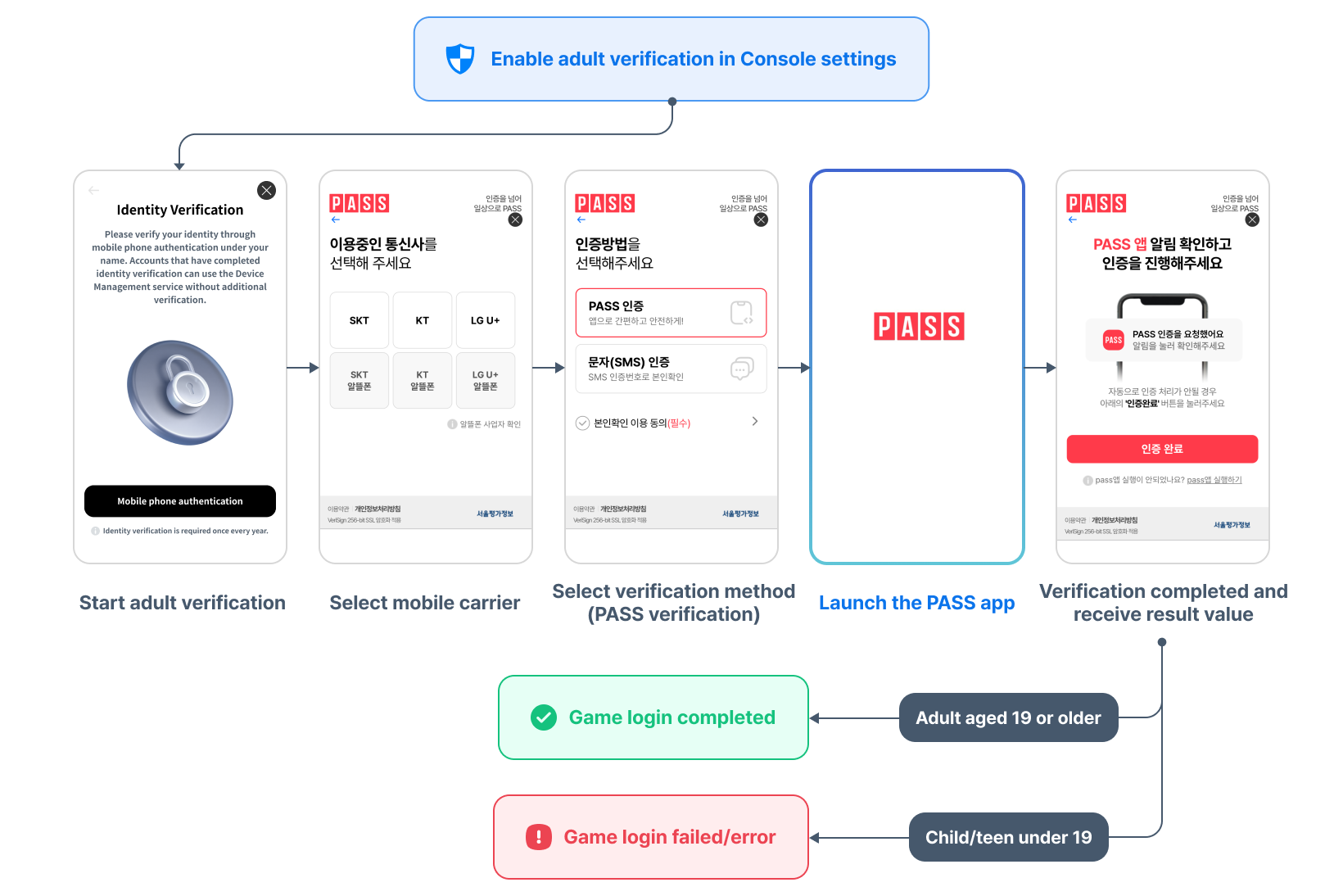
When adult verification is set to Use in Hive Console, adult verification is automatically performed at game login without additional code implementation in Hive SDK. However, if adult verification fails, on mobile you need to implement an in-game guidance popup and block entry into the game so users are informed.
In addition, if you want to provide additional flows in the game based on the adult verification result value, you can implement features such as account creation limits by obtaining the Duplication Information (DI) hash value.
Adult verification failure response
If a minor user under age 19 attempts adult verification and fails, ResultAPI.CANCELED(-6), ResultAPI.Code.AgeLimit(-1200067), and the message "Failed due to age restriction." are returned in the response when calling SignIn().
Based on this response, game companies can provide guidance messages to minor users in the game in any desired way.
| Language | Message |
|---|---|
| Korean | 서비스 제한 연령으로 앱을 이용할 수 없습니다. |
| English | You cannot use the app due to the age restriction for service. |
| Japanese | サービスには年齢制限があるため、アプリを利用できません。 |
| Chinese (Simplified) | 由于年龄限制,不能使用应用。 |
| Chinese (Traditional) | 未符合使用服務的年齡限制,無法使用應用程式。 |
| German | Du kannst die Anwendung aufgrund der Altersbeschränkung des Dienstes nicht nutzen. |
| French | Vous ne pouvez pas utiliser l'application en raison de l'âge limite du service. |
| Russian | Использование приложения недоступно из-за возрастных ограничений. |
| Spanish | No puede usar la aplicación debido a la restricción de edad para el servicio. |
| Portuguese | Você não pode usar o aplicativo devido à restrição de idade do serviço. |
| Indonesian | Aplikasi tidak bisa digunakan karena terdapat usia minimal untuk menggunakan layanan ini. |
| Thai | คุณไม่สามารถใช้แอปได้เนื่องจากบริการนี้มีการจำกัดอายุ |
| Vietnamese | Bạn không thể sử dụng ứng dụng do thuộc độ tuổi bị giới hạn sử dụng dịch vụ. |
| Italian | Non è possibile utilizzare l'applicazione a causa del limite di età per l'uso del servizio. |
| Turkish | Hizmetin yaş kısıtlaması nedeniyle uygulamayı kullanamazsınız. |
| Arabic | لا يمكنك استخدام التطبيق بسبب القيود العمرية للخدمة. |
Obtain DI hash value
After adult verification is complete, calling the SDK's AuthV4.getHashedDi method lets you obtain the DI hash value that can identify an adult-verified user. DI is provided in hashed form for security, and this value is linked with PlayerID after login, so it can be used as an adult-verified user identifier.
API Reference: hive.AuthV4.getHashedDi
using hive;
AuthV4.getHashedDi((ResultAPI result, String hashedDi) => {
    if (result.isSuccess()) {
        // API call successful
    } else {
        // NEED_INITIALIZE called before setup
        // INVALID_SESSION called before signIn
        // DEVELOPER_ERROR, CommonLibraryMissing failed to reference adult verification library
    }
});
#include "HiveAuthV4.h"

FHiveAuthV4::getHashedDi(FHiveAuthV4OnHashedDiDelegate::CreateLambda([this](const FHiveResultAPI& Result, FString& hashedDi) {
    if (Result.IsSuccess()) {
        // API call successful
    } else {
        // NEED_INITIALIZE called before setup
        // INVALID_SESSION called before signIn
        // DEVELOPER_ERROR, CommonLibraryMissing failed to reference adult verification library
    }
}));
API Reference: AuthV4::getHashedDi
#include <HIVE_SDK_Plugin/HIVE_CPP.h>
using namespace std;
using namespace hive;
AuthV4::getHashedDi([=](ResultAPI result, string hashedDi) {
    if (result.isSuccess()) {
        // API call successful
    } else {
        // NEED_INITIALIZE called before setup
        // INVALID_SESSION called before signIn
        // DEVELOPER_ERROR, CommonLibraryMissing failed to reference adult verification library
    }
});
API Reference: AuthV4.getHashedDi
import com.hive.AuthV4
import com.hive.ResultAPI

AuthV4.getHashedDi(object : AuthV4.AuthV4GetHashedDiListener {
    override fun onAuthV4GetHashedDi(result: ResultAPI, hashedDi: String?) {
        if (result.isSuccess) {
            // API call successful
        } else {
            // NEED_INITIALIZE called before setup
            // INVALID_SESSION called before signIn
            // DEVELOPER_ERROR, CommonLibraryMissing failed to reference adult verification library
        }
    }
})
API Reference: AuthV4.getHashedDi
import com.hive.AuthV4;
import com.hive.ResultAPI;

AuthV4.getHashedDi(result, hashedDi -> {
    if (result.isSuccess()) {
        // API call successful
    } else {
        // NEED_INITIALIZE called before setup
        // INVALID_SESSION called before signIn
        // DEVELOPER_ERROR, CommonLibraryMissing failed to reference adult verification library
    }
});
API Reference: AuthV4Interface.getHashedDi
API Reference: HIVEAuthV4:getHashedDi
#import <HIVEService/HIVEService-Swift.h>

[HIVEAuthV4 getHashedDi: ^(HIVEResultAPI *result, NSString *> *hashedDi) {
    if ([result isSuccess]) {
        // API call successful
    } else {
        // NEED_INITIALIZE called before setup
        // INVALID_SESSION called before signIn
        // DEVELOPER_ERROR, CommonLibraryMissing failed to reference adult verification library
    }
}];
Use DI hash value in account creation restriction policies
Adult verification allows users with multiple PlayerIDs to be verified with one mobile phone number. If you want to limit multiple verifications with the same phone number according to your game operation policy, you can do so by limiting the number of accounts that can be adult-verified per phone number. Game companies should store the DI hash value received from the adult verification result mapped with PlayerID. By checking the number of PlayerIDs already created based on the DI hash value, you can control game user entry according to your account creation restriction policy.
Parental consent
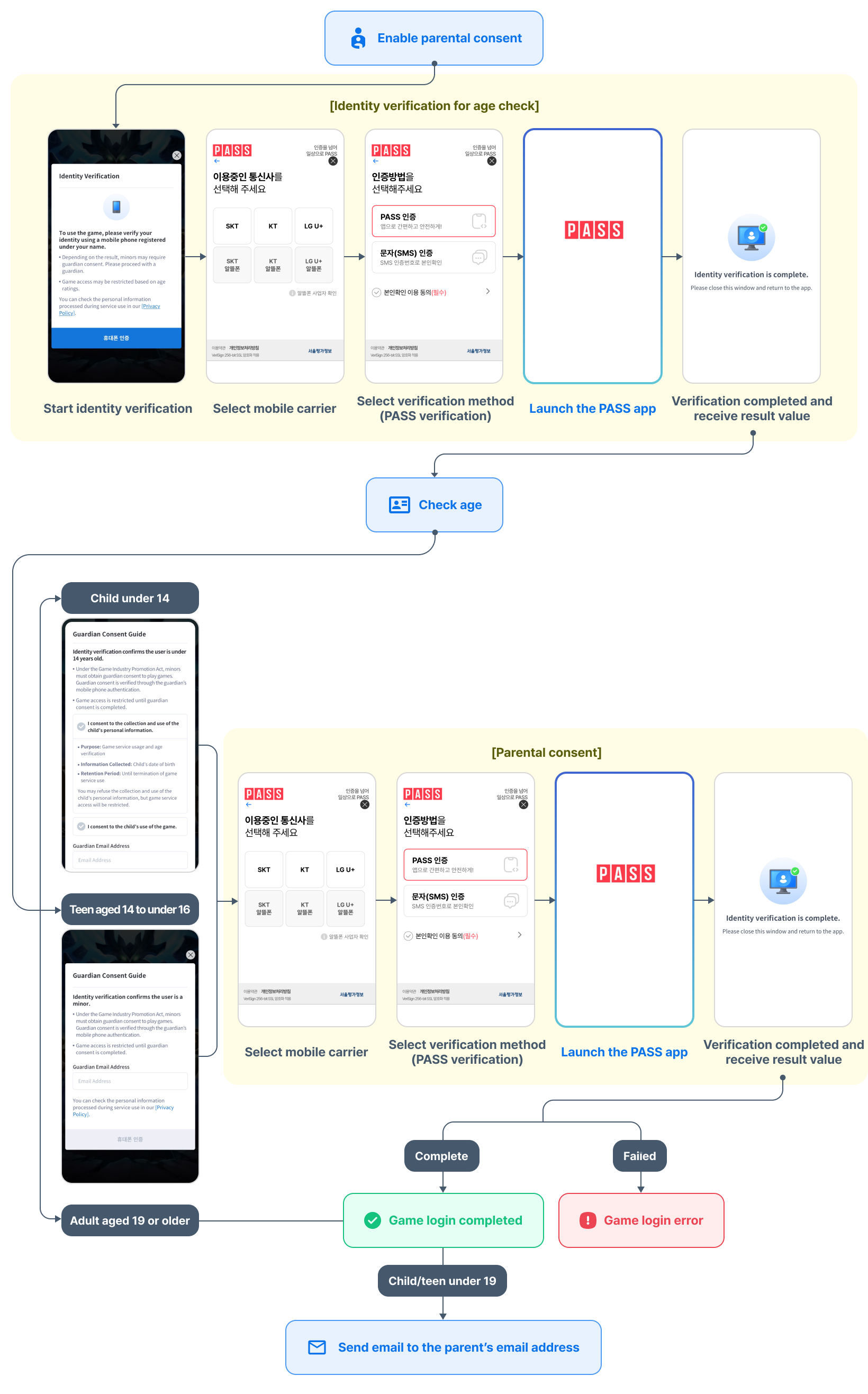
When a child or teenager uses a PC game, users under age 19 need parental consent according to the Juvenile Protection Act. Hive Platform verifies the user's age through mobile phone identity verification, and if the user is a child or teenager, it performs parental mobile phone identity verification once more by a parent or legal guardian to confirm game use. Parental consent is performed once after game installation.
Parental consent behavior
Age verification
When the PC game is first launched, the user's age is verified through mobile phone identity verification. Based on the verification result, users are classified as child, teenager, or adult, and parental consent proceeds if the user is a child or teenager. The collected information and operation process differ by age.
Behavior by age
- Child (under age 14)
- Check whether parental consent is required and collect the guardian's email
- Proceed with parental consent through the guardian's mobile phone identity verification, and at this time verify that the guardian is at least 19 years old
- After parental consent is complete, a game usage guidance email is sent to the collected guardian email
- Teenager (age 14 or older and under 19)
- Display parental consent guidance and collect the guardian's email
- Proceed with parental consent through the guardian's mobile phone identity verification, and at this time verify that the guardian is at least 19 years old
- After parental consent is complete, a game usage guidance email is sent to the collected guardian email
- Adult (age 19 or older)
- Use the game immediately without additional procedures
| Category | Age criteria | Whether parental consent proceeds | Guardian email sent |
|---|---|---|---|
| Child | Under age 14 | Proceed | Send game usage guidance email |
| Teenager | Age 14 or older and under 19 | Proceed | Send game usage guidance email |
| Adult | Age 19 or older | Do not proceed | Do not send |
Parental consent information
The date of birth of child or teenager users and guardian email information can be used in the game for customer support processing, checking game usage history, guardian notifications, and other purposes.
To retrieve parental consent information, call the getParentalConsentInfo() method after parental consent is complete. The getParentalConsentInfo() method returns the following information collected during the parental consent process.
- Date of birth of child or teenager users
- Guardian email address
Identity verification
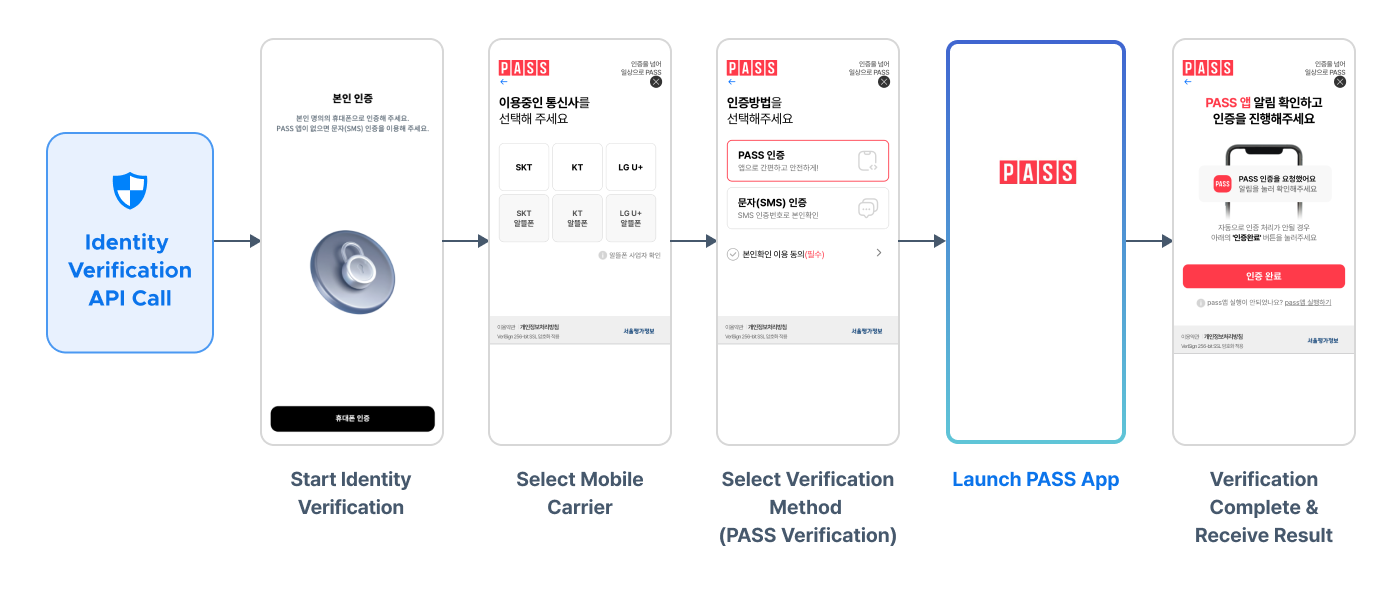
Identity verification is a feature that verifies whether the user is the account owner by entering a 6-digit verification code sent by SMS or through the PASS app via a mobile carrier (SKT, KT, LGU+, budget carriers) subscribed under the user's name.
Hive SDK supports calling the identity verification API at any time the game wants, regardless of game login status. Accordingly, you can configure identity verification to run when using specific services such as entering the shop or entering a dungeon. You can use it according to your game operation policy, such as checking age when entering the in-game shop to restrict minors from purchasing probability-based items, or not displaying ads to users below a certain age group.
Response information
When Hive SDK calls the identity verification API, it returns the phone number, date of birth, and DI hash value after verification is complete. Because the identity verification API can be called at any time the game wants, it is difficult to map it to the PlayerID obtained at login time. Therefore, the DI hash value from identity verification cannot be used for user identification purposes.
- Phone number
- Date of birth
- DI hash value (Hashed DI)
If you fail to receive the result normally after calling the API, call the identity verification API again to retry.
API Reference: hive.AuthV4.showIdentityVerification
using hive;

AuthV4.showIdentityVerification((ResultAPI result, Identity identity) => {
    if (result.isSuccess()) {
        // API call successful
        // identity.phoneCode, phoneNumber, dateOfBirth, hashedDi
    } else {
        // NEED_INITIALIZE called before setup
        // CANCELED window closed before receiving verification result
        // RESPONSE_FAIL abnormal response
        // DEVELOPER_ERROR, CommonLibraryMissing failed to reference identity verification library
    }
});
#include "HiveAuthV4.h"

FHiveAuthV4::showIdentityVerification(FHiveAuthV4OnIdentityVerificationDelegate::CreateLambda([this](const FHiveResultAPI& Result, FHiveIdentity& identity) {
    if (Result.IsSuccess()) {
        // API call successful
        // identity.phoneCode, phoneNumber, dateOfBirth, hashedDi
    } else {
        // NEED_INITIALIZE called before setup
        // CANCELED window closed before receiving verification result
        // RESPONSE_FAIL abnormal response
        // DEVELOPER_ERROR, CommonLibraryMissing failed to reference identity verification library
    }
}));
API Reference: AuthV4::showIdentityVerification
#include <HIVE_SDK_Plugin/HIVE_CPP.h>
using namespace std;
using namespace hive;

AuthV4::showIdentityVerification([=](ResultAPI result, Identity identity) {
    if (result.isSuccess()) {
        // API call successful
        // identity.phoneCode, phoneNumber, dateOfBirth, hashedDi
    } else {
        // NEED_INITIALIZE called before setup
        // CANCELED window closed before receiving verification result
        // RESPONSE_FAIL abnormal response
        // DEVELOPER_ERROR, CommonLibraryMissing failed to reference identity verification library
    }
});
API Reference: AuthV4.showIdentityVerification
import com.hive.AuthV4
import com.hive.ResultAPI

AuthV4.showIdentityVerification(object : AuthV4.AuthV4ShowIdentityVerificationListener {
    override fun onAuthV4ShowIdentityVerification(result: ResultAPI, identity: Identity?) {
        if (result.isSuccess) {
            // API call successful
            // identity.phoneCode, phoneNumber, dateOfBirth, hashedDi
        } else {
            // NEED_INITIALIZE called before setup
            // CANCELED window closed before receiving verification result
            // RESPONSE_FAIL abnormal response
            // DEVELOPER_ERROR, CommonLibraryMissing failed to reference identity verification library
        }
    }
})
API Reference: AuthV4.showIdentityVerification
import com.hive.AuthV4;
import com.hive.ResultAPI;

AuthV4.showIdentityVerification(result, identity -> {
    if (result.isSuccess()) {
        // API call successful
        // identity.phoneCode, phoneNumber, dateOfBirth, hashedDi
    } else {
        // NEED_INITIALIZE called before setup
        // CANCELED window closed before receiving verification result
        // RESPONSE_FAIL abnormal response
        // DEVELOPER_ERROR, CommonLibraryMissing failed to reference identity verification library
    }
});
API Reference: AuthV4Interface.showIdentityVerification
import HIVEService

AuthV4Interface.showIdentityVerification() { result, identity in
    if result.isSuccess() {
        // API call successful
        // identity.phoneCode, phoneNumber, dateOfBirth, hashedDi
    } else {
        // NEED_INITIALIZE called before setup
        // CANCELED window closed before receiving verification result
        // RESPONSE_FAIL abnormal response
        // DEVELOPER_ERROR, CommonLibraryMissing failed to reference identity verification library
    }
}
API Reference: HIVEAuthV4:showIdentityVerification
#import <HIVEService/HIVEService-Swift.h>

[HIVEAuthV4 showIdentityVerification: ^(HIVEResultAPI *result, HIVEIdentity *> *identity) {
    if ([result isSuccess]) {
        // API call successful
        // identity.phoneCode, phoneNumber, dateOfBirth, hashedDi
    } else {
        // NEED_INITIALIZE called before setup
        // CANCELED window closed before receiving verification result
        // RESPONSE_FAIL abnormal response
        // DEVELOPER_ERROR, CommonLibraryMissing failed to reference identity verification library
    }
}];
DI hash value summary for adult verification and identity verification
| Category | Adult verification | Identity verification |
|---|---|---|
| DI hash value | Can identify users and map with PlayerID | Cannot be mapped because it is only an identity verification result value |
| Characteristics | Can be used as an identifier because it is linked with the login session | Do not use as an identifier because it can be called regardless of login status (for one-time verification use) |
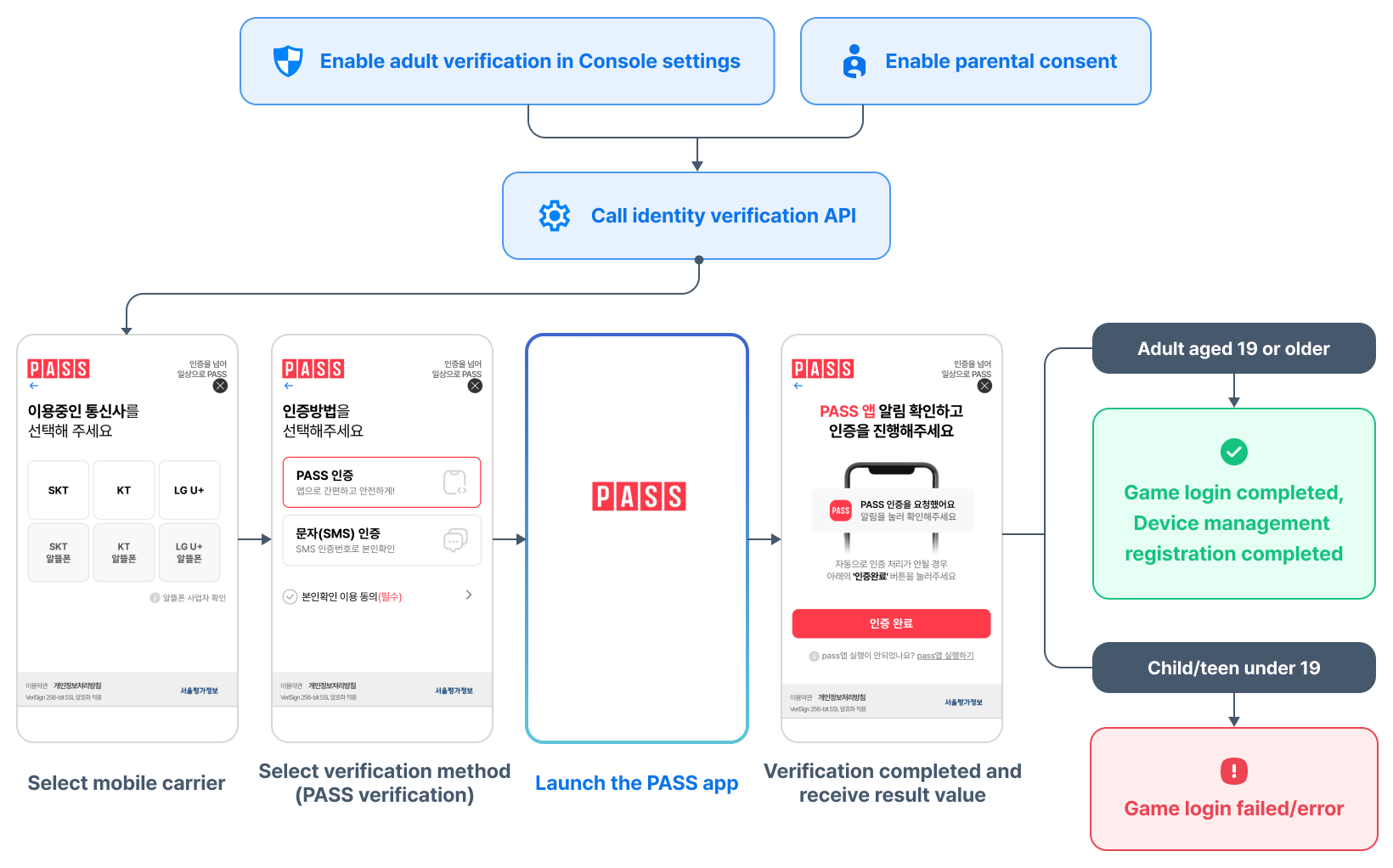
When using identity verification and adult verification together, or identity verification and device management together
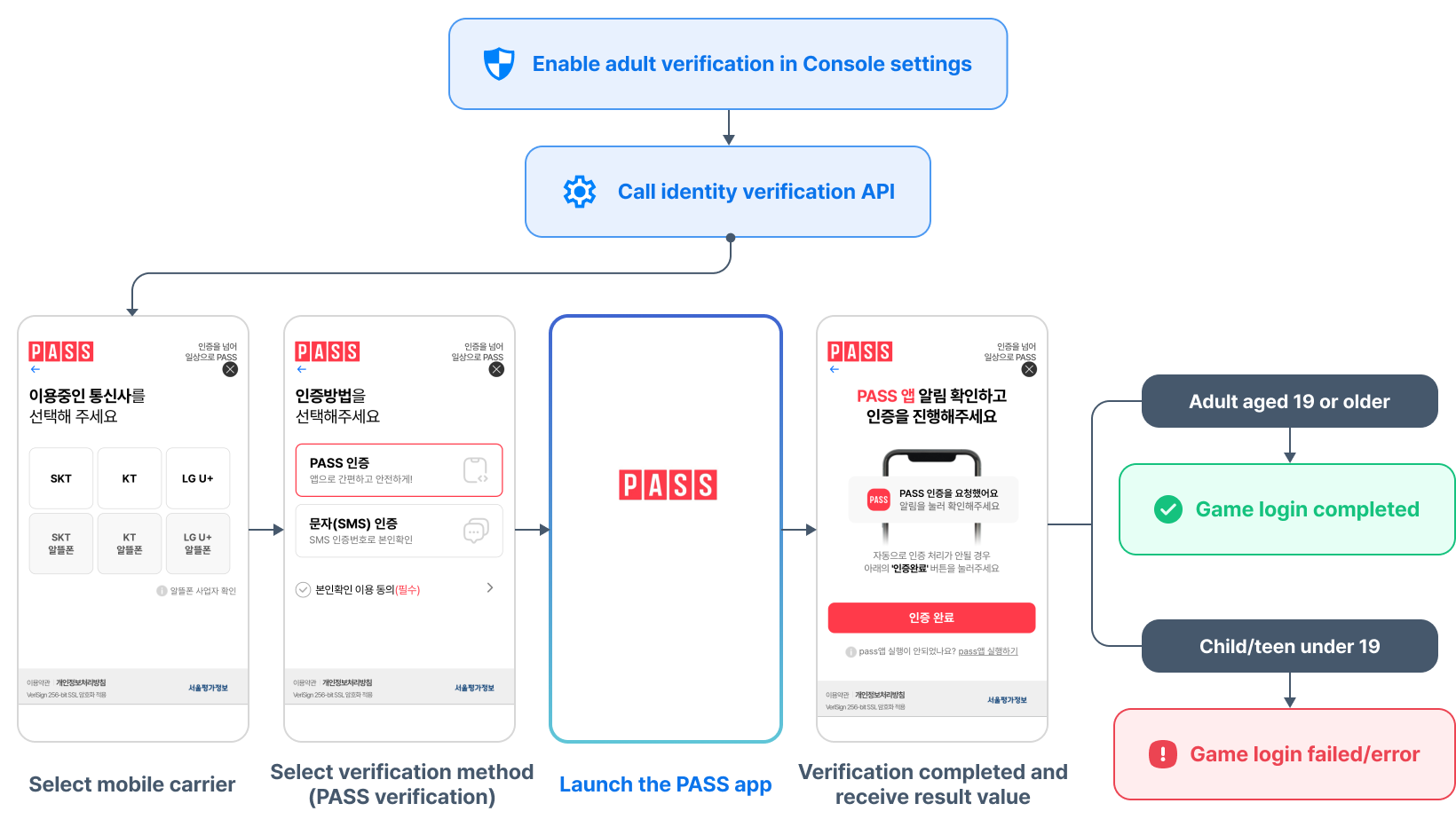
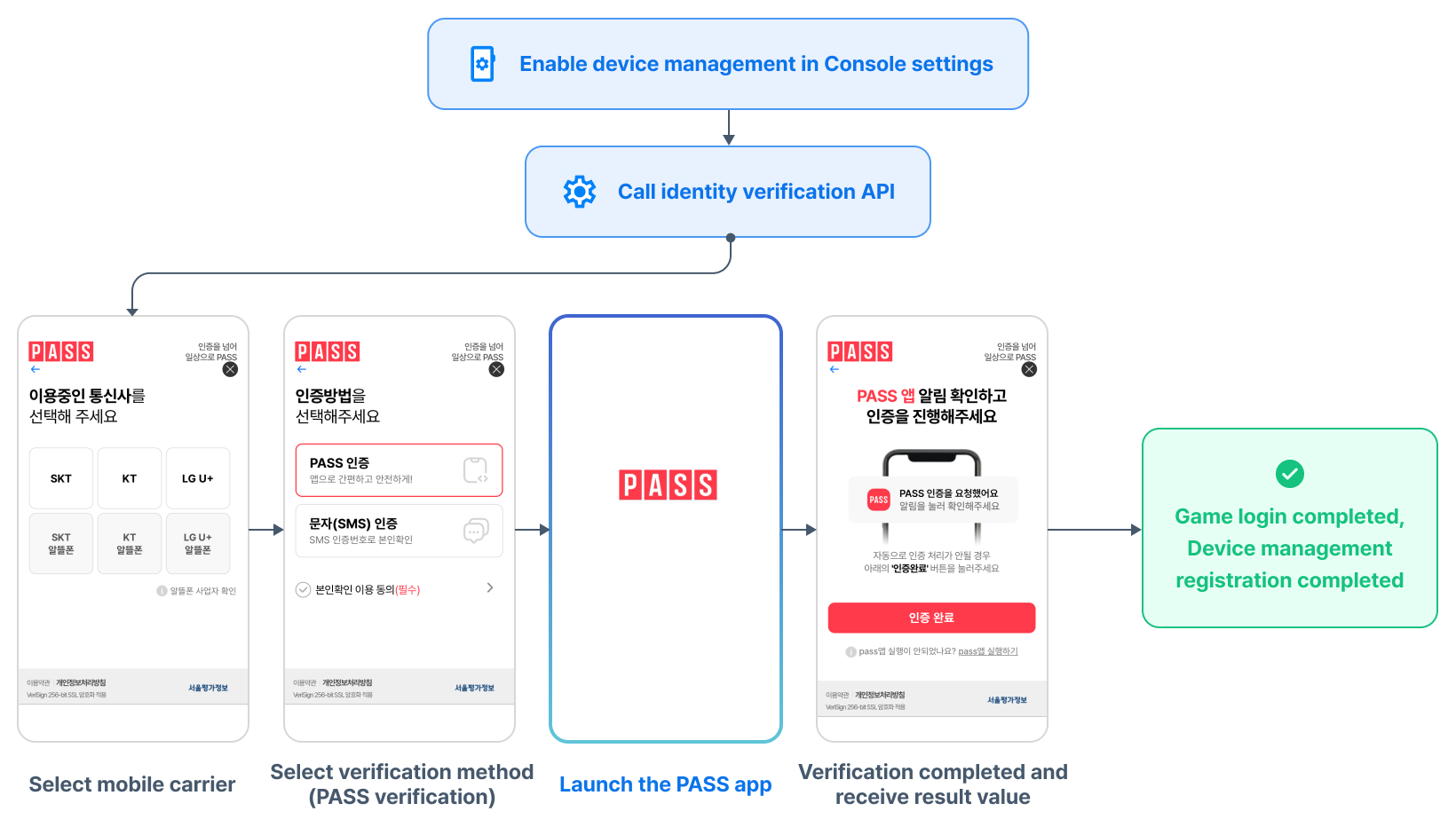
When identity verification and adult verification, or identity verification and device management, are used together in the app, the identity verification procedure through the PASS app is performed only once for user convenience. However, when using this feature, you must call identity verification before login. Because adult verification and device management are performed during the login process, they are determined to be the same user and the verification process is skipped. If you call the identity verification API after login, it is difficult to determine whether the users attempting adult verification, device management, and identity verification are the same, so PASS app verification will be required separately.
When used together, you can apply them in the following order.
- Call identity verification API -> Launch PASS app -> Verify identity -> Check adult status -> Login complete
- Call identity verification API -> Launch PASS app -> Verify identity -> Device management enrollment -> Login complete
- Call identity verification API -> Launch PASS app -> Verify identity -> Check adult status -> Device management enrollment -> Login complete
When setting identity verification + adult verification
Because PASS verification is already performed during identity verification, only age determination proceeds in the adult verification step.
- Adult age 19 or older: login completed normally
- Children and teenagers under age 19: return a login error or display a 'Service unavailable' popup message
When setting identity verification + device management
Because PASS app verification is already performed during identity verification, you can proceed faster by skipping the one-time password (OTP) verification procedure required for device management enrollment.
When setting identity verification + adult verification + device management
Because PASS app verification is already performed during identity verification, the adult verification and device management procedures are simplified.
- Adult verification: only age determination proceeds
- Adult age 19 or older: login complete
- Children and teenagers under age 19: return a login error or display a 'Service unavailable' popup message
- Device management: proceed quickly by skipping the OTP verification procedure required for enrollment