PG payment
The following describes the PG payment features and how to process receipts.
Before applying PG payment, check the PG payment policy and register the necessary information in Hive Console according to the pre-work of the PG payment Hive Console guide.
PG payment features
The main features of PG payment are as follows.
-
PG payment operates based on IAP v4 and PG Payment API, and is processed asynchronously through the web browser provided by the payment agency (PG).
-
Orders for which payment has been completed must be processed for product payment completion through the
transactionFinish(marketPid)API. -
If you want to repurchase a product for which payment has been completed but payment completion processing has not been completed, the payment will not proceed. You can repurchase after the payment completion processing of the previously purchased product.
-
If you attempt to purchase additional products for which payment has not been completed, such as when you open multiple payment windows while payment has not been completed, only the first payment will be completed, and the remaining purchases will be automatically canceled even if they are paid.
-
Payments may be canceled at the game server's discretion even if a payment completion processing request is made.
PC PG payment
Info
PC PG payment is supported in Hive SDK 25.1.0 or later.
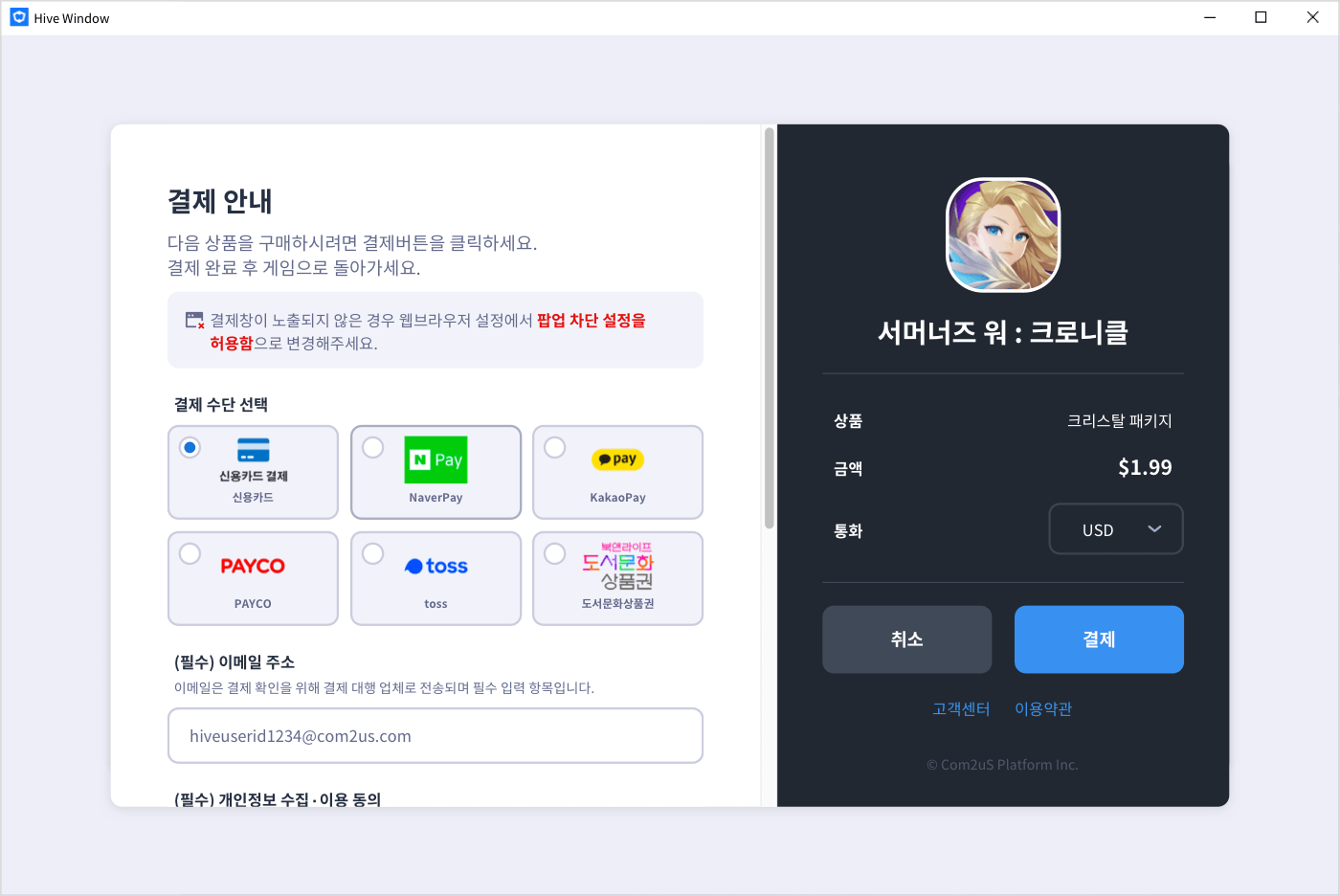
When you proceed with PG payment in a PC environment, the payment request screen appears in a new window as shown below.
Mobile PG payment
Info
Mobile PG payment is supported in Hive SDK 26.3.2 or later.
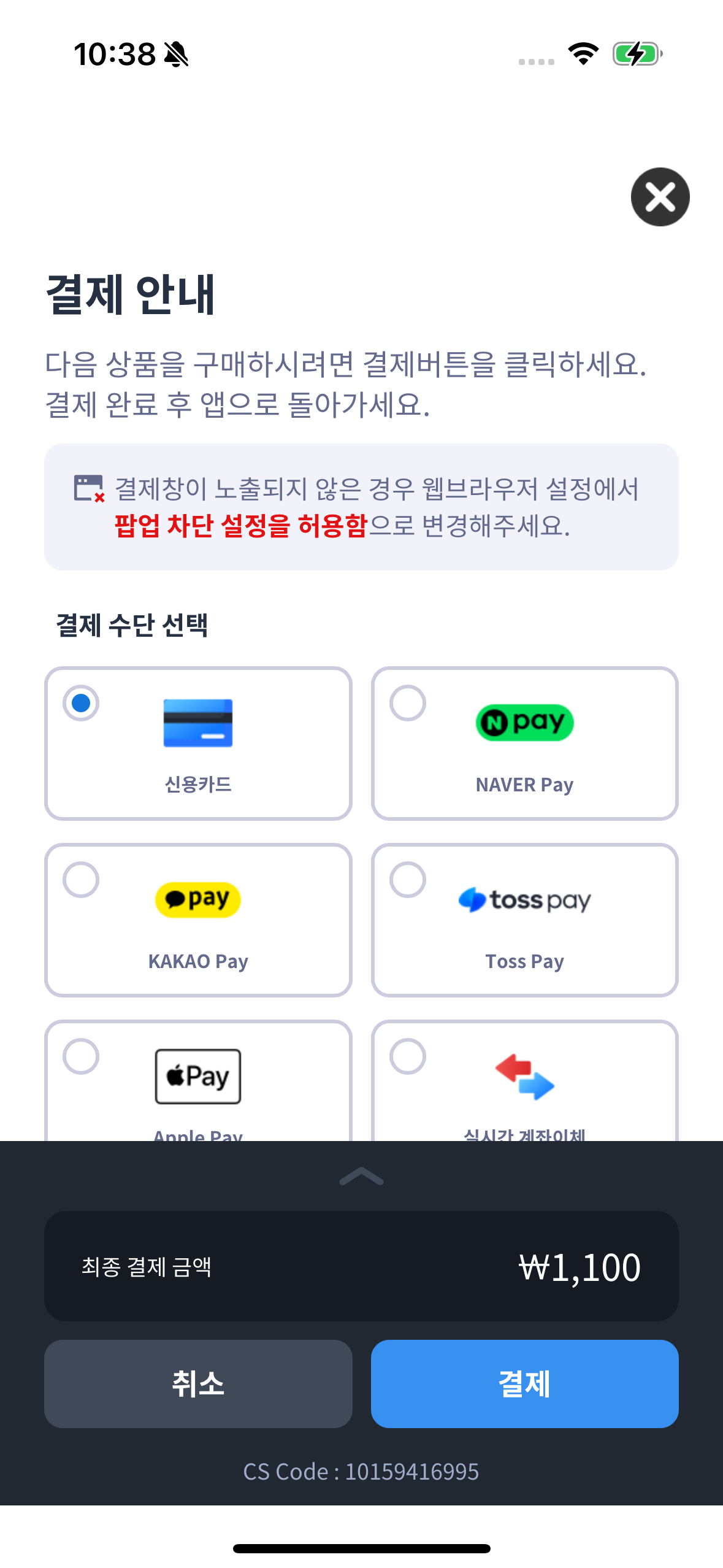
When you proceed with PG payment in a mobile environment, the payment request screen is displayed through an in-app webview.
Warning
To proceed with PG payment in a mobile environment, you must call the setMarketSelection API to change the market to PG. If you request a purchase without changing the market, payment will proceed through the existing market (Google Play, App Store, etc.). For more details, see Recommended timing to call market selection.
Tip
After completing PG payment, if you want to return to the existing market (App Store, Google Play, etc.), call the setMarketSelection API again to change back to the existing market. For example, on iOS, call setMarketSelection(IAPV4Type.appStore).
Prerequisites
To use mobile PG payment, you need to add the PG module to your project. Refer to the guidance below according to your SDK's development engine and target OS.
SDK Native Android
Add the PG market library to the module-level build.gradle file.
Note
For more details, see Hive SDK Android billing setup.
SDK Native iOS
Add the in-app purchase framework and PG framework to the Podfile in your project directory.
Note
For more details, see Hive SDK iOS billing setup.
Unity
- In the Unity editor, click Hive > ExternalDependency.
- In Market Settings, select Hive Store.
Note
For more details, see Hive SDK Unity billing setup.
Unreal
- In the Unreal editor menu, click Edit > Project Settings.
- In the left panel, select Hive SDK > Dependency – Android / Hive SDK > Dependency – iOS.
- In Market, select Hive Store.
Note
For more details, see Hive SDK Unreal Engine billing setup.
Mobile PG payment policy
The supported scope of mobile PG payment is limited according to platform-specific policies.
| Platform | Supported | Note |
|---|---|---|
| iOS | US storefront only | Support availability may change according to Apple's App Review Guidelines updates |
| Android | Not supported | - |
Precautions when implementing on iOS
On iOS, according to Apple's App Review Guidelines (Guideline 3.1.1, 3.1.1(a), 3.1.3), PG payment is supported only on the US storefront. As of May 2025, Apple updated its guidelines following a US court ruling, allowing buttons, external links, and CTAs (Call to Action) that direct users to payment methods other than in-app purchase (IAP) to be displayed without a separate Entitlement on the US storefront.
- On storefronts outside the US, displaying buttons or links that direct users to payment methods other than in-app purchase in your app will result in rejection during Apple review.
- It is recommended to branch the visibility of PG payment entry points based on the user's storefront region.
Warning
Apple's App Review Guidelines may change. Before app review, be sure to check the latest guidelines.
Third-party payment method cannot be set alone
According to Apple's policy, your app must include App Store in-app purchase (IAP) as the default payment method. Do not set PG exclusively in the Hive Console. Apps that provide only third-party payment methods may be rejected during Apple review or removed from the App Store. You must set it together with the App Store market.
Mobile PG payment integration flow
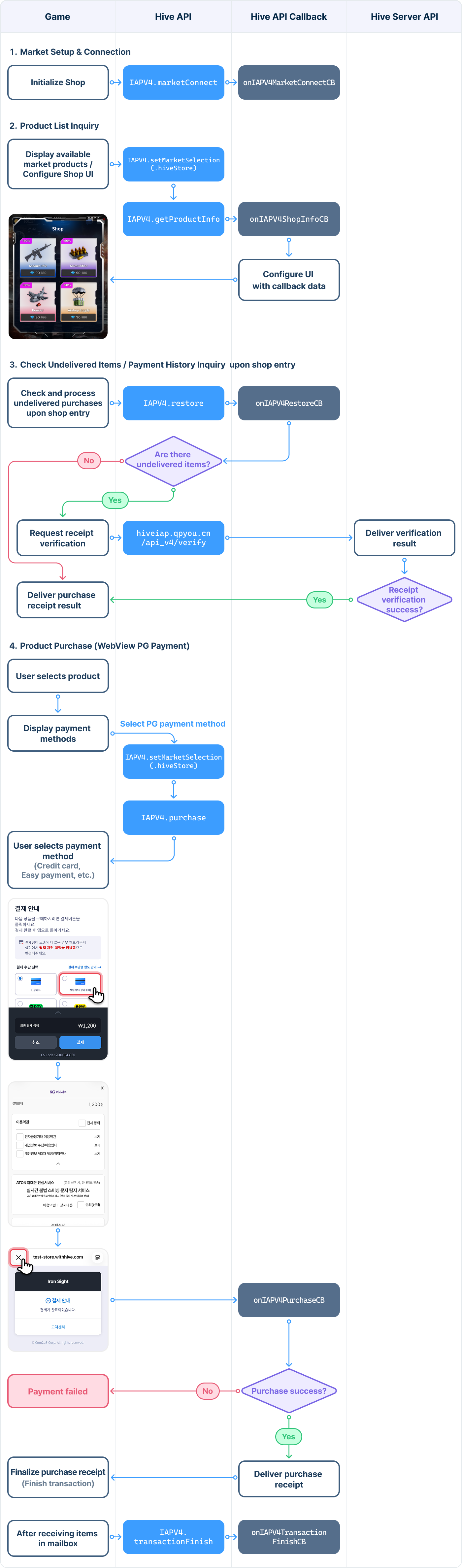
The flow for integrating PG payment in a mobile environment is as follows.
Payment and receipt processing flow
The receipt processing flow for PC and mobile PG payment is the same, except that for mobile, there is an additional step to change the market to PG before requesting a purchase.
-
(Mobile only) Call IAPV4.setMarketSelection(IAPV4Type.hiveStore) to change the market to PG
-
Call IAPV4.purchase(marketPid, iapPayload, onIAPV4PurchaseCB) to request a purchase
Warning
If you have registered a URL for payment completion information in Hive Console Billing > Payment Environment Settings > PG Settings > Optional Feature Settings, you must delete this URL first.
-
When the product purchase is successfully completed, the receipt information (
bypassInfo) is received through theonIAPV4PurchaseCBcallback -
The game client sends this receipt information to the game server
-
The game server calls the Receipt Verification API to verify this receipt information
-
After successfully completing receipt verification, call IAPV4.transactionFinish to complete the product delivery process
If you did not receive the receipt information indicating that the purchase was successfully completed through the onIAPV4PurchaseCB callback in step 3 above, call IAPV4.restore to request the receipt information for undelivered items again. Then follow steps 4-6 to complete the receipt verification and product delivery process.
Note
For more details on the receipt processing flow and verification method, refer to Receipt Verification.
Multi-quantity purchase
PG payment supports multi-quantity purchases. By specifying the quantity when requesting a purchase, you can purchase more than one of the same in-app products in one payment.
The Hive SDK calls hive.IAPV4.purchase(marketPid, iapPayload, quantity, onIAPV4PurchaseCB) with the quantity parameter, which allows you to specify the quantity.
Note
Multi-quantity purchases are only supported for consumable in-app products that can be repurchased. Be careful not to repeatedly purchase one-time products.
Example code for requesting a multi-quantity purchase is as follows.
API Reference: [hive .IAPV4.purchase](http://developers.withhive.com/HTML/v4_api_reference/Unity3D/group___i_a_p_v4.html#ga4f5a16cebe1b2b1fab22126faacafbec)

```cs
using hive;
        String marketPid = "{YOUR_PRODUCT_MARKET_PID}";
        String iapPayload = "{YOUR_CUSTOM_PAYLOAD}";
        int quantity = 3;

        IAPV4.purchase(marketPid, iapPayload, quantity, (ResultAPI result, IAPV4Receipt receipt) => {
        if (result.isSuccess()) {
                         // TODO: Request verification of receipt with received receipt
                 }
});
```
```c++

#include "HiveIAPV4.h"

FString MarketPid = TEXT("YOUR_PRODUCT_MARKET_PID");
FString IapPayload = TEXT("YOUR_CUSTOM_PAYLOAD");
int32 Quantity = 3;

FHiveIAPV4::Purchase(MarketPid, IapPayload, Quantity, FHiveIAPV4OnPurchaseDelegate::CreateLambda([this](const FHiveResultAPI& Result, const FHiveIAPV4Receipt& Receipt) {
                if (Result.IsSuccess()) {
                                // API call successful
                }
}));
```
API Reference: [IAPV4 ::purchase](http://developers.withhive.com/HTML/v4_api_reference/CPP/group___i_a_p_v4.html#ga2bff8cc9d70d0a25eaddc9d45dac86b8)

```cpp
#include <HIVE_SDK_Plugin/HIVE_CPP.h>
        using namespace std;
        using namespace hive;
        string marketPid = "{YOUR_PRODUCT_MARKET_PID}";
        string iapPayload = "{YOUR_CUSTOM_PAYLOAD}";
        int quantity = 3;
        IAPV4::purchase(marketPid, iapPayload, quantity, [=](ResultAPI const & result, IAPV4Receipt const & receipt) {
                 if (result.isSuccess()) {
                         // TODO: Request verification of receipt with received receipt
                 }
});
```
API Reference: [com.hive.IAPV4.purchase](https://developers.withhive.com/HTML/dokka/-hive%20-s-d-k%20v4/com.hive/-i-a-p-v4/purchase.html)

```kt
import com.hive.IAPV4
        import com.hive.ResultAPI
        val marketPid = "{YOUR_PRODUCT_MARKET_PID}"
        val iapPayload = "{YOUR_CUSTOM_PAYLOAD}"
        val quantity = 3
        IAPV4.purchase(marketPid, iapPayload, quantity, object : IAPV4.IAPV4PurchaseListener {
                 override fun onIAPV4Purchase(result: ResultAPI, iapV4Receipt: IAPV4.IAPV4Receipt?) {
                         if (result.isSuccess) {
                                 // call successful
                         }
                 }
})
```
API Reference: [com .hive.IAPV4.purchase](https://developers.withhive.com/HTML/v4_api_reference/Android/group___i_a_p_v4.html#gad5e467681ef02fc2ab393bad201e617c)

```java
import com.hive.IAPV4;
        import com.hive.ResultAPI;
        String marketPid = "{YOUR_PRODUCT_MARKET_PID}";
        String iapPayload = "{YOUR_CUSTOM_PAYLOAD}";
        int quantity = 3;
        IAPV4.INSTANCE.purchase(marketPid, iapPayload, quantity, (result, iapV4Receipt) -> {
                 if (result.isSuccess()) {
                         // call successful
                 }
});
```
API Reference: [HIVEIAPV4::purchase:additionalInfo:handler:](https://developers.withhive.com/documentation/hiveiapv4/iapv4interface/purchase(_:iappayload:handler:))

```swift
import HIVEService
        let marketPid = "{YOUR_PRODUCT_MARKET_PID}"
        let iapPayload = "{YOUR_CUSTOM_PAYLOAD}"
        let quantity = 3

        HIVEIAPV4.purchase(marketPid, iapPayload, quantity) { result, receipt in
                 if result.isSuccess() {
                         // TODO: Request verification of receipt with received receipt
                 }
}
```
<strong>API Reference</strong>: <a href="[cgv hive_sdk4_ios_api_ref_en]/group___i_a_p_v4.html#ga4cd19176f947717f2c7be545ed76a6e0" target="_blank" rel="noopener noreferrer">HIVEIAPV4::purchase:additionalInfo:handler:</a >

```objc
#import <HIVEService/HIVEService-Swift.h>

NSString *marketPid = @"{YOUR_PRODUCT_MARKET_PID}";
NSString *iapPayload = @"{YOUR_CUSTOM_PAYLOAD}";
NSNumber quantity = 3;

[HIVEIAPV4 purchase: marketPid iapPayload: iapPayload quantity handler: ^(HIVEResultAPI *result, HIVEIAPV4Receipt *receipt) {
        if ([result isSuccess]) {
                // TODO: Request verification of receipt with received receipt
        }
}];
```