Minor protection legislation compliance
Hive SDK provides an Age range module that helps developers comply with app store accountability laws for protecting minors and Brazil's ECA by verifying user age. As age-verification regulations are rolled out, developers distributing apps through marketplaces can apply the Age range module to check user age ranges and request guardian approval.
Note
The Age range module is available from Hive SDK v4 26.0.1 for Android and iOS targets. Until age-verification laws take effect, applying the module is not mandatory.
To check a user's age range on iOS, the following requirements must be met.
- Xcode 26.2 or later
- Feature support on iOS 26.2 or later
Warning
Before age-verification laws take effect, calling the getAgeRange API with the Age range module in real user environments returns error responses from each marketplace (Google Play, Apple App Store). Therefore, before enforcement, you may omit the Age range module. Even if you add and call it, you can ignore errors other than explicit behavioral responses such as PENDING or DENIED.
To receive normal responses before enforcement, you can use Apple's sandbox test APIs and tools. For details, see the official Apple announcement.
After enforcement begins, adding the Age range module and calling getAgeRange allows real-time retrieval of user status and age information. (A separate notice will be provided.)
This guide explains how the Age range module works in Hive SDK, how to use it, and how to test it.
Age range overview
The Age range module provides the following features.
- Check user age range and approval status
- Notify users about major in-app changes and request approval
- showAgeRangeUpdatePermission API (Apple App Store only)
- Guardian approval revocation notifications
Marketplace flow by store
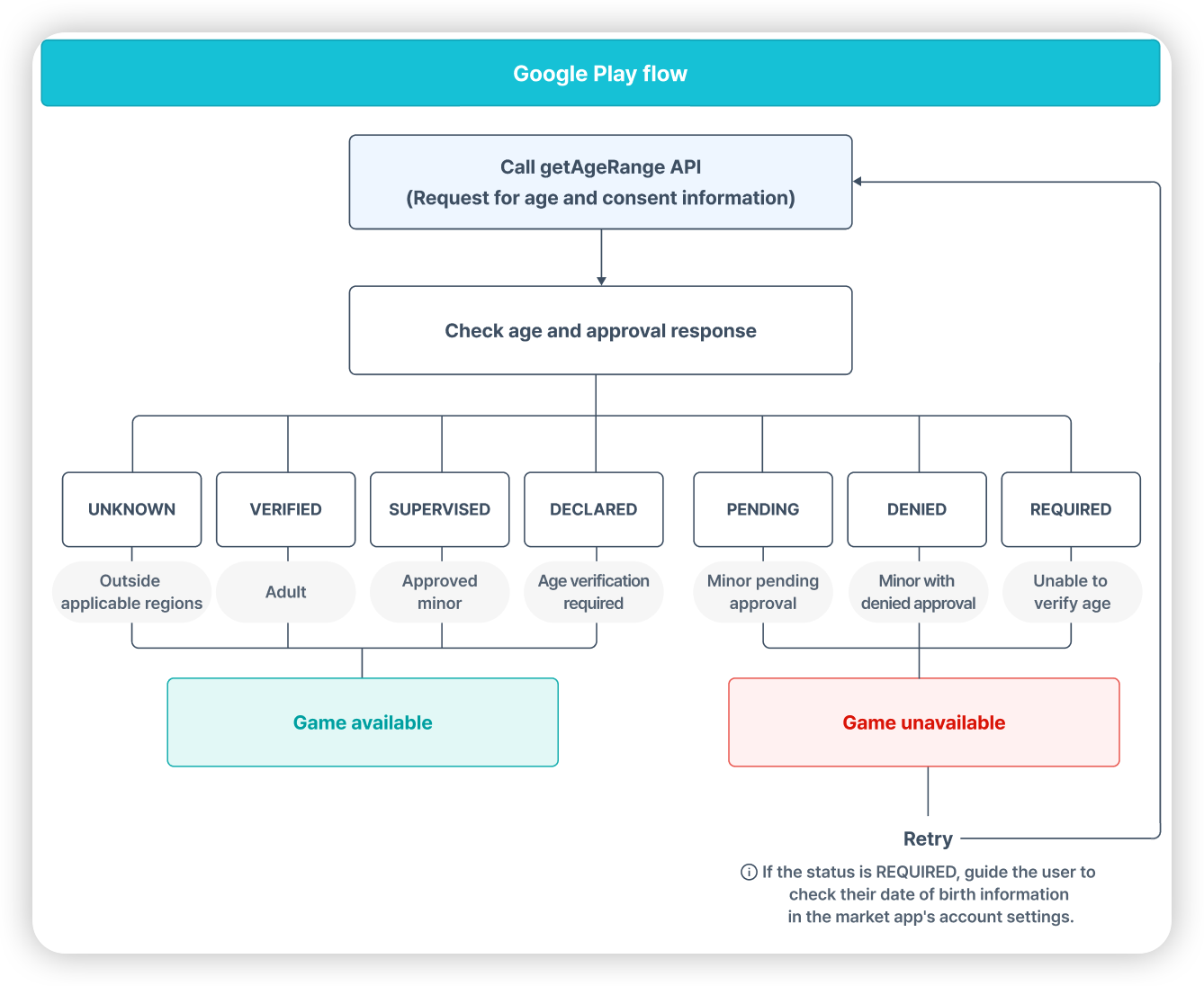
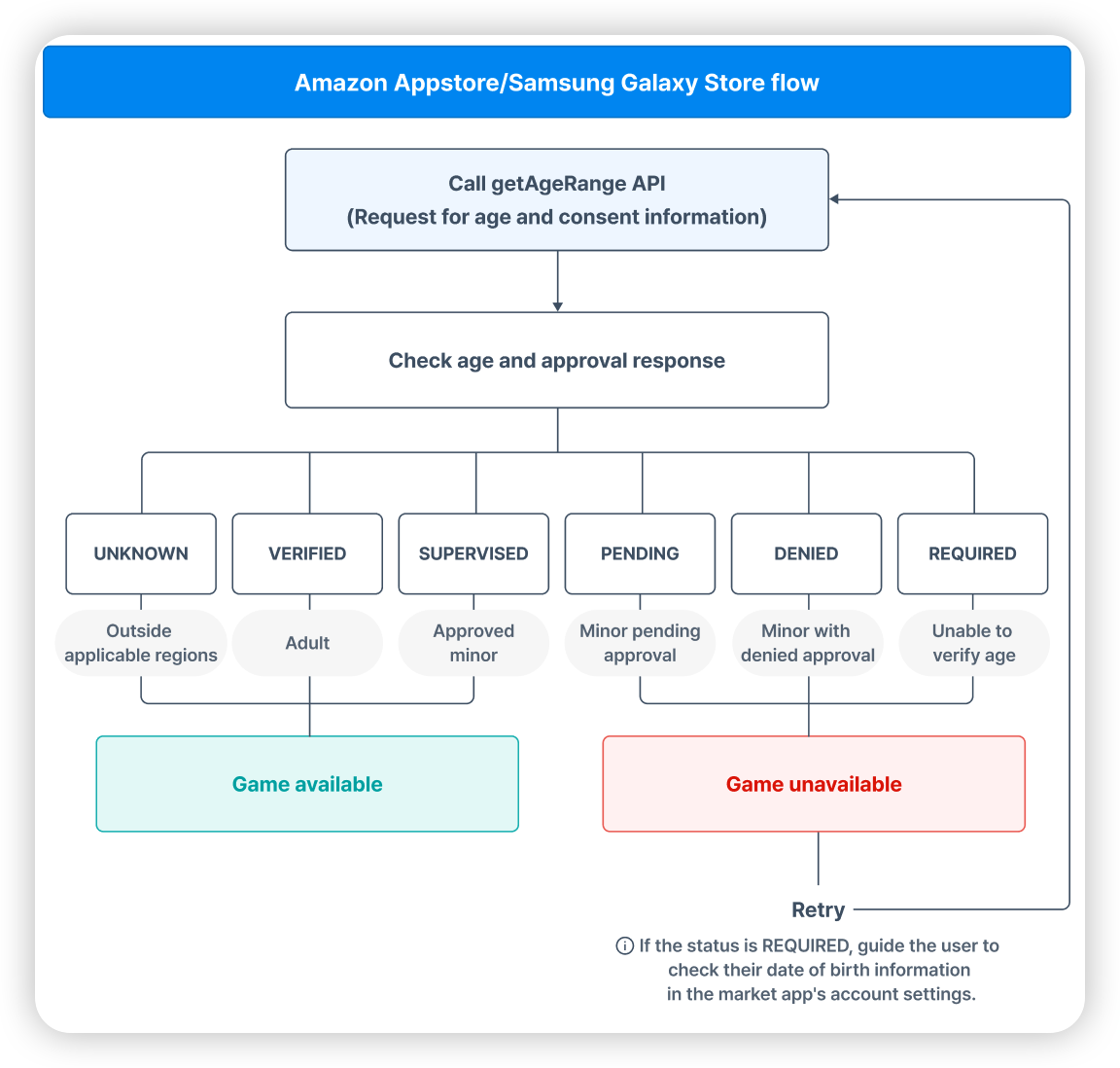
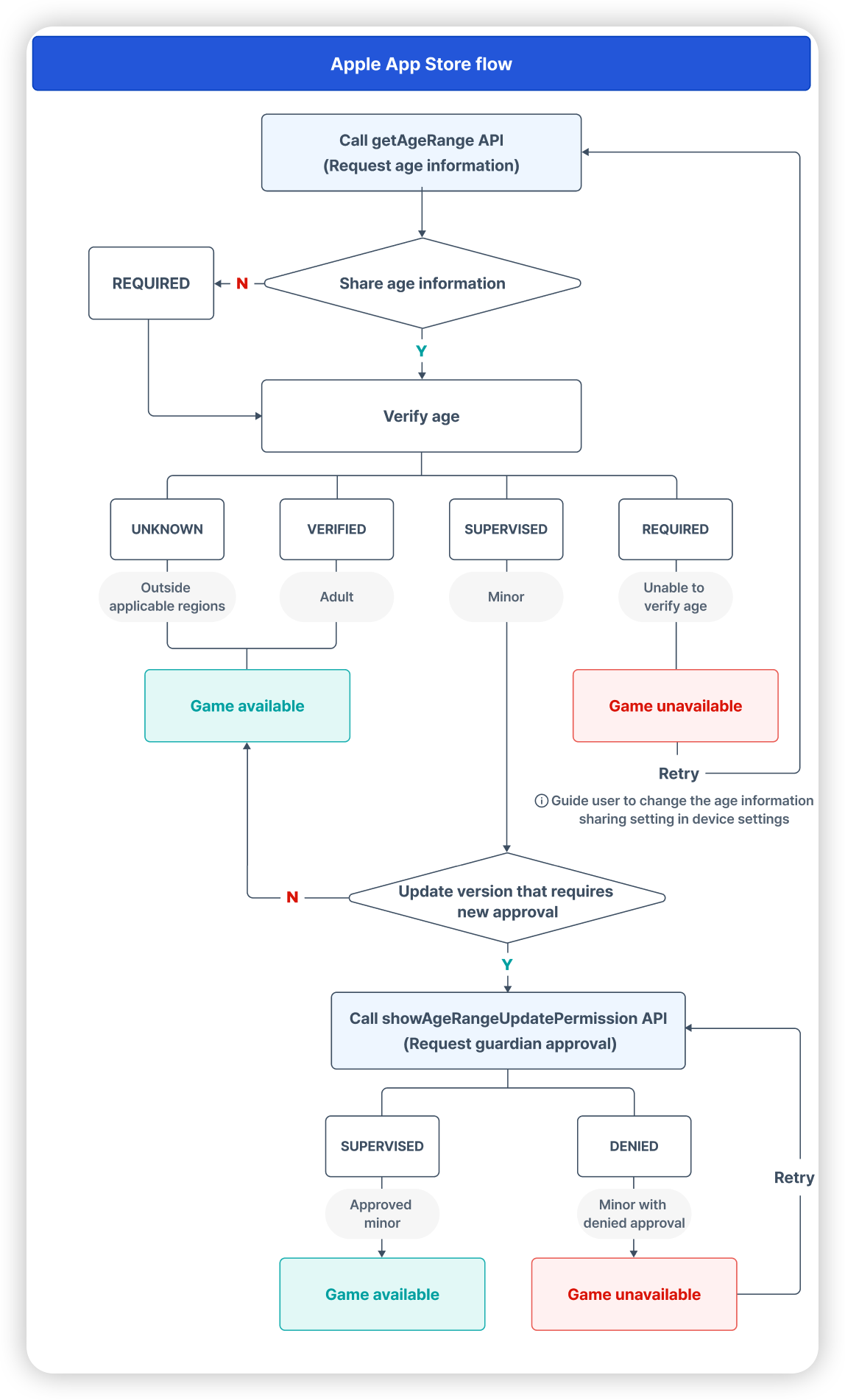
The Age range module flow by marketplace is as follows.
-
Google Play
-
Amazon Appstore, Samsung Galaxy Store
-
Apple App Store
Note
- In this guide, we explain that if guardian consent is not confirmed, gameplay is blocked to comply with app store accountability laws. Actual behavior may differ depending on each game's policy and operational decisions.
- Brazil's ECA is unrelated to guardian approval. Only user age verification is required.
Prerequisites: add the Age range module
As a prerequisite for using the Age range module, add or remove the module according to each SDK's development engine and target OS.
SDK native Android
Add the Age range module
- Set
marketin common SDK settings. - Add the following to your module-level build.gradle file.
Remove the Age range module
Remove the following from your module-level build.gradle file.
// implementation "com.com2us.android.hive:hive-agerange-google-agesignals" // Remove this line when not used
SDK native iOS
Add the Age range module
For iOS, app-store-accountability-related system APIs are supported only on iOS 26.2 or later.
-
Refer to the Podfile example code and add the Age range module configuration.
-
In SDK native iOS, add the Declared Age Range capability in the following order.
- In Xcode Project navigator, select your developer project.
- In TARGETS, select your app target.
- Click the Signing & Capabilities tab.
- Click + Capability at the top left of Signing & Capabilities.
- Select and add Declared Age Range from the list.
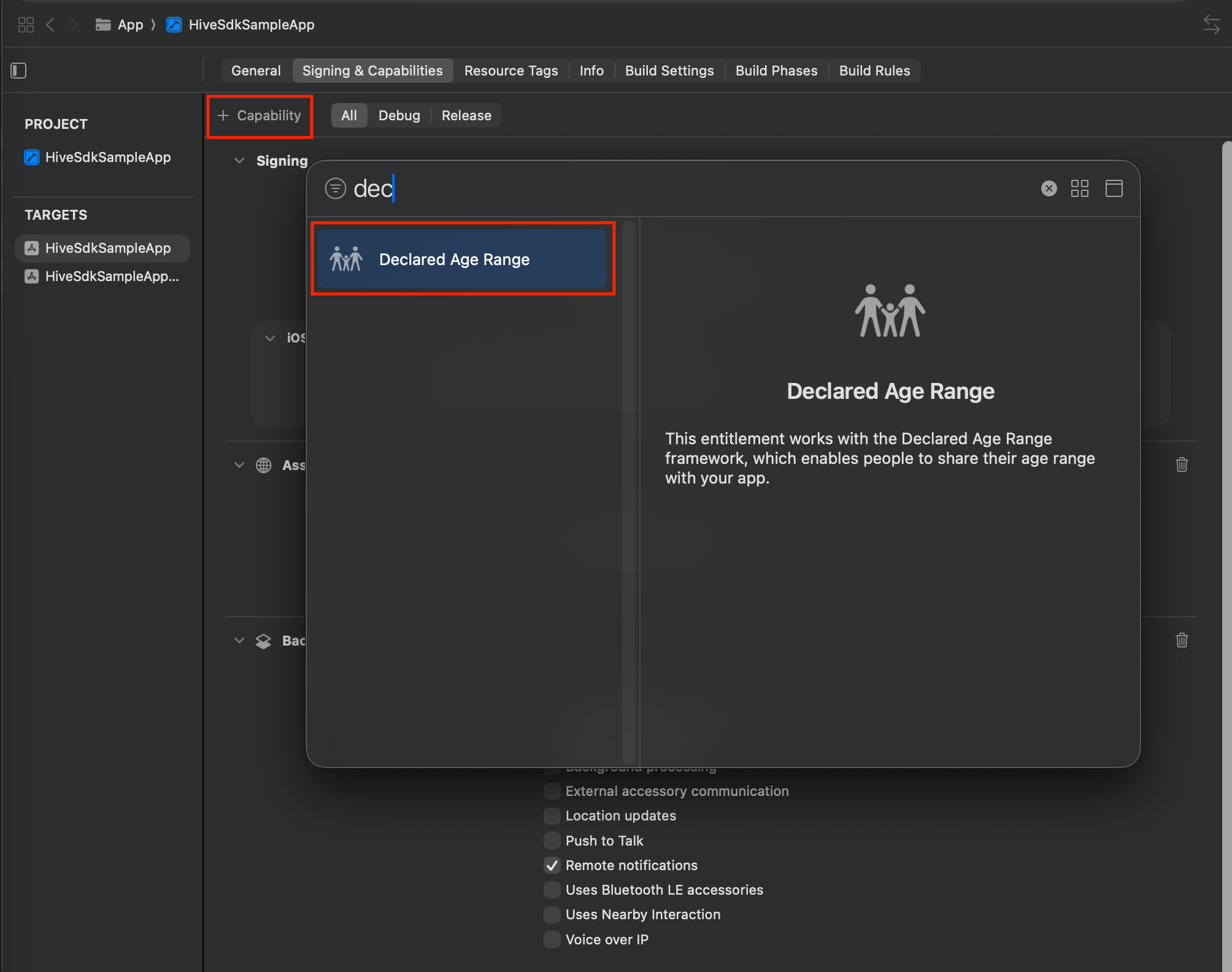
- Verify Declared Age Range was added to Signing & Capabilities.
Remove the Age range module
Refer to the Podfile example code and remove the Age range module configuration.
SDK Cocos2d-x Android
Same as SDK native Android.
SDK Cocos2d-x iOS
Same as SDK native iOS.
SDK Unity Android
To use the Age range module in Unity for Android targets, configure as follows.
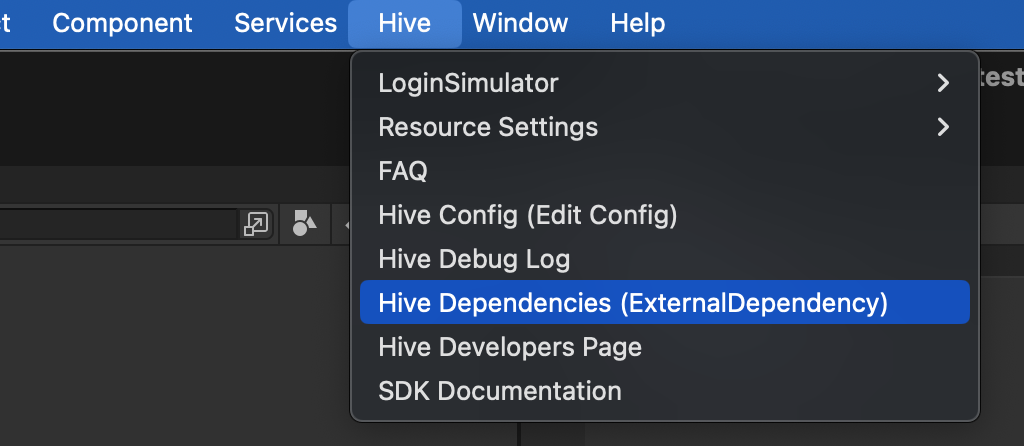
- Click the Hive > ExternalDependency menu.
- Under Market Settings, check the Age Range [Market] items for supported markets. The Age range module depends on the selected market modules.
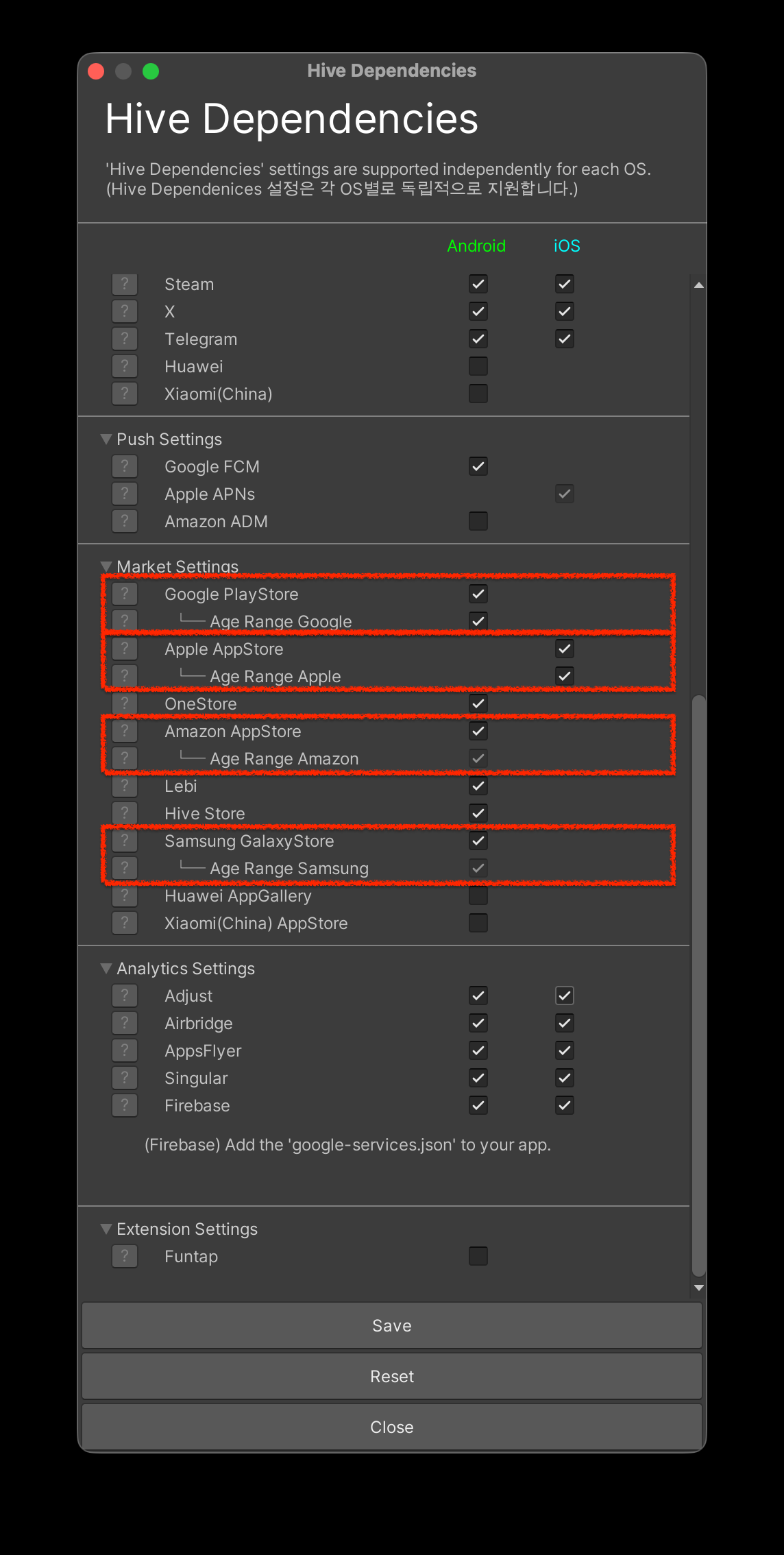
※ Uncheck to disable the Age range module.
You can uncheck Age Range Google and Age Range Apple when they are not used. Age Range Amazon and Age Range Samsung are included automatically when their parent market modules are included.
SDK Unity iOS
App-store-accountability-related system APIs are supported only on iOS 26.2 or later.
- Click the [Hive > ExternalDependency] menu.
- Under Market Settings, check Age Range [Market] for supported markets. The Age range module depends on the selected market modules.
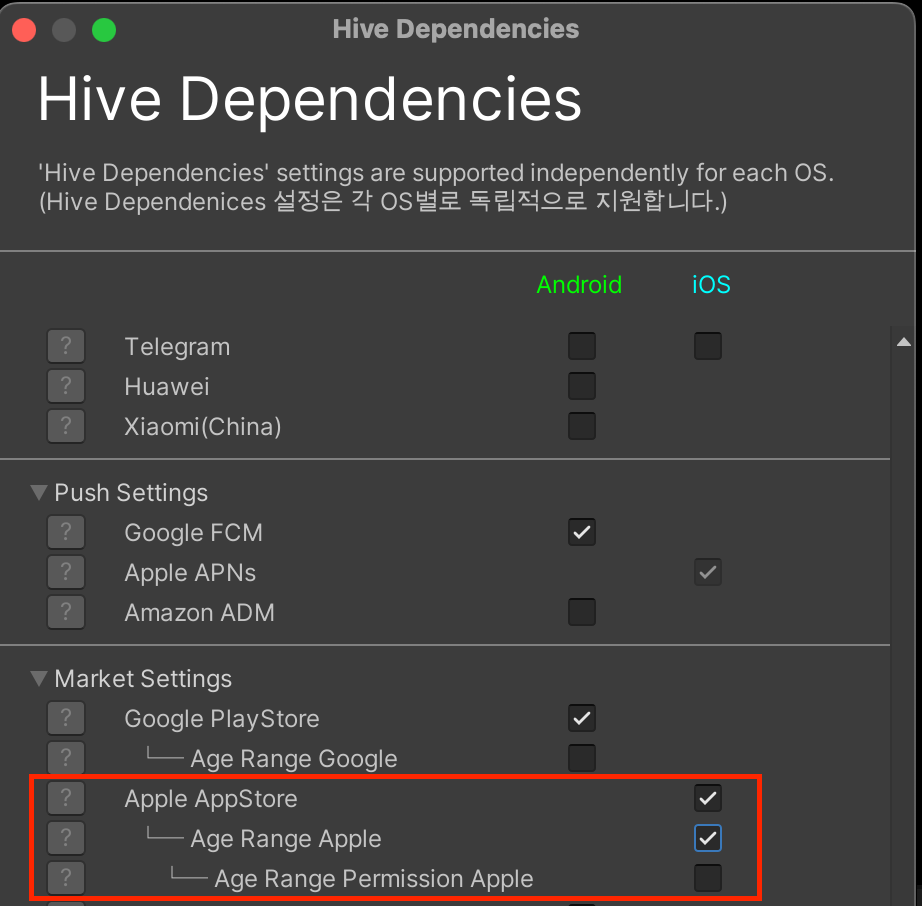
※ Uncheck to disable the Age range module.
You can uncheck Age Range Apple and Age Range Permission Apple when they are not used.
To use the Age range module in Unity for iOS targets, add the Declared Age Range capability as follows. You can configure it easily from the Unity editor.
- In the Unity top menu, select Hive.
- Select Build project post process setting > iOS.

- In Hive PostProcess Editor (iOS), check Age Range.
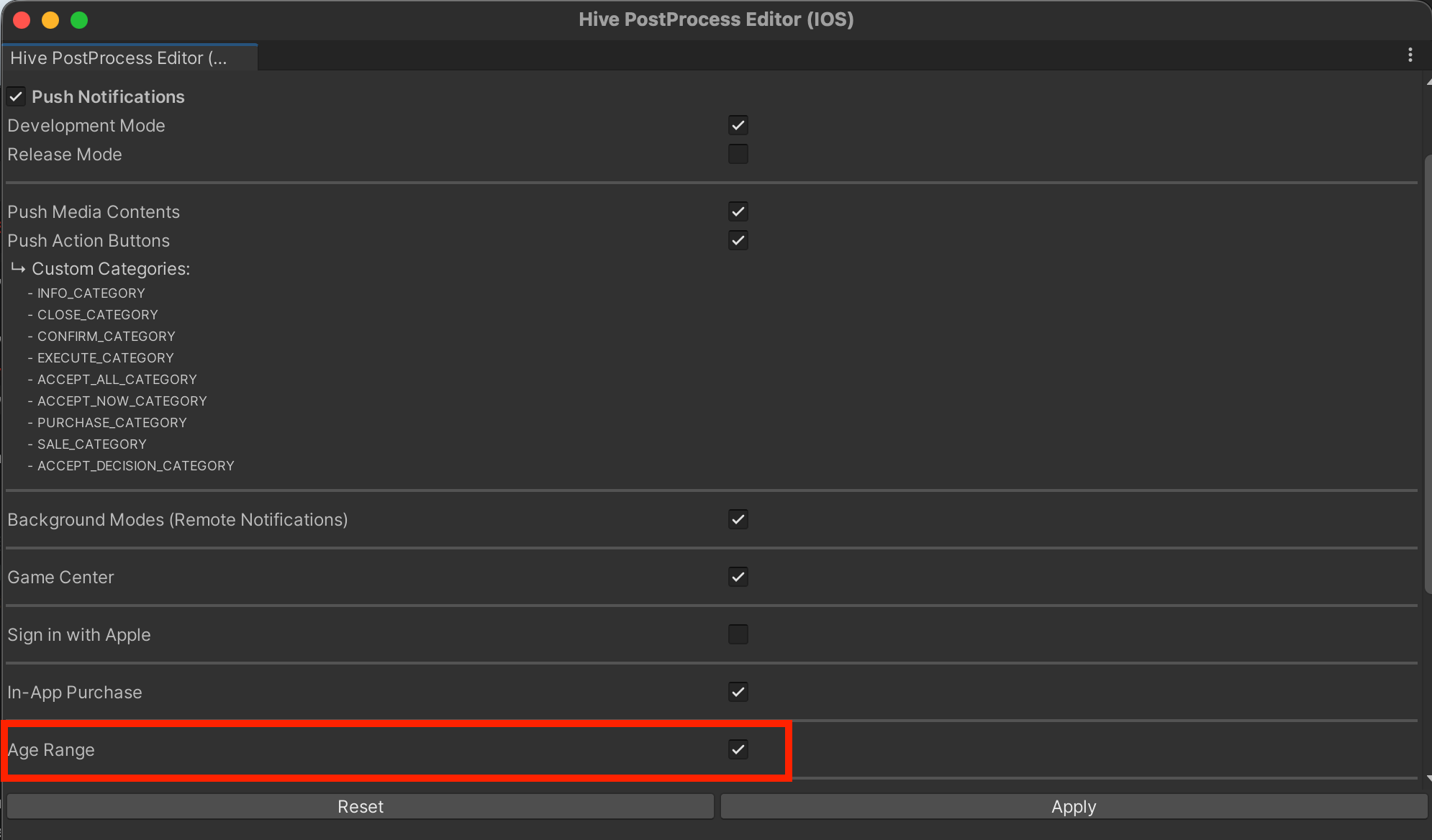
- After iOS project export, verify Declared Age Range is added in Signing & Capabilities.
SDK Unreal Engine Android
To use the Age range module in Unreal Engine for Android targets, configure as follows.
- In Unreal Editor, select Edit → Project Settings.
- In the left panel, select Hive SDK → Dependency → Android.
-
Check Hive Module → Enable AgeRange.
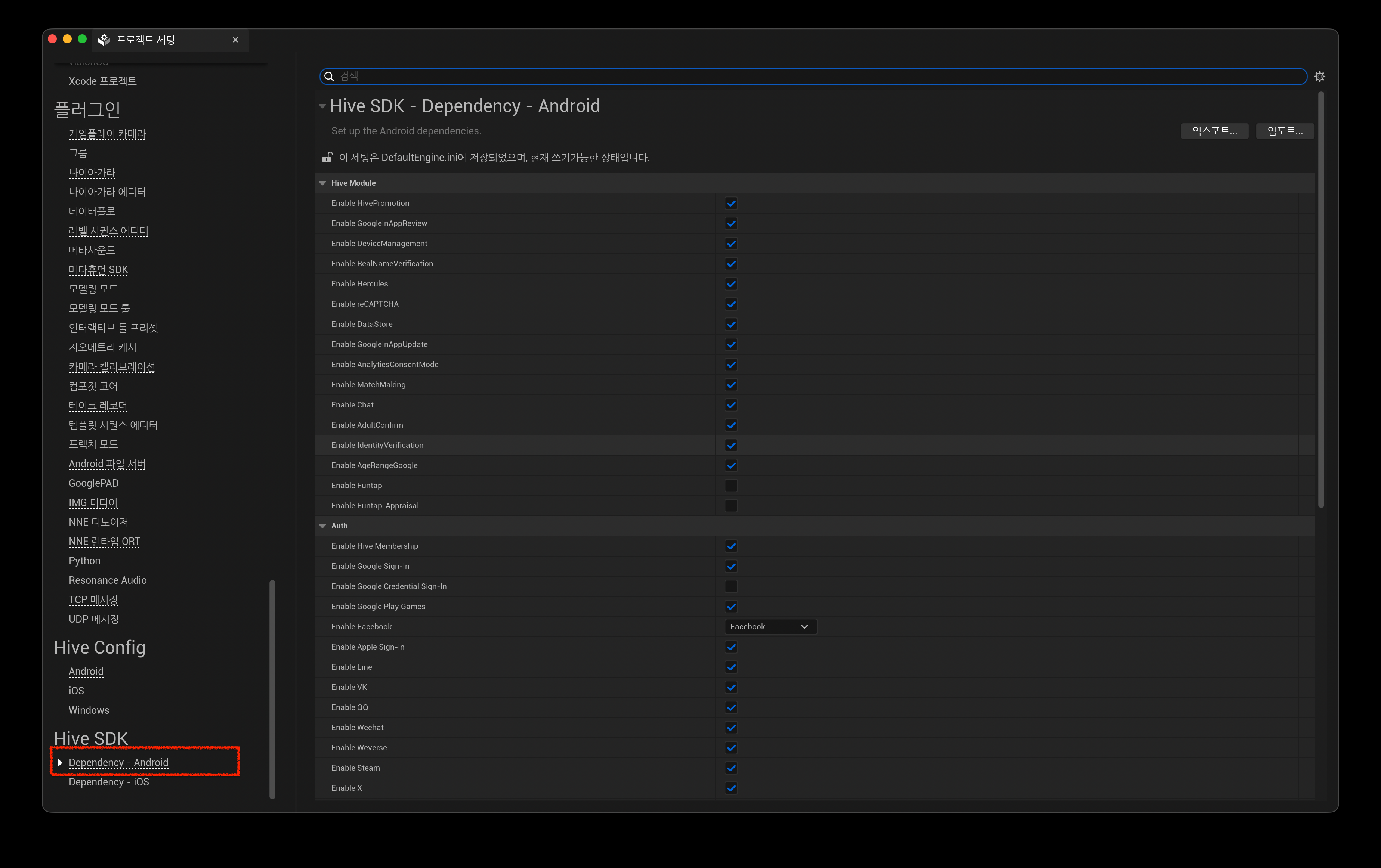
※ Uncheck if you do not want to use the AgeRange module.
SDK Unreal Engine iOS
For iOS, app-store-accountability-related system APIs are supported only on iOS 26.2 or later. To use the Age range module in Unreal Engine for iOS targets, configure as follows.
- In Unreal Editor, select Edit → Project Settings.
- In the left panel, select Hive SDK → Dependency → iOS.
-
Check Hive Module → Enable AgeRange.
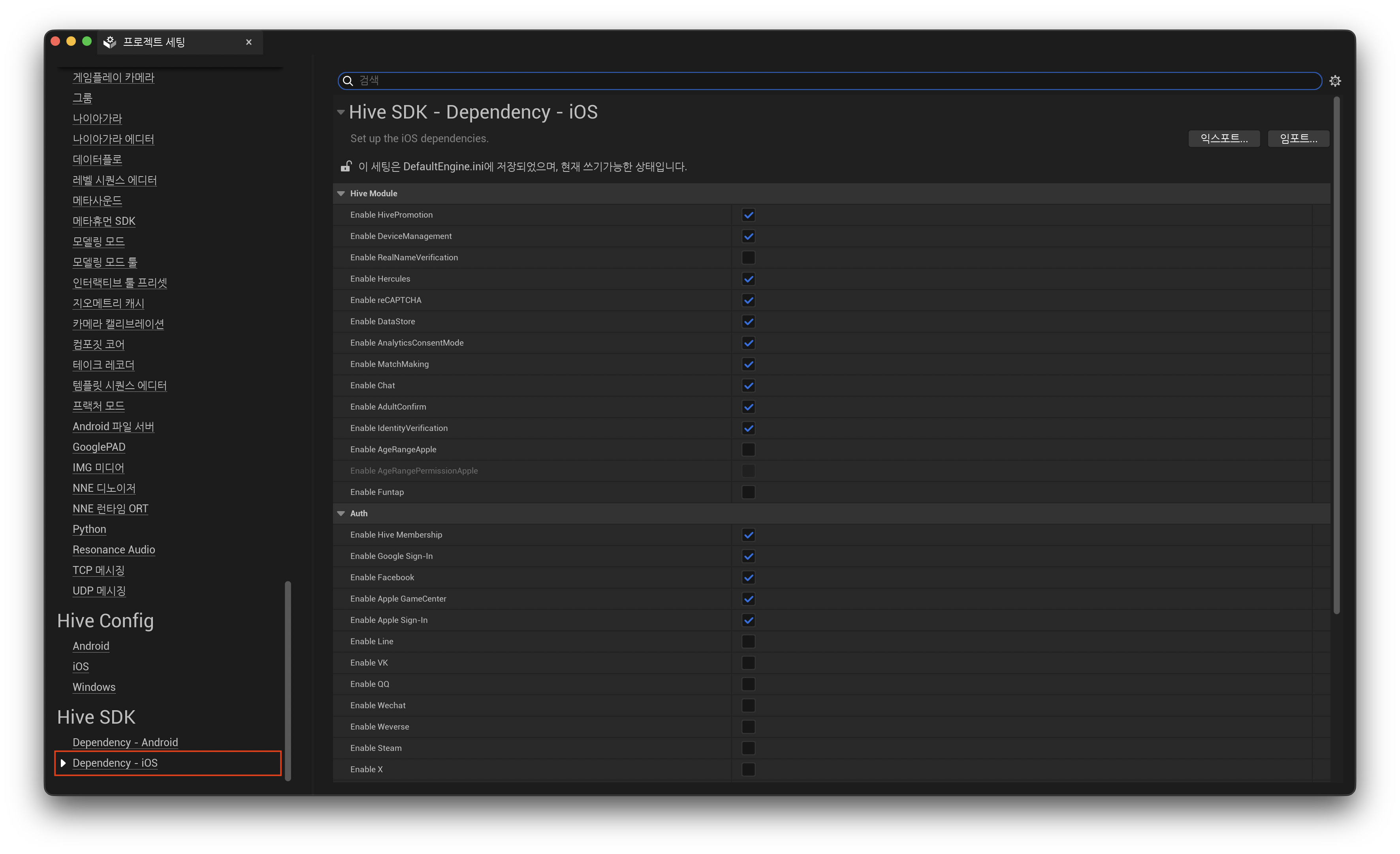
※ Uncheck to disable the AgeRange module.
-
In Unreal Engine, add the Declared Age Range capability by editing IOSExport.cs.
In Engine/Source/Programs/UnrealBuildTool/Platform/IOS/IOSExport.cs, add the lines between'Add'and'Add End'.Text.AppendLine( "<dict>"); Text.AppendLine( "\t<key>get-task-allow</key>"); Text.AppendLine(string.Format( "\t<{0}/>", bForDistribution ? "false": "true")); // Add // Required when using the Age range module. Text.AppendLine("\t<key>com.apple.developer.declared-age-range</key>"); Text.AppendLine("\t<true/>"); // Add End if (bCloudKitSupported) { if (iCloudContainerIdentifiersXML != "")
Edit the entitlements template (Unreal Engine 5)
Note
In Hive SDK Unreal Engine 5, you can add the Declared Age Range capability using an *.entitlements template instead of editing IOSExport.cs.
In Unreal Engine 5 projects, add the Declared Age Range capability using an .entitlements_ template like below. Add the key to your existing _.entitlements template.
If you do not have an entitlements template, refer to HIVESDKV4Tester.entitlements under Plugins/HIVESDK/Source/HiveSDKiOS/template/.
Request user age range and approval status
Call the getAgeRange API at runtime to check the user's age and guardian approval status. This API is not mandatory on every app launch. Call it as needed based on your service policy or feature requirements. Typical cases for calling it include the following.
- You need to control features or content based on user age or guardian approval status at app launch.
- App updates include changes that may affect age ratings.
- Re-consent from guardians is required (for example, after major changes).
If your app has its own age-verification flow in addition to legal compliance requirements, we recommend calling getAgeRange first to verify age.
When getAgeRange is called, the response includes the user status data userState and age range for users living in regions where age-verification laws apply. The default age ranges returned for those jurisdictions are as follows and may change by regional requirements.
- 0 to 12
- 13 to 15
- 16 to 17
- 18+
Note
The Age range module behavior differs by country and regulation.
- United States
- Guardian-approval-based behavior (
SUPERVISEDstate exists) - On iOS, when a major app change occurs, guardian approval must be requested via
showAgeRangeUpdatePermission.
- Guardian-approval-based behavior (
- Brazil
- No guardian approval process
userStateonly providesDECLARED,UNKNOWN, andREQUIRED- You must provide age-appropriate content based on user age information
Call the getAgeRange API
The following examples show how to call getAgeRange.
On successful getAgeRange calls
After calling getAgeRange, your game app can behave as follows based on userState.
- One of
UNKNOWN,VERIFIED, orSUPERVISED: Continue app flow and provide age-appropriate content- If
SUPERVISEDand major in-app change notification is required: CallshowAgeRangeUpdatePermissionfor games distributed via Apple App Store
- If
SUPERVISED_APPROVAL_PENDINGorSUPERVISED_APPROVAL_DENIED:- Guardian approval for allowing the minor to continue using the app is pending or denied. Verify age and handle app progression according to your policy.
REQUIRED: User age is not verified in the relevant jurisdiction/region. Prompt users to share age information via device settings or marketplace app settings.DECLARED: In Brazil, the user, parent, or legal guardian has declared the user's age. Provide age-appropriate content.
On failed getAgeRange calls
If a getAgeRange call fails, you may receive the following ResultAPI failure codes.
API errors can occur for many reasons, such as outdated marketplace apps.
If errors occur during a session, implement handling that minimizes user disruption, such as stopping retries after a maximum retry count.
Example getAgeRange response (Apple App Store)
When getAgeRange is called on Apple App Store, a popup asking for age-range sharing is displayed.
Only users who allow age-range sharing can return age/approval status. If the user denies it, REQUIRED is returned.

getAgeRange response data
The following describes getAgeRange response fields. You can use these fields to drive age-based game processes.
Response values can change. To get the latest values, request API responses when the app opens.
| Response field | Values | Description |
|---|---|---|
userState | VERIFIED | The user is 18 years old or older. |
| SUPERVISED | The user has a supervised account with age set by a parent. Use ageLower and ageUpper to determine the age range. | |
| SUPERVISED_APPROVAL_PENDING | The user has a supervised account and the supervising parent has not approved one or more pending major changes. Use ageLower and ageUpper for age range, and mostRecentApprovalDate for the most recently approved major change. | |
| SUPERVISED_APPROVAL_DENIED | The user has a supervised account and the parent denied approval for one or more major changes. Use ageLower, ageUpper, and mostRecentApprovalDate to determine the last approved major change. | |
| UNKNOWN | The user is not subject to age verification. The user may be outside the jurisdiction/region or may be over/under 18. If "Console > Provisioning > SDK Settings > User age verification" is set to "Do not verify", UNKNOWN is returned. | |
| REQUIRED | The user is not verified or supervised in the relevant jurisdiction/region. The user may be over or under 18. Ask the user to check device and marketplace app settings to complete age verification. | |
| DECLARED | The user, parent, or legal guardian has declared the user's age. Use ageLower and ageUpper to determine the age range. | |
ageLower | 0 to 18 | Inclusive lower bound of the supervised user's age range. Use with ageUpper. |
| -1 | userState is UNKNOWN or REQUIRED. | |
ageUpper | 2 to 18 | Inclusive upper bound of the supervised user's age range. Use with ageLower. |
| -1 | The user is 18+ or userState is UNKNOWN or REQUIRED. | |
mostRecentApprovalDate | Datestamp | Date of the most recently approved major change. Ex) "2023-07-01T00:00:00.008Z" Not supported on Apple App Store. Samsung Galaxy Store returns YYYY-MM-DD format. |
| Empty (a blank value) | userState is SUPERVISED and there are no submitted major changes, or userState is UNKNOWN/REQUIRED.Not supported on Apple App Store. | |
ageRangeId | App Store generated ID | Identifier generated by the marketplace. Google Play Store: installID assigned for supervised-user installations. Used for app approval revocation notifications. See revoked app approval.Amazon App Store: Amazon account userId.Apple App Store: Not supported. Samsung Galaxy Store: Store-generated ID. |
| Empty (a blank value) | userState is UNKNOWN or REQUIRED.Not supported on Apple App Store. |
Notify major in-app changes and request approval
Under regulations in some jurisdictions/regions, if the game app has changes like the following, the app must notify guardians (parents) and request approval for minors to continue using the app.
- Changes to collected, stored, or shared data
- Changes to age rating
- Added in-app purchases or advertising features
- Changes to user experience
The game app can decide when to notify and request approval. Marketplace-specific methods are as follows.
- Google Play, Amazon Appstore, Samsung Galaxy Store: Notify through each marketplace's developer console
- Apple App Store: Notify directly from the game app by calling
showAgeRangeUpdatePermission
showAgeRangeUpdatePermission API
For apps distributed through Apple App Store, call showAgeRangeUpdatePermission in your app to notify guardians (parents) of major changes and request approval.
From Hive SDK 26.3.4, using showAgeRangeUpdatePermission requires adding the HiveAgeRangePermissionApple module. See SDK native iOS for details.
The following examples show how to call showAgeRangeUpdatePermission.
API Reference: Unity ®
API Reference: C++
#include <HIVE_SDK_Plugin/HIVE_CPP.h>
using namespace std;
using namespace hive;

std::string description = "This update adds video calling and location sharing features.";

AuthV4::showAgeRangeUpdatePermission(description, [=](ResultAPI const & result, AgeRange const & ageRange) {
    if (result.isSuccess()) {
        // API call success
    }
});
API Reference: Kotlin
import com.hive.AuthV4;
import com.hive.ResultAPI;

val description: String = "This update adds video calling and location sharing features."

AuthV4.showAgeRangeUpdatePermission(description, object : AuthV4.AuthV4GetAgeRangeListener {
    override fun onAuthV4GetAgeRange(result: ResultAPI, ageRange: AuthV4.AgeRange?) {
        if (result.isSuccess) {
            // API call success
        }
    }
})
API Reference: Java
API Reference: Swift
API Reference: Objective-C
#include "HiveAuthV4.h"

FString Description = TEXT("This update adds video calling and location sharing features.");

FHiveAuthV4::ShowAgeRangeUpdatePermission(Description, FHiveAuthV4OnShowAgeRangeUpdatePermissionDelegate::CreateLambda([this](const FHiveResultAPI& Result, const FHiveAuthV4AgeRange& AgeRange) {
    if (Result.IsSuccess()) {
            // Call succeeded
    }
}));
Guardian approval revocation notification
Guardians (parents) can revoke approval even after approving major in-app change notifications. If approval is revoked, minors can no longer access the app.
You can check revocation by marketplace as follows.
- Google Play: Download the
installIDlist from the Age signals page to identify revocations.- Google Play
installIDis valid for 3 months and then removed.
- Google Play
- Apple App Store: Sends approval revocation notifications.
- Amazon Appstore: Download Amazon
userIddata from the Reports section in the developer console. - Samsung Galaxy Store: No separate revocation notification is sent, so call
getAgeRangeand check the returned status.
Age range testing
Hive SDK provides test environments and test cases so you can receive normal responses for getAgeRange regardless of whether age-verification laws are currently in effect.
The Age range test environment and test cases are available only for Android target development environments. You can simulate API behavior through debug mode.
Note
To test Age range on iOS targets, use Apple's sandbox test tools. Sign in with an Apple sandbox account.
Enable debug mode
To enable debug mode in Android target development environments, run the following command. Debug mode works in Hive ZoneType.SANDBOX.
Use debug mode only for unit or integration testing to verify behavior in game apps.
Responses by test case
After enabling debug mode in Android target development environments, Google Play Store returns the following data for each test case.
| TestCase | userStatus | ageLower | ageUpper | mostRecentApprovalDate | ageRangeId | Description |
|---|---|---|---|---|---|---|
1 | VERIFIED | 18 | -1 | Empty | Empty | Response for verified users aged 18 or older. |
2 | REQUIRED | -1 | -1 | Empty | Empty | Response for users whose age verification/consent status cannot be determined. |
3 | SUPERVISED | 0 | 12 | 2026-01-01T07:00:00.008+0900 | 550e8400-e29b-41d4-a716-446655441111 | Response for users aged 0 to 12 (inclusive). |
4 | SUPERVISED | 13 | 15 | 2026-01-01T07:00:00.008+0900 | 550e8400-e29b-41d4-a716-446655441111 | Response for users aged 13 to 15 (inclusive). |
5 | SUPERVISED | 16 | 17 | 2026-01-01T07:00:00.008+0900 | 550e8400-e29b-41d4-a716-446655441111 | Response for users aged 16 to 17 (inclusive). |
6 | SUPERVISED_APPROVAL_DENIED | 0 | 12 | 2026-01-01T07:00:00.008+0900 | 550e8400-e29b-41d4-a716-446655441111 | Response for users under 18 whose consent is pending or denied. |
7 | UNKNOWN | -1 | -1 | Empty | Empty | Response for all cases where age-verification laws do not apply. |
8 | UNKNOWN | -1 | -1 | Empty | Empty | Response when API returns ResultAPI.RESPONSE_FAIL. (APP_NOT_OWNED) |
9 | UNKNOWN | -1 | -1 | Empty | Empty | Response when API returns ResultAPI.RESPONSE_FAIL. (CLIENT_TRANSIENT_ERROR) |
10 | UNKNOWN | -1 | -1 | Empty | Empty | Response when API returns ResultAPI.RESPONSE_FAIL. (INTERNAL_ERROR) |
11 | UNKNOWN | -1 | -1 | Empty | Empty | Response when API returns ResultAPI.RESPONSE_FAIL. (API_NOT_AVAILABLE) |
12 | DECLARED | 13 | 15 | Empty | 550e8400-e29b-41d4-a716-446655441111 | Response for users whose age was declared by the user, parent, or legal guardian, with age declared as 13 to 15. |