How to use Billing
IAP v4 is a billing module that enables you to respond quickly to the growing market and implement the billing system with less development time. Examples of what IAP v4 supports include verifying a receipt, confirming duplicated payment, and sending billing logs.
Overview
IAP v4 helps you to:
- Develop billing system on Google Play Store, Apple App Store, ONE Store and Lebi with a single API.
- Calculate VAT in accordance with currency and then send the data when game app requests item information.
- Provides Market PID list registered on data system in sales through Hive SDK.
- Send billing logs of games to Analytics when game app requests receipt verification of games to IAP v4 server.
- Carry out purchase based on a Market PID.
- Gather logs in the process of pre-purchase (when tapping purchase), purchase (after purchase), and post purchase (after calling finish) to clarify the current status of purchase as well as verification process.
- IAP v4 purchases items, verifies receipts, sends logs. Sending item is managed by game server.
- In the Windows, mobile environment, it supports PG payments and Steam market payments.
- In the Windows mobile environment, it supports Steam market payments.
- The following Hive Console settings are required for Steam market payments:
- If you set the Steam environment to sandbox, payment will be made in sandbox.
Purchase process with IAP v4
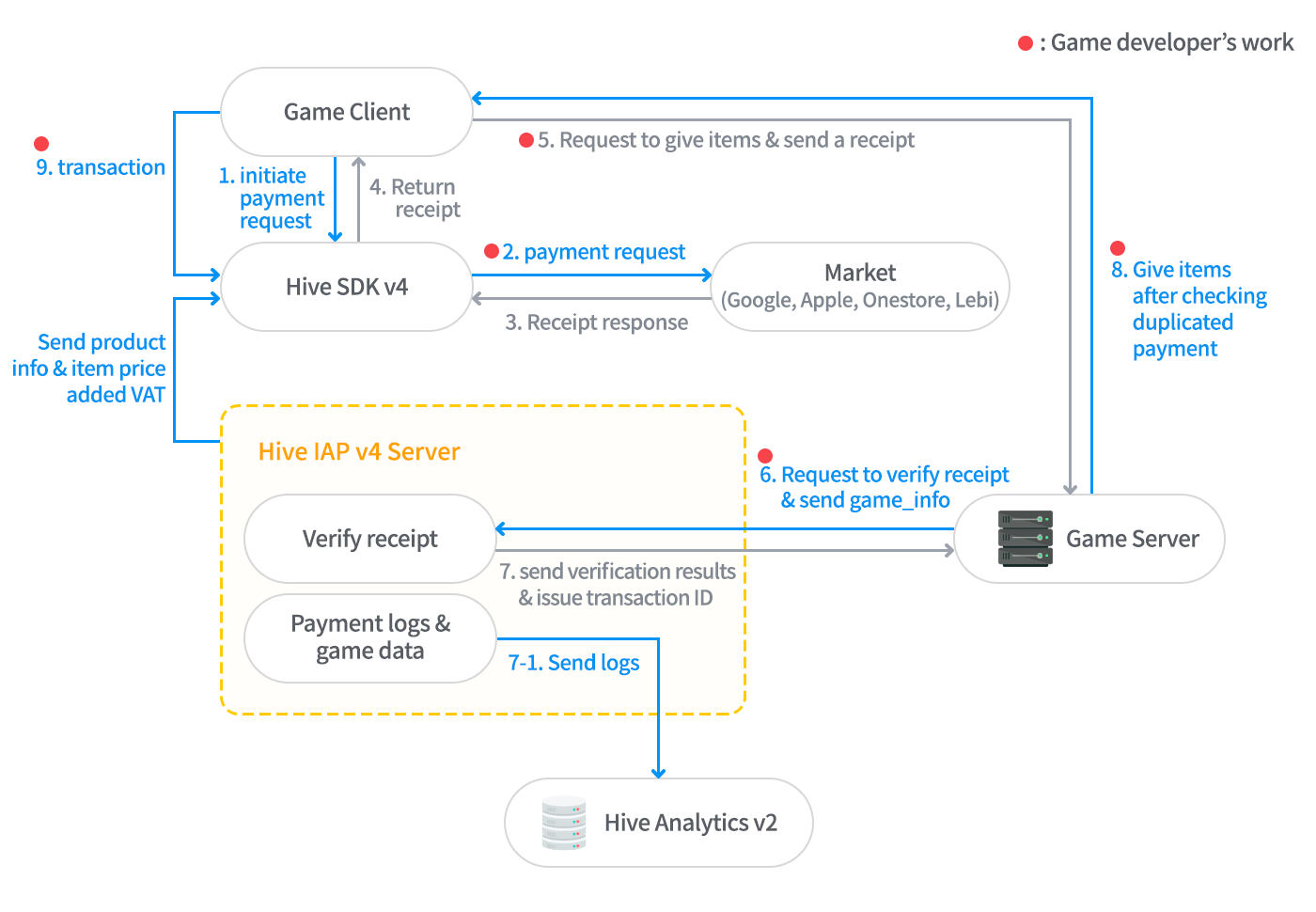
The status of supported IAP v4 features
| Operating System | iOS | Android | Android | Android | Android | Android | Android | Windows | Windows | ALL |
|---|---|---|---|---|---|---|---|---|---|---|
| Market/Platform | Apple App Store | Google Play Store | ONE Store v4 | ONE Store v7 (v5,v6) | Samsung Galaxy Store | Amazon Appstore | Huawei AppConnect | Steam | DMM | PG |
| Single Purchase | O | O | O | O | O | O | O | O | O | O |
| Multiple Purchase | - | O | - | - | - | - | - | - | O | O |
| Purchase Recovery | O | O | O | O | O | O | O | O | O | O |
| Cancellation/Refund History | O | O | X | O | X | O | O | O | X | O |
| Repurchase by Refunded Users | O | O | X | O | X | O | O | O | X | O |
| Subscription | O | O | X | O | O | O | O | X | X | X |
| Auto-Renewal Subscription | Weekly, Monthly, Bimonthly, Trimonthly, Biannually, Yearly | Weekly, Monthly, Trimonthly, Biannually, Yearly | X | Weekly, Monthly, Trimonthly, Biannually, Yearly | Weekly, Monthly, Trimonthly, Biannually, Yearly | Weekly, Biweekly, Monthly, Bimonthly, Quarterly, Semi-Annually, Annually | P1W, P1M, P2M, P6M, P1Y, ..., ISO 8601 | X | X | X |
| Payload Support | O | O | Not Supported | O | O | O | O | O | O | O |
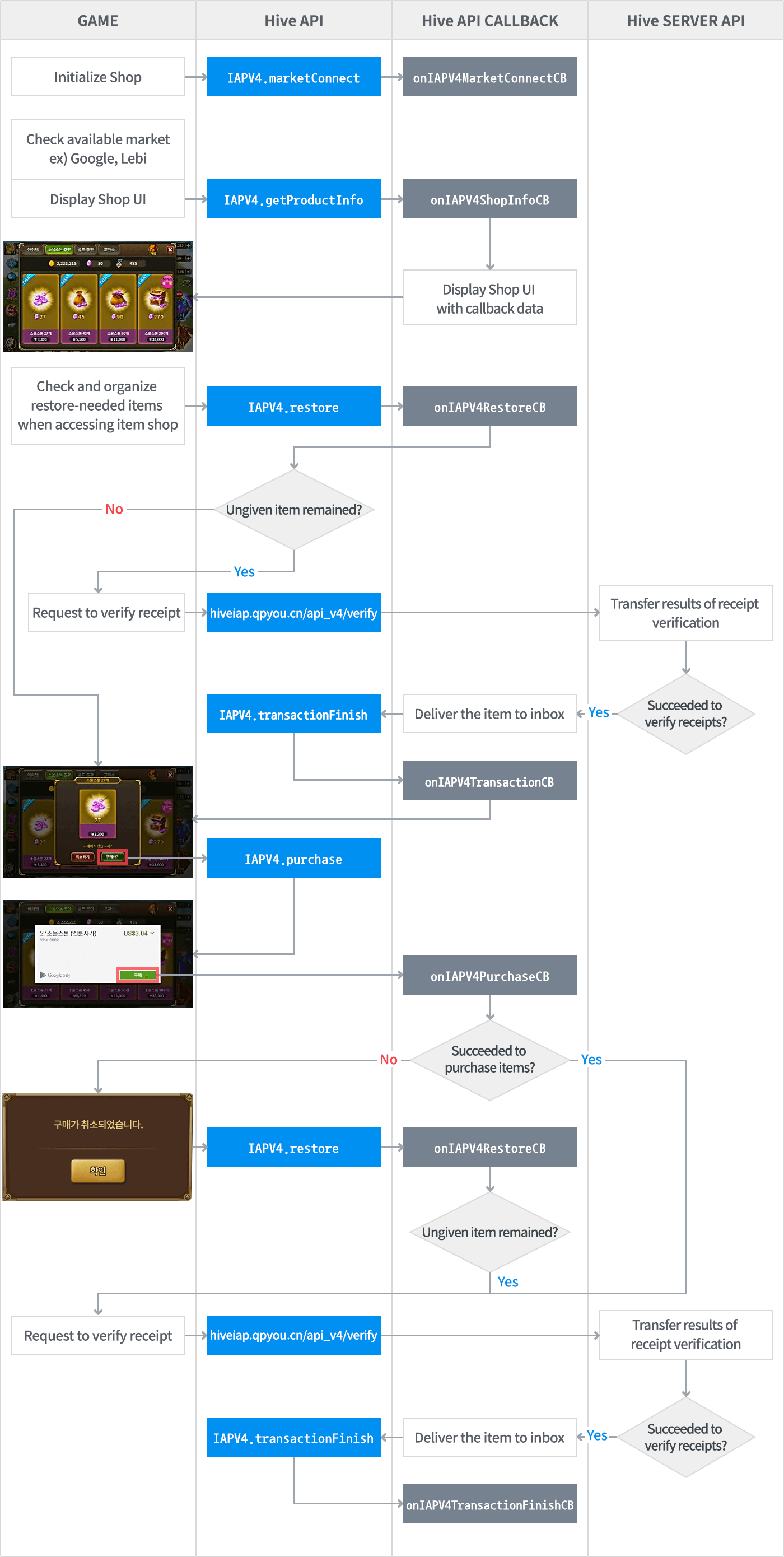
Flowchart to sync with IAP v4
Note
Please refer to the Mobile PG Integration Flow document when integrating mobile PG.
Integration flow for multiple markets
If your app supports multiple markets (for example: App Store + Hive Store), refer to the flow below and call the APIs accordingly.
flowchart TD
        A(["marketConnect"])
        B(["getProductInfo"])
        C(["setMarketSelection"])
        D(["purchase"])
        E(["Receipt Verification (Game Server)"])
        F(["transactionFinish"])

        A -- "Once when app launches" --> B
        B -- "Once per market initially" --> C
        C -- "Designate market for purchase" --> D
        D --> E --> F
Note
getProductInfoonly needs to be called once per market. There is no need to recall it even if you switch markets afterwards.- Whenever the user changes their payment method (market), call
setMarketSelectionbefore proceeding withpurchaseorrestore. - For more details on when to call each API, refer to Market Selection.
Warning
Apple does not support Apple Game Center and in-app purchases for iOS enterprise builds.
Note
Due to Steam's native touch screen support characteristics, on UMPCs, windows exposed by Steam (payment screens, etc.) may behave differently from user intent when touched. Touch works normally on SteamDeck.