Server maintenance
When providing the game app service, there are situations where you need to display a Server Maintenance Popup due to regular or emergency server maintenance, and either terminate the game app or redirect users to another site. In this way, Hive SDK provides a Server Maintenance Popup that can respond to server maintenance situations.
| Popup | Description |
|---|---|
| Server Maintenance | You can set the maintenance status for each game server, and it is recommended to provide game-related links during the maintenance period |
Exposure method
- Register the desired Server Maintenance Popup in Hive Console.
- Register the server ID to be maintained in App Center.
- Call Configuration.setServerId to input the server information to be maintained.
- When calling
AuthV4.checkMaintenanceat the time of server maintenance, the registered popup will be displayed when accessing the corresponding server.
The point at which server maintenance is performed means blocking access to the game server for server maintenance and logging out users who have already connected to the server. You can set the desired server maintenance time zone when registering a popup in Hive Console.
Note
After successfully initializing Hive SDK, you must call AuthV4.checkMaintenance.
Info
It is recommended to always run AuthV4.checkMaintenance in the game app. This allows for easy exposure of periodic Server Maintenance Popups, such as regular server checks.
An example of calling AuthV4.checkMaintenance is as follows.
API Reference: Unity®
using hive;

// Whether to use Hive SDK UI
Boolean isShow = true;

AuthV4.checkMaintenance(isShow, (ResultAPI result, List maintenanceInfoList) => {

    if (isShow) {
        if (result.isSuccess()) {
            // There's nothing to check
        } else if (result.needExit()) {
            // TODO: Implement app termination functionality
            // Example) Application.Quit();
        } else {
            // Network error or other. try again.
        }
    } else { // isShow false
        if (result.isSuccess()) {
            if (maintenanceInfoList.Any()) {
                // TODO: Show custom maintenance dialog.
            } else {
                // There's nothing to check
            }
        } else {
            // Network error or other. try again.
        }
    }
});
API Reference: C++
#include <HIVE_SDK_Plugin/HIVE_CPP.h>
using namespace std;
using namespace hive;

// Whether to use Hive SDK UI
bool isShow = true;

AuthV4::checkMaintenance(isShow, [=](ResultAPI const & result, vector const & maintenanceInfolist){

    if (isShow) {
        if (result.isSuccess()) {
            // There's nothing to check
        } else if (reuslt.needExit()) {
            // TODO: Implement app termination functionality
            // Cocos2d-x engine user
            // Example) exit(0);
            // Unreal Engine User
            // Example) UKismetSystemLibrary::QuitGame(GetWorld(), nullptr, EQuitPreference::Quit, false);
        } else {
            // Network error or other. try again.
        }
    } else { // isShow false
        if (result.isSuccess()) {
            if (maintenanceInfolist.size() > 0) {
                // TODO: Show custom maintenance dialog.
            } else {
                // There's nothing to check
            }
        } else {
            // Network error or other. try again.
        }
    }
});
API Reference: Kotlin
import com.hive.AuthV4;
import com.hive.AuthV4;
import com.hive.ResultAPI;

// Hive SDK UI 사용 여부
val isShow = true

AuthV4.checkMaintenance(isShow, object : AuthV4.AuthV4MaintenanceListener {
    override fun onAuthV4Maintenance(result: ResultAPI, maintenanceInfo: ArrayList<AuthV4.AuthV4MaintenanceInfo>?) {

        if (isShow) {
            if (result.isSuccess) {
                // There's nothing to check
            } else if (result.needExit()) {
                // TODO: Implement app termination functionality
                // Example) exitProcess(0)
            } else {
                // Network error or other. try again.
            }
        } else { // isShow false
            if (result.isSuccess) {
                if (maintenanceInfo != null && maintenanceInfo.size > 0) {
                    // TODO: Show custom maintenance dialog.
                } else {
                    // There's nothing to check
                }
            } else {
                // Network error or other. try again.
            }
        }
    }
})
API Reference: Java
import com.hive.AuthV4;
import com.hive.ResultAPI;

// Whether to use Hive SDK UI
boolean isShow = true;

AuthV4.checkMaintenance(isShow, (result, maintenanceInfo) -> {

    if (isShow) {
        if (result.isSuccess()) {
            // There's nothing to check
        } else if (result.needExit()) {
            // TODO: Implement app termination functionality
            // Example) System.exit(0);
        } else {
            // Network error or other. try again.
        }
    } else { // isShow false
        if (result.isSuccess()) {
            if (maintenanceInfo != null && maintenanceInfo.size() > 0) {
                // TODO: Show custom maintenance dialog.
            } else {
                // There's nothing to check
            }
        } else {
            // Network error or other. try again.
        }
    }
});
API Reference: Swift
import HIVEService

// Hive SDK UI를 사용할지 여부
let isShow = true

AuthV4Interface.checkMaintenance(isShow) { result, maintenances in

    if isShow {
        if result.isSuccess() {
            // There's nothing to check
        } else if result.needExit() {
            // TODO: Implement app termination functionality
            // Example) exit(0)
        } else {
            // Network error or other. try again.
        }
    } else { // isShow false
        if result.isSuccess() {
            if (maintenances.count > 0) {
                // TODO: Show custom maintenance dialog.
            } else {
                // There's nothing to check
            }
        } else {
            // Network error or other. try again.
        }
    }
}
API Reference: Objective-C
#import <HIVEService/HIVEService-Swift.h>

// Whether to use Hive SDK UI
BOOL isShow = YES;

[HIVEAuthV4 checkMaintenance:isShow handler: ^(HIVEResultAPI *result, NSArray<HIVEAuthV4MaintenanceInfo *> *maintenanceInfolist) {

    if (isShow) {
        if (result.isSuccess) {
            // There's nothing to check
        } else if (result.needExit) {
            // TODO: Implement app termination functionality
            // Example) exit(0);
        } else {
            // Network error or other. try again.
        }
    } else { // isShow false
        if (result.isSuccess) {
            if (maintenanceInfolist.count > 0) {
                // TODO: Show custom maintenance dialog.
            } else {
                // There's nothing to check
            }
        } else {
            // Network error or other. try again.
        }
    }
}];
#include "HiveAuthV4.h"

// Hive SDK UI usage
bool bIsShow = true;

FHiveAuthV4::CheckMaintenance(bIsShow, FHiveAuthV4OnMaintenanceInfoDelegate::CreateLambda([this](const FHiveResultAPI& Result, const TArray<FHiveAuthV4MaintenanceInfo>& AuthV4MaintenanceInfoArray) {

    if (bIsShow) {
        if (Result.IsSuccess()) {
            // There's nothing to check
        } else if (Result.NeedExit()) {
            // TODO: Implement app termination functionality
            // Example) UKismetSystemLibrary::QuitGame(GetWorld(), nullptr, EQuitPreference::Quit, false);
        } else {
            // Network error or other. try again.
        }
    } else { // isShow false
        if (Result.IsSuccess()) {
            if (AuthV4MaintenanceInfoArray.Num() > 0) {
                // TODO: Show custom maintenance dialog.
            } else {
                // There's nothing to check
            }
        } else {
            // Network error or other. try again.
        }
    }
}));
The Server Maintenance Popup UI can use the default UI of Hive SDK or a customized UI, and if isShow is true, the default UI is used. If using a customized UI, isShow must be false.
Configuration.setServerId
Before displaying the Server Maintenance Popup, you must select which server to check. Hive Console allows you to register Server Maintenance Popups differently for each game server, and you can display different Server Maintenance Popups for each server.
If you have registered different Server Maintenance Popups for each server in Hive Console, Hive SDK will select the server to be checked by calling Configuration.setServerId with the server ID value to be checked. You only need to call this method before calling AuthV4.checkMaintenance.
If the user selects a server after accessing the game app, call Configuration.setServerId with the server ID value selected by the user.
Implementation of actions based on popup button settings
In Hive Console, you can select buttons to display in the Server Maintenance Popup, such as closing the popup, exiting the game, or navigating to a URL. The actions that need to be implemented when the user presses a button depend on whether you are using the default UI of Hive SDK or a custom UI. For more details, please refer to the Server Maintenance Popup UI.
Popup UI: basic UI
The Server Maintenance Popup can use the default UI provided by Hive SDK or a customized UI. When using a customized UI, Hive SDK provides the necessary information for creating a custom UI to the game client. The game client must implement the code to draw and expose the UI using this information.
The basic UI is the Server Maintenance Popup UI provided by Hive SDK by default. To expose the basic UI, call AuthV4.checkMaintenance with isShow set to true as shown below.
Info
It is recommended to separately register Server Maintenance Popups for regular or emergency maintenance in Hive Console and use them.
- Regular Maintenance
- Set the maintenance time zone in Hive Console
- Call
AuthV4.checkMaintenancefrom the game client - Display the popup only during the specified time zone based on the call result
- Emergency Maintenance
- Set the time to "current time" in Hive Console
- Block all users from accessing the game server
- Call
AuthV4.checkMaintenancefrom the game client - Display the popup according to the current time when users reconnect to the game app based on the call result
API Reference: Unity®
using hive;

// Whether to use Hive SDK UI
Boolean isShow = true;

AuthV4.checkMaintenance(isShow, (ResultAPI result, List maintenanceInfoList) => {

    if (result.isSuccess()) {
        // There's nothing to check
    } else if (result.needExit()) {
        // TODO: Implement app termination functionality
        // Example) Application.Quit();
    } else {
        // Network error or other. try again.
    }
});
API Reference: C++
#include <HIVE_SDK_Plugin/HIVE_CPP.h>
using namespace std;
using namespace hive;

// Whether to use Hive SDK UI
bool isShow = true;

AuthV4::checkMaintenance(isShow, [=](ResultAPI const & result, vector const & maintenanceInfolist){

    if (result.isSuccess()) {
        // There's nothing to check
    } else if (reuslt.needExit()) {
        // TODO: Implement app termination functionality
        // Cocos2d-x engine user
        // Example) exit(0);
        // Unreal Engine User
        // Example) UKismetSystemLibrary::QuitGame(GetWorld(), nullptr, EQuitPreference::Quit, false);
    } else {
        // Network error or other. try again.
    }
});
API Reference: Kotlin
import com.hive.AuthV4;
import com.hive.AuthV4;
import com.hive.ResultAPI;

// Whether to use Hive SDK UI
val isShow = true

AuthV4.checkMaintenance(isShow, object : AuthV4.AuthV4MaintenanceListener {
    override fun onAuthV4Maintenance(result: ResultAPI, maintenanceInfo: ArrayList<AuthV4.AuthV4MaintenanceInfo>?) {

        if (result.isSuccess) {
            // There's nothing to check
        } else if (result.needExit()) {
            // TODO: Implement app termination functionality
            // Example) exitProcess(0)
        } else {
            // Network error or other. try again.
        }
    }
})
API Reference: Java
import com.hive.AuthV4;
import com.hive.ResultAPI;

// Whether to use Hive SDK UI
boolean isShow = true;

AuthV4.checkMaintenance(isShow, (result, maintenanceInfo) -> {

    if (result.isSuccess()) {
        // There's nothing to check
    } else if (result.needExit()) {
        // TODO: Implement app termination functionality
        // Example) System.exit(0);
    } else {
        // Network error or other. try again.
    }
});
API Reference: Swift
import HIVEService

// Whether to use Hive SDK UI
let isShow = true

AuthV4Interface.checkMaintenance(isShow) { result, maintenances in

    if result.isSuccess() {
        // There's nothing to check
    } else if result.needExit() {
        // TODO: Implement app termination functionality
        // Example) exit(0)
    } else {
        // Network error or other. try again.
    }
}
API Reference: Objective-C
#import <HIVEService/HIVEService-Swift.h>

// Whether to use Hive SDK UI
BOOL isShow = YES;

[HIVEAuthV4 checkMaintenance:isShow handler: ^(HIVEResultAPI *result, NSArray<HIVEAuthV4MaintenanceInfo *> *maintenanceInfolist) {

    if (result.isSuccess) {
        // There's nothing to check
    } else if (result.needExit) {
        // TODO: Implement app termination functionality
        // Example) exit(0);
    } else {
        // Network error or other. try again.
    }
}];
#include "HiveAuthV4.h"

// Whether to use Hive SDK UI
bool bIsShow = true;

FHiveAuthV4::CheckMaintenance(bIsShow, FHiveAuthV4OnMaintenanceInfoDelegate::CreateLambda([this](const FHiveResultAPI& Result, const TArray<FHiveAuthV4MaintenanceInfo>& AuthV4MaintenanceInfoArray) {

    if (Result.IsSuccess()) {
        // There's nothing to check
    } else if (Result.NeedExit()) {
        // TODO: Implement app termination functionality
        // Example) UKismetSystemLibrary::QuitGame(GetWorld(), nullptr, EQuitPreference::Quit, false);
    } else {
        // Network error or other. try again.
    }
}));
Implementing app exit when using the game exit button
If you use the Game Exit button in Hive Console, Hive SDK will send an event (NeedExit) to ResultAPI result indicating that the app should exit.
The game client must implement and execute the code to terminate the game app after receiving this event, and this part is the same for both Hive SDK default UI and custom UI.
Implementing URL navigation when using the detail view (go to url) button
If you set the base URL in Hive Console and enabled navigate to URL, pressing the view details button will automatically open an external browser and redirect the user to the address set in the base URL by Hive SDK.
Implementing popup closure when using the close button
When using the close popup button in Hive Console, pressing the close button will automatically close the popup window by Hive SDK.
User behavior return
In the basic UI, you can know which button the user pressed in the popup window through the ResultAPI object. When the user presses a button, you get the ResultAPI object, which is the callback result of AuthV4.checkMaintenance, and you can know the action taken by the user from this object.
Popup UI: custom UI
The custom UI is a Server Maintenance Popup UI implemented directly by the developer. When isShow=false is called with AuthV4.checkMaintenance, the game client receives the necessary information to implement the popup UI in the form of the AuthV4MaintenanceInfo object. The developer must use this object to implement and display the custom UI directly. If this value is returned as null, it means there is no content to display in the popup.
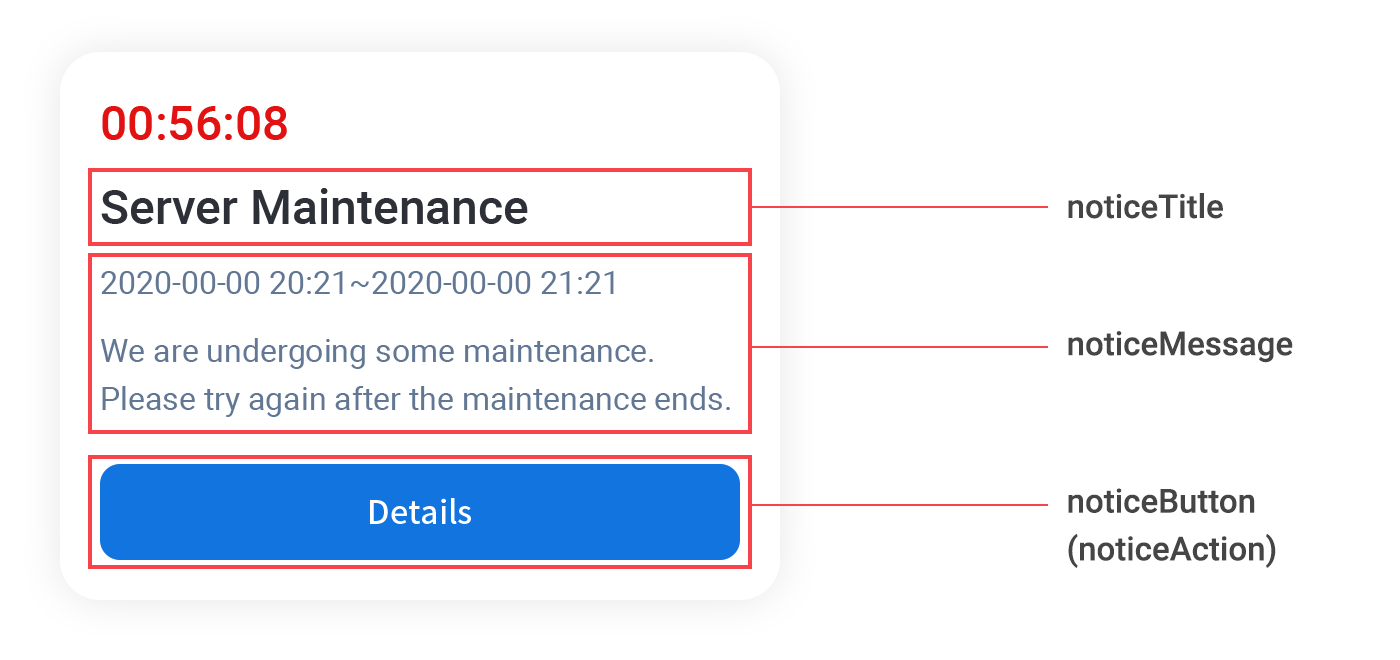
Below is an example of when isShow is false.
API Reference: Unity®
using hive;

// Whether to use Hive SDK UI
Boolean isShow = false;

AuthV4.checkMaintenance(isShow, (ResultAPI result, List maintenanceInfoList) => {

    if (result.isSuccess()) {
        if (maintenanceInfoList.Any()) {
            // TODO: Show custom maintenance dialog.
        } else {
            // There's nothing to check
        }
    } else {
        // Network error or other. try again.
    }
});
API Reference: C++
#include <HIVE_SDK_Plugin/HIVE_CPP.h>
using namespace std;
using namespace hive;

// Whether to use Hive SDK UI
bool isShow = flase;

AuthV4::checkMaintenance(isShow, [=](ResultAPI const & result, vector const & maintenanceInfolist){

    if (result.isSuccess()) {
        if (maintenanceInfolist.size() > 0) {
            // TODO: Show custom maintenance dialog.
        } else {
            // There's nothing to check
        }
    } else {
        // Network error or other. try again.
    }
});
API Reference: Kotlin
import com.hive.AuthV4;
import com.hive.AuthV4;
import com.hive.ResultAPI;

// Whether to use Hive SDK UI
val isShow = false

AuthV4.checkMaintenance(isShow, object : AuthV4.AuthV4MaintenanceListener {
    override fun onAuthV4Maintenance(result: ResultAPI, maintenanceInfo: ArrayList<AuthV4.AuthV4MaintenanceInfo>?) {

        if (result.isSuccess) {
            if (maintenanceInfo != null && maintenanceInfo.size > 0) {
                // TODO: Show custom maintenance dialog.
            } else {
                // There's nothing to check
            }
        } else {
            // Network error or other. try again.
        }
    }
})
API Reference: Java
import com.hive.AuthV4;
import com.hive.ResultAPI;
// Whether to use Hive SDK UI
boolean isShow = false;

AuthV4.checkMaintenance(isShow, (result, maintenanceInfo) -> {

    if (result.isSuccess()) {
        if (maintenanceInfo != null && maintenanceInfo.size() > 0) {
            // TODO: Show custom maintenance dialog.
        } else {
            // There's nothing to check
        }
    } else {
        // Network error or other. try again.
    }
});
API Reference: Swift
import HIVEService

// Whether to use Hive SDK UI
let isShow = false

AuthV4Interface.checkMaintenance(isShow) { result, maintenances in

    if result.isSuccess() {
        if (maintenances.count > 0) {
            // TODO: Show custom maintenance dialog.
        } else {
            // There's nothing to check
        }
    } else {
        // Network error or other. try again.
    }
}
API Reference: Objective-C
#import <HIVEService/HIVEService-Swift.h>

// Whether to use Hive SDK UI
BOOL isShow = YES;

[HIVEAuthV4 checkMaintenance:isShow handler: ^(HIVEResultAPI *result, NSArray<HIVEAuthV4MaintenanceInfo *> *maintenanceInfolist) {

    if (result.isSuccess) {
        if (maintenanceInfolist.count > 0) {
            // TODO: Show custom maintenance dialog.
        } else {
            // There's nothing to check
        }
    } else {
        // Network error or other. try again.
    }
}];
#include "HiveAuthV4.h"

// Hive SDK UI usage status
bool bIsShow = true;

FHiveAuthV4::CheckMaintenance(bIsShow, FHiveAuthV4OnMaintenanceInfoDelegate::CreateLambda([this](const FHiveResultAPI& Result, const TArray<FHiveAuthV4MaintenanceInfo>& AuthV4MaintenanceInfoArray) {

    if (Result.IsSuccess()) {
        if (AuthV4MaintenanceInfoArray.Num() > 0) {
            // TODO: Show custom maintenance dialog.
        } else {
            // There's nothing to check
        }
    } else {
        // Network error or other. try again.
    }
}));
Authv4maintenanceinfo object
| Field Name | Description | Type |
|---|---|---|
| title | Popup title | String |
| message | Popup content | String |
| button | Label text of the popup button | String |
| action | Indicates what action will be taken when the popup button is pressed OPEN_URL: Executes the URL passed to the external browser EXIT: Exits the app DONE: Closes the inspection popup without any processing | AuthV4MaintenanceActionType enum |
| url | URL to be opened in the external browser. Valid when the action field value is OPEN_URL | String |
| remainingTime | Remaining time in seconds until the inspection is complete. The time is updated in real-time, and the app will exit when it reaches 0 seconds | Integer |
| startDate | Inspection start date | String |
| endDate | Inspection end date | String |
| customerButton | Customer Service button text (an empty string is passed in the inspection popup) | String |
| customerLink | Customer Service button link (an empty string is passed in the inspection popup) | String |
| exButtons | Popup button information (up to 3 can be passed) | JSONArray |
| exButtons.action | Indicates what action will be taken when the popup button is pressed OPEN_URL: Executes the URL passed to the external browser EXIT: Exits the app DONE: Closes the inspection popup without any processing | AuthV4MaintenanceActionType enum |
| exButtons.button | Label text of the popup button | String |
| exButtons.url | URL to be opened in the external browser. Valid when the action field value is OPEN_URL | String |
You implement code in the game client to create and display a custom Server Maintenance Popup using this object. By using this object, a custom Server Maintenance Popup can be automatically displayed every time the server is checked.
Note
If the server maintenance time set in Hive Console is not correct, it will return null with the AuthV4MaintenanceInfo object.
Info
It is recommended to separately register Server Maintenance Popups for regular or emergency maintenance in Hive Console and use them.
- Regular Maintenance
- Set the maintenance time zone in Hive Console
- Call
AuthV4.checkMaintenancefrom the game client - Show the popup only during the specified time zone based on the call result
- Emergency Maintenance
- Set the time to "current time" in Hive Console
- Block all users from accessing the game server
- Call
AuthV4.checkMaintenancefrom the game client - Show the popup when users reconnect to the game app according to the current time based on the call result
Implementation of app exit when using the game exit button
If you use the End Game button in Hive Console, Hive SDK will send an event (Exit) to the ResultAPI result indicating that the game app should be terminated. The game client must implement and execute the code to terminate the game app after receiving this event, and this part is the same for both the default UI and custom UI of Hive SDK.
Implementing URL navigation when using the detailed view (go to url) button
If the default URL is set in Hive Console and Navigate to URL is activated, you must implement the action to redirect the user to the address set as the default URL when the View Details button is pressed. The information needed to implement this is in the AuthV4MaintenanceInfo object.
For example, if you set the base URL, you will receive a value (OPEN_URL) in the action field of the AuthV4MaintenanceInfo object that indicates the need to navigate to a specific URL. If the game client receives this value, it must implement code to redirect the user to the URL in url.
Implementing popup closure when using the close button
If using the close button in Hive Console, you must implement code that automatically closes the popup based on the information in the AuthV4MaintenanceInfo object when the close button is pressed.
Exposure order
Notice Popups do not appear simultaneously. If you have registered all Notice Popups (Country Restriction, Update, General Notice, Server Maintenance) in Hive Console, the order in which the Notice Popups are displayed is as follows.
- Country Restriction Popup
- Role: Notify users that access is blocked if they are connecting from a specific country
- Next Step: Encourage users to close the app
- Update Popup
- Role: Notify users to update if they are using an older version of the game app (if not restricted by country)
- Next Step: Close the game app and direct users to the app market to update to the latest version
- General Notice Popup
- Role: Display information about game app updates and any notices if the game app is not restricted by country and is the latest version
- Server Maintenance Popup
- Role: Notify users of server maintenance (if not restricted by country, the game app is the latest version, and General Notices have been provided)
- Next Step: Encourage users to close the game app
Example 1: when a user accesses from a restricted country
If a user connects from a restricted country, only the Country Restriction Popup will be displayed, and the game will exit. If the Country Restriction Popup has not been registered in Hive Console, the Country Restriction Popup will not be displayed, and it will proceed to the Update Popup display step as shown in Example 2 below.
Example 2: when a user accesses from an allowed country
If the user has accessed from a country that is allowed, the Country Restriction Popup will not be displayed. The popup that is displayed afterward will vary as shown below, depending on whether the app is the latest version or not.
If the game app is an older version (if the game app has not been updated)
Displays an Update Popup. The Update Popup encourages users to update the game to the latest version from the market after exiting the game.
If the game app is the latest version (if the game app has been updated)
Displays a General Notice Popup without showing the Update Popup. If the server is under maintenance, it will display the Server Maintenance Popup.