SDK Manager
Hive SDK Manager is a feature that automatically upgrades the Hive SDK and is provided in the form of a Unity package .unitypackage.
Download
| Release Date | Download | Supported Engine |
|---|---|---|
| 2025-11-24 | HIVE SDK Manager v2.0.2.zip | Unity 2021+ |
Warning
When updating the Hive SDK Manager from v1.0.0, v1.1.0, or v1.1.1 to the latest version, you must remove Assets/HIVE/Manager/Editor/Plugin/ICSharpCode.SharpZipLib.dll.
Release History
| Release Date | Version | Description |
|---|---|---|
| 2025-11-24 | v2.0.2 | Fixed an issue where the Hive SDK Unity Interface package update failed after saving Hive Dependencies settings. Fixed an issue where the network function of the Hive SDK Manager did not work properly when the device language used in the Unity project was set to Chinese. |
| 2025-07-31 | v2.0.1 | Fixed dll-related errors that occurred when building iOS projects in Unity 2021 versions. |
| 2025-07-21 | v2.0.0 | Supported new SDK upgrade format and improved UI convenience. |
| 2024-04-03 | v1.4.1 | Improved version readability and fixed other bugs. |
| 2024-03-06 | v1.4.0 | Improved UI convenience for SDK upgrade and integrity verification. |
| 2023-11-30 | v1.3.0 | Changed to display Hive SDK versions up to the patch version and added Japanese language support. |
| 2022-10-12 | v1.2.0 | Fixed errors where patching and installation could fail depending on the path length and removed the dependency on ICSharpCode.SharpZipLib. |
| 2020-04-28 | v1.1.0 | Added a log transmission function for download log collection and a patch exception file setting function. |
| 2020-01-10 | v1.0.1 | Improved an error where unsupported versions were activated in the upgrade menu. |
| 2019-10-16 | v1.0.0 | Released HIVE SDK Manager. |
Key Features of SDK Manager
Using the SDK Manager offers the following advantages:
- When a new version of the Hive SDK is released, a notification appears in Unity, allowing you to download the SDK immediately.
- The SDK Manager checks for changed or added files and automatically upgrades them. There is no hassle of manually upgrading changed files or overwriting all files.
- Since integrity checks are performed during the upgrade, you can identify bugs caused by modifications to original files in advance.
- You can receive notifications about new SDK releases or SDK-related announcements via popup notices.
The SDK Manager provides various functions such as Hive SDK upgrade and integrity verification.
- SDK Upgrade: Upgrades the SDK to the version you selected from the SDK list. Or, if the SDK is not installed, it installs it newly.
- Integrity Verification: Checks the integrity of the currently used SDK.
- Notice: HIVE quickly delivers new SDK releases and development issues, which can be immediately checked by the game development studio.
- Version: Displays the currently applied HIVE SDK version.
- File Restoration: Restores modified SDK files to their original form.
- Retry Connection: Retries the connection between the HIVE SDK Manager and the server. Refreshes the manager data linked with the server.
- Edit Ignored Files: Registers or modifies files to be ignored when performing some functions.
Managing SDK Manager
Installing SDK Manager
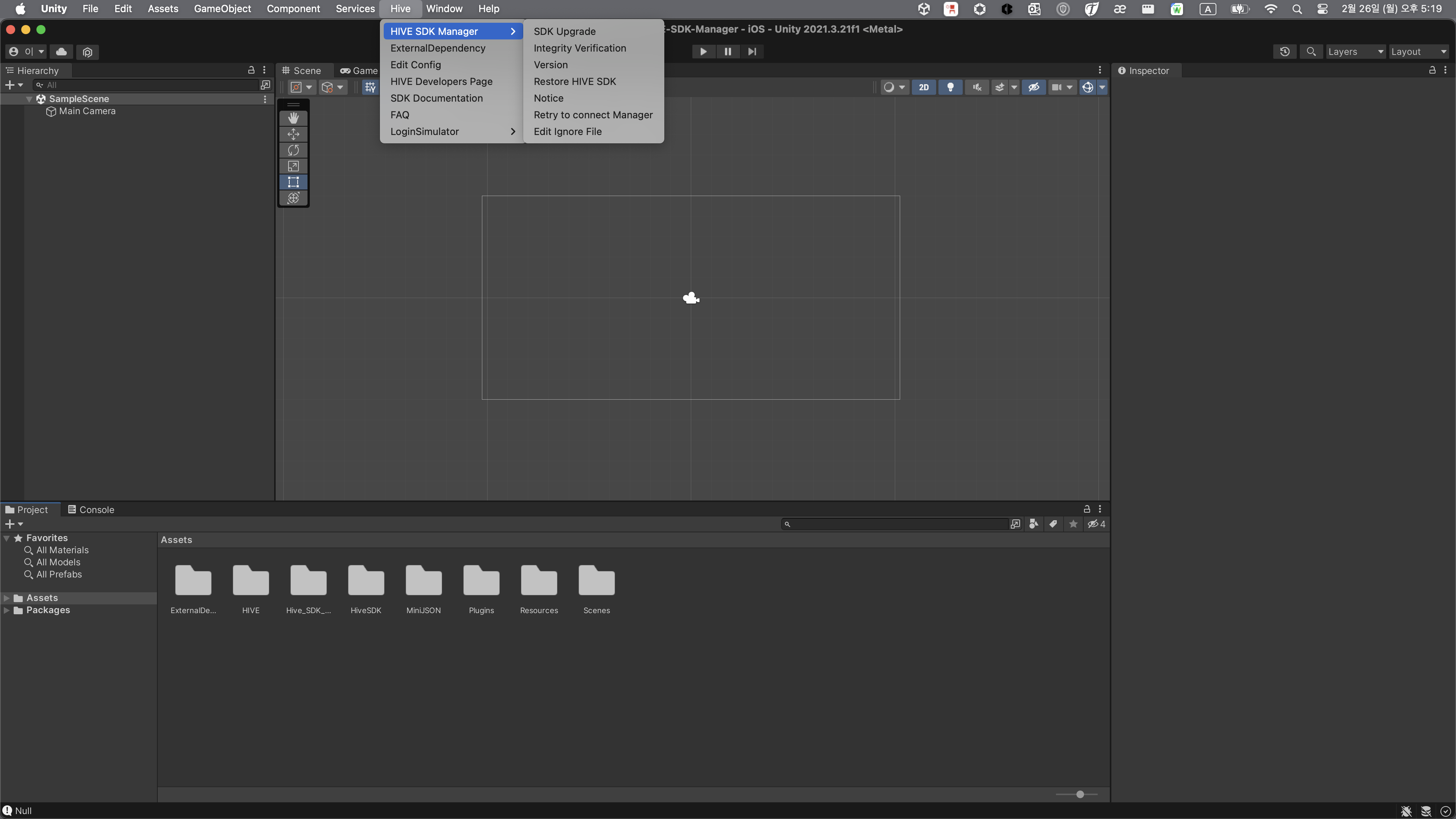
Download and run the Hive SDK Manager installation file provided above, and Hive > HIVE SDK Manager will be added to the Unity Editor top menu as shown below.
Updating SDK Manager
To update the SDK Manager to the latest version, follow the SDK Manager uninstallation instructions below to delete the currently used SDK Manager. Then, follow the SDK Manager installation instructions above to install the latest version.
Uninstalling SDK Manager
Delete all files or folders in /Assets/HIVE.