请求出生日期验证
AuthV4.checkAgeGate 向用户显示一个弹窗,用户可以在其中输入出生日期信息。用户可以从弹窗的年/月/日项目中选择自己的出生日期。用户完成输入后,AuthV4.checkAgeGate 会通过回调返回该值(yyyy-MM-dd 格式)。
Warning
Hive SDK 不会验证用户输入的出生日期信息是否准确。
Info
弹窗显示语言会根据 Hive SDK 中设置的语言值 而变化。此外,年/月/日的顺序也可能根据语言值而变化。


控制取消按钮显示
调用 AuthV4.checkAgeGate 时,可以根据 useCloseButton 设置来决定是否显示取消按钮。如果使用 useCloseButton=false 调用该方法,则不会显示取消按钮,在这种情况下,用户在选择出生日期之前无法关闭弹窗,也无法导航到其他屏幕。


示例代码
#include <HIVE_SDK_Plugin/HIVE_CPP.h>
using namespace std;
using namespace hive;

bool useCloseButton = true;     // or 'false'. (是否使用取消按钮)
AuthV4::checkAgeGate (useCloseButton, [=](ResultAPI const & result, std::string dateOfBirth) {
    if (!result.isSuccess()) {
        // 失败或取消
        return;
    }
    else {
        // 成功
        // dateOfBirth 返回出生日期数据 (yyyy-MM-dd 格式)
    }
});
import com.hive.AuthV4
import com.hive.ResultAPI

var useCloseButton = true;     // or 'false'. (是否使用取消按钮)
AuthV4.checkAgeGate(useCloseButton, object : AuthV4.AuthV4AgeGateListener {
    override fun onAuthV4AgeGate(result: ResultAPI, dateOfBirth: String?) {
        if (!result.isSuccess) {
            // 失败或取消
            return
        }
        else {
            // 成功
            // dateOfBirth 返回出生日期数据 (yyyy-MM-dd 格式)
        }
    }
})
带来 Facebook 好友列表
getProviderFriendsList() 方法提供了用户在同一游戏中 Facebook 好友的 PlayerID。那些没有 Facebook 同步的玩家不在好友列表中,而之前同步的玩家返回 -1 作为 PlayerID。
Warning
Facebook于2018年5月修订了政策,解释了对平台API的基本访问权限项。要使用Facebook /user/friends API,从此需要user_friends权限。
查看Facebook应用审核指南
API 参考: hive.AuthV4.getProviderFriendsList
using hive;

    AuthV4.ProviderType providerType = AuthV4.ProviderType.FACEBOOK;

    AuthV4.getProviderFriendsList (providerType, (ResultAPI result, AuthV4.ProviderType providerType, Dictionary<String, Int64> providerUserIdList) => {
         if (!result.isSuccess()) {
             return;
         }

         if (providerUserIdList != null) {
             foreach (KeyValuePair<String, Int64> providerUserId in providerUserIdList ) {
                 // providerUserId: providerUserId.Key
                 // playerId: providerUserId.Value
             }
         }
});
#include "HiveAuthV4.h"

EHiveProviderType TargetProviderType = EHiveProviderType::FACEBOOK;
FHiveAuthV4::GetProviderFriendsList(TargetProviderType,
                                                                        FHiveAuthV4OnGetProviderFriendsListDelegate::CreateLambda([this](const FHiveResultAPI& Result, const EHiveProviderType& ProviderType, const ProviderFriendsMap& ProviderUserIdList) {
        // (别名) using ProviderFriendsMap = TMap<FString, int64>;
        if (!Result.IsSuccess()) {
                return;
        }

        for (const auto& ProviderUserIdEntry : ProviderUserIdList) {
                // ProviderUserId: ProviderUserIdEntry.Key;
                // Player Id: ProviderUserIdEntry.Value;
        }

}));
API 参考: AuthV4::getProviderFriendsList
#include <HIVE_SDK_Plugin/HIVE_CPP.h>
    using namespace std;
    using namespace hive;

    ProviderType providerType = ProviderType::FACEBOOK;

    AuthV4::getProviderFriendsList (providerType, [=](ResultAPI const & result, ProviderType providerType, map<string,PlayerID> providerUserIdList) {
         if (!result.isSuccess()) {
             return;
         }

         if (providerUserIdList != null) {
             for(auto i = providerUserIdList.begin() ; i != providerUserIdList.end(); i++)
             {
                 // providerUserId: ( i->first).c_str()
                 // playerId: i->second
             }
         }
});
API 参考: com.hive.AuthV4.getProviderFriendsList
import com.hive.AuthV4
    import com.hive.ResultAPI

    val providerType = AuthV4.ProviderType.FACEBOOK

    AuthV4.getProviderFriendsList(providerType, object : AuthV4.AuthV4ProviderFriendsListener {
         override fun onGetProviderFriendsList(result: ResultAPI, providerType: AuthV4.ProviderType, providerUserIdList: Map<String, Long>?) {
             if (!result.isSuccess) {
                 return
             }

             providerUserIdList?.forEach {
                 // providerUserId: it.key
                 // playerId: it.value
             }
         }
})
API 参考: com.hive.AuthV4.getProviderFriendsList
import com.hive.AuthV4;
    import com.hive.ResultAPI;

    AuthV4.ProviderType type = AuthV4.ProviderType.FACEBOOK;

    AuthV4.INSTANCE.getProviderFriendsList(type, (result, providerType, providerUserIdList) -> {
         if (!result.isSuccess()) {
             return;
         }

         if (providerUserIdList != null) {
             for (Map.Entry<String, Long> entry : providerUserIdList.entrySet()) {
                 // providerUserId: entry.getKey();
                 // playerId: entry.getValue();
             }
         }
});
API 参考: HIVEAuthV4:getProviderFriendsList
#import <HIVEService/HIVEService-Swift.h>

    [HIVEAuthV4 getProviderFriendsList: HIVEProviderTypeFACEBOOK handler: ^(HIVEResultAPI *result, HIVEProviderType retProviderType, NSDictionary<NSString *,NSNumber *> *providerUserIdList) {
         if (!result.isSuccess()) {
             return;
         }

         if (providerUserIdList != nil) {
             for (NSString *key in providerUserIdList) {
                 // providerUserId: key
                 // playerId: [[providerUserIdList objectForKey:key] longlongValue];
             }
         }
}];
响应 COPPA
儿童在线隐私保护法案(COPPA)是美国的一项联邦法律,旨在保护13岁以下儿童的在线隐私。为了响应COPPA,Hive 平台发布了 Hive SDK v4.10.0,其中包括 getAgeGateU13() API,用于查询用户是否在13岁以下。如果玩家年龄在13岁以下,API将返回 true。
示例代码
API 参考: AuthV4.getAgeGateU13
API 参考: AuthV4 ::getAgeGateU13
API 参考: AuthV4.getAgeGateU13
API 参考: AuthV4.INSTANCE.getAgeGateU13
API 参考: AuthV4Interface.getAgeGateU13
API Reference: HIVEAuthV4 getAgeGateU13
有哪些变化
如果 ageGateU13() 返回 true,则实现以下内容。
- iOS
- 当调用
AuthV4.setup()或Auth.initialize()时,推送通知的协议请求弹出窗口未显示。 - 推送 API 尚未实现。
- 当调用
- Android
- 显示退出弹出窗口时,更多游戏按钮未显示。
- 无法接收远程推送,且推送 API 尚未实现。
检查适用于GDPR国家中16岁以下用户的服务条款协议
从 Hive SDK v4 24.2.0 开始,您可以使用 Configuration.getAgeGateU16Agree() 方法来确定在受 GDPR(通用数据保护条例)影响的国家/地区,是否有16岁以下的用户同意条款。如果返回值为 true,则表示16岁以下的用户已同意条款;如果为 false,则表示他们未同意。当使用第三方库时,如果您需要根据用户是否在16岁以下来限制应用功能,可以利用 Configuration.getAgeGateU16Agree() 方法。
检查法定监护人同意
从 Hive SDK v4 24.3.0 开始,如果应用程序使用法定监护人同意确认条款,您可以通过调用Configuration.getLegalGuardianConsentAgree()方法来检索应用程序用户是否已获得法定监护人同意。如果值为true,则表示已给予同意。
重新请求操作系统权限
游戏所需的访问权限列表在 AndroidManifest.xml 文件中组织。尝试将一些权限作为相关 API 的字符串列表发送并使用它们。您可以检查用户是否选择了特定权限。如果某些危险权限被拒绝,请确保显示请求再次访问操作系统的弹出窗口。其他权限会根据用户设备上的设置自动选择或取消选择。如果您输入错误的权限或错误的单词,系统会认为这些权限未在 AndroidManifest.xml 文件中声明,并且不允许访问这些权限。
Android 6.0(API级别23)支持此功能。如果操作系统是iOS或Android API级别早于23,则ResultAPI将被发送为不支持。
Note
此功能仅适用于Android。
示例代码
API 参考: PlatformHelper .requestUserPermissions
String[] requestArray = {"android.permission.WRITE_EXTERNAL_STORAGE", "android.permission.BLUETOOTH", "android.permission.READ_CONTACTS"};
    List<String> requests = new List<String>(requestArray);

    PlatformHelper.requestUserPermissions( requests, (ResultAPI result, String[] granted, String[] denied) => {

         if (result.code == ResultAPI.Code.PlatformHelperOSNotSupported) {
            //仅限Android
         }

         if (result.code == ResultAPI.Code.PlatformHelperOSVersionNotSupported) {
             //Android 操作系统版本不受支持。
         }

         if (granted != null && granted.Length > 0) {
             foreach (String name in granted) {
                 // List of permissions accepted among requests
             }
         }

         if (denied != null && denied.Length > 0) {
             foreach (String name denied) {
                 // List of permissions denied among requests
             }
         }
});
#include "HivePlatformHelper.h"

TArray<FString> Requests;
Requests.Add(TEXT("android.permission.WRITE_EXTERNAL_STORAGE"));
Requests.Add(TEXT("android.permission.READ_CONTACTS"));

FHivePlatformHelper::RequestUserPermissions(Requests, FHivePlatformHelperOnUserPermissionsDelegate::CreateLambda([this](const FHiveResultAPI& Result, const TArray<FString>& GrantedRequests, const TArray<FString>& DeniedRequests) {

        switch(Result.Code) {
                case FHiveResultAPI::ECode::Success: {
                        if (GrantedRequests.Num() > 0) {
                                // List of permissions accepted among requests
                        }
                        if (DeniedRequests.Num() > 0) {
                                // List of permissions denied among requests
                        }
                }
                        break;
                case FHiveResultAPI::ECode::PlatformHelperOSVersionNotSupported:
                        // Android OS version not supported.
                        break;
                default:
                        // Other exceptions
                        break;
        }
}));
API 参考: PlatformHelper ::requestUserPermissions
string requestArray[] = {"android.permission.WRITE_EXTERNAL_STORAGE", "android.permission.BLUETOOTH", "android.permission.READ_CONTACTS"};
    vector<string> requests(begin(requestArray), end(requestArray));

    PlatformHelper::requestUserPermissions(requests, [=](ResultAPI const & result, vector<string> const & granted, vector<string> const & denied) {

         if (result.code == hive::ResultAPI::PlatformHelperOSNotSupported) {
             //仅限Android
         }

         if (result.code == hive::ResultAPI::PlatformHelperOSVersionNotSupported) {
             //Android 操作系统版本不支持。
         }

         if (!granted.empty()) {
             for (string name : granted) {
                 // List of permissions accepted among requests
             }
         }

         if (!denied.empty()) {
             for (string name : denied) {
                 // List of permissions denied among requests
             }
         }
});
API 参考: PlatformHelper.requestUserPermissions
import com.hive.PlatformHelper
    import com.hive.ResultAPI

    val requests = arrayListOf(
         "android.permission.WRITE_EXTERNAL_STORAGE",
         "android.permission.BLUETOOTH",
         "android.permission.READ_CONTACTS"
    )

    PlatformHelper.requestUserPermissions(requests, object : PlatformHelper.RequestUserPermissionsListener {
         override fun onRequestUserPermissions(result: ResultAPI, granted: List<String>, denied: List<String>) {
             when (result.code) {
                 ResultAPI.Code.Success -> {
                     if (granted.isNotEmpty()) {
                         // List of permissions accepted among requests
                     }
                     if (denied.isNotEmpty()) {
                         // List of permissions denied among requests
                     }
                 }
                 ResultAPI.Code.PlatformHelperOSVersionNotSupported -> {
                     //Android OS version not supported.
                 }
                 else -> {
                     // other exception situations
                 }
             }
         }
})
API 参考: PlatformHelper .INSTANCE.requestUserPermissions
import com.hive.PlatformHelper;
    import com.hive.ResultAPI;

    List<String> requests = Arrays.asList(
             "android.permission.WRITE_EXTERNAL_STORAGE",
             "android.permission.BLUETOOTH",
             "android.permission.READ_CONTACTS");

    PlatformHelper.INSTANCE.requestUserPermissions(requests, (result, granted, denied) -> {
         switch (result.getCode()) {
             case Success:
                 if (!granted.isEmpty()) {
                     // List of permissions accepted among requests
                 }
                 if (!denied.isEmpty()) {
                     // List of permissions denied among requests
                 }
                 break;
             case PlatformHelperOSVersionNotSupported:
                 //Android OS version not supported.
                 break;
             default:
                 // other exception situations
                 break;
         }
});
使用设备管理服务
设备管理服务会根据Hive控制台上的设置在登录时自动实现。登录后,游戏调用AuthV4类的showDeviceManagement()方法,并向用户显示设备管理列表。
当由于设备认证失败而取消登录时,具有设备管理服务的游戏应处理Result API的AuthV4NotRegisteredDevice代码,以尝试再次静默登录或执行注销。有关设备管理服务的更多信息,请参阅操作指南:设备管理服务简介。
API 参考: AuthV4.showDeviceManagement
API 参考: AuthV4 ::showDeviceManagement
API 参考: AuthV4.showDeviceManagement
API 参考: HIVEAuthV4 showDeviceManagement
Google Play 游戏成就和排行榜
要在 Google Play 游戏中展示您的游戏,您需要实现 Google Play 游戏的成就和排行榜功能。
当用户使用 Google Play 登录时,将自动登录 Play 游戏服务(PGS),并可以使用成就和排行榜功能。有关相关功能的详细信息,请参阅 Google Play 游戏服务指南。
Note
使用 AuthV4Helper 类时
- 如果用户在启动应用后,在尝试隐式登录 Google Play 游戏时拒绝了登录,应用将记住这一状态,不再尝试隐式登录。即使在维持玩家会话期间可以自动登录,应用也会继续记住隐式登录被拒绝的状态。
- 如果未登录 Google Play 的用户完成了成就,结果将不会发送到 Google Play 游戏。
此内容符合 Google Play 游戏服务指南。
发送玩家ID
如果您需要向 Google Play 游戏请求 PlayerID,请在 ProviderGoogle 类中实现 getGooglePlayerId() 方法。通过实现此方法,它将发送 PlayerID 以及 AuthCode,以验证会话密钥。
以下是示例代码。
API 参考: ProviderGoogle::getGooglePlayerId
// 从Google Play游戏请求playerID。
ProviderGoogle::getGooglePlayerId([=](ResultAPI const &result, std::string const &googlePlayerId, std::string const &authCode) {
    if (result.isSuccess())
    {
        // API调用成功。
    }
});
成就
实现ProviderGoogle类,以通过Hive SDK使用Achievement功能的Google Play游戏。
请求揭示一个隐藏成就
要向当前登录的玩家揭示隐藏的成就,请调用 achievementsReveal() 方法。它将没有效果,但会揭示0%的成就。 以下是示例代码。
API 参考: ProviderGoogle.achievementsReveal
import com.hive.ProviderGoogle
    import com.hive.ResultAPI
    //成就 ID
    val achievementId = "abcdef123456"
    ProviderGoogle.achievementsReveal(achievementId, object : ProviderGoogle.GoogleAchievementsListener {
         override fun onAchievementsResult(resultAPI: ResultAPI) {
             if (resultAPI.isSuccess) {
                 // 调用成功
             }
         }
})
请求解锁成就
要解锁当前登录玩家的成就,请调用 achievementsUnlock() 方法。此方法将标记 100% 的成就,无论其状态如何;无论是隐藏的还是未隐藏的。 以下是示例代码。
API 参考: ProviderGoogle.achievementsUnlock
import com.hive.ProviderGoogle
    import com.hive.ResultAPI
    //成就 ID
    val achievementId = "abcdef123456"
    ProviderGoogle.achievementsUnlock(achievementId, object : ProviderGoogle.GoogleAchievementsListener {
         override fun onAchievementsResult(resultAPI: ResultAPI) {
             if (resultAPI.isSuccess) {
                 // 调用成功
             }
         }
})
请求增加成就
要使用请求功能来增加成就,请将成就值设置为参数,然后调用achievementsIncrement()方法。成就值是调用相应API时设置的值的总和,当总和达到最大值时,成就会自动完成。
以下是示例代码。
#include "HiveProviderGoogle.h"

//成就 ID
FString AchievementId = TEXT("abcdef123456");
// 成就数量
int32 Value = 1;

FHiveProviderGoogle::AchievementsIncrement(AchievementId, Value, FHiveProviderGoogleOnAchievementsDelegate::CreateLambda([this](const FHiveResultAPI& Result) {
        if (Result.IsSuccess()) {
                // 调用成功
        }
}));
API 参考: ProviderGoogle.achievementsIncrement
import com.hive.ProviderGoogle
    import com.hive.ResultAPI
    //成就 ID
    val achievementId = "abcdef123456"
    // 成就数量
    val value = 1
    ProviderGoogle.achievementsIncrement(achievementId, value, object : ProviderGoogle.GoogleAchievementsListener {
         override fun onAchievementsResult(resultAPI: ResultAPI) {
             if (resultAPI.isSuccess) {
                 // 调用成功
             }
         }
})
请求显示成就列表(助手)
Note
SDK 4.7.0 提供了 Helper,可以轻松比较用户设备上的已登录帐户和与 PlayerID 同步的帐户。如果两个帐户不相同,请参考 IdP Sync 页面以处理此情况。
调用 showAchievements() 方法以请求 Google Play 游戏的成就列表。
以下是示例代码。
API 参考: AuthV4.Helper.showAchievements
using hive;
    AuthV4.Helper.showAchievements ((ResultAPI result, AuthV4.PlayerInfo playerInfo) => {
      switch (result.code) {
        case ResultAPI.Code.Success:
          // 交付成功并指示成就
          break;
        case ResultAPI.Code.AuthV4ConflictPlayer:
          // 账户冲突
          break;
        case ResultAPI.Code.AuthV4GoogleLogout:
          //TODO:
          // 从 Google Play 登出后,登出游戏
          // 重新启动游戏必须由开发工作室处理
          break;
        default:
          // 其他异常情况
          break;
      }
});
#include "HiveAuthV4.h"

FHiveAuthV4::Helper::ShowAchievements(FHiveAuthV4HelperDelegate::CreateLambda([this](const FHiveResultAPI& Result, const TOptional<FHivePlayerInfo>& PlayerInfo) {
        switch (Result.Code) {
                case FHiveResultAPI::ECode::Success:
                        // 交付成功并显示成就指示
                        break;
                case FHiveResultAPI::ECode::AuthV4ConflictPlayer:
                        // 账户冲突
                        break;
                case FHiveResultAPI::ECode::AuthV4GoogleLogout:
                        // TODO:
                        // 登出Google Play后,登出游戏
                        // 重新启动游戏必须由开发工作室处理
                        break;
                default:
                        // 其他异常情况
                        break;
        }
}));
API 参考: AuthV4 ::Helper::showAchievements
#include <HIVE_SDK_Plugin/HIVE_CPP.h>
    using namespace std;
    using namespace hive;
    AuthV4::Helper::showAchievements([=](ResultAPI const & result, shared_ptr playerInfo) {
      switch (result.code) {
        case ResultAPI::Success:
          // Deliver Success with achievement indication
          break;
        case ResultAPI::AuthV4ConflictPlayer:
          // account conflict
          break;
        case ResultAPI::AuthV4GoogleLogout:
          //TODO:
          // After logging out of Google Play, log out of the game
          // Relaunching the game must be handled by the development studio
          break;
        default:
          // other exception situations
          break;
      }
});
API 参考: AuthV4.Helper.showAchievements
import com.hive.AuthV4
    import com.hive.ResultAPI
    AuthV4.Helper.showAchievements(object : AuthV4.Helper.AuthV4HelperListener {
         override fun onAuthV4Helper(result: ResultAPI, playerInfo: AuthV4.PlayerInfo?) {
             when (result.code) {
                 ResultAPI.Code.Success -> {
                     // 交付成功并指示成就
                 }
                 ResultAPI.Code.AuthV4ConflictPlayer -> {
                     // 账户冲突
                 }
                 ResultAPI.Code.AuthV4GoogleLogout -> {
                     //TODO:
                     // 从 Google Play 登出后,登出游戏
                     // 重新启动游戏必须由开发工作室处理
                 }
                 else -> {
                     // 其他异常情况
                 }
             }
         }
})
API 参考: AuthV4.Helper.INSTANCE.showAchievements
import com.hive.AuthV4;
    import com.hive.ResultAPI;

    AuthV4.Helper.INSTANCE.showAchievements((result, playerInfo) -> {
         switch (result.getCode()) {
             case Success:
                 // 交付成功并指示成就
                 break;
             case AuthV4ConflictPlayer:
                 // 账户冲突
                 break;
             case AuthV4GoogleLogout:
                 //TODO:
                 // 从 Google Play 登出后,退出游戏
                 // 重新启动游戏必须由开发工作室处理
                 break;
             default:
                 // 其他异常情况
                 break;
         }
});
Warning
如果用户从 Play 游戏服务的设置屏幕注销,则玩家账户将被注销,并作为回调发送名为 ResultAPI.Code.AuthV4GoogleLogout 的错误代码。注销完成后,将显示注销弹出窗口,并将显示更改为游戏标题。
请求显示成就列表 (Auth v4)
调用showAchievements()方法以请求Google Play游戏的成就列表。
以下是示例代码。
API 参考: ProviderGoogle .showAchievements
using hive;
    ProviderGoogle.showAchievements((ResultAPI result) => {
      switch (result.code) {
        case ResultAPI.Code.Success:
          // Deliver Success with achievement indication
          break;
        case ResultAPI.Code.AuthV4GoogleLogout:
          //TODO:
          // After logging out of Google Play, log out of the game
          // Relaunching the game must be handled by the development studio
          break;
        default:
          // other exception situations
          break;
      }
});
#include "HiveProviderGoogle.h"

FHiveProviderGoogle::ShowAchievements(FHiveProviderGoogleOnLeaderboardsDelegate::CreateLambda([this](const FHiveResultAPI& Result) {
                case FHiveResultAPI::ECode::Success:
                        // 显示成就并传递成功
                        break;
                case FHiveResultAPI::ECode::AuthV4GoogleLogout:
                        // TODO:
                        // 在Google Play注销后执行游戏注销
                        // 游戏重新启动由开发工作室处理
                        break;
                default:
                        // 其他异常情况
                        break;
}));
API 参考: ProviderGoogle ::showAchievements
#include <HIVE_SDK_Plugin/HIVE_CPP.h>
    using namespace std;
    using namespace hive;
    ProviderGoogle::showAchievements([=](ResultAPI const & result) {
      switch (result.code) {
        case ResultAPI::Success:
          // Deliver Success with achievement indication
          break;
        case ResultAPI::AuthV4GoogleLogout:
          //TODO:
          // After logging out of Google Play, log out of the game
          // Relaunching the game must be handled by the development studio
          break;
        default:
          // other exception situations
          break;
      }
});
API 参考: ProviderGoogle.showAchievements
import com.hive.ProviderGoogle
    import com.hive.ResultAPI
    ProviderGoogle.showAchievements(object : ProviderGoogle.GoogleAchievementsListener {
         override fun onAchievementsResult(resultAPI: ResultAPI) {
             when(resultAPI.code) {
                 ResultAPI.Code.Success -> {
                     // Deliver Success with achievement indication
                 }
                 ResultAPI.Code.AuthV4GoogleLogout -> {
                     //TODO:
                     // After logging out of Google Play, log out of the game
                     // Relaunching the game must be handled by the development studio
                 }
                 else -> {
                     // other exception situations
                 }
             }
         }
})
API 参考: ProviderGoogle.INSTANCE.showAchievements
import com.hive.ProviderGoogle;
    import com.hive.ResultAPI;

    ProviderGoogle.INSTANCE.showAchievements(resultAPI -> {
         switch (resultAPI.getCode()) {
             case Success:
                 // Deliver Success with achievement indication
                 break;
             case AuthV4GoogleLogout:
                 //TODO:
                 // After logging out of Google Play, log out of the game
                 // Relaunching the game must be handled by the development studio
                 break;
             default:
                 // other exception situations
                 break;
         }
});
Warning
如果用户从Play Games Services的设置屏幕注销,将作为回调发送名为ResultAPI.Code.AuthV4GoogleLogout的错误代码。一旦发送此错误,请确保代码与游戏中点击注销按钮时的处理相同。
排行榜
实现ProviderGoogle类,以通过Hive SDK使用Google Play游戏的Leaderboard功能。
排行榜分数更新
调用leaderboardsSubmitScore()方法请求Google Play Games的排行榜分数更新。
以下是示例代码。
#include "HiveProviderGoogle.h"

// 排行榜 ID
FString LeaderboardId = TEXT("12345abcde");

// 排行榜分数
int64 Score = 100;

FHiveProviderGoogle::LeaderboardsSubmitScore(LeaderboardId, Score, FHiveProviderGoogleOnLeaderboardsDelegate::CreateLambda([this](const FHiveResultAPI& Result) {
        if (Result.IsSuccess()) {
                // API 调用成功
        }
}));
API 参考: ProviderGoogle::leaderboardsSubmitScore
#include <HIVE_SDK_Plugin/HIVE_CPP.h>
    using namespace std;
    using namespace hive;
    // Leaderboard ID
    string leaderboardId = "12345abcde";

    // 排行榜分数
    long score = 100;

    ProviderGoogle::leaderboardsSubmitScore(leaderboardId, score, [=](ResultAPI const & result) {
       if (result.isSuccess()) {
          // API call successful
        }
});
API 参考: ProviderGoogle.leaderboardsSubmitScore
import com.hive.ProviderGoogle
    import com.hive.ResultAPI
    // 排行榜 ID
    val leaderboardId = "12345abcde"
    // 排行榜分数
    val score = 100L
    ProviderGoogle.leaderboardsSubmitScore(leaderboardId, score, object : ProviderGoogle.GoogleLeaderboardsListener {
         override fun onLeaderboardsResult(resultAPI: ResultAPI) {
             if (resultAPI.isSuccess) {
                 // API 调用成功
             }
         }
})
请求显示排行榜列表(助手)
调用showLeaderboards()方法请求Google Play游戏的排行榜列表。
以下是示例代码。
API 参考: hive.AuthV4.Helper.showLeaderboard
using hive;
    AuthV4.Helper.showLeaderboard ((ResultAPI result, AuthV4.PlayerInfo playerInfo) => {
       switch (result.code) {
         case ResultAPI.Code.Success:
           // Deliver Success with leaderboard display
           break;
         case ResultAPI.Code.AuthV4ConflictPlayer:
           // account conflict
           break;
         case ResultAPI.CodeAuthV4GoogleLogout:
    //TODO:
           // After logging out of Google Play, log out of the game
           // Relaunching the game must be handled by the development studio
           break;
         default:
           // other exception situations
           break;
       }
});
#include "HiveAuthV4.h"

FHiveAuthV4::Helper::ShowLeaderboard(FHiveAuthV4HelperDelegate::CreateLambda([this](const FHiveResultAPI& Result, const TOptional<FHivePlayerInfo>& PlayerInfo) {
                case FHiveResultAPI::ECode::Success:
                        // Deliver Success with leaderboard display
                        break;
                case FHiveResultAPI::ECode::AuthV4ConflictPlayer:
                        // 账户冲突
                        break;
                case FHiveResultAPI::ECode::AuthV4GoogleLogout:
                        // TODO:
                        // 在退出 Google Play 后,退出游戏
          // 重新启动游戏必须由开发工作室处理
                        break;
                default:
                        // 其他异常情况
                        break;
}));
API 参考: com.hive.AuthV4.Helper.showLeaderboard
#include <HIVE_SDK_Plugin/HIVE_CPP.h>
    using namespace std;
    using namespace hive;
    AuthV4::Helper::showLeaderboard([=](ResultAPI const & result, shared_ptr playerInfo) {
    switch (result.code) {
           case ResultAPI::Success:
             // Deliver Success with leaderboard display
             break;
           case ResultAPI::AuthV4ConflictPlayer:
             // account conflict
             break;
           case ResultAPI::AuthV4GoogleLogout:
    //TODO:
             // After logging out of Google Play, log out of the game
             // Relaunching the game must be handled by the development studio
             break;
           default:
             break;
         }
});
API 参考: Helper.showLeaderboard
import com.hive.AuthV4
    import com.hive.ResultAPI
    AuthV4.Helper.showLeaderboard(object : AuthV4.Helper.AuthV4HelperListener {
         override fun onAuthV4Helper(result: ResultAPI, playerInfo: AuthV4.PlayerInfo?) {
             when (result.code) {
                 ResultAPI.Code.Success -> {
                     // 交付成功并显示排行榜
                 }
                 ResultAPI.Code.AuthV4ConflictPlayer -> {
                     // 账户冲突
                 }
                 ResultAPI.Code.AuthV4GoogleLogout -> {
                     //TODO:
                     // 从Google Play注销后,注销游戏
                     // 重新启动游戏必须由开发工作室处理
                 }
                 else -> {
    // 其他异常情况
    }
             }
         }
})
API 参考: AuthV4.Helper.INSTANCE.showLeaderboard
import com.hive.AuthV4;
import com.hive.ResultAPI;

AuthV4.Helper.INSTANCE.showLeaderboard((result, playerInfo) -> {
    switch (result.getCode()) {
        case Success:
            // Deliver Success with leaderboard display
            break;
        case AuthV4ConflictPlayer:
            // account conflict
            break;
        case AuthV4GoogleLogout:
            //TODO:
            // After logging out of Google Play, log out of the game
            // Relaunching the game must be handled by the development studio
            break;
        default:
            // other exception situations
            break;
    }
});
Warning
如果用户在Play Games Services的设置屏幕上注销,玩家账户将被注销,并作为回调发送名为ResultAPI.Code.AuthV4GoogleLogout的错误代码。当注销完成后,将显示注销弹出窗口,并且显示更改为游戏标题。
请求显示排行榜列表 (Auth v4)
调用showLeaderboards()方法请求Google Play Games的排行榜列表。
以下是示例代码。
API 参考: hive.ProviderGoogle.showLeaderboards
using hive;

    ProviderGoogle.showLeaderboards(onLeaderboardsResult, (ResultAPI result) => {
    switch (result.code) {
         case ResultAPI.Code.Success:
           // Deliver Success with leaderboard display
           break;
         case ResultAPI.CodeAuthV4GoogleLogout:
           //TODO:
           // After logging out of Google Play, log out of the game
           // Relaunching the game must be handled by the development studio
           break;
         default:
           // other exception situations
           break;
       }
});
#include "HiveProviderGoogle.h"

FHiveProviderGoogle::ShowLeaderboard(FHiveProviderGoogleOnLeaderboardsDelegate::CreateLambda([this](const FHiveResultAPI& Result) {
                    case FHiveResultAPI::ECode::Success:
                        // Deliver Success with leaderboard display
                        break;
                case FHiveResultAPI::ECode::AuthV4GoogleLogout:
                        // TODO:
                        // After logging out of Google Play, log out of the game
          // Relaunching the game must be handled by the development studio
                        break;
                default:
                        // other exception situations
                        break;
}));
API 参考: ProviderGoogle::showLeaderboards
#include <HIVE_SDK_Plugin/HIVE_CPP.h>
    using namespace std;
    using namespace hive;
    ProviderGoogle::showLeaderboard([=](ResultAPI const & result) {
    switch (result.code) {
           case ResultAPI::Success:
             // Deliver Success with leaderboard display
             break;
           case ResultAPI::AuthV4GoogleLogout:
             //TODO:
             // After logging out of Google Play, log out of the game
             // Relaunching the game must be handled by the development studio
             break;
           default:
    // other exception situations
             break;
         }
});
API 参考: ProviderGoogle.showLeaderboards
import com.hive.ProviderGoogle
    import com.hive.ResultAPI
    ProviderGoogle.showLeaderboards(object : ProviderGoogle.GoogleLeaderboardsListener {
         override fun onLeaderboardsResult(resultAPI: ResultAPI) {
             when(resultAPI.code) {
                 ResultAPI.Code.Success -> {
                     // Deliver Success with leaderboard display
                 }
                 ResultAPI.Code.AuthV4GoogleLogout -> {
                     //TODO:
                     // After logging out of Google Play, log out of the game
                     // Relaunching the game must be handled by the development studio
                 }
                 else -> {
    // other exception situations
    }
             }
         }
})
API 参考: com.hive.ProviderGoogle.showLeaderboards
import com.hive.ProviderGoogle;
    import com.hive.ResultAPI;

    ProviderGoogle.INSTANCE.showLeaderboards(resultAPI -> {
         switch (resultAPI.getCode()) {
             case Success:
                 // Deliver Success with leaderboard display
                 break;
             case AuthV4GoogleLogout:
                 //TODO:
                 // After logging out of Google Play, log out of the game
                 // Relaunching the game must be handled by the development studio
                 break;
             default:
                  // other exception situations
                 break;
         }
});
Warning
如果用户在Play Games Services的设置屏幕上注销,将作为回调发送名为ResultAPI.Code.AuthV4GoogleLogout的错误代码。一旦发送此错误,请确保代码与游戏中点击注销按钮时的处理相同。
Google Play 游戏 游戏统计{ #google-play-game-stats }
如果您的开发目的是为了参与 Google Level Up 计划,则必须应用 Google Play Games 的游戏统计功能。
Google Play 游戏的游戏统计信息是一项功能,可收集用户的游戏历史记录作为事件,并将其显示为玩家个人资料的统计信息。您的应用定义自己的统计数据,并在 Google Play Console 中设置计数方法,例如运行总计或最高值。
要使用 Hive 平台的游戏统计功能,您可以使用AuthV4.Helper类。相关功能的详细说明,请参阅 Google Play Games 游戏统计。
从 Hive SDK 26.7.0 开始支持游戏统计。仅限Android,不支持iOS。要使用游戏统计数据,需要 Android minSdk 24 或更高版本。
Caution
游戏统计数据基于 [Play 游戏服务] (#google-play-games) 身份验证,并且与您的 Hive 帐户是否链接无关。如果用户未登录Google Play或拒绝隐式登录,即使API返回成功,也不会收集任何统计信息。
准备工作{ #game-stats-prepare }
要使用游戏统计数据,您需要在 Google Play 管理中心创建事件并设置统计数据。创建事件声明应用程序将发送哪些游戏记录,设置统计数据定义收集的记录将在玩家个人资料中显示哪些统计数据。
创建事件
要为新的、未发布的游戏创建事件,您需要为PlayerGameEvent.csv事件创建 CSV 文件。
有关更详细的说明,请参阅事件的 CSV 文件指南。
PlayerGameEvent.csv声明要由应用程序发送的事件名称和属性。有四种属性类型:STRING、INT64、DOUBLE和BOOL。
progressUpdate是 Google Play Games 专门为进度而设置的保留事件,仅使用currentProgress作为属性。
统计设置
要设置统计信息,您必须上传包含 RepetitiveStatsConfig.csv 和 ProgressionStatConfig.csv 的统计信息 ZIP 文件。 StatLocalizations.csv 文件是一个可选文件,用于将要在用户屏幕上显示的统计名称和描述翻译(本地化)为多种语言。
RepetitiveStatsConfig.csv定义聚合用户重复执行的操作的重复统计信息。重复统计支持SUM、MAX、MIN和COUNT聚合,并可以根据特定属性值进行过滤。
ProgressionStatConfig.csv定义进度统计信息,显示用户在应用程序中的进度。有关如何填充此统计信息的信息,请参阅请求 Google Play 游戏记录游戏进度。
您创建的 CSV 文件和统计信息图标将捆绑到 ZIP 中并上传到 Google Play 管理中心。每个统计所需的图标规范和ZIP配置规则请参考【统计ZIP文件指南】(https://developer.android.com/games/pgs/integrate-gamestats#zip-file-stats-config)。
游戏统计记录{ #game-stats-record }
要发送的事件是使用游戏统计事件类创建的。类名根据引擎的不同而不同; Unity、C++ 和 Android 使用AuthV4.GameStatsEvent,虚幻引擎使用FHiveGameStatsEvent。将 Google Play Console 中声明的事件名称输入到构造函数中,并使用适合属性类型的addProperty()方法填充属性。有关如何声明属性名称和类型的详细说明,请参阅事件的 CSV 文件指南。
本节中描述的三种方法只是将事件写入设备的缓冲区。当您按照请求从 Google Play 游戏上传游戏统计数据事件 中所述调用gameStatsRequestEventsUpload()时,实际传输就会发生。
Caution
属性的名称和类型必须与 Google Play Console 中声明的值匹配。如果存在不匹配,该事件将不会反映在统计中。
请求记录来自 Google Play 游戏的游戏统计数据事件
要记录单个游戏统计事件,请调用gameStatsRecordEvent()方法。
下面是示例代码。按原样使用预准备中声明的run_finished事件。事件名称和属性名称使用CSV中声明的值,属性值是应用程序用播放结果填充的值。
API Reference: hive.AuthV4.Helper.gameStatsRecordEvent
```cs using hive;
// 在 Google Play Console 中声明的事件名称 AuthV4.GameStatsEvent gameStatsEvent = new AuthV4.GameStatsEvent("run_finished") .addProperty("runner_id", "runner_ninja") // STRING .addProperty("is_new_record", true) // BOOL .addProperty("coins_collected", 10L) // INT64 .addProperty("distance_meters", 1350.2); // DOUBLE
AuthV4.Helper.gameStatsRecordEvent(gameStatsEvent, (ResultAPI result, AuthV4.PlayerInfo playerInfo) => {
    if (result.isSuccess()) {
        // call successful
    }
});
```
```c++
include "HiveAuthV4.h"
// 在 Google Play Console 中声明的事件名称 FHiveGameStatsEvent GameStatsEvent(TEXT("run_finished")); GameStatsEvent.AddProperty(TEXT("runner_id"), FString(TEXT("runner_ninja"))) // STRING .AddProperty(TEXT("is_new_record"), true) // BOOL .AddProperty(TEXT("coins_collected"), 10) // INT64 .AddProperty(TEXT("distance_meters"), 1350.2); // DOUBLE
FHiveAuthV4::Helper::GameStatsRecordEvent(GameStatsEvent, FHiveAuthV4HelperDelegate::CreateLambda([this](const FHiveResultAPI& Result, const TOptional<FHivePlayerInfo>& PlayerInfo) {
        if (Result.IsSuccess()) {
// API调用成功 } })); ```
API Reference: AuthV4::Helper::gameStatsRecordEvent
```cpp
include 
using namespace std; using namespace hive;
// 在 Google Play Console 中声明的事件名称 GameStatsEvent gameStatsEvent("run_finished"); gameStatsEvent.addProperty("runner_id", "runner_ninja") // STRING .addProperty("is_new_record", true) // BOOL .addProperty("coins_collected", (long long)10) // INT64 .addProperty("distance_meters", 1350.2); // DOUBLE
AuthV4::Helper::gameStatsRecordEvent(gameStatsEvent, [=](ResultAPI const & result, shared_ptr<PlayerInfo> playerInfo) {
    if (result.isSuccess()) {
        // call successful
    }
});
```
API Reference: AuthV4.Helper.gameStatsRecordEvent
```kt import com.hive.AuthV4 import com.hive.ResultAPI
// 在 Google Play Console 中声明的事件名称 val gameStatsEvent = AuthV4.GameStatsEvent("run_finished") .addProperty("runner_id", "runner_ninja") // STRING .addProperty("is_new_record", true) // BOOL .addProperty("coins_collected", 10L) // INT64 .addProperty("distance_meters", 1350.2) // DOUBLE
AuthV4.Helper.gameStatsRecordEvent(gameStatsEvent, object : AuthV4.Helper.AuthV4HelperListener {
    override fun onAuthV4Helper(result: ResultAPI, playerInfo: AuthV4.PlayerInfo?) {
        if (result.isSuccess) {
            // call successful
        }
    }
})
```
API Reference: AuthV4.Helper.INSTANCE.gameStatsRecordEvent
```java import com.hive.AuthV4; import com.hive.ResultAPI;
// 在 Google Play Console 中声明的事件名称 AuthV4.GameStatsEvent gameStatsEvent = new AuthV4.GameStatsEvent("run_finished") .addProperty("runner_id", "runner_ninja") // STRING .addProperty("is_new_record", true) // BOOL .addProperty("coins_collected", 10L) // INT64 .addProperty("distance_meters", 1350.2); // DOUBLE
AuthV4.Helper.INSTANCE.gameStatsRecordEvent(gameStatsEvent, (result, playerInfo) -> {
    if (result.isSuccess()) {
        // call successful
    }
});
```
请求记录来自 Google Play Games 的多个游戏统计事件
要一次记录多个游戏统计事件,请调用gameStatsRecordEvents()方法。事件列表可以包含多个相同的事件或不同事件的混合,或者它可以仅填充一些声明的属性并发送它们。
下面是示例代码。这显示了包含两个相同的run_finished事件,但仅填写了runner_id和coins_collected属性的情况。
API Reference: hive.AuthV4.Helper.gameStatsRecordEvents
using hive;

List<AuthV4.GameStatsEvent> gameStatsEvents = new List<AuthV4.GameStatsEvent>();

gameStatsEvents.Add(new AuthV4.GameStatsEvent("run_finished")
        .addProperty("runner_id", "runner_ninja")
        .addProperty("coins_collected", 2L));

gameStatsEvents.Add(new AuthV4.GameStatsEvent("run_finished")
        .addProperty("runner_id", "runner_default")
        .addProperty("coins_collected", 5L));

AuthV4.Helper.gameStatsRecordEvents(gameStatsEvents, (ResultAPI result, AuthV4.PlayerInfo playerInfo) => {
    if (result.isSuccess()) {
        // call successful
    }
});
```c++
include "HiveAuthV4.h"
FHiveGameStatsEvent First(TEXT("run_finished")); First.AddProperty(TEXT("runner_id"), FString(TEXT("runner_ninja"))) .AddProperty(TEXT("coins_collected"), 2);
FHiveGameStatsEvent Second(TEXT("run_finished")); Second.AddProperty(TEXT("runner_id"), FString(TEXT("runner_default"))) .AddProperty(TEXT("coins_collected"), 5);
TArray
FHiveAuthV4::Helper::GameStatsRecordEvents(GameStatsEvents, FHiveAuthV4HelperDelegate::CreateLambda(this { if (Result.IsSuccess()) {
// API调用成功 } })); ```
API Reference: AuthV4::Helper::gameStatsRecordEvents
#include <HIVE_SDK_Plugin/HIVE_CPP.h>
using namespace std;
using namespace hive;

GameStatsEvent first("run_finished");
first.addProperty("runner_id", "runner_ninja")
     .addProperty("coins_collected", (long long)2);

GameStatsEvent second("run_finished");
second.addProperty("runner_id", "runner_default")
      .addProperty("coins_collected", (long long)5);

vector<GameStatsEvent> gameStatsEvents;
gameStatsEvents.push_back(first);
gameStatsEvents.push_back(second);

AuthV4::Helper::gameStatsRecordEvents(gameStatsEvents, [=](ResultAPI const & result, shared_ptr<PlayerInfo> playerInfo) {
    if (result.isSuccess()) {
        // call successful
    }
});
API Reference: AuthV4.Helper.gameStatsRecordEvents
import com.hive.AuthV4
import com.hive.ResultAPI

val gameStatsEvents = listOf(
    AuthV4.GameStatsEvent("run_finished")
            .addProperty("runner_id", "runner_ninja")
            .addProperty("coins_collected", 2L),
    AuthV4.GameStatsEvent("run_finished")
            .addProperty("runner_id", "runner_default")
            .addProperty("coins_collected", 5L)
)

AuthV4.Helper.gameStatsRecordEvents(gameStatsEvents, object : AuthV4.Helper.AuthV4HelperListener {
    override fun onAuthV4Helper(result: ResultAPI, playerInfo: AuthV4.PlayerInfo?) {
        if (result.isSuccess) {
            // call successful
        }
    }
})
API Reference: AuthV4.Helper.INSTANCE.gameStatsRecordEvents
import com.hive.AuthV4;
import com.hive.ResultAPI;

List<AuthV4.GameStatsEvent> gameStatsEvents = new ArrayList<>();

gameStatsEvents.add(new AuthV4.GameStatsEvent("run_finished")
        .addProperty("runner_id", "runner_ninja")
        .addProperty("coins_collected", 2L));

gameStatsEvents.add(new AuthV4.GameStatsEvent("run_finished")
        .addProperty("runner_id", "runner_default")
        .addProperty("coins_collected", 5L));

AuthV4.Helper.INSTANCE.gameStatsRecordEvents(gameStatsEvents, (result, playerInfo) -> {
    if (result.isSuccess()) {
        // call successful
    }
});
请求记录来自 Google Play 游戏的游戏进度{ #game-stats-progress }
要记录用户的进度,请调用gameStatsRecordProgress()方法。发送到此方法的值将发送到计划事件progressUpdate并反映在ProgressionStatConfig.csv中定义的进度统计中。
进度是当前值,而不是累积值。即使您发送一个值三次,它也不会累加,并且会显示最后发送的值。我们建议您始终在应用程序启动时发送当前进度。
Caution
您可以在 Google Play 管理中心中将currentProgress声明为INT64或STRING。如果发送的类型与声明的类型不同,该事件将被丢弃并且不会反映在统计信息中,因此请使用gameStatsRecordProgress(),它仅在声明为字符串时接收字符串值。字符串值用于记录难以用数字表达的进度级别,例如rank tier。确定字符串顺序的标准不是公开的,因此请尽可能使用数字。
下面是示例代码。
API Reference: hive.AuthV4.Helper.gameStatsRecordProgress
```cs using hive;
// 玩家当前进度 long currentProgress = 5L;
AuthV4.Helper.gameStatsRecordProgress(currentProgress, (ResultAPI result, AuthV4.PlayerInfo playerInfo) => {
    if (result.isSuccess()) {
        // call successful
    }
});
```
```c++
include "HiveAuthV4.h"
// 玩家当前进度 int64 CurrentProgress = 5;
FHiveAuthV4::Helper::GameStatsRecordProgress(CurrentProgress, FHiveAuthV4HelperDelegate::CreateLambda([this](const FHiveResultAPI& Result, const TOptional<FHivePlayerInfo>& PlayerInfo) {
        if (Result.IsSuccess()) {
// API调用成功 } })); ```
API Reference: AuthV4::Helper::gameStatsRecordProgress
```cpp
include 
using namespace std; using namespace hive;
// 玩家当前进度 long long currentProgress = 5;
AuthV4::Helper::gameStatsRecordProgress(currentProgress, [=](ResultAPI const & result, shared_ptr<PlayerInfo> playerInfo) {
    if (result.isSuccess()) {
        // call successful
    }
});
```
API Reference: AuthV4.Helper.gameStatsRecordProgress
```kt import com.hive.AuthV4 import com.hive.ResultAPI
// 玩家当前进度 val currentProgress = 5L
AuthV4.Helper.gameStatsRecordProgress(currentProgress, object : AuthV4.Helper.AuthV4HelperListener {
    override fun onAuthV4Helper(result: ResultAPI, playerInfo: AuthV4.PlayerInfo?) {
        if (result.isSuccess) {
            // call successful
        }
    }
})
```
API Reference: AuthV4.Helper.INSTANCE.gameStatsRecordProgress
```java import com.hive.AuthV4; import com.hive.ResultAPI;
// 玩家当前进度 long currentProgress = 5L;
AuthV4.Helper.INSTANCE.gameStatsRecordProgress(currentProgress, (result, playerInfo) -> {
    if (result.isSuccess()) {
        // call successful
    }
});
```
请求从 Google Play Games{ #game-stats-upload }上传游戏统计数据事件
要请求上传存储在设备缓冲区中的游戏统计事件,请调用gameStatsRequestEventsUpload()方法。
Caution
gameStatsRecordEvent()、gameStatsRecordEvents()和gameStatsRecordProgress()仅将事件写入设备的缓冲区,而不传输它们。 您需要调用gameStatsRequestEventsUpload()才能将其实际发送到 Google 服务器。这是未收集统计数据时首先要检查的事情。
下面是示例代码。
API Reference: hive.AuthV4.Helper.gameStatsRequestEventsUpload
// API调用成功 } })); ```
API Reference: AuthV4::Helper::gameStatsRequestEventsUpload
API Reference: AuthV4.Helper.gameStatsRequestEventsUpload
API Reference: AuthV4.Helper.INSTANCE.gameStatsRequestEventsUpload
成功上传活动后,请在 Google Play 商店应用中的我的页面的选项卡中打开您的玩家个人资料,检查您的游戏统计数据。
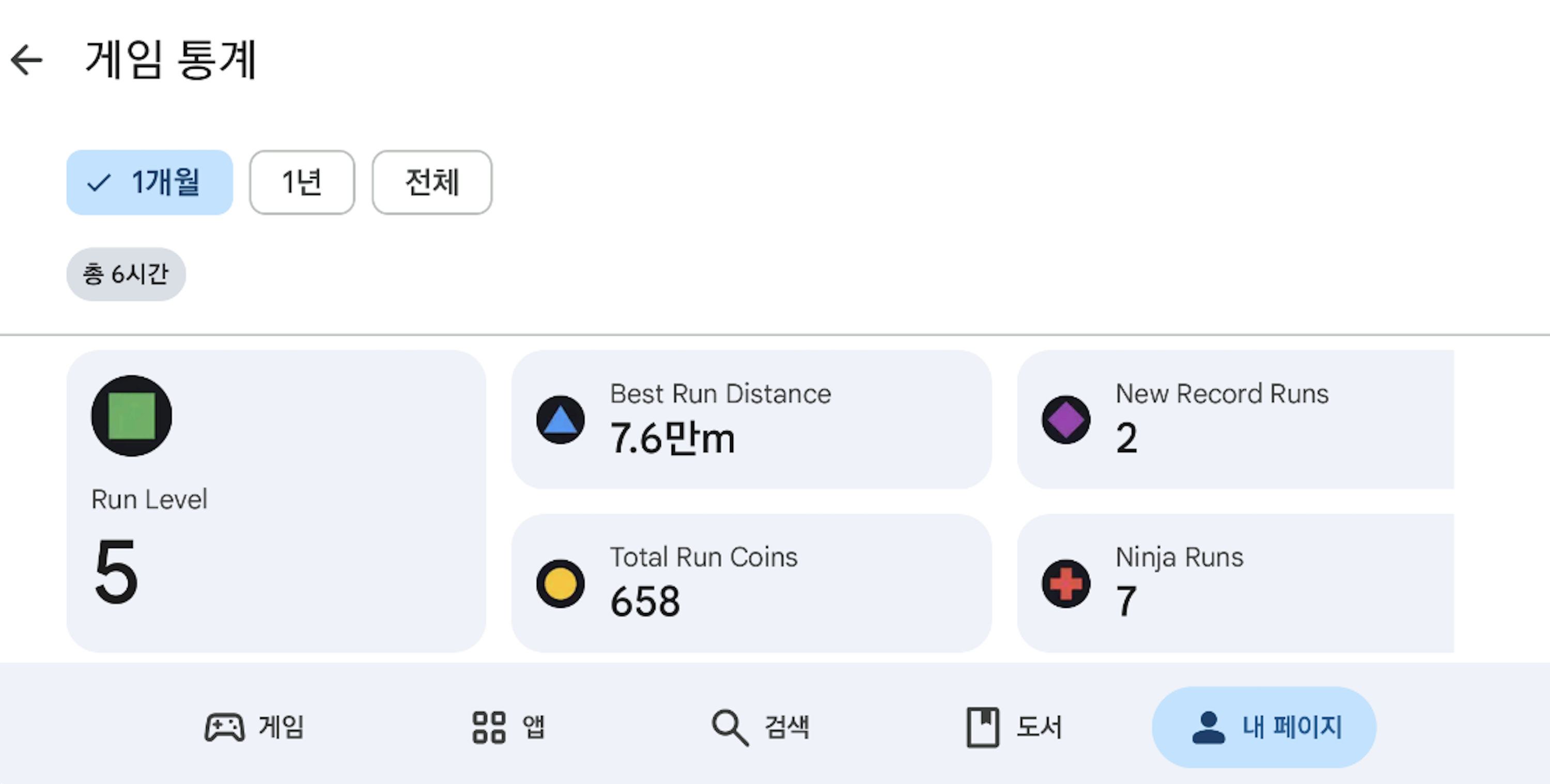
上传后需要一段时间才能显示,因此无法立即确认属于正常现象。如果未显示统计信息,请按以下顺序检查。
-
确保您已拨打
gameStatsRequestEventsUpload()。 -
检查您的 Google Play 登录状态。
-
检查CSV 中声明的事件名称、属性名称和类型是否与代码中写入的值匹配。
-
通过终端设置查看设备上的日志信息。如果出现“GameStats event 提交成功”等提示,则表示传输成功。
苹果游戏中心游戏成就和排行榜
要在苹果游戏中心展示您的游戏,您需要申请苹果游戏中心的成就和排行榜功能。
无论用户的身份验证状态如何,Apple Game Center 的两个功能由 Hive SDK 提供。也就是说,成就和排行榜使用 Apple Game Center 账户,但成就和排行榜使用 Apple Game Center 账户,但该账户可能未链接到 Hive 账户或与玩家当前登录的 Hive 账户不同。
有关 Apple Game Center 功能的更多信息,请参阅 Apple Game Center Guide。
Note
iOS 企业版不支持 Apple Game Center。
成就
实现 ProviderApple 类,以通过 Hive SDK 使用 Apple Game Center 的成就功能。
请求成就列表
要加载成就列表,请调用loadAchievements()方法。
以下是示例代码。
API 参考: hive.ProviderApple.loadAchievements
// 请求成就列表到提供者 Apple
// 使用 hive


// 回调处理程序管理对Provider Apple的成就列表请求
public void onLoadAchievements(ResultAPI result, List achievementList) {

Logger.log("ProviderTestView.onLoadAchievements() 回调\nresult = " + result.toString() + "\n");

if (result.isSuccess() != true)
    return;
}

// 请求成就列表到提供者 Apple
ProviderApple.loadAchievements(onLoadAchievements);
API 参考: ProviderApple::loadAchievements
请求报告成就
要报告一个成就,请调用 reportAchievement() 方法,并将参数设置为 成就率 和 成功成就的通知横幅曝光。
以下是示例代码。
API 参考: hive .ProviderApple.reportAchievement
using hive;

    //成就达成 %. 成就完成于 100
    String achievementPercent = "100";
    // 成就成功时是否显示顶部横幅。 默认 false
    Boolean isShow = true;
    // 成就 ID
    String achievementId = "com.hivesdk.achievement.10hit";

    ProviderApple.reportAchievement(achievementPercent, isShow, achievementId, (ResultAPI result) => {
         if (result.isSuccess()) {
             // call successful
         }
});
#include "HiveProviderApple.h"

//成就达成 %. 成就完成于 100
FString Percent = TEXT("100");
// 成就成功时是否显示顶部横幅。 默认值为 false
bool bIsShow = true;
// 成就 ID
FString AchievementId = TEXT("com.hivesdk.achievement.10hit");

FHiveProviderApple::ReportAchievement(Percent, bIsShow, AchievementId, FHiveProviderAppleOnReportAchievement::CreateLambda([this](const FHiveResultAPI& Result) {
        if (Result.IsSuccess()) {
                // API call successful
        }
}));
API 参考: ProviderApple ::reportAchievement
#include <HIVE_SDK_Plugin/HIVE_CPP.h>
    using namespace std;
    using namespace hive;

    //成就达成 %. 成就完成于 100
    string achievementPercent = "100";
    // 成就成功时是否显示顶部横幅。 默认值为 false
    bool isShow = true;
    //成就 ID
    string achievementId = "com.hivesdk.achievement.10hit";

    ProviderApple::reportAchievement(achievementPercent, isShow, achievementId, [=](ResultAPI const & result) {
         if (result.isSuccess()) {
             // call successful
         }
});
API 参考: ProviderApple.reportAchievement
import HIVEService

    //成就达成 %. 成就完成于 100
    letachievementPercent = "100"
    // 成就成功时是否显示顶部横幅。 默认值为 false
    let isShow = true
    // 成就 ID
    let achievementId = "com.hivesdk.achievement.10hit"

    ProviderApple.reportAchievement(achievementPercent, showsCompletionBanner: isShow, achievementIdentifier: achievementId) { result in
         if result.isSuccess() {
             // call successful
         }
}
API 参考: HIVEProviderApple reportAchievement
#import <HIVEService/HIVEService-Swift.h>

    //成就达到 %. 当达到 100 时完成成就
    NSString *achievementPercent = @"100";
    // 成就成功时是否显示顶部横幅。 默认 NO
    BOOL isShow = YES;
    //成就 ID
    NSString *achievementId = @"com.hivesdk.achievement.10hit";

    [HIVEProviderApple reportAchievement: achievementPercent showsCompletionBanner: isShow achievementIdentifier: achievementId handler: ^(HIVEResultAPI *result) {
         if ([result isSuccess]) {
             // call successful
         }
}];
请求显示成就 UI (助手)
Note
SDK 4.7.0 提供了 Helper,它可以轻松比较用户设备上已登录账户和 PlayerID 同步账户。如果两个账户不相同,请参考 IdP Sync 页面来处理这种情况。
要显示成就界面,请调用showAchievements()方法。
以下是示例代码。
API 参考: hive.AuthV4.Helper.showAchievements
using hive;

AuthV4.Helper.showAchievements ((ResultAPI result, AuthV4.PlayerInfo playerInfo) => {
switch (result.code) {
    case ResultAPI.Code.Success:
    // Deliver Success with achievement indication
    break;
    case ResultAPI.Code.AuthV4ConflictPlayer:
    // account conflict
    break;
    case ResultAPI.Code.AuthV4GoogleLogout:
    //TODO:
    // After logging out of Google Play, log out of the game
    // Relaunching the game must be handled by the development studio
    break;
    default:
    // other exception situations
    break;
}
});
#include "HiveAuthV4.h"

FHiveAuthV4::Helper::ShowAchievements(FHiveAuthV4HelperDelegate::CreateLambda([this](const FHiveResultAPI& Result, const TOptional<FHivePlayerInfo>& PlayerInfo) {
        switch (Result.Code) {
                case FHiveResultAPI::ECode::Success:
                        // Deliver Success with achievement indication
                        break;
                case FHiveResultAPI::ECode::AuthV4ConflictPlayer:
                        // account conflict
                        break;
                default:
                        // other exception situations
                        break;
        }
}));
API 参考: AuthV4 ::Helper::showAchievements
#include <HIVE_SDK_Plugin/HIVE_CPP.h>
    using namespace std;
    using namespace hive;
    AuthV4::Helper::showAchievements([=](ResultAPI const & result, shared_ptr playerInfo) {
      switch (result.code) {
        case ResultAPI::Success:
          // Deliver Success with achievement indication
          break;
        case ResultAPI::AuthV4ConflictPlayer:
          // account conflict
          break;
        case ResultAPI::AuthV4GoogleLogout:
          //TODO:
          // After logging out of Google Play, log out of the game
          // Relaunching the game must be handled by the development studio
          break;
        default:
          // other exception situations
          break;
      }
});
API 参考: [ HIVEAuthV4 helper] showAchievements
// 如果当前登录的 Hive 账户未连接到 GameCenter
    // 自动尝试连接到 GameCenter

    #import <HIVEService/HIVEService-Swift.h>

    [[HIVEAuthV4 helper] showAchievements: ^(HIVEResultAPI *result, HIVEPlayerInfo *playerInfo) {
         switch ([result getCode]) {
             case HIVEResultAPICodeSuccess:
                 // Deliver Success with achievement indication
                 break;
             case HIVEResultAPICodeAuthV4ConflictPlayer:
                 // account conflict
                 break;
             default:
                 // other exception situations
                 break;
         }
}];
请求显示成就界面
要显示成就 UI,请调用 showAchievements() 方法。
以下是示例代码。
API 参考: ProviderApple.showAchievements
API 参考: ProviderApple::showAchievements
API 参考: ProviderApple.showAchievements
请求重置成就
要重置成就,请实现resetAchievements()方法。
以下是示例代码。
排行榜
实现 ProviderApple 类,以通过 Hive SDK 使用 Leaderboard 功能的 Apple 游戏中心。
请求报告排行榜分数
要将排行榜分数报告给 Apple Game Center,请调用 reportScore() 方法。
以下是示例代码。
API 参考: hive .ProviderApple.reportScore
#include "HiveProviderApple.h"

FString PlayerScore = TEXT("1234");
FString LeaderBoardId = TEXT("com.hivesdk.leaderboard.10hit");

FHiveProviderApple::ReportScore(PlayerScore, LeaderBoardId, FHiveProviderAppleOnReportLeaderboard::CreateLambda([this](const FHiveResultAPI& Result) {
        if (Result.IsSuccess()) {
                // API call successful
        }
}));
API 参考: ProviderApple ::reportScore
#include <HIVE_SDK_Plugin/HIVE_CPP.h>
using namespace std;
using namespace hive;

string playerScore = "1234";
string leaderBoardId = "com.hivesdk.leaderboard.10hit";

ProviderApple::reportScore(playerScore, leaderBoardId, [=](ResultAPI const & result) {
    if (result.isSuccess()) {
        // call successful
    }
});
请求显示排行榜 UI (助手)
要显示排行榜 UI,请调用 showLeaderboard() 方法。
以下是示例代码。
API 参考: hive .AuthV4.Helper.showLeaderboard
// 如果当前登录的 Hive 账户未连接到 GameCenter
    // 自动尝试连接到 GameCenter

    使用蜂巢;

    AuthV4.Helper.showLeaderboard((ResultAPI result, AuthV4.PlayerInfo playerInfo) => {
         switch (result.code) {
             case ResultAPI.Code.Success:
                 // Deliver Success with leaderboard display
                 break;
             case ResultAPI.Code.AuthV4ConflictPlayer:
                 // account conflict
                 break;
             default:
                 // other exception situations
                 break;
         }
});
API 参考: AuthV4 ::Helper::showLeaderboard
// 如果当前登录的 Hive 账户未连接到 GameCenter
// 将自动尝试连接到 GameCenter

#include <HIVE_SDK_Plugin/HIVE_CPP.h>
using namespace std;
using namespace hive;

AuthV4::Helper::showLeaderboard([=](ResultAPI const & result, shared_ptr<PlayerInfo> playerInfo) {
    switch (result.code) {
        case ResultAPI::Success:
            // Deliver Success with leaderboard display
            break;
        case ResultAPI::AuthV4ConflictPlayer:
            // account conflict
            break;
        default:
            break;
    }
});
API 参考: showLeaderboard
API Reference: HIVEProviderApple ::showLeaderboard:
// 如果当前登录的 Hive 账户未连接到 GameCenter
    // 自动尝试连接到 GameCenter

    #import <HIVEService/HIVEService-Swift.h>

    [[HIVEAuthV4 helper] showLeaderboard: ^(HIVEResultAPI *result, HIVEPlayerInfo *playerInfo) {
         switch ([result getCode]) {
             case HIVEResultAPICodeSuccess:
                 // Deliver Success with leaderboard display
                 break;
             case HIVEResultAPICodeAuthV4ConflictPlayer:
                 // account conflict
                 break;
             default:
                 // other exception situations
                 break;
         }
}];
请求显示排行榜 UI
要显示排行榜 UI,请调用 showLeaderboard() 方法。
以下是示例代码。
在社交媒体上发布照片
用户可以通过游戏从设备的图库导入照片,在Facebook上分享和发布照片。以下是示例代码:
API 参考: SocialV4. sharePhoto
API 参考: SocialV4::sharePhoto
API 参考: SocialV4.sharePhoto
API 参考: SocialV4.INSTANCE. sharePhoto
API 参考: SocialV4Interface.sharePhoto
API 参考: HIVESocialV4 sharePhoto
使用社区登录自动登录PC游戏
当您在社区网站上点击“在PC上播放”按钮时,PC游戏将通过Crossplay Launcher启动。
此时,PC游戏使用社区的“登录令牌值”自动登录。
Warning
自动登录到PC游戏的社区登录功能仅适用于Windows版本的Hive SDK v4 24.0.0及更高版本。
Steam隐式登录 (Unity Windows)
Hive SDK v4 Unity Windows 24.2.0 支持 Steam 隐式登录。
在使用Steam隐式登录与SDK v4 Unity Windows 24.2.0或更高版本时,请注意以下限制:
- 您必须使用
AuthV4.Helper.signIn方法;不能使用AuthV4.signIn(AUTO,...)方法。 - 安装游戏应用后,用户必须至少执行一次 Steam 隐式登录。
- 当用户卸载应用时,您必须实现删除存储 SDK 配置数据的
propFolder文件夹。