未成年人保护法合规
Hive SDK 提供 Age range 模块,用于在未成年人保护相关法规(如 App Store Responsibility Act 与巴西 ECA)下验证用户年龄。 随着强制年龄验证法规逐步实施,通过应用市场分发应用的开发者可应用 Age range 模块,验证用户年龄范围并请求监护人同意。
Note
Age range 模块从 Hive SDK v4 26.0.1 起支持 Android 与 iOS 目标;在年龄验证法规正式实施前,不属于强制项。
如需在 iOS 上进行用户年龄范围确认,必须满足以下条件。
- Xcode 26.2 或更高版本
- 该功能在 iOS 26.2 及以上版本提供
Warning
在年龄验证法规生效前,在真实用户环境中添加 Age range 模块并调用 getAgeRange API,可能会收到各应用市场(Google Play、Apple App Store)返回的错误响应。 因此,在法规生效前不添加 Age range 模块也可正常开发;即使添加并调用,除 PENDING / DENIED 等明确行为错误外,其余错误可忽略。
若要在法规生效前获取正常响应,可使用 Apple 提供的沙盒测试 API 与工具。详情请参考 Apple 官方公告。
法规生效后,添加 Age range 模块并调用 getAgeRange API 即可实时接收用户状态与年龄信息。(将另行公告)
本指南说明 Hive SDK 提供的 Age range 模块的工作机制、使用方法与测试方法。
Age range 工作概览
Age range 模块提供以下能力:
- 用户年龄范围与同意状态查询
- 应用内重大变更通知与同意请求
- showAgeRangeUpdatePermission API(仅限 Apple App Store)
- 监护人同意撤销通知
按应用市场划分的流程
Age range 模块按应用市场的流程如下:
-
Google Play
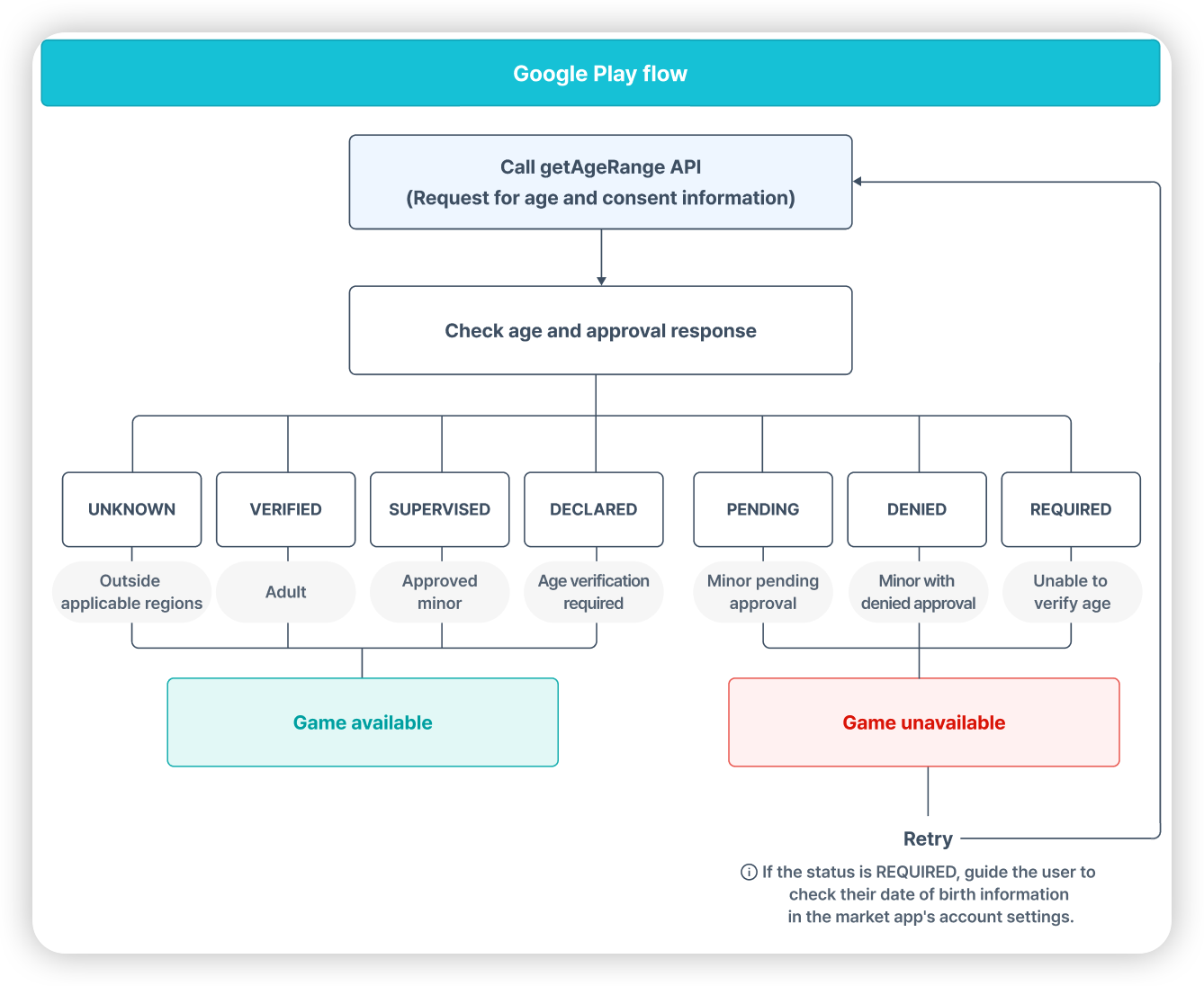
-
Amazon Appstore、Samsung Galaxy Store
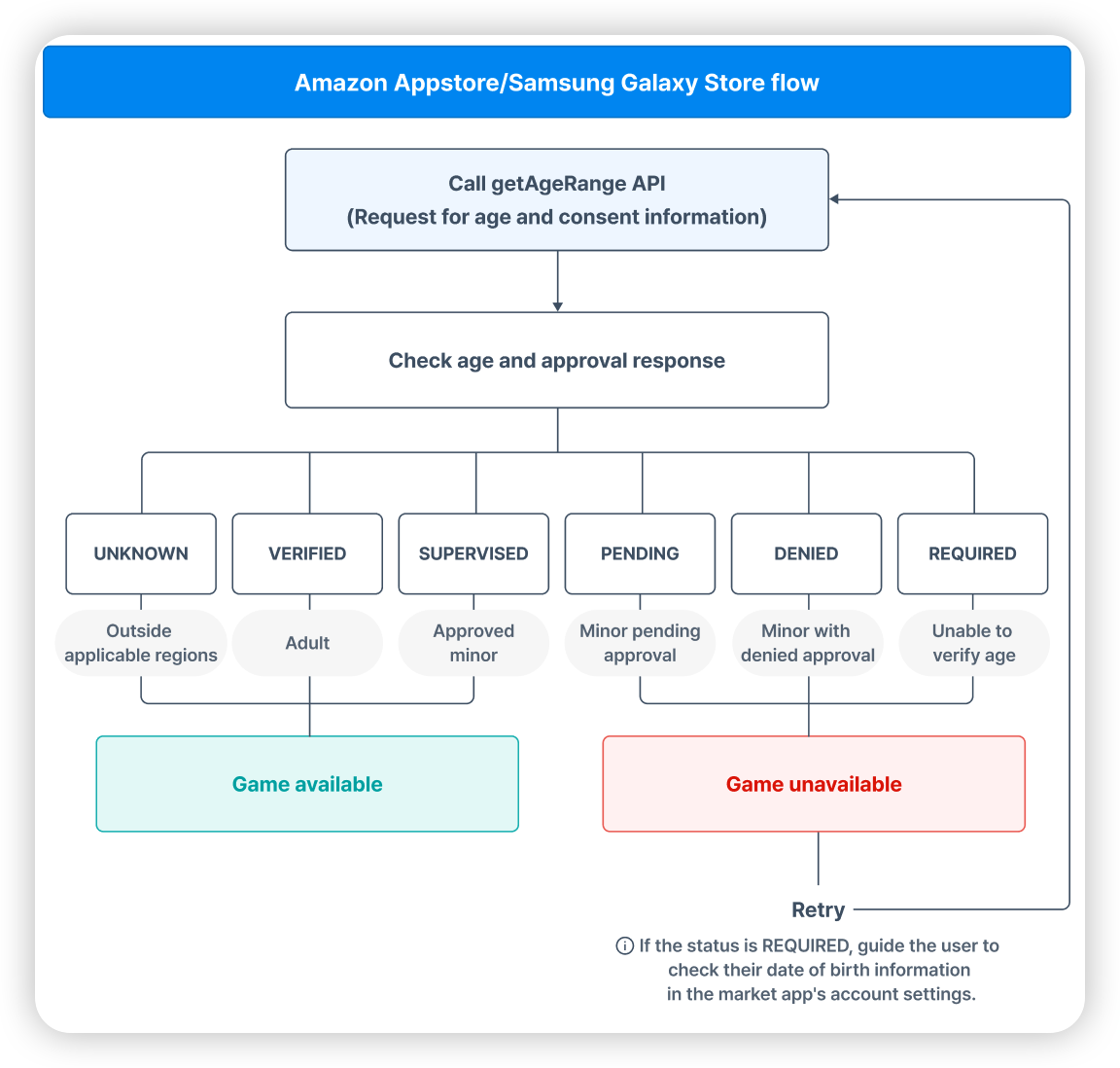
-
Apple App Store
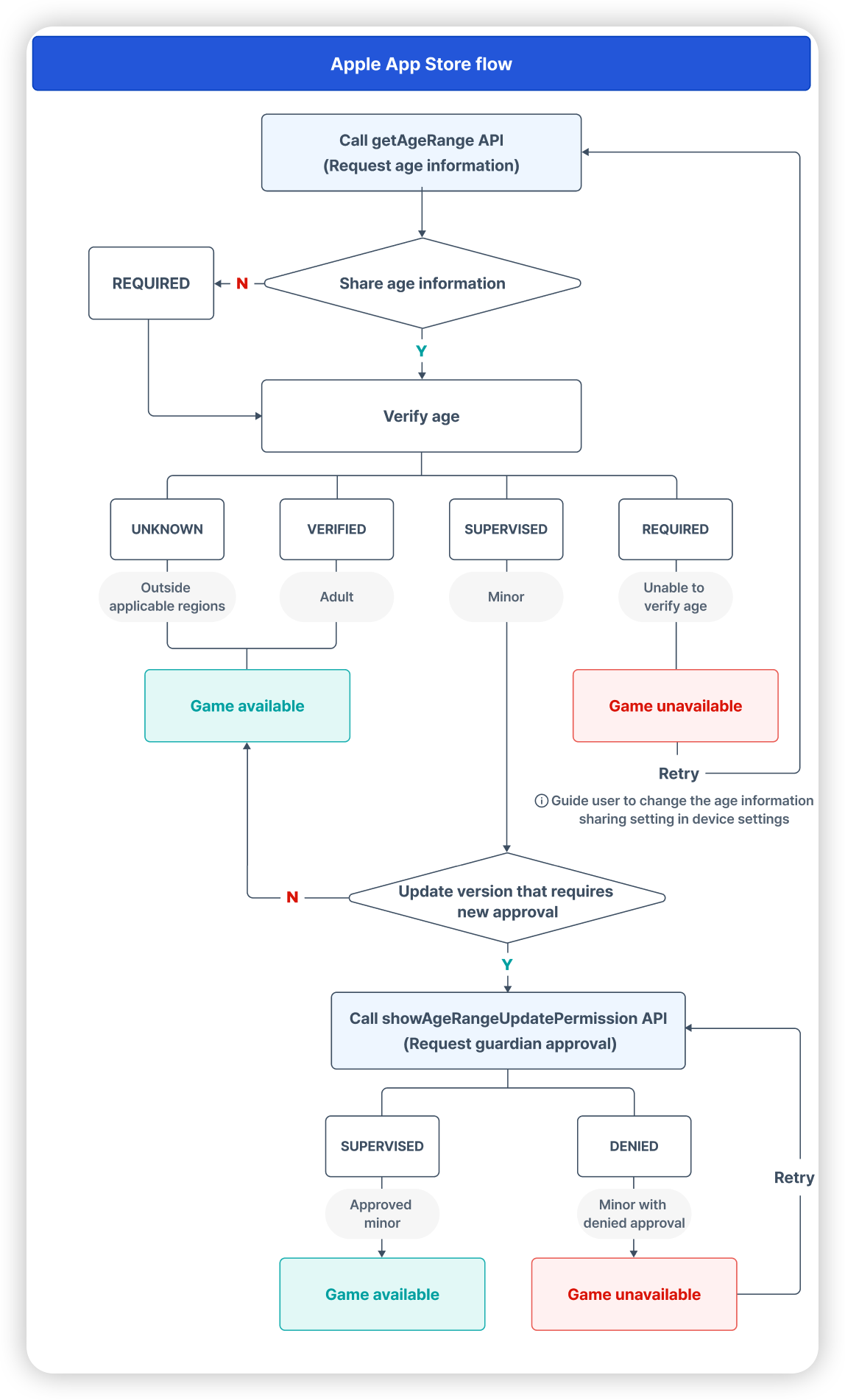
Note
- 本指南中说明:若未确认监护人同意,则为满足应用商店责任法要求,游戏流程不可继续。但实际行为可根据各游戏服务政策与运营决策调整。
- 巴西 ECA 与监护人同意无关,仅需进行用户年龄确认。
准备工作:添加 Age range 模块
作为使用年龄范围模块的准备,根据各 SDK 的开发引擎和目标操作系统添加或移除年龄范围模块。
SDK Native Android
添加年龄范围模块
- 在 SDK 通用设置 中设置市场。
- 将以下内容添加到模块级别的 build.gradle 文件:
移除年龄范围模块
从模块级别的 build.gradle 文件中移除以下内容:
// 应用商店问责法合规 - Google
// implementation "com.com2us.android.hive:hive-agerange-google-agesignals" // 不使用时移除此行
SDK Native iOS
添加年龄范围模块
-
参考 Podfile 示例代码 并添加应用商店问责法相关内容:
-
在 SDK Native iOS 环境中按以下顺序添加声明的年龄范围权限:
- 在 Xcode 项目窗口的项目导航器中选择您的开发者项目。
- 从 TARGETS 列表中选择您的开发者应用。
- 单击"签名和功能"选项卡。
- 在"签名和功能"选项卡的左上角单击 + Capability 按钮。
- 从列表中选择 Declared Age Range 以添加它。
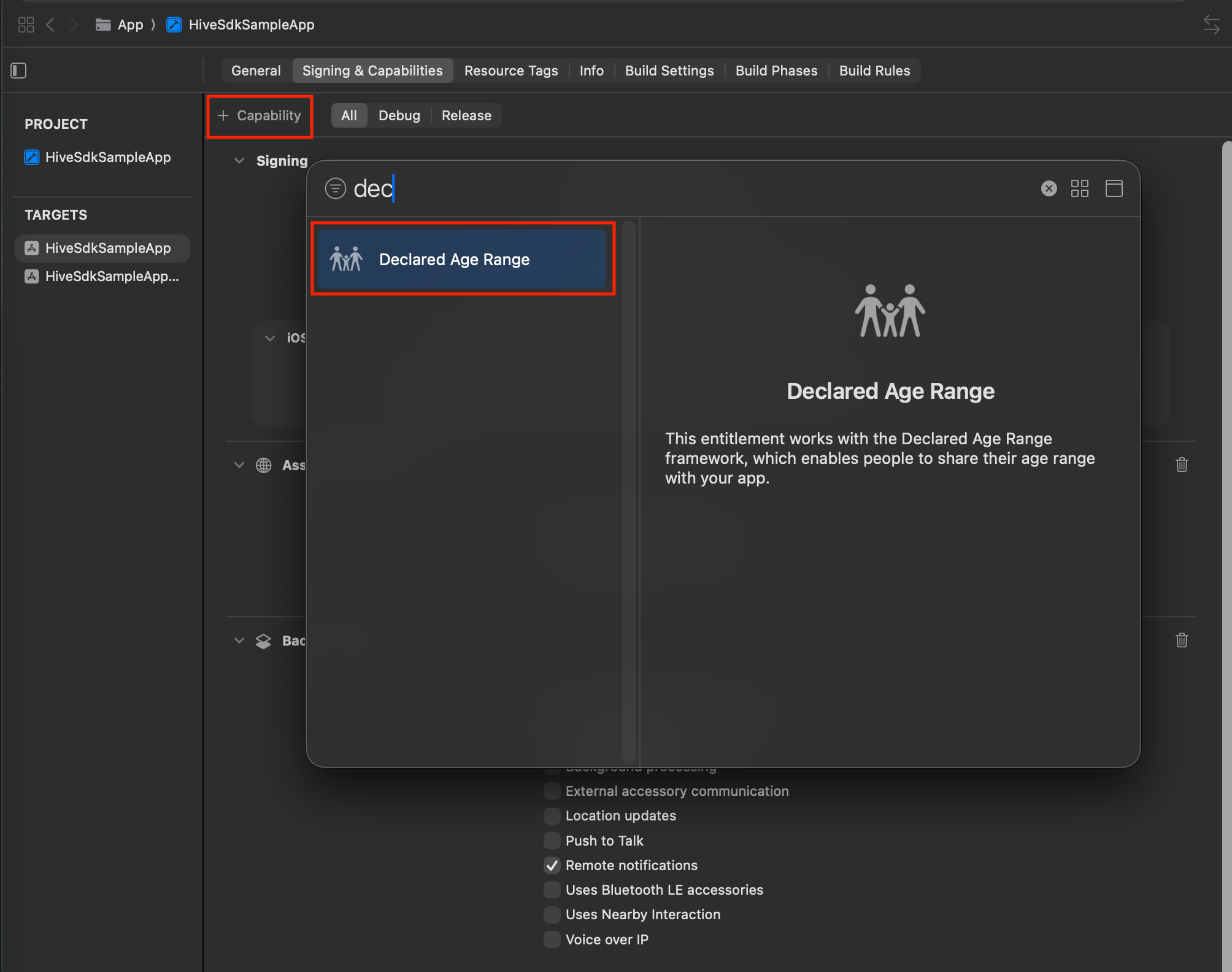
- 您可以验证已添加到"签名和功能"列表中的 Declared Age Range。
移除年龄范围模块
参考 Podfile 示例代码 并移除应用商店问责法相关内容:
SDK Cocos2d-x Android
与 SDK Native Android 相同。
SDK Cocos2d-x iOS
与 SDK Native iOS 相同。
SDK Unity Android
要在 Android 目标 Unity 环境中使用年龄范围模块,请按以下顺序配置:
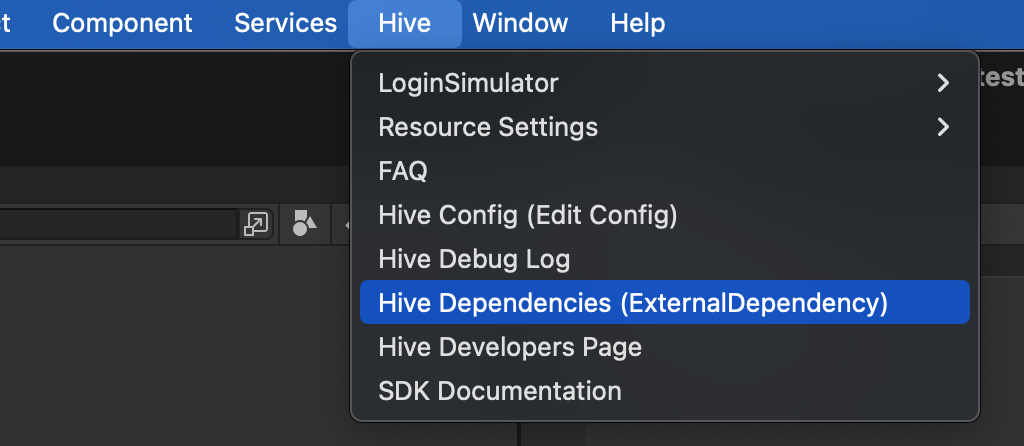
- 单击 Hive > ExternalDependency 菜单。
-
在市场设置下,检查支持的市场的年龄范围 [Market] 项。年龄范围模块需要您要支持的市场模块。
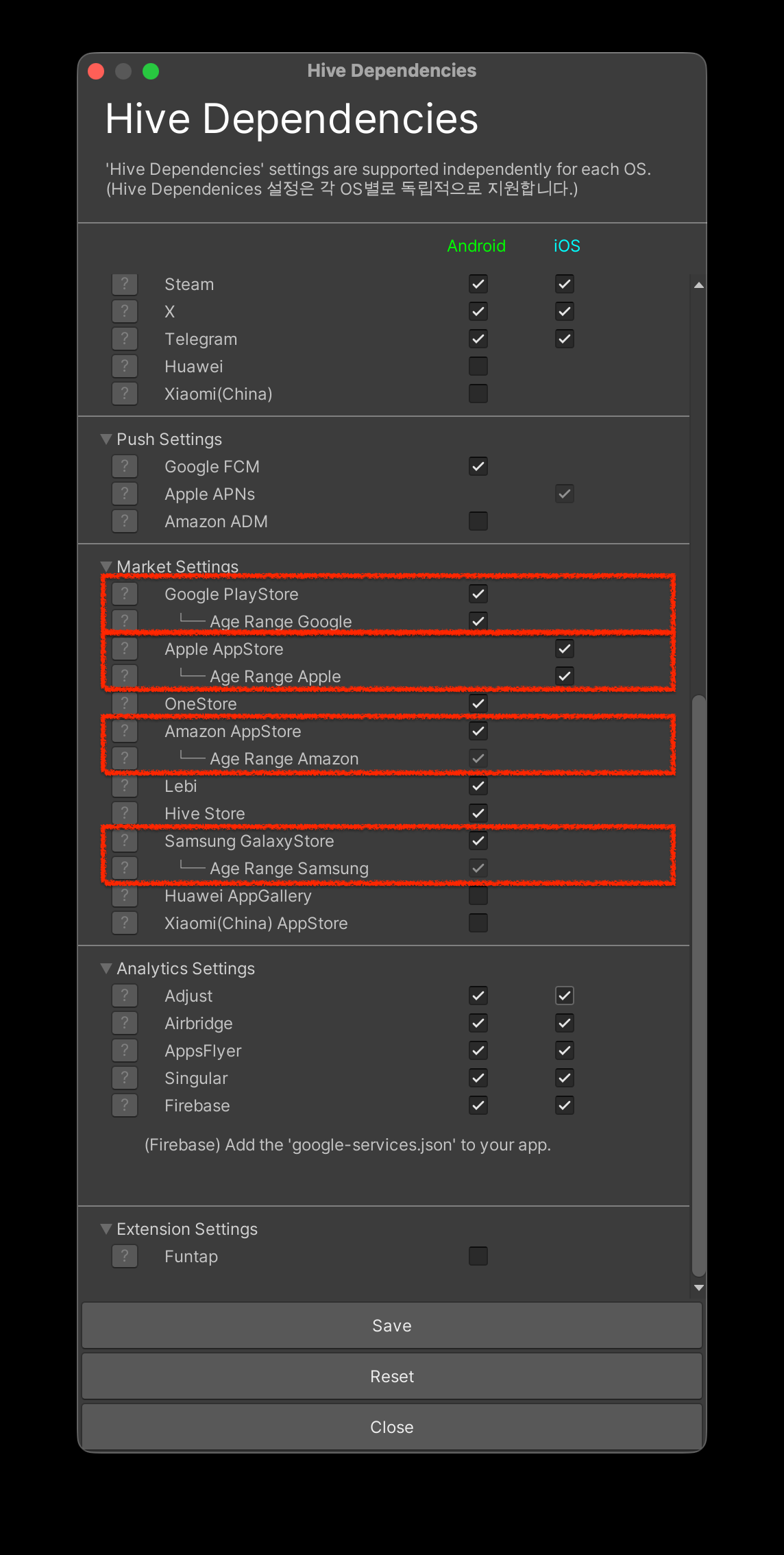
※ 如果不想使用年龄范围模块,取消选中。
如果不使用年龄范围 Google 和 Apple 年龄范围模块,可以取消选中。年龄范围 Amazon 和 年龄范围 Samsung 模块在您包含各自上层市场模块时会自动包含。
SDK Unity iOS
与 App Store 责任法相关的系统 API 仅支持 iOS 26.2 及以上版本。
- 点击 [Hive > ExternalDependency] 菜单。
-
在 Market Settings 设置下,勾选支持市场的 Age Range [Market] 项。Age Range 模块需要对应的市场模块。
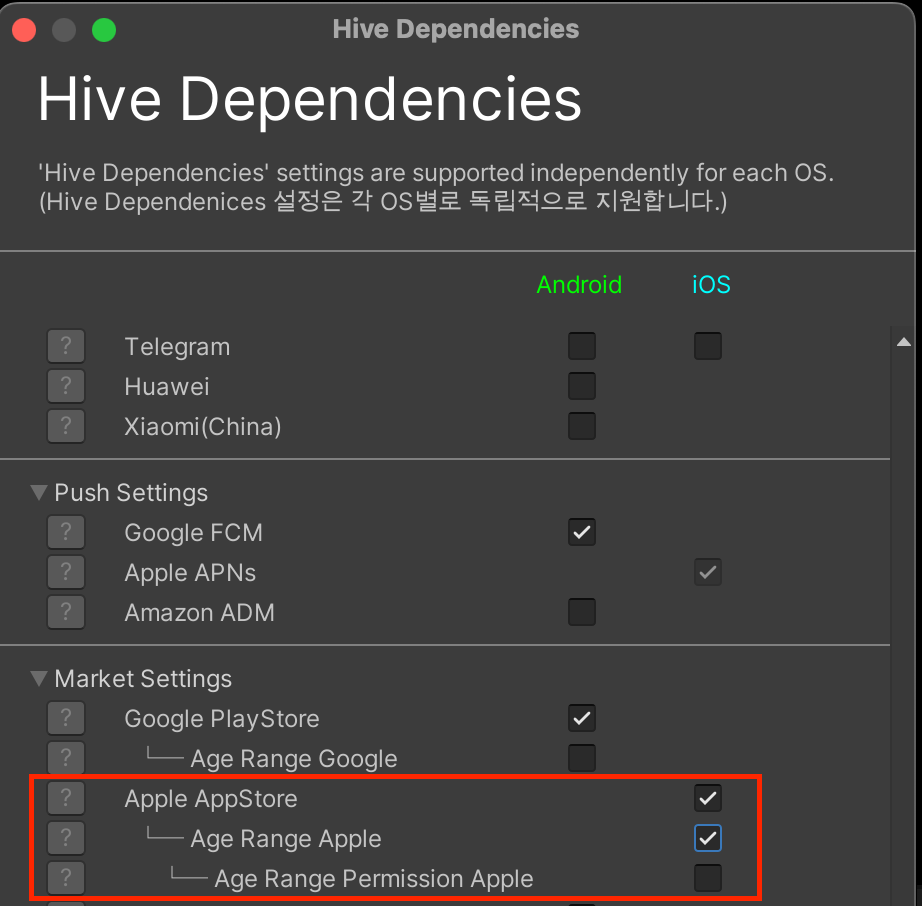
※ 如果不使用 Age Range 模块,请取消勾选。
如果不使用 Age Range Apple 和 Age Range Permission Apple 模块,则可以取消勾选。
要在 iOS 目标 Unity 环境中使用年龄范围模块,请按以下顺序添加声明的年龄范围权限。您可以使用 Unity 编辑器轻松配置它。
- 从 Unity 顶部菜单中选择 Hive。
- 选择 Build project post process setting > iOS。

- 在 Hive PostProcess Editor(iOS) 中选中 Age Range 复选框。
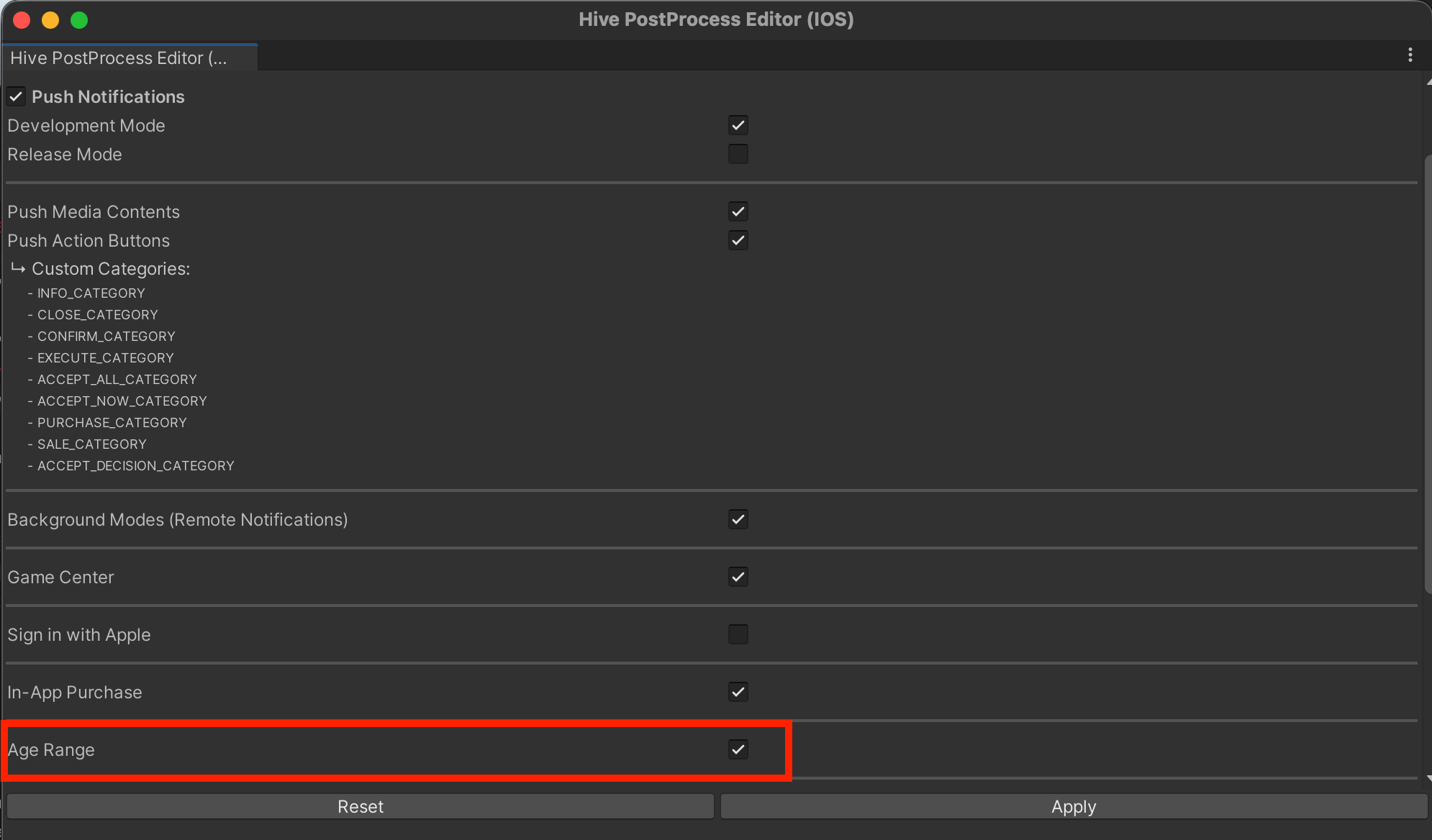
- 在 iOS project export 之后,可以在 Signing & Capabilities 列表中确认新增的 Declared Age Range。
SDK Unreal Engine Android
要在 Android 目标 Unreal Engine 环境中使用年龄范围模块,请按以下顺序配置:
- 选择 Unreal Editor → Edit → Project Settings 菜单。
- 从 Project Settings 左侧面板中选择 Hive SDK → Dependency → Android。
-
检查 Hive Module → Enable AgeRange。
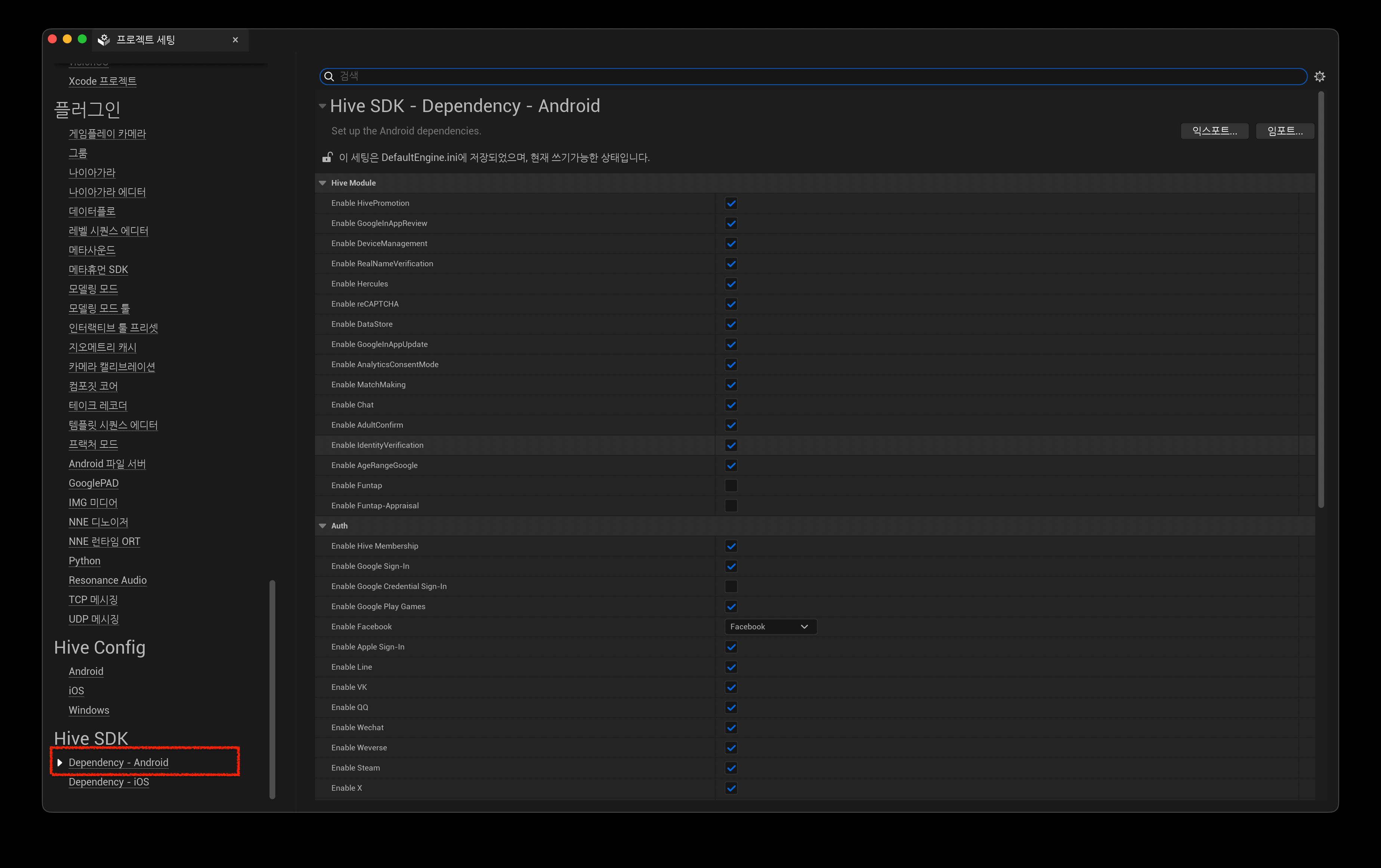
※ 如果不想使用年龄范围模块,取消选中。
SDK Unreal Engine iOS
要在 iOS 目标 Unreal Engine 环境中使用年龄范围模块,请按以下顺序配置:
- 选择 Unreal Editor → Edit → Project Settings。
- 从 Project Settings 左侧面板中选择 Hive SDK → Dependency → iOS。
-
检查 Hive Module → Enable AgeRange。
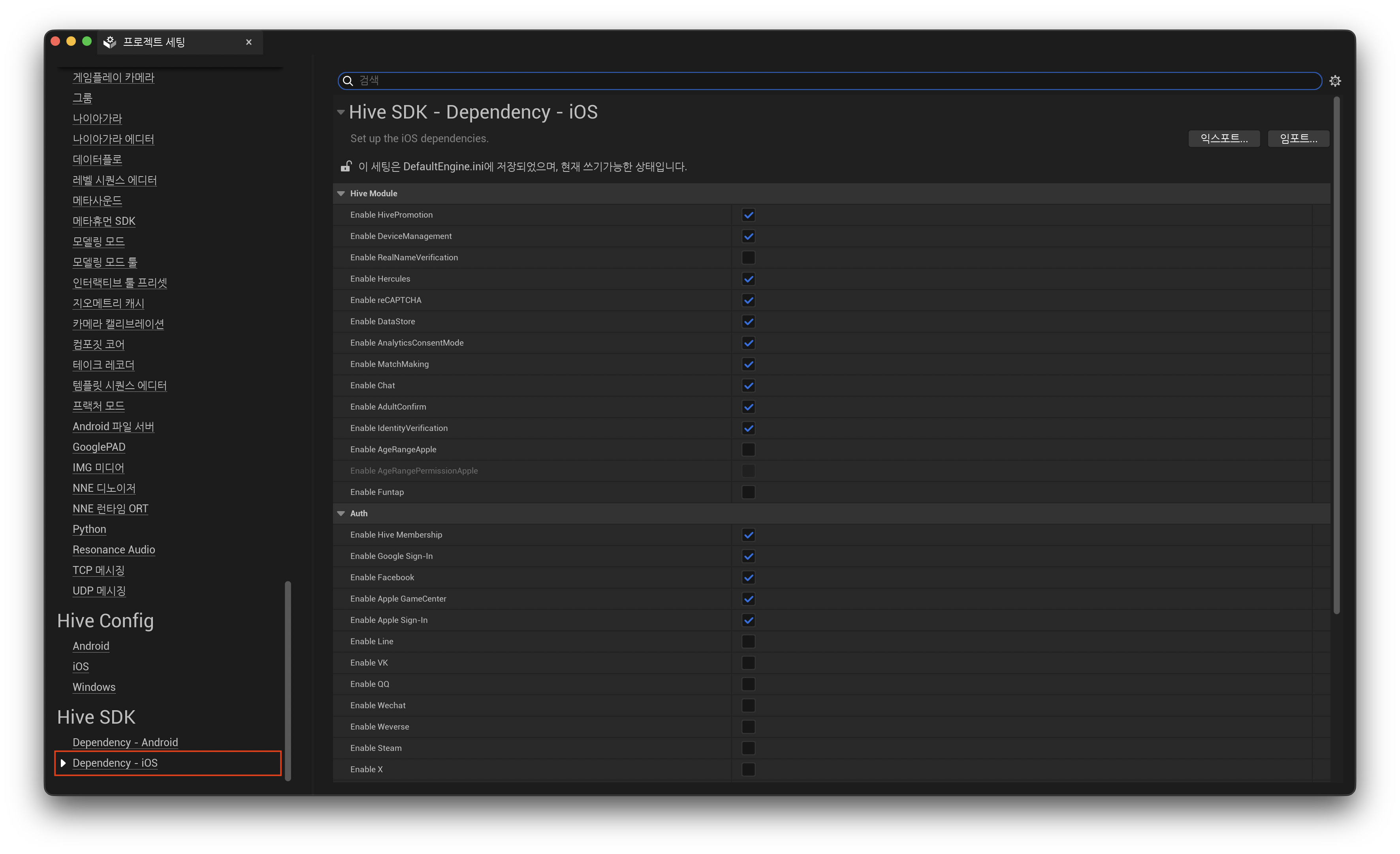
※ 如果不想使用年龄范围模块,取消选中。
-
在 Unreal Engine 环境中,修改 IOSExport.cs 文件以添加声明的年龄范围权限。
在 Engine/Source/Programs/UnrealBuildTool/Platform/IOS/IOSExport.cs 文件中,在'Add'和'Add End'之间添加行。Text.AppendLine( "<dict>"); Text.AppendLine( "\t<key>get-task-allow</key>"); Text.AppendLine(string.Format( "\t<{0}/>", bForDistribution ? "false": "true")); // Add // Age Range 모듈 사용을 위해 필요한 항목입니다. Text.AppendLine("\t<key>com.apple.developer.declared-age-range</key>"); Text.AppendLine("\t<true/>"); // Add End if (bCloudKitSupported) { if (iCloudContainerIdentifiersXML != "")
修改 entitlements 模板 (Unreal Engine 5)
Note
在 Hive SDK Unreal Engine 5 环境中,您可以使用 *.entitlements 模板添加声明的年龄范围权限,而不是修改 IOSExport.cs 文件。
在您的 Unreal Engine 5 项目中,使用 .entitlements_ 模板添加声明的年龄范围权限,如下所示。将键值对添加到您现有的 _.entitlements 模板中。
如果没有 entitlements 模板,可以参考 Plugins/HIVESDK/Source/HiveSDKiOS/template/ 路径下的 HIVESDKV4Tester.entitlements 文件。
请求用户年龄范围和批准状态
在运行时应用中调用 getAgeRange API 以验证用户年龄和家长批准状态。除了受此合规性管辖的法律外,如果应用具有单独的年龄验证流程,建议首先调用 getAgeRange API 来验证年龄。
当您调用 getAgeRange API 时,状态数据 userState 和居住在受年龄验证法律约束地区的用户的年龄范围作为响应返回。 适用司法管辖区返回的默认年龄范围如下,可能会根据地区要求而变化:
- 0~12 岁
- 13~15 岁
- 16~17 岁
- 18 岁及以上
调用 getAgeRange API
以下是调用 getAgeRange API 请求用户年龄范围的示例代码。
getAgeRange API 调用成功时
在游戏应用中请求 getAgeRange API 后,根据响应值 userState 的游戏应用操作流程如下:
UNKNOWN、VERIFIED或SUPERVISED之一 : 继续使用应用并提供适合年龄的内容 * 在SUPERVISED状态下通知重要应用内更改时 : 仅对在 Apple App Store 上分发的游戏调用 showAgeRangeUpdatePermission APISUPERVISED_APPROVAL_PENDING或SUPERVISED_APPROVAL_DENIED: * 请求未成年人继续使用应用的家长批准仍在等待或已被拒绝。验证年龄并允许应用继续。REQUIRED: 用户的年龄在适用的司法管辖区和地区尚未得到验证。指导用户在应用市场应用或设备设置中共享年龄信息,以便应用可以验证年龄。
getAgeRange API 调用失败时
在游戏应用中请求 getAgeRange API 后,如果调用失败,您将收到以下 ResultAPI 失败代码:
API 调用错误可能由于各种原因发生,例如使用的应用市场应用不是最新版本。
如果在会话期间发生错误,请实现以最小化对用户环境的干扰,例如在超过最大 API 调用重试次数时结束调用。
getAgeRange API 调用响应示例 (Apple App Store)
在 Apple App Store 上调用 getAgeRange API 时,会显示请求年龄范围共享的弹窗。
只有选择共享其年龄范围的用户才能验证年龄范围和批准状态。如果被拒绝,将收到 REQUIRED 状态。

getAgeRange API 响应数据
以下是 getAgeRange API 响应字段的说明。您可以通过利用各字段值来提供基于年龄的游戏流程。
响应值可能会变化。要获取最新值,请在应用打开时请求 API 响应。
| 响应字段 | 值 | 说明 |
|---|---|---|
userState | VERIFIED | 用户年龄为 18 岁或以上。 |
| SUPERVISED | 用户拥有由设置了年龄范围的家长监管的账户。使用 ageLower 和 ageUpper 来验证用户的年龄范围。 | |
| SUPERVISED_APPROVAL_PENDING | 用户拥有监管账户,而监管家长尚未批准一项或多项待定的重要更改。使用 ageLower 和 ageUpper 来验证用户的年龄范围。使用 mostRecentApprovalDate 来检查最近批准的重要更改。 | |
| SUPERVISED_APPROVAL_DENIED | 用户拥有监管账户,而监管家长已拒绝批准一项或多项重要更改。使用 ageLower、ageUpper 和 mostRecentApprovalDate 来验证最近批准的重要更改。 | |
| UNKNOWN | 用户不受年龄验证的约束。用户可能在适用司法管辖区和地区之外,或可能为 18 岁或以上/以下。如果您在“控制台 > 配置 > SDK 设置”中将“用户年龄验证”设置为“不验证”,您将收到 UNKNOWN 响应。 | |
| REQUIRED | 用户在适用的司法管辖区和地区尚未得到验证或监管。这些用户可能为 18 岁或以上/以下。要接受年龄验证,请要求用户访问设备设置和应用市场应用来检查其状态。 | |
ageLower | 0 到 18 | 监管用户年龄范围的下限(包含)。使用 ageLower 和 ageUpper 来验证用户的年龄范围。 |
| -1 | userState 为 UNKNOWN 或 REQUIRED。 | |
ageUpper | 2 到 18 | 监管用户年龄范围的上限(包含)。使用 ageLower 和 ageUpper 来验证用户的年龄范围。 |
| -1 | 用户年龄为 18 岁或以上,或 userState 为 UNKNOWN 或 REQUIRED。 | |
mostRecentApprovalDate | 日期戳 | 最近批准的重要更改的日期。 例)"2023-07-01T00:00:00.008Z" Apple App Store 不支持。 Samsung Galaxy Store 以 YYYY-MM-DD 格式返回数据。 |
| 空(空白值) | userState 为 SUPERVISED 且没有提交重要更改。或 userState 为 UNKNOWN 或 REQUIRED。 Apple App Store 不支持。 | |
ageRangeId | App Store 生成的 ID | 应用市场生成的标识符 ID。 Google Play Store : Google Play 为监管用户安装分配的 ID,称为 installID。用于通知应用批准撤销。查看 应用批准撤销文档。Amazon Appstore : Amazon 账户的 userId。Apple App Store : 不支持。 Samsung Galaxy Store: Samsung Galaxy Store 生成的 ID。 |
| 空(空白值) | userState 为 UNKNOWN 或 REQUIRED。 Apple App Store 不支持。 |
应用内重要更改通知和批准请求
根据某些司法管辖区和地区的法规,当游戏应用中发生以下更改时,游戏应用必须向家长或监护人通知更改并请求批准未成年人继续使用应用。
- 收集、存储或共享数据的更改
- 年龄等级的更改
- 增加新的应用内购买或广告功能
- 用户体验的更改等
游戏应用可以确定何时通知更改并请求批准。各应用市场通知更改的方法如下:
- Google Play 和 Amazon Appstore、Samsung Galaxy Store:通过各应用市场运营的开发者控制台通知
- Apple App Store:通过从游戏应用直接调用
showAgeRangeUpdatePermissionAPI 通知
ShowAgeRangeUpdatePermission API
如果应用发布到 Apple App Store 市场,则需要在应用中直接调用 showAgeRangeUpdatePermission API,向监护人(父母)告知重要变更并请求批准。
从 Hive SDK 26.3.4 开始,如需使用 showAgeRangeUpdatePermission API,必须添加 HiveAgeRangePermissionApple 模块。详情请参见 SDK Native iOS 条目。
以下是调用 showAgeRangeUpdatePermission API 的示例代码。
API Reference: Unity ®
API Reference: C++
#include <HIVE_SDK_Plugin/HIVE_CPP.h>
using namespace std;
using namespace hive;

std::string description = "This update adds video calling and location sharing features.";

AuthV4::showAgeRangeUpdatePermission(description, [=](ResultAPI const & result, AgeRange const & ageRange) {
    if (result.isSuccess()) {
        // API call success
    }
});
API Reference: Kotlin
import com.hive.AuthV4;
import com.hive.ResultAPI;

val description: String = "This update adds video calling and location sharing features."

AuthV4.showAgeRangeUpdatePermission(description, object : AuthV4.AuthV4GetAgeRangeListener {
    override fun onAuthV4GetAgeRange(result: ResultAPI, ageRange: AuthV4.AgeRange?) {
        if (result.isSuccess) {
            // API call success
        }
    }
})
API Reference: Java
API Reference: Swift
API Reference: Objective-C
#include "HiveAuthV4.h"

FString Description = TEXT("This update adds video calling and location sharing features.");

FHiveAuthV4::ShowAgeRangeUpdatePermission(Description, FHiveAuthV4OnShowAgeRangeUpdatePermissionDelegate::CreateLambda([this](const FHiveResultAPI& Result, const FHiveAuthV4AgeRange& AgeRange) {
    if (Result.IsSuccess()) {
        // API call success
    }
}));
Parental approval revocation notification
Even after a parent or guardian has approved an important change notification in the app, they can cancel the approval later. If approval is revoked, a minor user will no longer have access to the app.
When a parent or guardian revokes approval, the method to check the revocation notification through each marketplace is as follows:
- Google Play: You can confirm the revocation by downloading the
installIDlist from the Age Signals page. * Google Play'sinstallIDis valid for 3 months and will be deleted thereafter. - Apple App Store: Sends a notification about approval revocation.
- Amazon Appstore: You can confirm the revocation by downloading the Amazon
userIdfrom the reports section in the developer console. - Samsung Galaxy Store:由于不会单独收到撤销监护人同意的通知,因此可以调用
getAgeRagneAPI,通过返回的状态值进行确认。
Age range testing
Hive SDK provides a test environment and test cases that allow you to receive normal responses when requesting the getAgeRange API, regardless of whether age verification bill has been implemented.
The Age Range test environment and test cases are only available in the Android target development environment, and you can simulate API behavior through debug mode settings.
Note
To test the Age Range feature in the iOS target development environment, you can use the sandbox testing tools provided by Apple. Log in with an Apple sandbox account and test.
Enable debug mode
To set debug mode in the Android target development environment, run the following command. Debug mode operates in Hive ZoneType.SANDBOX.
Use debug mode settings only for unit testing or integration testing to verify behavior in a game app.
Data response by test case
After setting debug mode in the Android target development environment, the data response returned by Google Play Store for each test case is as follows:
| 测试用例 | userStatus | ageLower | ageUpper | mostRecentApprovalDate | ageRangeId | 说明 |
|---|---|---|---|---|---|---|
1 | VERIFIED | 18 | -1 | Empty | Empty | 18 岁或以上已验证年龄用户的响应。 |
2 | REQUIRED | -1 | -1 | Empty | Empty | 无法确认年龄验证和同意状态的用户响应。 |
3 | SUPERVISED | 0 | 12 | 2026-01-01T07:00:00.008+0900 | 550e8400-e29b-41d4-a716-446655441111 | 0 至 12 岁(含)用户的响应。 |
4 | SUPERVISED | 13 | 15 | 2026-01-01T07:00:00.008+0900 | 550e8400-e29b-41d4-a716-446655441111 | 13 至 15 岁(含)用户的响应。 |
5 | SUPERVISED | 16 | 17 | 2026-01-01T07:00:00.008+0900 | 550e8400-e29b-41d4-a716-446655441111 | 16 至 17 岁(含)用户的响应。 |
6 | SUPERVISED_APPROVAL_DENIED | 0 | 12 | 2026-01-01T07:00:00.008+0900 | 550e8400-e29b-41d4-a716-446655441111 | 18 岁以下同意待定或未获得的用户响应。 |
7 | UNKNOWN | -1 | -1 | Empty | Empty | 年龄验证法不适用的所有情况的响应。 |
8 | UNKNOWN | -1 | -1 | Empty | Empty | API 返回 ResultAPI.RESPONSE_FAIL 状态时的响应。 (APP_NOT_OWNED) |
9 | UNKNOWN | -1 | -1 | Empty | Empty | API 返回 ResultAPI.RESPONSE_FAIL 状态时的响应。 (CLIENT_TRANSIENT_ERROR) |
10 | UNKNOWN | -1 | -1 | Empty | Empty | API 返回 ResultAPI.RESPONSE_FAIL 状态时的响应。 (INTERNAL_ERROR) |
11 | UNKNOWN | -1 | -1 | Empty | Empty | API 返回 ResultAPI.RESPONSE_FAIL 状态时的响应。 (API_NOT_AVAILABLE) |