ตรวจสอบข้อมูลผู้ใช้
หากคุณเข้าสู่ระบบสำเร็จแล้ว คุณสามารถตรวจสอบข้อมูลโปรไฟล์และข้อมูลการระงับของผู้ใช้ที่เข้าสู่ระบบได้.
การเปิดเผยโปรไฟล์ผู้ใช้
Hive SDK มีฟังก์ชันในการแสดงโปรไฟล์ผู้ใช้ในเว็บวิวภายในแอป เพื่อแสดงหน้าจอโปรไฟล์ คุณต้องทำตามขั้นตอนเหล่านี้
- นักพัฒนาจะสร้างปุ่มหรือองค์ประกอบ UI ที่สามารถเปิดเผยโปรไฟล์ในแอปได้
- เมื่อผู้ใช้เลือกปุ่มหรือองค์ประกอบ UI นี้ในแอป แอปจะใช้ฟีเจอร์การตรวจสอบสิทธิ์ Hive SDK เพื่อเรียกใช้
AuthV4.showProfile.
การเรียก AuthV4.showProfile จะแสดงหน้าจอโปรไฟล์ที่ SDK จัดเตรียมไว้ให้ ผู้ใช้สามารถดูและเปลี่ยนรูปโปรไฟล์และชื่อเล่นได้ในหน้าจอโปรไฟล์ ก่อนที่ผู้ใช้จะตั้งค่าโปรไฟล์ รูปโปรไฟล์จะแสดงเป็นรูปภาพเริ่มต้น และชื่อเล่นจะถูกกำหนดโดยอัตโนมัติ
Note
หากประเทศที่ผู้ใช้เชื่อมต่อคือจีน ฟังก์ชันการแสดงและแก้ไขรูปโปรไฟล์จะไม่มีให้บริการในหน้าจอโปรไฟล์
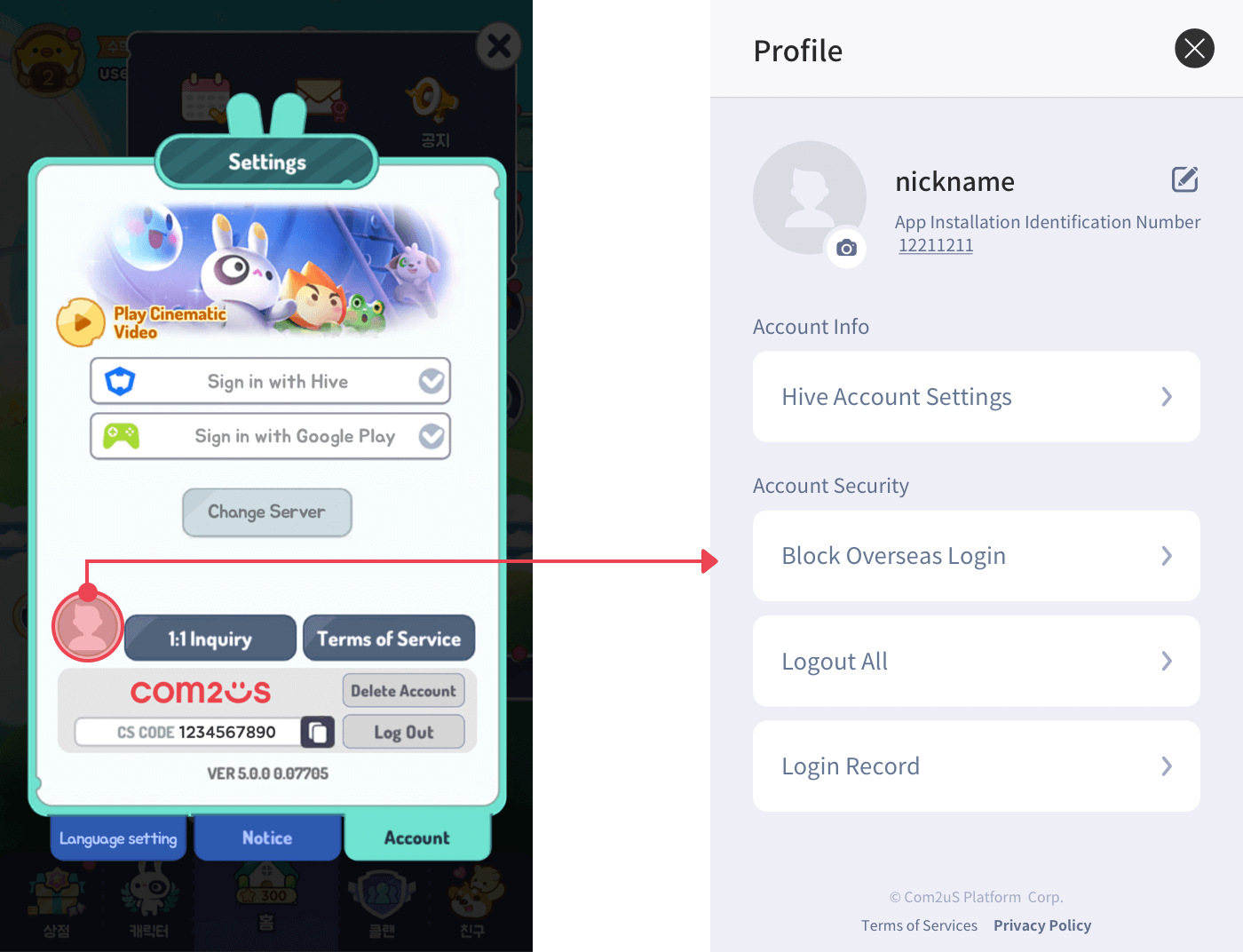
นี่คือตัวอย่างโค้ดที่เปิดเผยโปรไฟล์
API Reference: AuthV4.showProfile
API Reference: AuthV4::showProfile
API Reference: AuthV4.showProfile
API Reference: AuthV4.INSTANCE.showProfile
API Reference: AuthV4Interface.showProfile
API Reference: [HIVEAuthV4 showProfile]
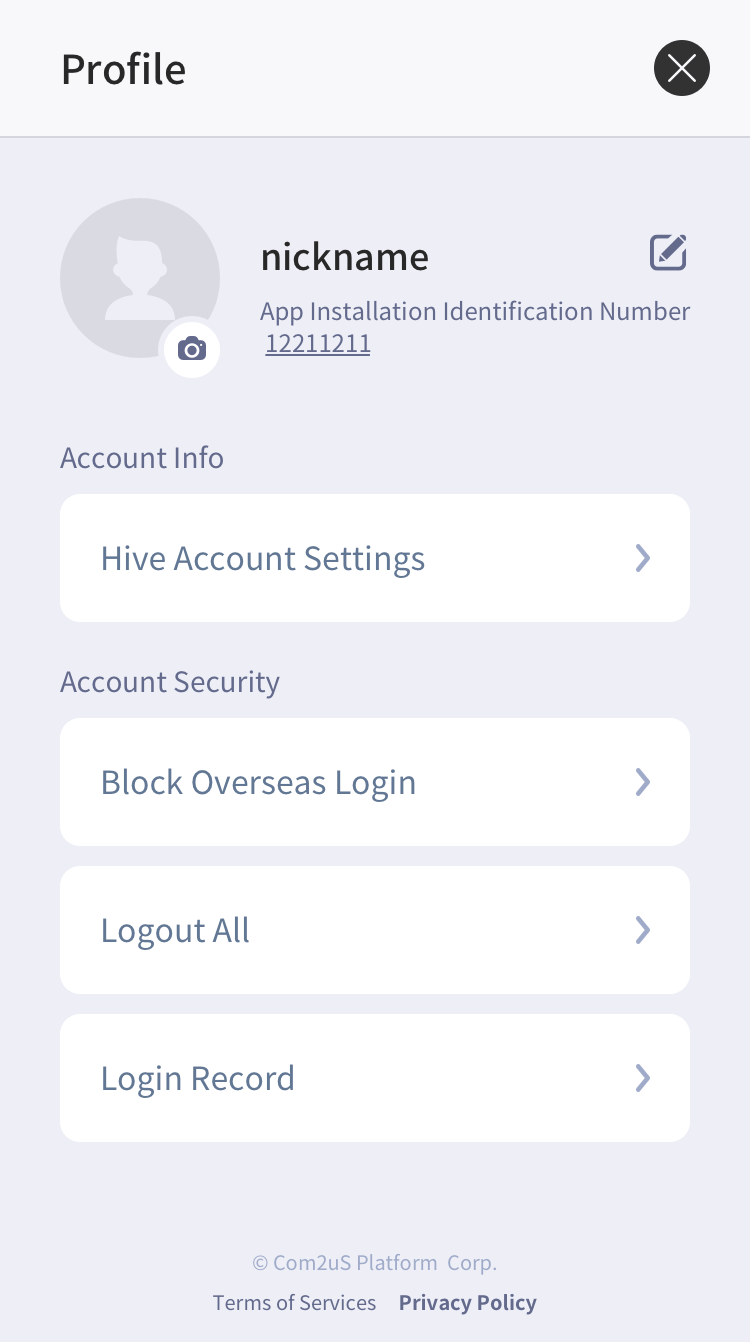
การใช้หน้าจอโปรไฟล์ขึ้นอยู่กับดุลยพินิจของนักพัฒนาเป็นหลัก อย่างไรก็ตาม หากคุณให้ Hive Membership IdP คุณ ต้องดำเนินการ showProfile() นี่เป็นเพราะการเป็นสมาชิก Hive มีฟีเจอร์การเปลี่ยนรหัสผ่านและการถอนในการตั้งค่าบัญชี Hive บนหน้าจอโปรไฟล์ตามที่แสดงด้านล่าง
| Hive สถานะการรวม IdP สมาชิก | สถานะการรวม IdP แขกและอื่น ๆ |
|---|---|
 | 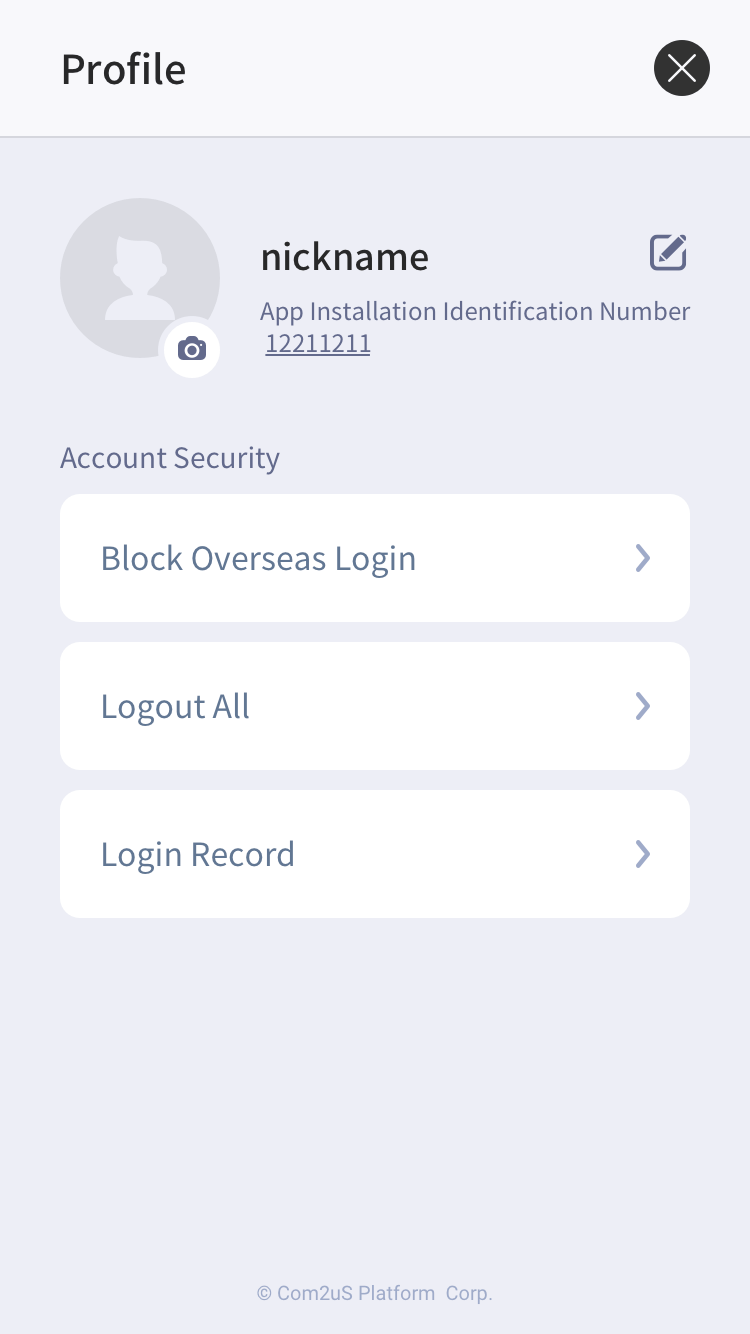 |
แม้ว่า Hive จะมีเพียง IdP อื่นนอกเหนือจาก IdP สมาชิก การแสดงหน้าประวัติสามารถให้ฟีเจอร์ด้านความปลอดภัย เช่น การบล็อกการเข้าสู่ระบบจากต่างประเทศ การออกจากระบบทั้งหมด และการตรวจสอบประวัติการเข้าสู่ระบบ ดังนั้นจึงแนะนำให้ดำเนินการแสดงหน้าประวัติด้วยการใช้ showProfile()。
ตรวจสอบโปรไฟล์ผู้ใช้
เมื่อผู้ใช้ลงชื่อเข้าใช้ คุณสามารถดึงข้อมูลโปรไฟล์ผู้ใช้ได้โดยการเรียกใช้วิธี getProfile() ของคลาส AuthV4 ข้อมูลโปรไฟล์ประกอบด้วย playerId, playerName สำหรับชื่อที่แสดง และ playerImageUrl สำหรับภาพขนาดย่อของผู้ใช้
ต่อไปนี้คือตัวอย่างโค้ดเพื่อรับข้อมูลโปรไฟล์
เอกสารอ้างอิง API: hive.AuthV4.getProfile
ใช้ hive;

List<Int64> playerIdList = new List();
playerIdList.Add(0123);
playerIdList.Add(4567);

AuthV4.getProfile(playerIdList, (ResultAPI result, List profileInfoList) => {
    if (!result.isSuccess()) {
return;
    }

    if (profileInfoList != null) {
        foreach (ProfileInfo profileInfo in profileInfoList) {
        // PlayerName: profileInfo.playerName
        // PlayerId: profileInfo.playerId
        }
    }
});
#include "HiveAuthV4.h"

TArray<int64> PlayerIdArray;
PlayerIdArray.Add(1234);
PlayerIdArray.Add(5678);

FHiveAuthV4::GetProfile(PlayerIdArray, FHiveAuthV4OnGetProfileDelegate::CreateLambda([this](const FHiveResultAPI& Result, const TArray<FHiveProfileInfo> ProfileInfoArray) {
        if (!Result.IsSuccess()) {
                return;
        }

        for (const auto& ProfileInfo : ProfileInfoArray)
        {
                // PlayerName: ProfileInfo.PlayerName;
                // PlayerId : ProfileInfo.ProfileInfo;
        }
}));
เอกสารอ้างอิง API: AuthV4::getProfile
#include <HIVE_SDK_Plugin/HIVE_CPP.h>
using namespace std;
using namespace hive;

vector<PlayerID> playerIdList;
playerIdList.push_back(0123);
playerIdList.push_back(4567);

AuthV4::getProfile(playerIdList, [=](ResultAPI const & result, vector<ProfileInfo> const & profileInfoList) {
    if (!result.isSuccess()) {
return;
}

if (profileInfoList != null) {
    for (auto profileInfo : profileInfoList) {
        // PlayerName: profileInfo.playerName
        // PlayerId: profileInfo.playerId
        }
    }
});
เอกสารอ้างอิง API: AuthV4.getProfile
import com.hive.AuthV4
import com.hive.ResultAPI

val playerIdList = arrayListOf<Long>(
    1234,
    4567
)

AuthV4.getProfile(playerIdList, object : AuthV4.AuthV4GetProfileListener {
    override fun onAuthV4GetProfile(result: ResultAPI, profileInfoList: ArrayList<AuthV4.ProfileInfo>?) {
        if (!result.isSuccess) {
            return
        }

        if (profileInfoList != null) {
            for (i in 0 until profileInfoList.size) {
                // PlayerName: profileInfoList[i].playerName
                // PlayerId: profileInfoList[i].playerId
            }
        }
    }
})
เอกสารอ้างอิง API: com.hive.AuthV4.getProfile
import com.hive.AuthV4;
import com.hive.ResultAPI;

ArrayList<Long> playerIdList = new ArrayList<>(Arrays.asList(
        1234L,
        5678L
));

AuthV4.INSTANCE.getProfile(playerIdList, (result, profileInfoList) -> {
    if (!result.isSuccess()) {
        return;
    }

    if (profileInfoList != null) {
        for (AuthV4.ProfileInfo profileInfo : profileInfoList) {
            // PlayerName: profileInfo.getPlayerName();
            // PlayerId: profileInfo.getPlayerId();
        }
    }
});
API Reference: AuthV4Interface.getProfile
import HIVEService

var playerIdList = [Int64]()
playerIdList.append(0123)
playerIdList.append(4567)

AuthV4Interface.getProfile(playerIdList) { result, profileInfoList in
    if !result.isSuccess() {
    return
    }

    if let profileInfoList = profileInfoList {
        for (profileInfo in profileInfoList) {
        // PlayerName: profileInfo.playerName
        // PlayerId: profileInfo.playerId
        }
    }
}
API Reference: HIVEAuthV4:getProfile
#import <HIVEService/HIVEService-Swift.h>

NSMutableArray<NSNumber *> *playerIdList = [[[NSMutableArray] alloc] init];
[playerIdList addObject: [NSNumber numberWithLongLong:0123]];
[playerIdList addObject: [NSNUmber numberWithLongLong:4567]];

[HIVEAuthV4 getProfile: playerIdList handler: ^(HIVEResultAPI *result, NSArray<HIVEProfileInfo *> *profileInfoList) {
    if (![result isSuccess]) {
    return;
    }
    if (profileInfoList != nil) {
        for (HIVEProfileInfo *profileInfo in profileInfoList) {
        // PlayerName: profileInfo.playerName
        // PlayerId: profileInfo.playerId
        }
    }
}];
ตรวจสอบรายการดำ
เมื่อผู้ใช้ลงชื่อเข้าใช้หรือซิงค์กับ IdP, Hive SDK จะตรวจสอบรายชื่อดำโดยอัตโนมัติและระงับผู้ใช้จากการเล่นเกม หากคุณต้องการตรวจสอบสถานะการระงับผู้ใช้ระหว่างเกม, ใช้เมธอด checkBlacklist() เพื่อตรวจสอบสถานะการระงับของผู้ใช้แบบเรียลไทม์และจำกัดการเล่นเกม ขึ้นอยู่กับค่าของพารามิเตอร์ isShow ในขณะเรียก checkBlacklist(), Hive SDK จะจะแสดงป๊อปอัปสถานะการระงับโดยตรงหรือส่งคืนเนื้อหาป๊อปอัปเพื่อปรับแต่งป๊อปอัปสถานะการระงับ
- การใช้ป๊อปอัปการระงับที่จัดเตรียมไว้: ตั้งค่าพารามิเตอร์
isShowเป็นtrue. -
การใช้ป๊อปอัปการระงับที่กำหนดเอง: ตั้งค่าพารามิเตอร์
isShowเป็นfalseสำหรับข้อมูลเพิ่มเติมเกี่ยวกับข้อมูลป๊อปอัป โปรดดูที่ ข้อมูลป๊อปอัปที่ส่งคืนโดย Hive SDK ด้านล่าง. -
ตัวอย่างหน้าจอของป๊อปอัพการระงับ
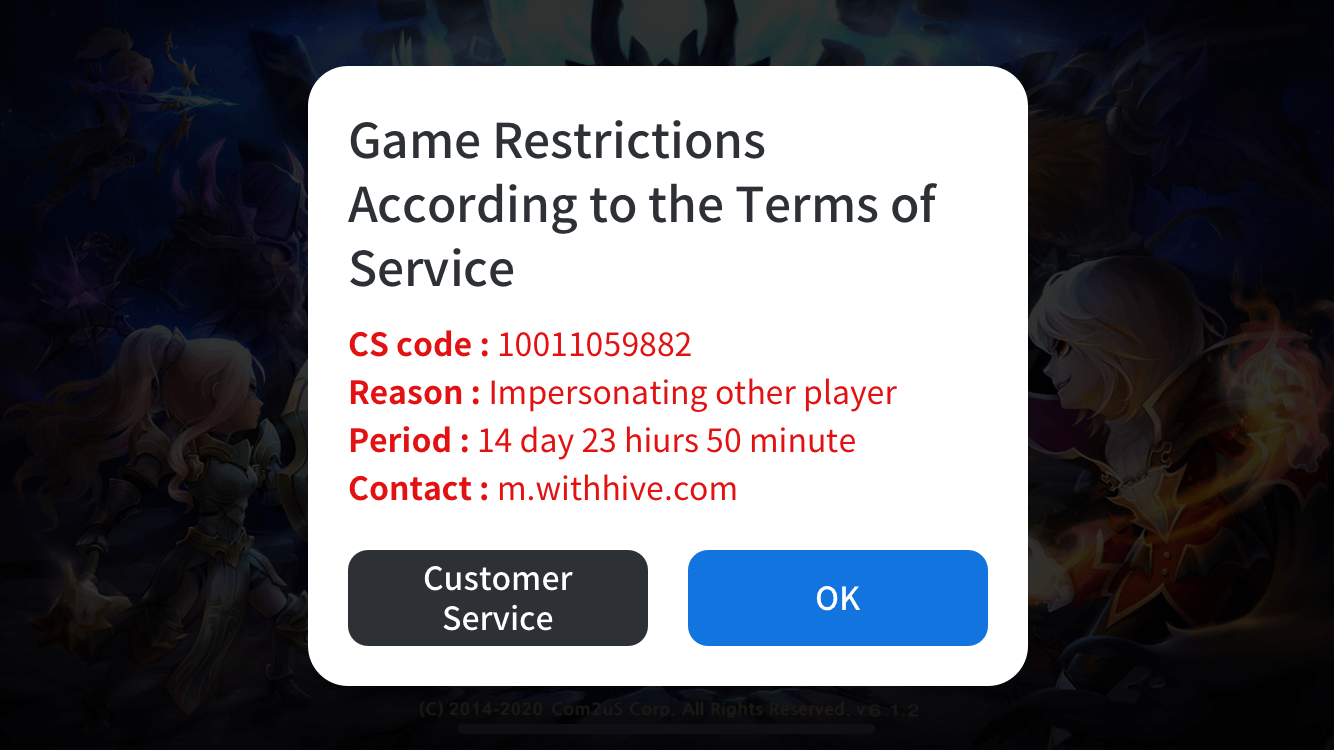
ข้อมูลป๊อปอัพการระงับที่ส่งกลับโดย Hive SDK
หากผลลัพธ์ของการเรียกใช้เมธอด checkBlacklist() สำเร็จ, Hive SDK จะส่งค่าตามตารางด้านล่างผ่านวัตถุ AuthV4MaintenanceInfo
| ชื่อฟิลด์ | คำอธิบาย | ประเภท |
|---|---|---|
| title | ชื่อป๊อปอัพ | สตริง |
| message | เนื้อหาป๊อปอัพ | สตริง |
| button | ข้อความบนป้ายของปุ่มป๊อปอัพ | สตริง |
| action | ประเภทการกระทำเมื่อผู้ใช้แตะปุ่มป๊อปอัพ * OPEN_URL: เปิด URL ที่ส่งโดยเบราว์เซอร์ภายนอก * EXIT: สิ้นสุดแอป * DONE: ปิดป๊อปอัพการบำรุงรักษา | ประเภทการจัด enumerations ของ AuthV4MaintenanceActionType |
| url | URL ที่แสดงโดยเบราว์เซอร์ภายนอก ซึ่งจะใช้ได้เมื่อค่าของฟิลด์ action เป็น OPEN_URL | สตริง |
| remainingTime | เวลาที่เหลือจนกว่าจะเสร็จสิ้นการบำรุงรักษา (หน่วย: วินาที). เวลาจะรีเฟรชแบบเรียลไทม์และเมื่อถึงศูนย์ แอปจะถูกปิด | จำนวนเต็ม |
ต่อไปนี้คือตัวอย่างโค้ดเพื่อตรวจสอบผู้ใช้ที่อยู่ภายใต้การระงับ
- ในกรณีที่ไม่ใช้ UI SDK ของ Hive (isShow = false)
API Reference: hive.AuthV4.checkBlacklist
using hive;

Boolean isShow = false;

AuthV4.checkBlacklist(isShow, (ResultAPI result, List<AuthV4.MaintenanceInfo> maintenanceInfo) => {
    if (!result.isSuccess()) {
        // การตรวจสอบการระงับล้มเหลว
        return;
    }

    if(maintenanceInfo != null){
        // ในกรณีของผู้ใช้ที่ถูกระงับ
    } else{
        // หากคุณเป็นผู้ใช้ทั่วไป
    }
});
#include "HiveAuthV4.h"

bool bIsShow = false;
FHiveAuthV4::CheckBlacklist(bIsShow,
                                                            FHiveAuthV4OnMaintenanceInfoDelegate::CreateLambda([this](const FHiveResultAPI& Result, const TArray<FHiveAuthV4MaintenanceInfo>& AuthV4MaintenanceInfoArray) {
        if (!Result.IsSuccess()) {
                // การร้องขอเพื่อตรวจสอบการระงับล้มเหลว
                return;
        }

        if (AuthV4MaintenanceInfoArray.Num() > 0) {
                //  ในกรณีของผู้ใช้ที่ถูกระงับ
        } else {
                // หากคุณเป็นผู้ใช้ทั่วไป
        }
}));
API Reference: AuthV4.checkBlacklist
#include <HIVE_SDK_Plugin/HIVE_CPP.h>
using namespace std;
using namespace hive;

bool isShow = false;

AuthV4::checkBlacklist(isShow, [=](ResultAPI const & result, vector<AuthV4MaintenanceInfo> const & maintenanceInfo) {
    if(!result.isSuccess) {
        // การตรวจสอบการระงับล้มเหลว
        return;
    }

    if (maintenanceInfo != null){
        // In case of suspended user
    } else {
        // If you are a general user
    }
});
API Reference: AuthV4.checkBlacklist
    import com.hive.AuthV4
    import com.hive.ResultAPI

    val isShow = false

    AuthV4.checkBlacklist(isShow, object : AuthV4.AuthV4MaintenanceListener {
        override fun onAuthV4Maintenance(result: ResultAPI, maintenanceInfo: ArrayList<AuthV4.AuthV4MaintenanceInfo>?) {
            if (!result.isSuccess) {
                // การร้องขอเพื่อตรวจสอบการระงับล้มเหลว
                return
            }

            if (maintenanceInfo != null) {
                // In case of suspended user
            } else {
                // If you are a general user
            }
        }
    })
API Reference: com.hive.AuthV4.checkBlacklist
    import com.hive.AuthV4;
    import com.hive.ResultAPI;

    boolean isShow = false;

    AuthV4.INSTANCE.checkBlacklist(isShow, (result, maintenanceInfo) -> {
        if (!result.isSuccess()) {
            // การตรวจสอบการระงับล้มเหลว
            return;
        }

        if (maintenanceInfo != null) {
            // In case of suspended user
        } else {
            // If you are a general user
        }
    });
API Reference: AuthV4Interface.checkBlacklist
API Reference: HIVEAuthV4:checkBlacklist
    #import <HIVEService/HIVEService-Swift.h>

    BOOL isShow = NO;

    [HIVEAuthV4 checkBlackList: isShow handler: ^(HIVEResultAPI *result, HIVEAuthV4MaintenanceInfo *maintenanceInfo) {
        if (![result isSuccess]) {
        // การตรวจสอบการระงับล้มเหลว
        return;
        }

        if (maintenanceInfo != nil) {
        // ในกรณีของผู้ใช้ที่ถูกระงับ
        } else {
        // หากคุณเป็นผู้ใช้ทั่วไป
        }
    }];
- ในกรณีที่ใช้ Hive SDK UI (isShow = true)
API Reference: hive.AuthV4.checkBlacklist
// ถ้า isShow เป็นจริง, Hive SDK จะแสดงป๊อปอัพการระงับ.
    Boolean isShow = true;

    // Hive SDK AuthV4 requests to check whether suspended user or not.
    AuthV4.checkBlacklist(isShow, (ResultAPI result, List<AuthV4.MaintenanceInfo> maintenanceInfo)=>{
    if (result.isSuccess()) {
        // ในกรณีของผู้ใช้ปกติ
    }    else if (result.needExit()) {

    // TODO: Implement the termination of the app.
     // ตัวอย่าง) Application.Quit();    }});
#include "HiveAuthV4.h"

// ถ้า isShow เป็นจริง, Hive SDK จะแสดงป๊อปอัพการระงับ.
bool bIsShow = true;

// Hive SDK AuthV4 requests เพื่อตรวจสอบว่าผู้ใช้ถูกระงับหรือไม่
FHiveAuthV4::CheckBlacklist(bIsShow,
                                                            FHiveAuthV4OnMaintenanceInfoDelegate::CreateLambda([this](const FHiveResultAPI& Result, const TArray<FHiveAuthV4MaintenanceInfo>& AuthV4MaintenanceInfoArray) {
        if (Result.IsSuccess()) {
                // ในกรณีของผู้ใช้ปกติ
        } else if (Result.NeedExit() {
                // TODO: Implement the termination of the app.
                // Ex) UKismetSystemLibrary::QuitGame(GetWorld(), nullptr, EQuitPreference::Quit, false);
        }
}));
API Reference: AuthV4.checkBlacklist
// ถ้า isShow เป็นจริง, Hive SDK จะแสดงป๊อปอัปการระงับ.
    bool isShow = true;

    // Hive SDK AuthV4 requests to check whether suspended user or not.
    AuthV4::checkBlacklist(isShow,  [=](ResultAPI const & result,std::vector<AuthV4MaintenanceInfo> const & maintenanceInfolist){
    if (result.isSuccess()) {
        // In case of normal user
    }    else if (result.needExit()) {
        // TODO: Implement the termination of the app.
        // Users of the Cocos2d-x engine
        // ex) exit(0);
        // Unreal engine users
        // Example) UKismetSystemLibrary::QuitGame(GetWorld(), nullptr, EQuitPreference::Quit, false);    }});
API Reference: AuthV4.checkBlacklist
// ถ้า isShow เป็นจริง, Hive SDK จะแสดงป๊อปอัปการระงับ.
    val isShow = true

 // Hive SDK AuthV4 requests to check whether suspended user or not.
AuthV4.checkBlacklist(isShow, object : AuthV4.AuthV4MaintenanceListener {
 override fun onAuthV4Maintenance(
result: ResultAPI,
maintenanceInfo: ArrayList<AuthV4.AuthV4MaintenanceInfo>?    ) {        if (result.isSuccess) {
    // In case of normal user
} else if (result.needExit()) {
    // TODO: Implement the termination of the app.
    // Example) exitProcess(0)        }    }})
API Reference: com.hive.AuthV4.checkBlacklist
// If isShow is true, Hive SDK displays suspension popup.
boolean isShow = true;

// Hive SDK AuthV4 requests เพื่อตรวจสอบว่าผู้ใช้ถูกระงับหรือไม่
AuthV4.checkBlacklist(isShow, new AuthV4.AuthV4MaintenanceListener() {
@Override
public void onAuthV4Maintenance(ResultAPI result, ArrayList<AuthV4.AuthV4MaintenanceInfo> maintenanceInfo) {
    if (result.isSuccess()) {
        // ในกรณีของผู้ใช้ปกติ
    }        else if (result.needExit()) {
        // TODO: Implement the termination of the app.
        // Example) System.exit(0);        }    }});
API Reference: AuthV4Interface.checkBlacklist
// ถ้า isShow เป็นจริง, Hive SDK จะแสดงป๊อปอัปการระงับ.
    let isShow = true

// Hive SDK AuthV4 requests to check whether suspended user or not.
AuthV4Interface.checkBlacklist(isShow) { (result, maintenanceInfolist) in
if result.isSuccess() {
    // In case of normal user
}
else if result.needExit() {
    // TODO: Implement the termination of the app.
    // Example) exit(0)
}
API Reference: HIVEAuthV4:checkBlacklist
// If isShow is YES, Hive SDK displays suspension popup.
    BOOL isShow = YES;

// Hive SDK AuthV4 requests to check whether suspended user or not.
[HIVEAuthV4 checkBlacklist:isShow handler:^(HIVEResultAPI *result, NSArray<HIVEAuthV4MaintenanceInfo *> *maintenanceInfolist) {
if (result.isSuccess) {
    // In case of normal user
}    else if (result.needExit) {
    // TODO: Implement the termination of the app.
    // Example) exit(0);             }}];
ใช้ที่อยู่อีเมลของผู้ใช้
บริษัทเกมมีฟังก์ชันในการรวบรวมข้อมูลอีเมลในข้อมูลโปรไฟล์ของผู้ใช้ที่เข้าสู่ระบบ เพื่อรวบรวมข้อมูลอีเมล คุณต้องเปิดใช้งานฟีเจอร์ใน Hive Console.
ก่อนอื่น คุณต้องขออนุญาตในการเก็บรวบรวมอีเมลจาก ‘IDP ที่สามารถเก็บรวบรวมอีเมล’ จากรายการ IDP ด้านล่าง
- IdPs ที่มีให้สำหรับการเก็บอีเมล: Google, Facebook, Huawei (Android), membership, Apple (iOS)
- ไม่สามารถเก็บอีเมลจาก IdPs: Google Play Games, Apple Game Center, QQ, VK, WeChat, Line, Weverse, Steam, X
<
หลังจากเรียกใช้ Explicit Login API คุณสามารถรับที่อยู่อีเมลของผู้ใช้ที่เข้าสู่ระบบโดยการอ้างอิง providerInfoData ในอินสแตนซ์ของคลาส PlayerInfo ซึ่งจะถูกส่งกลับใน callback.
ใช้ ProviderType เป็นกุญแจใน providerInfoData เพื่อดึงข้อมูล ProviderInfo สำหรับรายละเอียดเพิ่มเติม ดูตัวอย่างโค้ดด้านล่าง
เอกสารอ้างอิง API: hive.AuthV4.showSignIn
// Request Hive SDK AuthV4 Authentication UI
AuthV4.showSignIn((ResultAPI result, AuthV4.PlayerInfo playerInfo)=>{
if (result.isSuccess()) {
    // authentication success
    // playerInfo: Authenticated user information

    // ตัวอย่างการดึงข้อมูลอีเมล
    foreach (KeyValuePair<AuthV4.ProviderType , AuthV4.ProviderInfo> entry in playerInfo.providerInfoData) {

        AuthV4.ProviderInfo providerInfo = entry.Value;
        if(providerInfo.providerEmail != null && providerInfo.providerEmail != "") {
            string email = providerInfo.providerEmail;
            break;
         }
        }
    }
    else if (result.needExit()) {
        // TODO: Implement the termination of the app
        // Example) Application.Quit();
    }
});
#include "HiveAuthV4.h"

// ขอ Hive SDK AuthV4 การตรวจสอบสิทธิ์ UI
FHiveAuthV4::ShowSignIn(FHiveAuthV4OnSignInDelegate::CreateLambda([this](const FHiveResultAPI& Result, const FHivePlayerInfo& PlayerInfo) {
        if (Result.IsSuccess()) {
                // การตรวจสอบสิทธิ์สำเร็จ
      // playerInfo: ข้อมูลผู้ใช้ที่ตรวจสอบสิทธิ์

                // ตัวอย่างการดึงข้อมูลอีเมล
                for (const auto& ProviderInfoEntry : PlayerInfo.ProviderInfoData) {
                        FHiveProviderInfo ProviderInfo = ProviderInfoEntry.Value;
                        FString Email = ProviderInfo.ProviderEmail;
                }
        } else if (Result.NeedExit()) {
                 // TODO: Implement the termination of the app
      // ผู้ใช้ของเอนจิน Cocos2d-x
      // ex) UKismetSystemLibrary::QuitGame(GetWorld(), nullptr, EQuitPreference::Quit, false);
        }
}));
เอกสารอ้างอิง API: AuthV4::showSignIn
// ขอ Hive SDK AuthV4 การตรวจสอบสิทธิ์ UI
AuthV4::showSignIn([=](ResultAPI const & result, PlayerInfo const & playerInfo) {
    if (result.isSuccess()) {
        // การตรวจสอบสิทธิ์สำเร็จ
        // playerInfo: ข้อมูลผู้ใช้ที่ได้รับการตรวจสอบสิทธิ์

        // ตัวอย่างการดึงข้อมูลอีเมล
        for(auto it = playerInfo.providerInfoData.begin(); it != playerInfo.providerInfoData.end(); ++it) {
            hive::ProviderInfo providerInfo = it->second;
            if(!providerInfo.providerEmail.empty()) {
                std::string email = providerInfo.providerEmail;
                break;
            }
        }
    }
    else if (result.needExit()) {
        // TODO: Implement the termination of the app
        // ผู้ใช้ของเอนจิน Cocos2d-x
        // ex) exit(0);
        // ผู้ใช้เอนจิน Unreal
        // ตัวอย่าง) UKismetSystemLibrary::QuitGame(GetWorld(), nullptr, EQuitPreference::Quit, false);
    }
});
เอกสาร API: com.hive.AuthV4.showSignIn
// Request Hive SDK AuthV4 Authentication UI
AuthV4.showSignIn(object : AuthV4.AuthV4SignInListener{
override fun onAuthV4SignIn(result: ResultAPI, playerInfo: AuthV4.PlayerInfo?) {
    if (result.isSuccess) {
        // authentication success
        // playerInfo: Authenticated user information

        // ตัวอย่างการดึงข้อมูลอีเมล
        playerInfo?.let {
            for ((key, value) in it.providerInfoData) {
                var providerInfo: AuthV4.ProviderInfo = value
                if(providerInfo.providerEmail.isNotEmpty()) {
                    val email = providerInfo.providerEmail
                    break
                }
            }
        }
    } else if (result.needExit()) {
            // TODO: Implement the termination of the app
            // ex) exitProcess(0)
        }
    }
})
เอกสารอ้างอิง API: com.hive.AuthV4.showSignIn
// Request Hive SDK AuthV4 Authentication UI
AuthV4.showSignIn(new AuthV4.AuthV4SignInListener() {
    @Override
    public void onAuthV4SignIn(ResultAPI result, AuthV4.PlayerInfo playerInfo) {

        if (result.isSuccess()) {
            // การตรวจสอบสิทธิ์สำเร็จ
            // playerInfo: ข้อมูลผู้ใช้ที่ได้รับการตรวจสอบสิทธิ์

            // ตัวอย่างการดึงข้อมูลอีเมล
            if(playerInfo != null) {
                for (Map.Entry<AuthV4.ProviderType , AuthV4.ProviderInfo> entry : playerInfo.getProviderInfoData().entrySet()) {
                    AuthV4.ProviderInfo providerInfo = entry.getValue();
                    if (providerInfo.getProviderEmail() != "") {
                        String email = providerInfo.getProviderEmail();
                        break;
                    }
                }
            }
        }
        else if (result.needExit()) {
            // TODO: Implement the termination of the app
            // Example) System.exit(0);
        }
    }
});
เอกสาร API: HIVEAuthV4:showSignIn
var email = String()

// ขอ Hive SDK AuthV4 การตรวจสอบสิทธิ์ UI
AuthV4Interface.showSignIn { (result, playerInfo) in

    หากผลลัพธ์.isSuccess() {
        // การตรวจสอบสิทธิ์สำเร็จ
        // playerInfo: ข้อมูลผู้ใช้ที่ตรวจสอบสิทธิ์แล้ว

        // ตัวอย่างการดึงข้อมูลอีเมล
        if let playerInfo = playerInfo {
            // ค้นหาข้อมูล providerInfo ที่มี providerEmail (ผู้ให้บริการของการเข้าสู่ระบบปัจจุบัน)
            for key in playerInfo.providerInfoData.keys {
                if let providerInfo = playerInfo.providerInfoData[key],
                providerInfo.providerEmail.count > 0 {
                    // providerEmail != ""
                    email = providerInfo.providerEmail
                    break
                }
            }
        }
    } else if result.needExit() {
        // TODO: Implement the termination of the app
        // Example) exit(0)
    }
}
เอกสารอ้างอิง API: HIVEAuthV4:showSignIn
__block NSString* email = @"";

// ขอ Hive SDK AuthV4 การตรวจสอบสิทธิ์ UI
[HIVEAuthV4 showSignIn:^(HIVEResultAPI *result, HIVEPlayerInfo *playerInfo) {

    if([result isSuccess]){
        // authentication success
        // playerInfo: Authenticated user information

        // ตัวอย่างการดึงข้อมูลอีเมล
        if(playerInfo != nil) {
            // ค้นหาข้อมูล providerInfo ที่มี providerEmail อยู่ (ผู้ให้บริการของการลงชื่อเข้าใช้ปัจจุบัน)
            for (NSString* key in playerInfo.providerInfoData.allKeys) {
                HIVEProviderInfo* providerInfo = playerInfo.providerInfoData[key];
                if (providerInfo != nil && providerInfo.providerEmail.length > 0) {
                    // providerEmail != ""
                    email = providerInfo.providerEmail;
                    break;
                }
            }
        }
    } else if ([result needExit]) {
        // TODO: Implement the termination of the app
        // ex) exit(0);
    }
}];
Note
การเข้าสู่ระบบแขกและการเข้าสู่ระบบที่กำหนดเองไม่มีข้อมูลอีเมลใน ProviderInfo มันถูกส่งกลับเป็นอักขระว่าง ("").
หากไม่มีข้อมูลอีเมลของผู้ใช้ ข้อมูลอีเมลใน ProviderInfo จะถูกส่งคืนเป็นอักขระว่าง ("").
ข้อมูลการตรวจสอบสิทธิ์ของผู้ใช้
หลังจากเข้าสู่ระบบเสร็จสิ้น ให้เรียก AuthV4.getPlayerInfo เพื่อตรวจสอบข้อมูลการตรวจสอบสิทธิ์ของผู้ใช้ที่เข้าสู่ระบบ โดยไม่ต้องใช้การสื่อสารผ่านเครือข่ายและไม่ต้องเปิดใช้งาน UI ระบบจะส่งคืนข้อมูลการตรวจสอบสิทธิ์ของผู้ใช้ที่เข้าสู่ระบบของแอปที่ทำงานอยู่ในขณะนี้ทันที
ด้านล่างคือตัวอย่างโค้ดสำหรับการเรียก AuthV4.getPlayerInfo
API Reference: AuthV4.getPlayerInfo
API Reference: AuthV4::getPlayerInfo
API Reference: AuthV4.getPlayerInfo
API Reference: AuthV4.INSTANCE.getPlayerInfo
API Reference: AuthV4Interface.getPlayerInfo
API Reference: [HIVEAuthV4 showProfile]
การจัดองค์ประกอบของข้อมูลการตรวจสอบสิทธิ์ที่ส่งคืนหลังจากเรียกใช้เมธอดมีดังนี้
| ชื่อเขตข้อมูล | คำอธิบาย | ประเภท |
| playerId | Hive SDK Player ID | Long |
| playerName | Hive SDK User Name | String |
| playerImageUrl | Hive SDK User Profile URL | String |
| accessToken | Hive SDK Standard JWT | String |
| playerToken | Token used by Hive SDK inside sign-in verification | String |
| did | Hive SDK Device Identifier | String |
| providerInfoData | IdP information linked to login account | Map |
| customProviderInfoData | Custom IdP information linked to login account | Map |
| isNewUser | New user judgment based on Hive SDK analysis criteria | Boolean |