检查用户数据
如果您已成功登入,您可以檢查已登入用戶的個人資料信息和暫停信息。
用戶檔案曝光
Hive SDK 提供了在應用內的網頁視圖中顯示用戶資料的功能。要顯示資料頁面,您必須遵循以下步驟。
- 開發者實現一個按鈕或 UI 元素,可以在應用程式中顯示個人資料。
- 當用戶在應用程式中選擇這個按鈕或 UI 元素時,應用程式利用 Hive SDK 認證功能來調用
AuthV4.showProfile。
呼叫AuthV4.showProfile會顯示SDK提供的個人資料畫面。使用者可以在個人資料畫面查看和修改頭像及暱稱。 在使用者設定個人資料之前,頭像會顯示為預設圖片,暱稱則會自動隨機分配。
Note
如果使用者連接的國家是中國,個人資料畫面將不提供頭像顯示及修改功能。
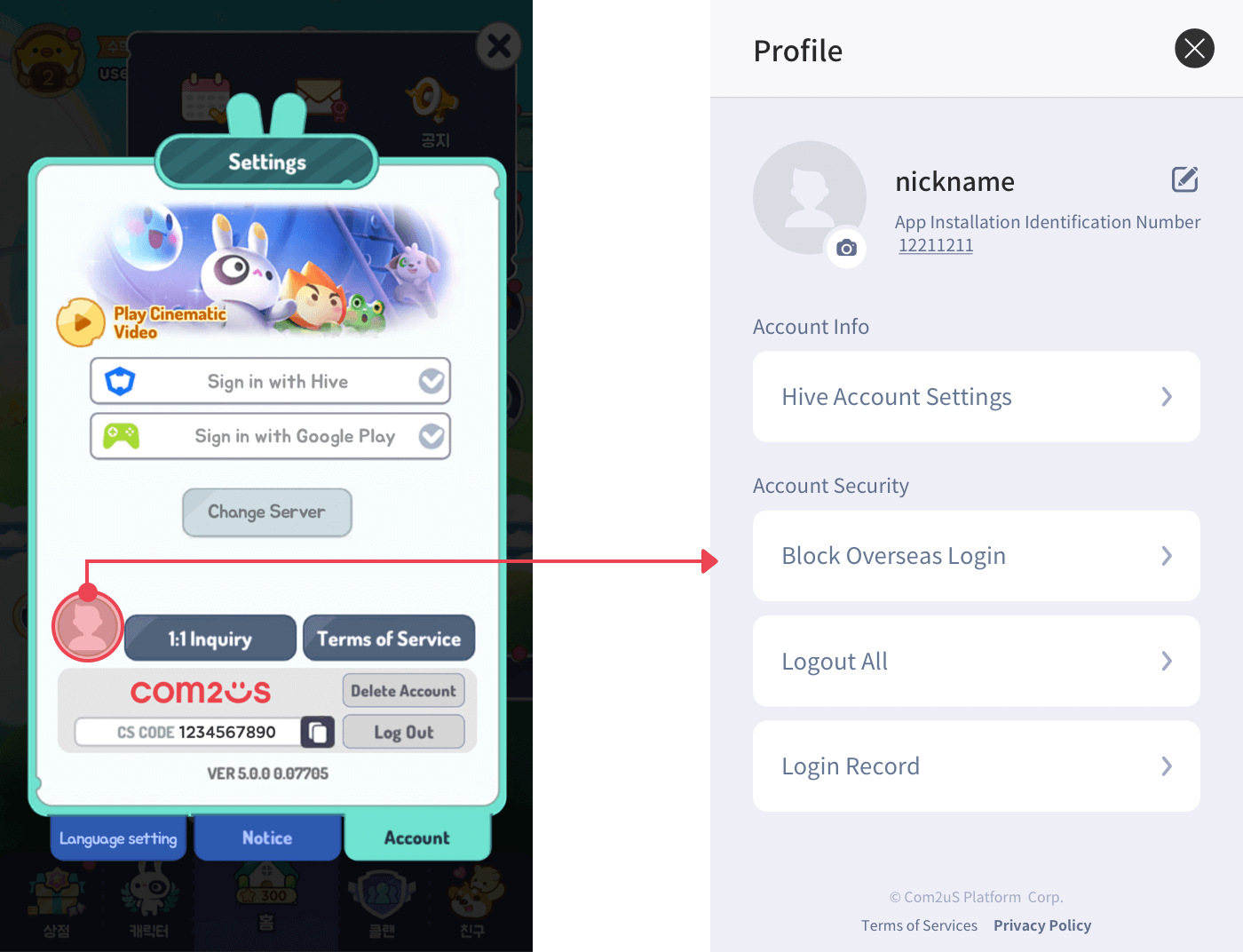
這是一個暴露個人資料的示例代碼。
API 參考: AuthV4.showProfile
API 參考: AuthV4::showProfile
API 參考: AuthV4.showProfile
API 參考: AuthV4.INSTANCE.showProfile
API 參考: AuthV4Interface.showProfile
API 參考: [HIVEAuthV4 showProfile]
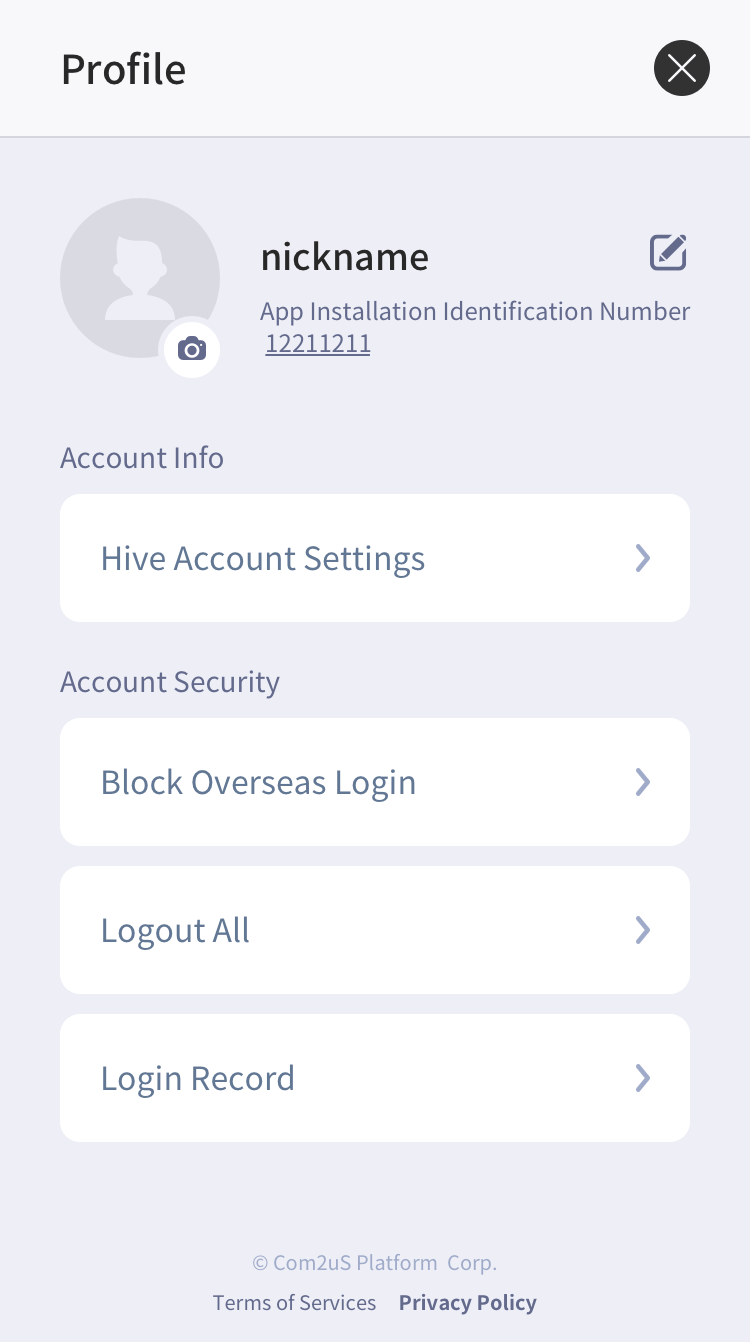
使用個人資料螢幕的方式基本上取決於開發者。然而,如果您提供一個 Hive 會員 IdP,您 必須實現 showProfile()。 這是因為 Hive 會員在個人資料螢幕的 Hive 帳戶設定中提供了更改密碼和撤回功能,如下所示。
| Hive 會員身份提供者整合狀態檔案 | 來賓及其他身份提供者整合狀態檔案 |
|---|---|
 | 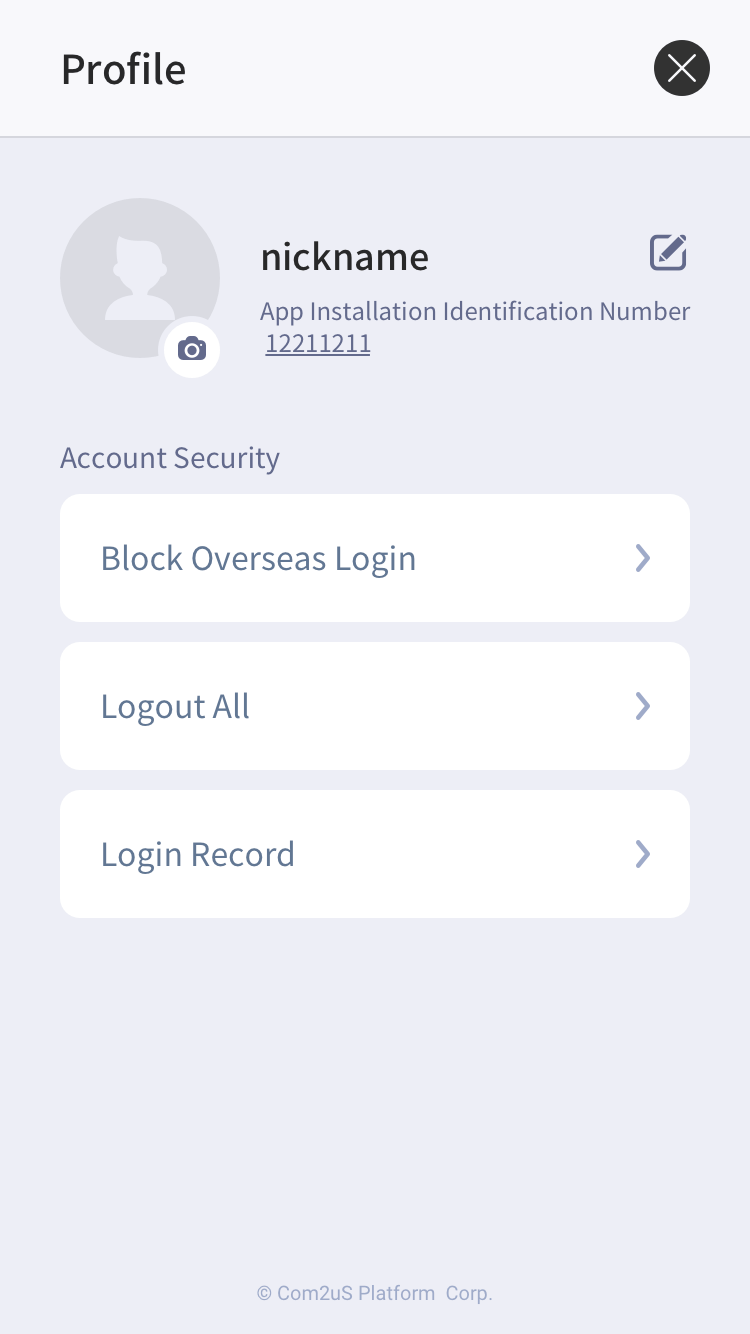 |
即使 Hive 只提供除會員 IdP 以外的 IdP,顯示個人資料畫面仍然可以提供安全功能,例如阻止海外登錄、完全登出和檢查登錄歷史。因此,建議使用 showProfile() 實現個人資料畫面的顯示。
用戶檔案檢查
當用戶登入時,您可以通過調用 AuthV4 類的 getProfile() 方法來獲取用戶資料。資料包含 playerId、用於顯示名稱的 playerName 和用戶縮略圖的 playerImageUrl。
以下是接收個人資料的範例代碼。
API 參考: hive.AuthV4.getProfile
使用 hive;

List<Int64> playerIdList = new List();
playerIdList.Add(0123);
playerIdList.Add(4567);

AuthV4.getProfile(playerIdList, (ResultAPI result, List profileInfoList) => {
    if (!result.isSuccess()) {
return;
    }

    if (profileInfoList != null) {
        foreach (ProfileInfo profileInfo in profileInfoList) {
        // PlayerName: profileInfo.playerName
        // PlayerId: profileInfo.playerId
        }
    }
});
#include "HiveAuthV4.h"

TArray<int64> PlayerIdArray;
PlayerIdArray.Add(1234);
PlayerIdArray.Add(5678);

FHiveAuthV4::GetProfile(PlayerIdArray, FHiveAuthV4OnGetProfileDelegate::CreateLambda([this](const FHiveResultAPI& Result, const TArray<FHiveProfileInfo> ProfileInfoArray) {
        if (!Result.IsSuccess()) {
                return;
        }

        for (const auto& ProfileInfo : ProfileInfoArray)
        {
                // PlayerName: ProfileInfo.PlayerName;
                // PlayerId : ProfileInfo.ProfileInfo;
        }
}));
API 參考: AuthV4::getProfile
#include <HIVE_SDK_Plugin/HIVE_CPP.h>
using namespace std;
using namespace hive;

vector<PlayerID> playerIdList;
playerIdList.push_back(0123);
playerIdList.push_back(4567);

AuthV4::getProfile(playerIdList, [=](ResultAPI const & result, vector<ProfileInfo> const & profileInfoList) {
    if (!result.isSuccess()) {
return;
}

if (profileInfoList != null) {
    for (auto profileInfo : profileInfoList) {
        // PlayerName: profileInfo.playerName
        // PlayerId: profileInfo.playerId
        }
    }
});
API 參考: AuthV4.getProfile
import com.hive.AuthV4
import com.hive.ResultAPI

val playerIdList = arrayListOf<Long>(
    1234,
    4567
)

AuthV4.getProfile(playerIdList, object : AuthV4.AuthV4GetProfileListener {
    override fun onAuthV4GetProfile(result: ResultAPI, profileInfoList: ArrayList<AuthV4.ProfileInfo>?) {
        if (!result.isSuccess) {
            return
        }

        if (profileInfoList != null) {
            for (i in 0 until profileInfoList.size) {
                // PlayerName: profileInfoList[i].playerName
                // PlayerId: profileInfoList[i].playerId
            }
        }
    }
})
API 參考: com.hive.AuthV4.getProfile
import com.hive.AuthV4;
import com.hive.ResultAPI;

ArrayList<Long> playerIdList = new ArrayList<>(Arrays.asList(
        1234L,
        5678L
));

AuthV4.INSTANCE.getProfile(playerIdList, (result, profileInfoList) -> {
    if (!result.isSuccess()) {
        return;
    }

    if (profileInfoList != null) {
        for (AuthV4.ProfileInfo profileInfo : profileInfoList) {
            // PlayerName: profileInfo.getPlayerName();
            // PlayerId: profileInfo.getPlayerId();
        }
    }
});
API 參考: AuthV4Interface.getProfile
import HIVEService

var playerIdList = [Int64]()
playerIdList.append(0123)
playerIdList.append(4567)

AuthV4Interface.getProfile(playerIdList) { result, profileInfoList in
    if !result.isSuccess() {
    return
    }

    if let profileInfoList = profileInfoList {
        for (profileInfo in profileInfoList) {
        // PlayerName: profileInfo.playerName
        // PlayerId: profileInfo.playerId
        }
    }
}
API 參考: HIVEAuthV4:getProfile
#import <HIVEService/HIVEService-Swift.h>

NSMutableArray<NSNumber *> *playerIdList = [[[NSMutableArray] alloc] init];
[playerIdList addObject: [NSNumber numberWithLongLong:0123]];
[playerIdList addObject: [NSNUmber numberWithLongLong:4567]];

[HIVEAuthV4 getProfile: playerIdList handler: ^(HIVEResultAPI *result, NSArray<HIVEProfileInfo *> *profileInfoList) {
    if (![result isSuccess]) {
    return;
    }
    if (profileInfoList != nil) {
        for (HIVEProfileInfo *profileInfo in profileInfoList) {
        // PlayerName: profileInfo.playerName
        // PlayerId: profileInfo.playerId
        }
    }
}];
檢查黑名單
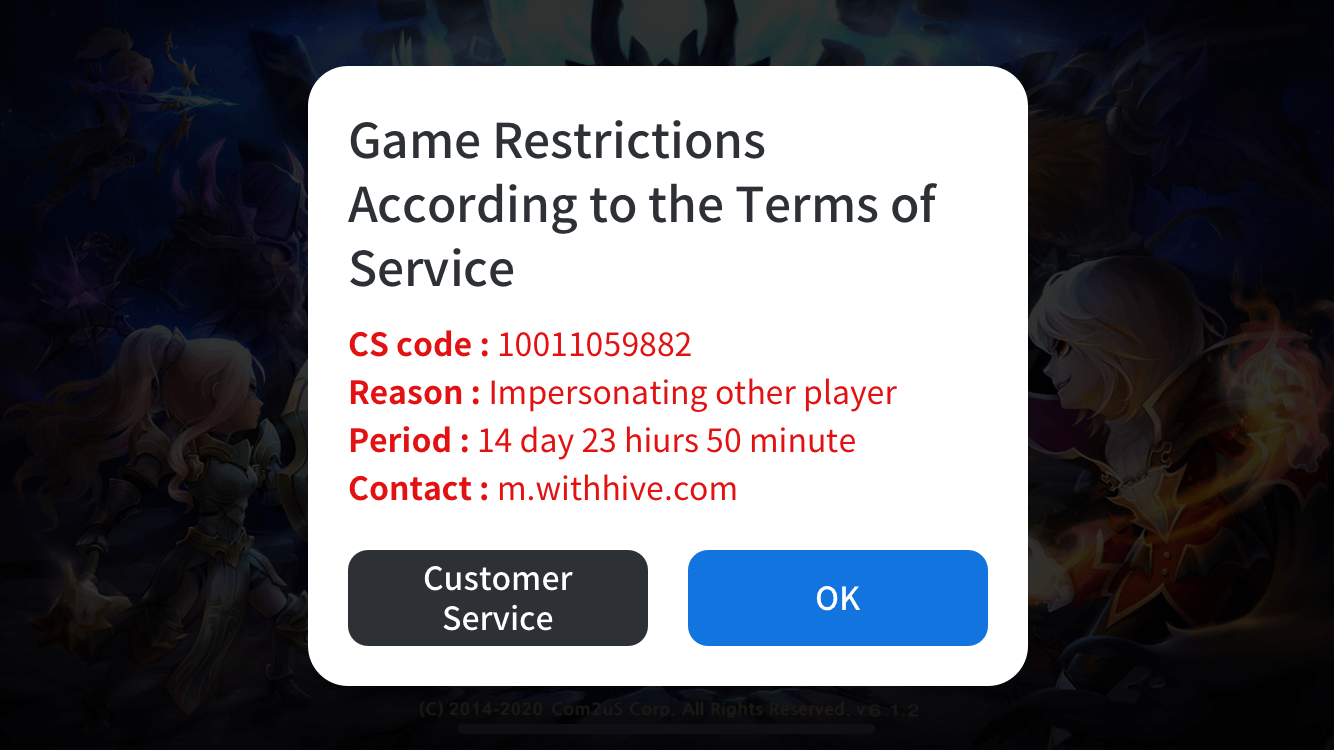
當用戶登錄或與 IdP 同步時,Hive SDK 會自動檢查黑名單並暫停用戶的遊戲。如果您需要在遊戲中檢查用戶暫停的狀態,請使用 checkBlacklist() 方法實時檢查用戶的暫停狀態並限制遊戲進行。根據在 checkBlacklist() 調用時 isShow 參數的值,Hive SDK 將直接顯示暫停狀態彈出窗口或返回自定義暫停狀態彈出窗口的內容。
- 使用提供的懸浮彈出窗口:將
isShow參數設置為true。 -
使用自定義的懸浮彈出窗口:將
isShow參數設置為false。有關彈出數據的更多信息,請參見下面的 Hive SDK 返回的懸浮彈出數據。 -
暫停彈出視窗的範例畫面
Hive SDK 返回的暂停弹出数据
如果调用 checkBlacklist() 方法的结果成功,Hive SDK 将通过 AuthV4MaintenanceInfo 对象返回以下表格中的值。
| 字段名稱 | 描述 | 類型 |
|---|---|---|
| title | 彈出窗口標題 | 字串 |
| message | 彈出窗口內容 | 字串 |
| button | 彈出窗口按鈕上的文本 | 字串 |
| action | 當用戶點擊彈出窗口按鈕時的操作類型 * OPEN_URL: 執行外部瀏覽器傳遞的 URL * EXIT: 結束應用程序 * DONE: 只是關閉維護彈出窗口 | AuthV4MaintenanceActionType 的枚舉類型 |
| url | 外部瀏覽器顯示的 URL。當 action 字段的值為 OPEN_URL 時有效 | 字串 |
| remainingTime | 直到維護完成的剩餘時間(單位:秒)。時間實時刷新,當變為零時,應用程序將終止。 | 整數 |
以下是檢查被暫停用戶的示例代碼。
- 如果不使用 Hive SDK UI (isShow = false)
API 參考: hive.AuthV4.checkBlacklist
#include "HiveAuthV4.h"

bool bIsShow = false;
FHiveAuthV4::CheckBlacklist(bIsShow,
                                                            FHiveAuthV4OnMaintenanceInfoDelegate::CreateLambda([this](const FHiveResultAPI& Result, const TArray<FHiveAuthV4MaintenanceInfo>& AuthV4MaintenanceInfoArray) {
        if (!Result.IsSuccess()) {
                // Request to check for suspension failed
                return;
        }

        if (AuthV4MaintenanceInfoArray.Num() > 0) {
                //  在用户被暂停的情况下
        } else {
                // 如果您是普通用户
        }
}));
API 參考: AuthV4.checkBlacklist
#include <HIVE_SDK_Plugin/HIVE_CPP.h>
using namespace std;
using namespace hive;

bool isShow = false;

AuthV4::checkBlacklist(isShow, [=](ResultAPI const & result, vector<AuthV4MaintenanceInfo> const & maintenanceInfo) {
    if(!result.isSuccess) {
        // Request to check for suspension failed
        return;
    }

    if (maintenanceInfo != null){
        // In case of suspended user
    } else {
        // If you are a general user
    }
});
API Reference: AuthV4.checkBlacklist
    import com.hive.AuthV4
    import com.hive.ResultAPI

    val isShow = false

    AuthV4.checkBlacklist(isShow, object : AuthV4.AuthV4MaintenanceListener {
        override fun onAuthV4Maintenance(result: ResultAPI, maintenanceInfo: ArrayList<AuthV4.AuthV4MaintenanceInfo>?) {
            if (!result.isSuccess) {
                // 请求检查暂停失败
                return
            }

            if (maintenanceInfo != null) {
                // In case of suspended user
            } else {
                // If you are a general user
            }
        }
    })
API 參考: com.hive.AuthV4.checkBlacklist
    import com.hive.AuthV4;
    import com.hive.ResultAPI;

    boolean isShow = false;

    AuthV4.INSTANCE.checkBlacklist(isShow, (result, maintenanceInfo) -> {
        if (!result.isSuccess()) {
            // Request to check for suspension failed
            return;
        }

        if (maintenanceInfo != null) {
            // In case of suspended user
        } else {
            // If you are a general user
        }
    });
API 參考: AuthV4Interface.checkBlacklist
API 參考: HIVEAuthV4:checkBlacklist
    #import <HIVEService/HIVEService-Swift.h>

    BOOL isShow = NO;

    [HIVEAuthV4 checkBlackList: isShow handler: ^(HIVEResultAPI *result, HIVEAuthV4MaintenanceInfo *maintenanceInfo) {
        if (![result isSuccess]) {
        // 请求检查暂停失败
        return;
        }

        if (maintenanceInfo != nil) {
        // In case of suspended user
        } else {
        // If you are a general user
        }
    }];
- 在使用 Hive SDK UI (isShow = true) 的情況下
API 參考: hive.AuthV4.checkBlacklist
// 如果 isShow 為真,Hive SDK 顯示懸浮彈出窗口。
    Boolean isShow = true;

    // Hive SDK AuthV4 請求以檢查用戶是否被暫停。
    AuthV4.checkBlacklist(isShow, (ResultAPI result, List<AuthV4.MaintenanceInfo> maintenanceInfo)=>{
    if (result.isSuccess()) {
        // 在正常用戶的情況下
    }    else if (result.needExit()) {

    // TODO: 實現應用程序的終止。
     // 例) Application.Quit();    }});
#include "HiveAuthV4.h"

// 如果 isShow 為真,Hive SDK 顯示懸浮彈出窗口。
bool bIsShow = true;

// Hive SDK AuthV4 请求检查用户是否被暂停。
FHiveAuthV4::CheckBlacklist(bIsShow,
                                                            FHiveAuthV4OnMaintenanceInfoDelegate::CreateLambda([this](const FHiveResultAPI& Result, const TArray<FHiveAuthV4MaintenanceInfo>& AuthV4MaintenanceInfoArray) {
        if (Result.IsSuccess()) {
                // 正常用户的情况
        } else if (Result.NeedExit() {
                // TODO: 实现应用程序的终止。
                // 例如) UKismetSystemLibrary::QuitGame(GetWorld(), nullptr, EQuitPreference::Quit, false);
        }
}));
API 參考: AuthV4.checkBlacklist
// 如果 isShow 為真,Hive SDK 會顯示懸浮彈出窗口。
    bool isShow = true;

    // Hive SDK AuthV4 請求以檢查用戶是否被暫停。
    AuthV4::checkBlacklist(isShow,  [=](ResultAPI const & result,std::vector<AuthV4MaintenanceInfo> const & maintenanceInfolist){
    if (result.isSuccess()) {
        // 正常用戶的情況
    }    else if (result.needExit()) {
        // TODO: 實現應用程序的終止。
        // Cocos2d-x 引擎的用戶
        // 例如) exit(0);
        // Unreal 引擎用戶
        // 例) UKismetSystemLibrary::QuitGame(GetWorld(), nullptr, EQuitPreference::Quit, false);    }});
API 參考: AuthV4.checkBlacklist
// 如果 isShow 為真,Hive SDK 顯示懸浮彈出窗口。
    val isShow = true

 // Hive SDK AuthV4 請求以檢查用戶是否被暫停。
AuthV4.checkBlacklist(isShow, object : AuthV4.AuthV4MaintenanceListener {
 override fun onAuthV4Maintenance(
result: ResultAPI,
maintenanceInfo: ArrayList<AuthV4.AuthV4MaintenanceInfo>?    ) {        if (result.isSuccess) {
    // 在正常用戶的情況下
} else if (result.needExit()) {
    // TODO: 實現應用程序的終止。
    // 例如) exitProcess(0)        }    }})
API 參考: com.hive.AuthV4.checkBlacklist
// 如果 isShow 為真,Hive SDK 顯示懸浮彈出窗口。
boolean isShow = true;

// Hive SDK AuthV4 請求以檢查用戶是否被暫停。
AuthV4.checkBlacklist(isShow, new AuthV4.AuthV4MaintenanceListener() {
@Override
public void onAuthV4Maintenance(ResultAPI result, ArrayList<AuthV4.AuthV4MaintenanceInfo> maintenanceInfo) {
    if (result.isSuccess()) {
        // 正常用戶的情況
    }        else if (result.needExit()) {
        // TODO: 實現應用程序的終止。
        // 例如) System.exit(0);        }    }});
API 參考: AuthV4Interface.checkBlacklist
API 參考: HIVEAuthV4:checkBlacklist
// 如果 isShow 是 YES,Hive SDK 顯示懸浮彈出窗口。
    BOOL isShow = YES;

// Hive SDK AuthV4 請求以檢查用戶是否被暫停。
[HIVEAuthV4 checkBlacklist:isShow handler:^(HIVEResultAPI *result, NSArray<HIVEAuthV4MaintenanceInfo *> *maintenanceInfolist) {
if (result.isSuccess) {
    // 正常用戶的情況
}    else if (result.needExit) {
    // TODO: 實現應用程序的終止。
    // 例) exit(0);             }}];
使用用戶的電子郵件地址
遊戲公司提供一個功能,以便在已登錄的用戶個人資料信息中收集電子郵件信息。要收集電子郵件信息,您必須在 Hive 控制台中啟用該功能。
首先,您必须从下面的IDP列表中获得“可以收集电子邮件的IDP”的许可,以收集电子邮件。
- 可用於電子郵件收集的身份提供者:Google、Facebook、華為(Android)、會員、Apple(iOS)
- 無法從身份提供者收集電子郵件:Google Play 遊戲、Apple 遊戲中心、QQ、VK、微信、Line、Weverse, Steam, X
<
在呼叫明確登入API後,您可以通過引用PlayerInfo類實例中的providerInfoData來獲取已登入用戶的電子郵件地址,該實例在回調中返回。
使用 ProviderType 作為 providerInfoData 中的鍵來獲取 ProviderInfo。更多詳細信息,請參見下面的示例代碼。
API 參考: hive.AuthV4.showSignIn
// 請求 Hive SDK AuthV4 認證 UI
AuthV4.showSignIn((ResultAPI result, AuthV4.PlayerInfo playerInfo)=>{
if (result.isSuccess()) {
    // 認證成功
    // playerInfo: 已認證的用戶信息

    // 獲取電子郵件信息的示例
    foreach (KeyValuePair<AuthV4.ProviderType , AuthV4.ProviderInfo> entry in playerInfo.providerInfoData) {

        AuthV4.ProviderInfo providerInfo = entry.Value;
        if(providerInfo.providerEmail != null && providerInfo.providerEmail != "") {
            string email = providerInfo.providerEmail;
            break;
         }
        }
    }
    else if (result.needExit()) {
        // TODO: Implement the termination of the app
        // Example) Application.Quit();
    }
});
#include "HiveAuthV4.h"

// 請求 Hive SDK AuthV4 認證 UI
FHiveAuthV4::ShowSignIn(FHiveAuthV4OnSignInDelegate::CreateLambda([this](const FHiveResultAPI& Result, const FHivePlayerInfo& PlayerInfo) {
        if (Result.IsSuccess()) {
                // 認證成功
      // playerInfo: 已認證用戶信息

                // 獲取電子郵件信息的示例
                for (const auto& ProviderInfoEntry : PlayerInfo.ProviderInfoData) {
                        FHiveProviderInfo ProviderInfo = ProviderInfoEntry.Value;
                        FString Email = ProviderInfo.ProviderEmail;
                }
        } else if (Result.NeedExit()) {
                 // TODO: 實現應用程序的終止
      // Cocos2d-x 引擎的用戶
      // ex) UKismetSystemLibrary::QuitGame(GetWorld(), nullptr, EQuitPreference::Quit, false);
        }
}));
API 參考: AuthV4::showSignIn
// 請求 Hive SDK AuthV4 認證 UI
AuthV4::showSignIn([=](ResultAPI const & result, PlayerInfo const & playerInfo) {
    if (result.isSuccess()) {
        // 認證成功
        // playerInfo: 已認證的用戶信息

        // 獲取電子郵件信息的示例
        for(auto it = playerInfo.providerInfoData.begin(); it != playerInfo.providerInfoData.end(); ++it) {
            hive::ProviderInfo providerInfo = it->second;
            if(!providerInfo.providerEmail.empty()) {
                std::string email = providerInfo.providerEmail;
                break;
            }
        }
    }
    else if (result.needExit()) {
        // TODO: 實現應用程序的終止
        // Cocos2d-x 引擎的用戶
        // ex) exit(0);
        // Unreal 引擎用戶
        // 示例) UKismetSystemLibrary::QuitGame(GetWorld(), nullptr, EQuitPreference::Quit, false);
    }
});
API 參考: com.hive.AuthV4.showSignIn
// 請求 Hive SDK AuthV4 認證 UI
AuthV4.showSignIn(object : AuthV4.AuthV4SignInListener{
override fun onAuthV4SignIn(result: ResultAPI, playerInfo: AuthV4.PlayerInfo?) {
    if (result.isSuccess) {
        // 認證成功
        // playerInfo: 已認證的用戶信息

        // 獲取電子郵件信息的示例
        playerInfo?.let {
            for ((key, value) in it.providerInfoData) {
                var providerInfo: AuthV4.ProviderInfo = value
                if(providerInfo.providerEmail.isNotEmpty()) {
                    val email = providerInfo.providerEmail
                    break
                }
            }
        }
    } else if (result.needExit()) {
            // TODO: 實現應用程序的終止
            // ex) exitProcess(0)
        }
    }
})
API 參考: com.hive.AuthV4.showSignIn
// Request Hive SDK AuthV4 Authentication UI
AuthV4.showSignIn(new AuthV4.AuthV4SignInListener() {
    @Override
    public void onAuthV4SignIn(ResultAPI result, AuthV4.PlayerInfo playerInfo) {

        if (result.isSuccess()) {
            // 認證成功
            // playerInfo: 已認證的用戶信息

            // 獲取電子郵件信息的示例
            if(playerInfo != null) {
                for (Map.Entry<AuthV4.ProviderType , AuthV4.ProviderInfo> entry : playerInfo.getProviderInfoData().entrySet()) {
                    AuthV4.ProviderInfo providerInfo = entry.getValue();
                    if (providerInfo.getProviderEmail() != "") {
                        String email = providerInfo.getProviderEmail();
                        break;
                    }
                }
            }
        }
        else if (result.needExit()) {
            // TODO: 實現應用程序的終止
            // 示例) System.exit(0);
        }
    }
});
API 參考: HIVEAuthV4:showSignIn
var email = String()

// 請求 Hive SDK AuthV4 認證 UI
AuthV4Interface.showSignIn { (result, playerInfo) in

    如果 result.isSuccess() {
        // 認證成功
        // playerInfo: 認證用戶信息

        // 獲取電子郵件資訊的範例
        if let playerInfo = playerInfo {
            // 找到提供者資訊中存在 providerEmail 的提供者(當前登入的提供者)
            for key in playerInfo.providerInfoData.keys {
                if let providerInfo = playerInfo.providerInfoData[key],
                providerInfo.providerEmail.count > 0 {
                    // providerEmail != ""
                    email = providerInfo.providerEmail
                    break
                }
            }
        }
    } else if result.needExit() {
        // TODO: 實現應用程式的終止
        // 範例) exit(0)
    }
}
API 參考: HIVEAuthV4:showSignIn
__block NSString* email = @"";

// 請求 Hive SDK AuthV4 認證 UI
[HIVEAuthV4 showSignIn:^(HIVEResultAPI *result, HIVEPlayerInfo *playerInfo) {

    if([result isSuccess]){
        // authentication success
        // playerInfo: Authenticated user information

        // 獲取電子郵件信息的示例
        if(playerInfo != nil) {
            // 找到存在 providerEmail 的 providerInfo(當前登錄的提供者)
            for (NSString* key in playerInfo.providerInfoData.allKeys) {
                HIVEProviderInfo* providerInfo = playerInfo.providerInfoData[key];
                if (providerInfo != nil && providerInfo.providerEmail.length > 0) {
                    // providerEmail != ""
                    email = providerInfo.providerEmail;
                    break;
                }
            }
        }
    } else if ([result needExit]) {
        // TODO: 實現應用程序的終止
        // ex) exit(0);
    }
}];
Note
客戶登入和自訂登入在ProviderInfo中沒有電子郵件資訊。它被返回為空字符("")。
如果沒有用戶電子郵件信息,則ProviderInfo中的電子郵件信息將返回為空字符("")。
使用者身份驗證資訊
成功登入後,呼叫 AuthV4.getPlayerInfo 來驗證已登入使用者的身份驗證資訊。無需網路通訊,無需公開任何 UI,即可立即返回目前執行應用程式的已登入使用者的身份驗證資訊。
以下是呼叫 AuthV4.getPlayerInfo 的程式碼範例。
API 參考:AuthV4.getPlayerInfo
API 參考:AuthV4::getPlayerInfo
API 參考:AuthV4.getPlayerInfo
API 參考:[HIVEAuthV4 showProfile]
方法呼叫後傳回的身份驗證資訊的組成如下所示。
| 欄位名稱 | 說明 | 類型 |
| playerId | Hive SDK 玩家 ID | Long |
| playerName | Hive SDK 使用者名稱 | String |
| playerImageUrl | Hive SDK 使用者設定檔 URL | String |
| accessToken | Hive SDK 標準 JWT | String |
| playerToken | Hive SDK 在登入驗證內部使用的權杖 | String |
| did | Hive SDK 裝置識別碼 | String |
| providerInfoData | 連結至登入帳戶的 IdP 資訊 | Map |
| customProviderInfoData | 連結至登入帳戶的自訂 IdP 資訊 | Map |
| isNewUser | Hive SDK 分析標準的新使用者判斷 | Boolean |