Unreal Engine 5
本指南說明安裝 Hive SDK 後需要執行的任務。
設定自動旋轉螢幕功能
當螢幕方向設定為同時支援橫向和直向時,需要進行以下設定。
Android
對於 Android 應用程式建置,如果將螢幕方向設定為同時支援橫向和直向,則需要進行以下程式碼修改,才能使自動旋轉螢幕功能正常運作。
- 前往 /Engine/Build/Android/Java/src/com/epicgames/unreal/GameActivity.java.template。
- 新增
HiveActivity.onConfigurationChanged()API。@Override public void onConfigurationChanged(Configuration newConfig) { HiveActivity.onConfigurationChanged(this, newConfig); // Add super.onConfigurationChanged(newConfig); // forward the orientation boolean bPortrait = newConfig.orientation == Configuration.ORIENTATION_PORTRAIT; nativeOnConfigurationChanged(bPortrait); }
iOS
Hive SDK Unreal Engine 5 iOS 不需要針對螢幕自動旋轉進行額外設定。
設定 entitlements (iOS)
用於應用程式簽章的 entitlements 檔案由應用程式專案直接管理,並透過 Unreal Engine 的 PremadeIOSEntitlements 設定指定。
為使遠端推送通知、Apple 登入、Universal Link 等 Hive SDK 主要功能正常運作,entitlements 檔案必須包含這些功能對應的權限項目。
-
在應用程式專案中建立 entitlements 檔案。例如:Build/IOS/YourGame.entitlements。以下是基於 Hive SDK 功能的設定範例。
<?xml version="1.0" encoding="UTF-8"?> <!DOCTYPE plist PUBLIC "-//Apple//DTD PLIST 1.0//EN" "http://www.apple.com/DTDs/PropertyList-1.0.dtd"> <plist version="1.0"> <dict> <key>application-identifier</key> <string>{Team ID}.{Bundle ID}</string> <key>com.apple.developer.team-identifier</key> <string>{Team ID}</string> <!-- 開發建置為 true,發佈建置為 false --> <key>get-task-allow</key> <false/> <key>aps-environment</key> <string>production</string> <key>com.apple.developer.applesignin</key> <array> <string>Default</string> </array> <key>com.apple.developer.associated-domains</key> <array> <string>applinks:{遊戲使用的網域}</string> </array> <key>com.apple.developer.game-center</key> <true/> </dict> </plist> -
Hive SDK 各功能所需的 entitlement 項目如下。請僅包含應用程式使用的功能對應項目,這些功能也必須在 provisioning profile 中作為 capability 啟用。關於各項目的詳細說明,請參閱 Apple 官方文件。
使用的功能 所需 entitlement 通用(應用程式簽章) application-identifier、com.apple.developer.team-identifier- 將{Team ID}、{Bundle ID}替換為遊戲的值Remote Push aps-environment- 開發環境為development,發佈環境為productionApple 登入 (IdP) com.apple.developer.applesigninUniversal Link(Deep Link/邀請連結) com.apple.developer.associated-domains- 網域設定請參閱設定 Universal LinkGame Center 登入 (IdP) com.apple.developer.game-center年齡聲明(AgeRange 模組) com.apple.developer.declared-age-range- 詳情請參閱 App Store 合規 -
在 Unreal Editor 選單中點擊 Edit > Project Settings,然後在左側面板中選擇 Platforms > Xcode Project。在 Entitlements 區段指定已建立的 entitlements 檔案。
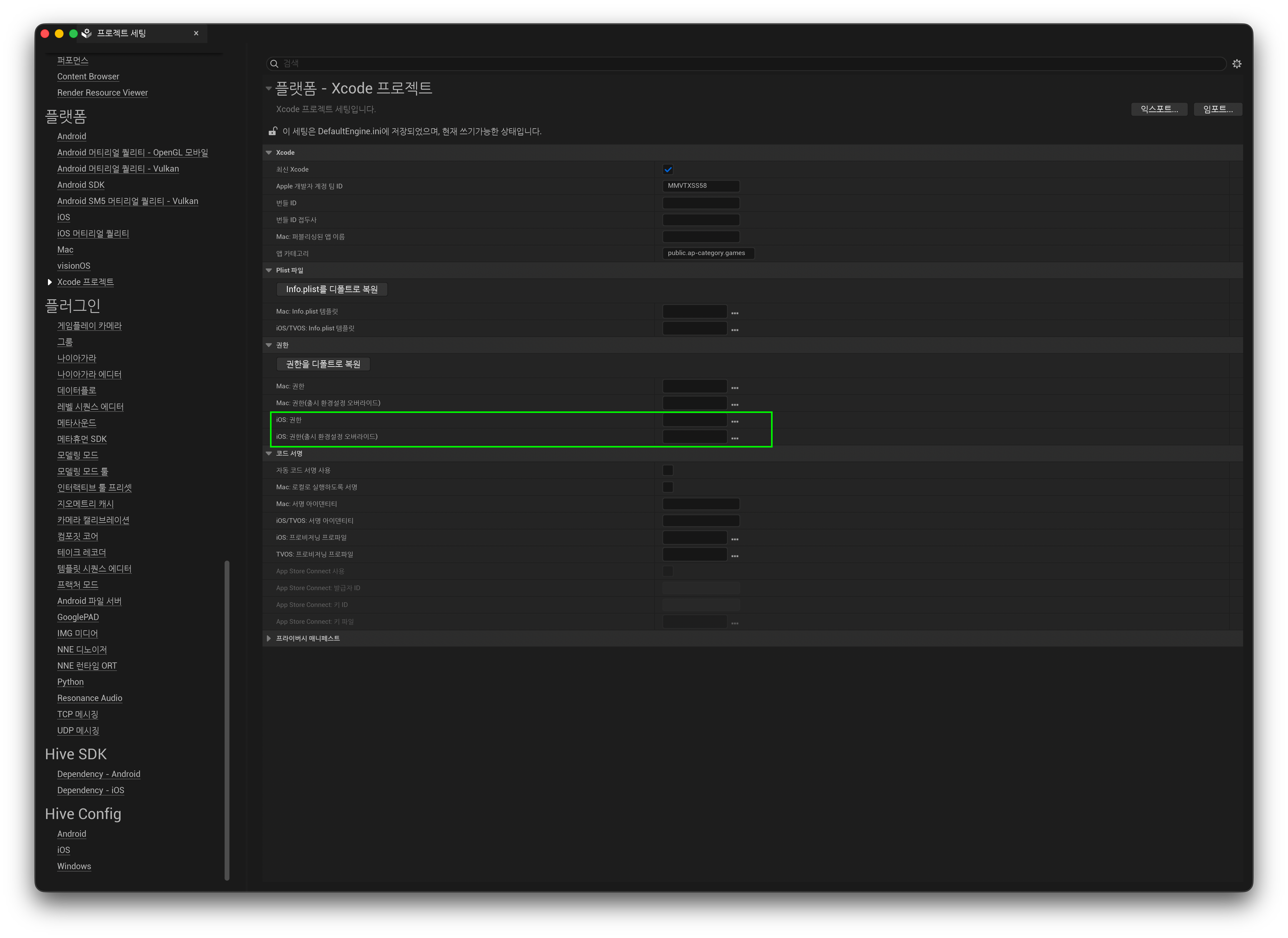
項目 說明 iOS: Entitlements 用於應用程式簽章的 entitlements 檔案 iOS: Entitlements (override shipping configuration) 若 Shipping 建置使用其他檔案,請在此指定 設定將按如下形式儲存到 Config/DefaultEngine.ini。也可以直接編輯該檔案來指定。
-
建置後,請確認 entitlements 是否已套用到應用程式。
Note
- 使用
PremadeIOSEntitlements指定檔案後,該檔案會在 iOS 簽章階段原樣套用。- 缺少必要項目時:Push、Apple 登入等相關功能將無法正常運作。
- 包含不支援的項目時:如果 entitlements 檔案中包含未在 provisioning profile 中註冊的權限,應用程式安裝和程式碼簽章驗證將失敗。
- Hive SDK 外掛程式的 Plugins/HIVESDK/Source/HiveSDKiOS/template/ 路徑中包含一個範例 entitlements 檔案,供參考使用。
Warning
範例 entitlements 檔案出於測試目的啟用了幾乎所有權限項目。請勿直接複製到專案中使用。務必僅選擇並使用遊戲服務所需的有效項目。
套用 HIVEAppDelegate (iOS)
從 Hive SDK v4 26.4.1 開始,HIVEAppDelegate swizzling 會在 Hive SDK 外掛程式內部自動執行。應用程式啟動時外掛程式會自動處理,因此無需在應用程式程式碼中進行額外操作。
刪除 v4 26.4.1 之前版本的既有整合程式碼
如果正在使用早於 Hive SDK v4 26.4.1 的版本,請在更新時刪除之前的修改。
-
刪除手動呼叫 HIVEAppDelegate 的程式碼:參考舊指南中的「套用 HIVEAppDelegate (iOS)」步驟,從專案中刪除應用程式初始化時新增的如下程式碼區塊。
#if PLATFORM_IOS UIApplication * dummyApplication = [UIApplication sharedApplication]; Class clzHIVEAppDelegate = NSClassFromString(@"HIVEAppDelegate"); SEL selApplicationDidFinishLaunchingWithOptions = NSSelectorFromString(@"application:didFinishLaunchingWithOptions:"); if( clzHIVEAppDelegate != nil && [clzHIVEAppDelegate respondsToSelector:selApplicationDidFinishLaunchingWithOptions] ) { NSMethodSignature *method = [clzHIVEAppDelegate methodSignatureForSelector:selApplicationDidFinishLaunchingWithOptions]; if (method != nil) { NSInvocation *invocation = [NSInvocation invocationWithMethodSignature:method]; [invocation setSelector:selApplicationDidFinishLaunchingWithOptions]; [invocation setTarget:clzHIVEAppDelegate]; [invocation setArgument:(void*)&dummyApplication atIndex:2]; NSDictionary *localLaunchOptions = [IOSAppDelegate GetDelegate].launchOptions; if( localLaunchOptions != nil ) { [invocation setArgument:(void*)&localLaunchOptions atIndex:3]; } [invocation invoke]; } } #endif -
刪除 Deep Link 委派訂閱程式碼:參考舊指南中的「為 Deep Link 設定新增 Promotion 程式碼 (iOS)」步驟,刪除新增到
GameInstance等類別中的如下訂閱和處理常式程式碼。-
處理常式內部邏輯可能根據所使用的介面,以
Promotion::processURI(...)或FHivePromotion::ProcessURI(...)的形式實作。// Subscription code (GameInstance::Init, etc.) - remove FIOSCoreDelegates::OnOpenURLwithOptions.AddUObject(this, &UMyGameInstance::ApplicationOpenURL); // Handler - remove (including the declaration in the header) void UMyGameInstance::ApplicationOpenURL(UIApplication* application, NSURL* url, NSDictionary* options) { Promotion::processURI(std::string([[url absoluteString] UTF8String])); }
-
-
刪除 Blueprint bootstrap trigger 呼叫:刪除應用程式中自訂並在 Blueprint 中呼叫的所有 trigger 函式(例如
RemoveOpenURLDelegate())及其對應的呼叫節點。如果上述應用程式內委派訂閱已正確刪除,直接套用到自訂引擎中的既有 openURL 相關修改程式碼(
IOSAppDelegate.h、IOSAppDelegate.cpp)不會影響引擎行為。因此,可以保留該程式碼,無需刪除或回滾。