個人符合
個人配對用於用戶希望單獨參加遊戲時。
SDK中的配對操作流程
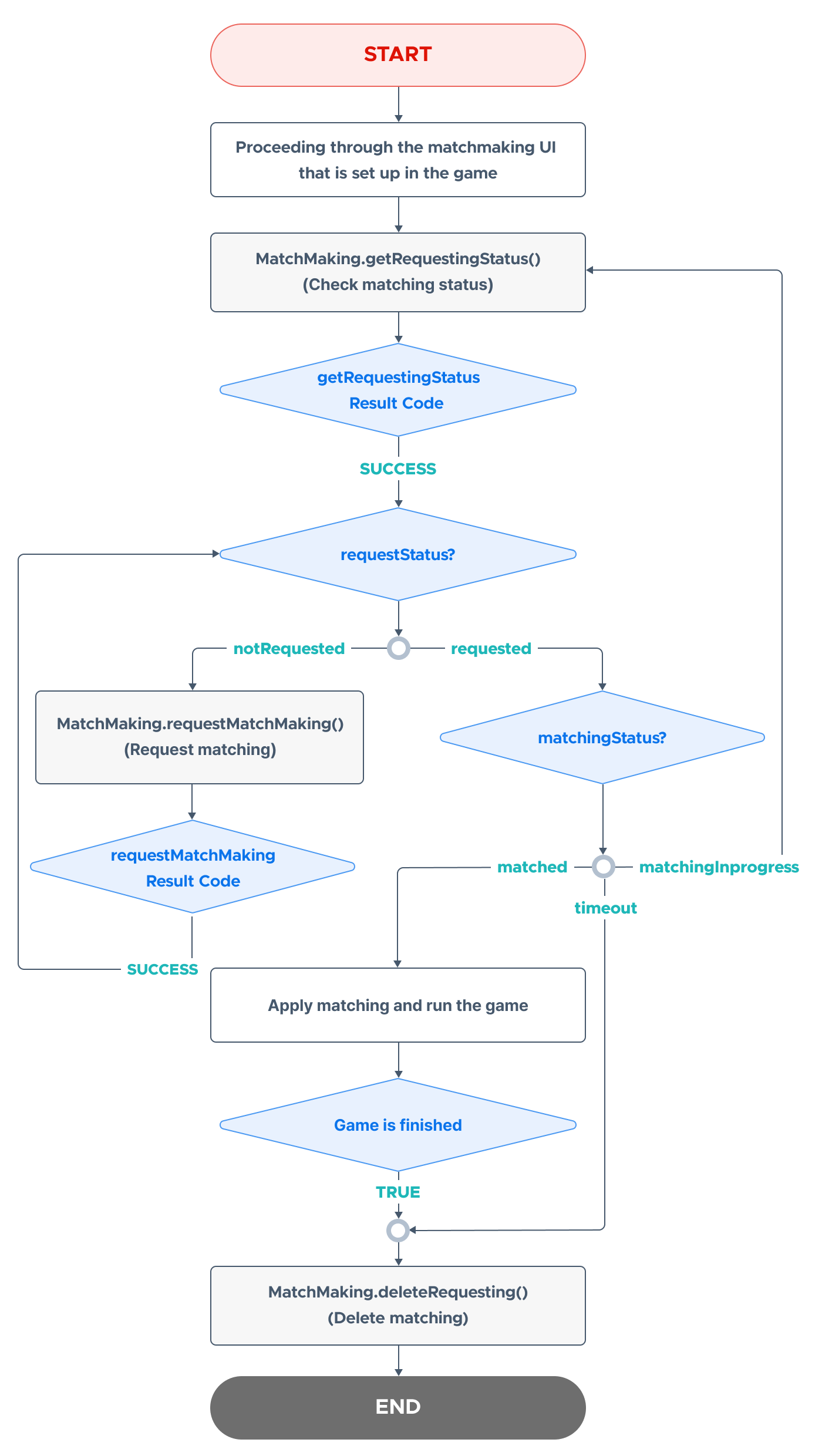
在使用 Hive SDK 實現個人配對時,操作的整體流程如下面的圖所示。
匹配請求
請求每個用戶的匹配。
在發送請求之前,您必須在 Hive 控制台中註冊與 matchId 相對應的比賽信息。
在请求匹配时,您需要提供分数 point(一个从 0 到小于 10^10 的整数)和额外信息 extraData(256 个字符以内的信息,例如昵称、等级、国家等)作为参数。
Warning
如果您在已有匹配进行时再次请求匹配,回调函数将返回错误值(MatchMakingResponseError),而不会停止现有的匹配。 因此,请务必在请求匹配之前先使用 检查匹配状态 检查匹配状态。
這裡是一個匹配請求的示例代碼。
API 參考: MatchMaking .requestMatchMaking
using hive;
        int matchId = 25;       // matchId 註冊在控制台
        int point = 300;            // 用於比賽的點數
        string extraData = "你的額外資料";    // 用於比賽的附加信息
        MatchMaking.requestMatchMaking(matchId, point, extraData, (ResultAPI result, MatchMaking.MatchMakingData data) => {
                    if (result.isSuccess()) {
                            // 呼叫成功
                    } else {
                            // 呼叫失敗。請參見下面的錯誤代碼
                    }
});
API 參考: MatchMaking ::requestMatchMaking
#include <HIVE_SDK_Plugin/HIVE_CPP.h>
        using namespace std;
        using namespace hive;

        int matchId = 25;           // matchId registered in the console
        int point = 300;                // points used for the match
        string extraData = "your extraData";    // additional information to be used for the match

        MatchMaking::requestMatchMaking(matchId, point, extraData, [=](ResultAPI const & result, MatchMakingData data) {
                    if (result.isSuccess()) {
                            // call successful
                    } else {
                            // Call failed. See error code below
                    }
});
API 參考: MatchMaking.requestMatchMaking
import com.hive.MatchMaking
        import com.hive.ResultAPI
        val matchId = 25            // 在控制台中注册的 matchId
        val point = 300             // 用于比赛的积分
        val extraData = "your extraData";   // 用于比赛的附加信息
        MatchMaking.requestMatchMaking(matchId, point, extraData, object : MatchMaking.MatchMakingDataListener {
                    override fun onMatchMakingData(result: ResultAPI, data: MatchMaking.MatchMakingDataListener) {
                            if (result.isSuccess) {
                                    // 调用成功
                            } else {
                                    // 调用失败。请参见下面的错误代码
                            }
                    }
})
API 參考: MatchMaking .requestMatchMaking
import com.hive.MatchMaking;
        import com.hive.ResultAPI;
        int matchId = 25;           // matchId 註冊在控制台
        int point = 300;                // 用於比賽的分數
        String extraData = "你的額外數據";    // 用於比賽的附加信息
        MatchMaking.INSTANCE.requestMatchMaking(matchId, point, extraData, (result, data) -> {
                    if (result.isSuccess()) {
                            // 呼叫成功
                    } else {
                            // 呼叫失敗。請參見下面的錯誤代碼
                    }
});
API 參考: MatchMakingInterface.requestMatchMaking
import HIVEService
let matchId: Int = 25                   // matchId registered in the console
let point: Int = 300                        // points used for the match
let extraData: String? = "your extraData"   // additional information to use for the match
MatchMakingInterface.requestMatchMaking(matchId: matchId, point: point, extraData: extraData) { result, data in
        if result.isSuccess() {
        // call successful
        }
        else {
        // Call failed. See error code below
        }
}
API 參考: HIVEMatchMaking requestMatchMaking
#import "HIVEService.h"
NSInteger matchId = 25;                     // matchId registered in the console
NSInteger point = 300;                      // points used for the match
NSString *extraData = @"your extraData";    // additional information to be used for the match

[MatchMakingInterface requestMatchMakingWithMatchId:matchId
                                              point:point
                                          extraData:extraData
                                         completion:^(HIVEResult *result, id data) {
    if ([result isSuccess]) {
        // call successful
    } else {
        // Call failed. See error code below
    }
}];
呼叫 requestMatchMatking() 和 getRequestingStatus() 方法的結果返回一個 MatchMakingData 物件。
MatchMakingData 物件結構
在回應配對請求和檢查配對狀態請求時返回的物件。它包括在請求過程中輸入的信息和配對結果信息。
| 字段名稱 | 描述 | 類型 |
|---|---|---|
| requestPlayerId | 請求比賽的用戶的玩家ID | Long |
| requestGameIndex | 比賽遊戲索引 | Int |
| requestMatchId | 請求的比賽ID(在Hive控制台中註冊的格式) | Int |
| requestStatus | 比賽請求狀態(requested:已請求比賽,notRequested:未請求(或,沒有已匹配的進行中的比賽)) | String |
| requestTimeUtc | 比賽請求時間(例如:2025-01-02T11:13:50.96) | String |
| requestPoint | 比賽分數 | Int |
| requestExtraData | 在比賽請求期間提供的附加信息(如果在請求期間使用了extraData則存在) | String |
| matchingStatus | 比賽進度狀態(matchingInProgress:正在匹配,timeout:在時間限制內未發生匹配,matched:匹配成功) | String |
| matchingType | 是否為團隊參加或個人參加(如果matchingStatus為matched則存在)(team:團隊,player:個人,unknown:如果無法確認匹配) | String |
| matchingId | 分配給成功匹配的ID(如果matchingStatus為matched則存在)(例如:539:21_2025-01-02T11:45:55.25_1) | String |
| matchingPlayerInfoList | 匹配用戶的信息列表 MatchingResultPlayerInfo(如果matchingStatus為matched則存在,個人參加時出現) | Array |
| matchingTeamInfoList | 團隊信息列表 MatchingResultTeamInfo(如果matchingStatus為matched則存在,團隊參加時出現) | Array |
MatchingResultTeamInfo 物件結構
這是當一個隊伍參加比賽並且匹配狀態為匹配時傳遞的物件。它包括隊伍索引和有關屬於該隊伍的用戶的信息。
| 字段名稱 | 描述 | 類型 |
|---|---|---|
| teamIndex | 團隊的唯一索引 | Int |
| playerInfos | 隸屬於該團隊的用戶信息列表 MatchingResultPlayerInfo | Array |
Note
當請求個人配對時,個人配對和團隊配對均可用,並且根據比賽結果,將提供相應的 matchingPlayerInfoList 或 matchingTeamInfoList。
MatchingResultPlayerInfo 資料結構
這是當用戶參加個人比賽並且匹配狀態為匹配時發送的物件。它包含有關參加比賽的用戶的信息。
| 字段名稱 | 描述 | 類型 |
|---|---|---|
| playerId | 匹配用戶的 playerId | Long |
| point | 匹配用戶的點數 | Int |
| extraData | 匹配用戶提供的附加信息(如果用戶在請求時使用了 extraData,則存在) | String |
檢查匹配狀態
檢查參加個人比賽的用戶的匹配狀態。
當調用匹配狀態檢查方法時,它會返回以下三個匹配狀態之一。
- 匹配進行中 (matchingStatus: matchingInProgress)
- 匹配成功 (matchingStatus: matched)
- 超時 (matchingStatus: timeout)
這是一個檢查匹配狀態的示例代碼。
API 參考: MatchMaking .getRequestingStatus
API 參考: MatchMaking ::getRequestingStatus
#include <HIVE_SDK_Plugin/HIVE_CPP.h>
        using namespace std;
        using namespace hive;

        int matchId = 25;           // 在控制台中注册的 matchId

        MatchMaking::getRequestingStatus(matchId, [=](ResultAPI const & result, MatchMakingData data) {
                    if (result.isSuccess()) {
                            // call successful
                    } else {
                            // Call failed. See error code below
                    }
});
API 參考: MatchMaking.getRequestingStatus
import com.hive.MatchMaking
        import com.hive.ResultAPI
        val matchId = 25            // 控制台中注册的 matchId
        MatchMaking.getRequestingStatus(matchId, object : MatchMaking.MatchMakingDataListener {
                    override fun onMatchMakingData(result: ResultAPI, data: MatchMaking.MatchMakingDataListener) {
                            if (result.isSuccess) {
                                    // 调用成功
                            } else {
                                    // 调用失败。请查看下面的错误代码
                            }
                    }
})
配對進行中
如果匹配状态为进行中,您需要反复调用该方法来检查匹配状态,以查看它是否已达到匹配状态。
建議在3到10秒的間隔內呼叫重複呼叫循環。根據應用程序實現的特性,也可以延長時間間隔。
匹配成功
如果匹配状态为匹配,则开发者的游戏将被启动。换句话说,通过 Hive SDK 连接的用户如果匹配成功,可以参与开发者的游戏。
超時
如果匹配状态是超时(matchingStatus: timeout),您需要删除现有匹配并再次请求匹配。
刪除匹配
刪除現有的匹配。
您必須在符合以下一個或多個情況時刪除比賽。
- 如果用戶取消比賽
- 如果匹配狀態超時 (matchingStatus: timeout)
-
如果用戶之間的遊戲正常完成
※ 在更新遊戲伺服器或遊戲客戶端上的比賽結果(排名、分數、勝負狀態等)後,您必須請求刪除比賽
這是一個刪除匹配的示例代碼。
API 參考: MatchMaking .deleteRequesting
API 參考: MatchMaking ::deleteRequesting
API 參考: MatchMaking.deleteRequesting
API 參考: HIVEMatchMaking deleteRequesting
錯誤代碼
| 錯誤代碼 | 訊息 | 描述 |
| NEED_INITIALIZE | MatchMakingNotInitialized | 如果SDK設置尚未完成(AuthV4.setup) |
| INVALID_SESSION | MatchMakingNeedSignIn | 如果尚未完成AuthV4登錄 |
| RESPONSE_FAIL | MatchMakingResponseError | - 由於API調用期間參數不正確而失敗 - 由於網絡問題而失敗 - 在已處於匹配請求狀態時請求再次匹配 - 請求刪除未請求的匹配 |