วิธีการใช้ Fluentd Docker
การส่งบันทึกด้วย fluentd โดยใช้ docker
คุณสามารถส่งบันทึกไปยังเซิร์ฟเวอร์วิเคราะห์โดยใช้ Docker โดยไม่ต้องติดตั้ง Fluentd เมื่อคุณรัน hive_fluentd.sh มันจะสร้างและเรียกใช้ภาพ Docker โดยอัตโนมัติ
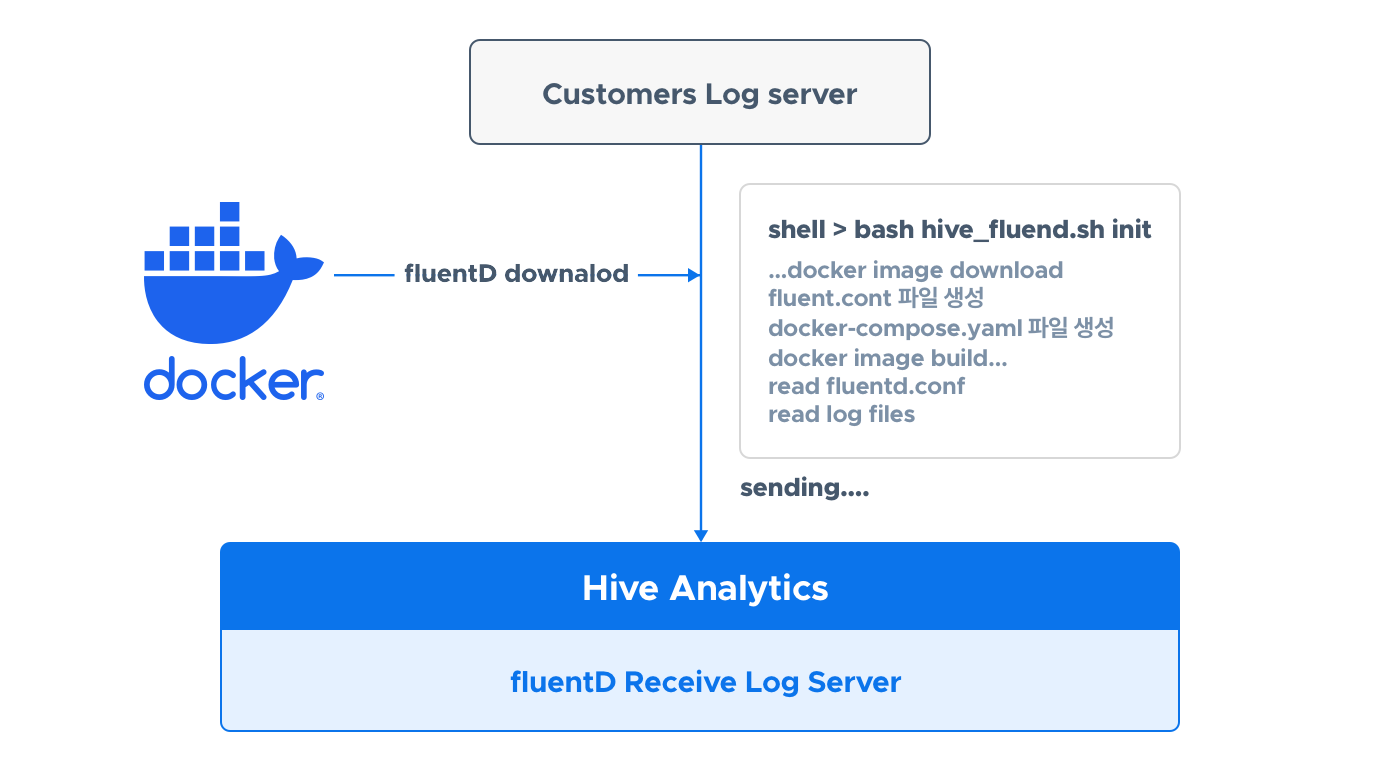
ก่อนที่คุณจะเริ่ม
เตรียมสภาพแวดล้อมที่คุณสามารถใช้ Docker และดาวน์โหลดสคริปต์อัตโนมัติ
การตั้งค่า Docker Environment
ในการใช้ Docker คุณต้องติดตั้ง docker engine และ docker-compose สำหรับรายละเอียดเพิ่มเติมดูที่ ที่นี่.
ดาวน์โหลดสคริปต์อัตโนมัติ
ดาวน์โหลดและแตกไฟล์ file
wget https://developers.withhive.com/wp-content/uploads/2024/08/hive_fluentd_docker.tar  # Download the file
tar -xvf hive_fluentd_docker.tar # Extract the file
หลังจากที่คุณได้ทำการแตกไฟล์ที่บีบอัดแล้ว คุณจะพบไฟล์การตั้งค่า hive.conf และไฟล์สคริปต์ hive_fluentd.sh ในโฟลเดอร์ hive_fluentd_docker
การตั้งค่า hive.conf
มีการกำหนดค่าสำหรับ การใช้ไลบรารีเฉพาะภาษา (Java, Python, ฯลฯ) และ การส่งไฟล์บันทึกเฉพาะ
การตั้งค่าสำหรับการใช้ไลบรารีเฉพาะภาษา
เพียงแค่กำหนดค่าบริการสร้าง (sandbox หรือ live) ดูตัวอย่างด้านล่าง
### Hive.conf ###
# Only use either sandbox or live for the build environment. logs are sent to the Hive server corresponding to each environment.
# Do not modify any other text
build:sandbox

### Don't delete this line ####
เมื่อส่งบันทึกผ่านไลบรารี Docker จะส่งบันทึกไปยังเซิร์ฟเวอร์บันทึกผ่านพอร์ต 24224
การตั้งค่าสำหรับการส่งไฟล์บันทึกเฉพาะ
กรุณาใส่เส้นทางไฟล์ (เส้นทางสัมบูรณ์) และ tag หากมีโฟลเดอร์บันทึกหลายโฟลเดอร์ คุณต้องเพิ่มทั้ง path และ tag.
ต่อไปนี้คือตัวอย่างเมื่อมีโฟลเดอร์ล็อกหนึ่งโฟลเดอร์
### hive.conf ###

build:sandbox # Only use either sandbox or live for the build environment. logs are sent to the Hive server corresponding to each environment.

# Path: folder path where the file to be sent is located (absolute path).
# Text lines added to all files in that path after fluentd is run are sent.
path:/home/user1/docker/shell_test/game

# Tag: tag name to be applied to the file, ha2union.game.log category name
tag:ha2union.game.log.test

### Don't delete this line ####
ต่อไปนี้คือตัวอย่างเมื่อมีโฟลเดอร์บันทึกหลายโฟลเดอร์
### hive.conf ###

build:sandbox # Only use either sandbox or live for the build environment. logs are sent to the Hive server corresponding to each environment.

# Path: folder path where the file to be sent is located (absolute path).
# Text lines added to all files in that path after fluentd is run are sent.
path:/home/user1/docker/shell_test/game

# Tag: tag name to be applied to the file, ha2union.game.log category name
tag:ha2union.game.log.test

# To add multiple file paths, follow the method below.
# Path and tag must be added together; otherwise, an error will occur if either is empty.
path:/home/user1/docker/shell_test/game2
tag:ha2union.game.log.test2

path:/home/user1/docker/shell_test/game3
tag:ha2union.game.log.test3

### Don't delete this line ####
อย่าแก้ไขข้อความที่ด้านบนและด้านล่างของไฟล์ config.
สร้าง
นี่หมายถึงประเภทของเซิร์ฟเวอร์การวิเคราะห์ที่บันทึกจะถูกส่งไป อาจเป็น sandbox หรือ live ซึ่งบ่งชี้ว่าเป็นเซิร์ฟเวอร์การวิเคราะห์แบบ sandbox หรือเซิร์ฟเวอร์การวิเคราะห์แบบ live
path
นี่คือเส้นทางโฟลเดอร์ (เส้นทางสัมบูรณ์) ที่ไฟล์บันทึกที่จะส่งตั้งอยู่ ไฟล์บันทึกต้องอยู่ในรูปแบบ JSON หลังจากที่ Docker ทำงานสำเร็จโดยการรันสคริปต์ hive_fluentd.sh