Install the Hive Axyl Plugin
Install the Hive Axyl Plugin by entering the following commands in order at the terminal prompt of the Codex CLI.
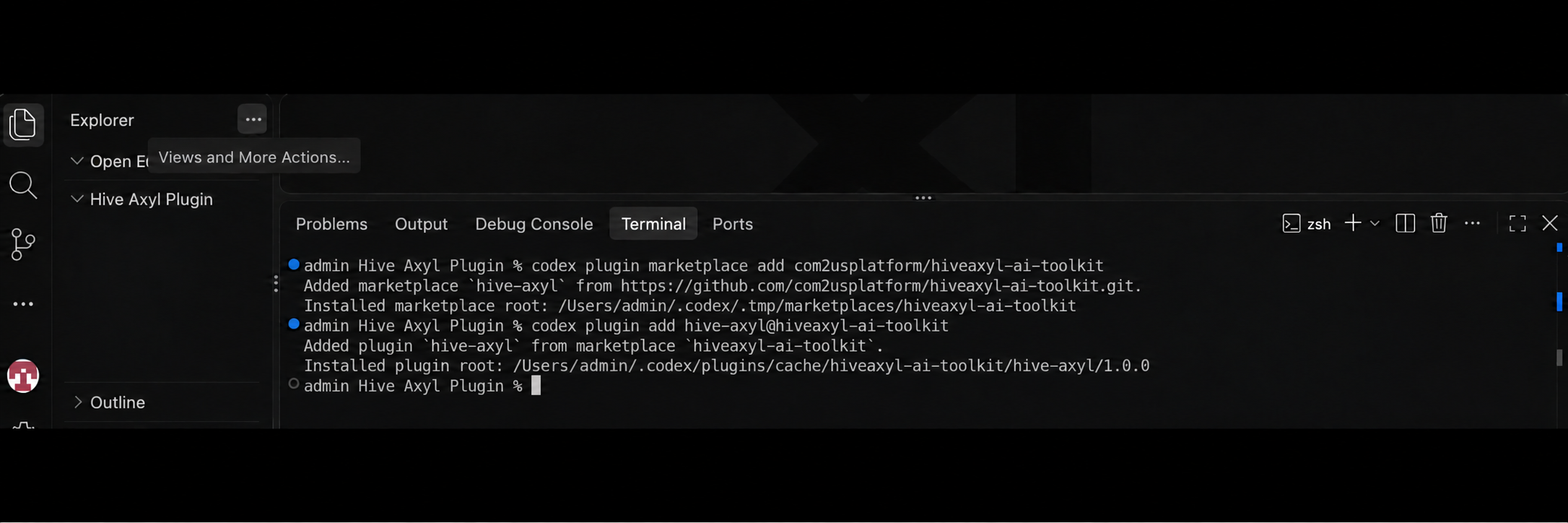
-
Use the following command to register the Hive Axyl GitHub repository as a Marketplace source in the Codex Marketplace settings.
-
To install the Hive Axyl Plugin from the registered Marketplace source, enter the following command.
-
To update the Hive Axyl Plugin to the latest version, enter the command below.
To use the console configuration features, create an account and register your company directly in the Hive Console. Then, ask the AI to connect to the console. The Hive Console login page will open in your browser. Sign in on the page to complete the console connection.
Request examples
Make requests to Codex in natural language, as shown below.
-
"Implement a feature that lets users additionally link Google and Apple login. Add a logout feature too."
-
"Get the store products to set up the shop, and develop the Google (Apple) payment feature."
-
"Analyze the metrics for the past week."
-
"Design the event logs, generate the sending code, and then validate it with sample data."
-
"Analyze the causes of the recent revenue decline by country, product, OS, and market, and build a dashboard from the results."
-
"Create a target user segment from the analysis results and recommend push message text."
-
"Connect the server functions with the DB and Storage, and carry it through to test code and call verification after deployment."
Troubleshooting
If a problem occurs while you install or use the Hive Axyl Plugin, check the following items according to the symptom.
The Hive Axyl Plugin does not appear
- Check that the Marketplace source is registered correctly.
- Sync or refresh the Marketplace source.
- Check that your Codex environment supports Marketplace plugins.
- Check the access permissions and organization policies for the Hive Axyl GitHub repository.
Authentication or permission errors occur
- Authenticate again on the official login screen.
- Check that the current account can access the target organization and project.
- If needed, ask the Hive Console admin for menu or project permissions.
The data you want is not retrieved after connecting
- Specify the project name, environment name, and resource scope in your request.
- Check the permission scope of the current account.
- Check that the Hive Axyl Plugin supports the feature you want to request.