Push notifications
The 'Push notifications' service is a global messaging solution that sends informational and advertising messages to users' devices in real time. It provides 'remote push', a remote relay delivery feature that uses external messaging infrastructure such as Firebase Cloud Messaging (FCM) and Apple Push Notification service (APNs).
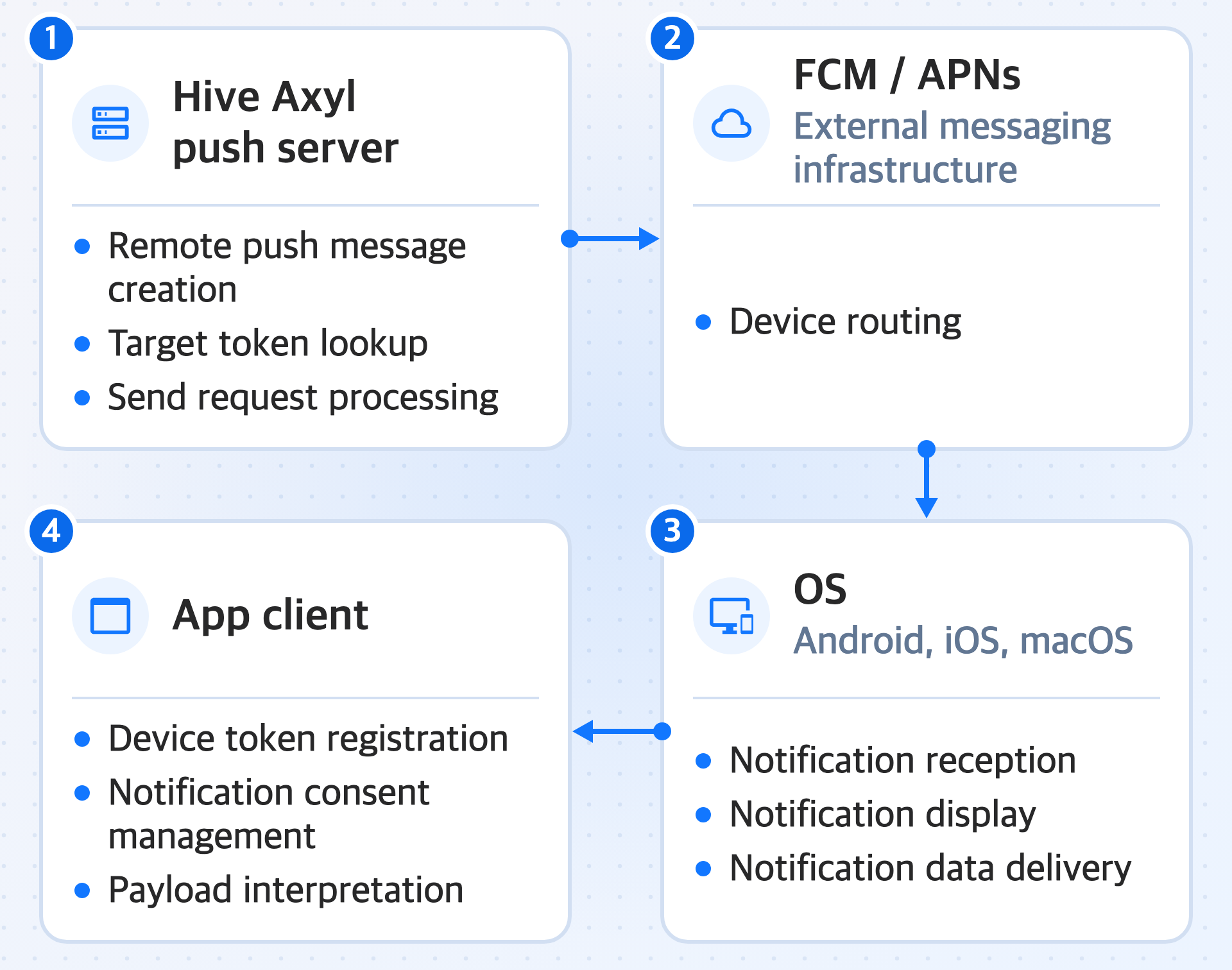
'Push notifications' work in the following flow.
- Hive Axyl push server: creates remote push messages, looks up target tokens, and processes send requests
- FCM / APNs: handle device routing through external messaging infrastructure
- OS (Android / iOS / macOS): receives and displays notifications, and passes notification data to the app
- App client: registers device tokens, manages notification consent, and interprets payloads
In the app, you can use the device token collection, server registration, reception event, and cold start payload retrieval features that the Hive Axyl SDK provides. Messages are sent from the Hive Console or with the server API.
Features
The push notification service sends remote push notifications through the Hive Axyl push server and the external messaging infrastructure of each OS.
The Hive Axyl push server creates a notification message, sends it remotely to the target device through the external messaging infrastructure (FCM or APNs), and the message is displayed on the screen. 'Remote push notifications' are classified into 'campaign push', which is sent in bulk to a specific group according to the operational purpose and targeting conditions, and 'single push', which is sent immediately to an individual the moment an event occurs.
-
Campaign push
A push feature that combines detailed targeting conditions, such as App ID and country code, to send messages to many users at once, or sends advertising or informational messages at a specific time.
- In Push Campaign Registration in the Hive Console, register a message that matches the recipients and the notification format, and set it to be sent at the specified time.
- You can send a 'campaign push' as long as a valid device token exists. Even if the Player ID link is removed because the user logged out of the app, the push is sent and displayed normally if notification consent on the device is enabled and the targeting conditions are met.
-
Single push
A push feature that the app server sends automatically to a single user identified by Player ID when a specific in-app event occurs or a business condition is met.
- Because a 'single push' is sent based on the Player ID, if you reset the Player ID after app logout or account deletion, the Player ID assigned to the device token is detached and the push cannot be sent.
About push notifications on macOS
Push notifications are also supported on macOS. However, APNs push notification reception can be unstable on macOS, so the delivery rate may be lower than on iOS.
SDK module structure
The SDK modules provided for the push notification service are divided into a common server API module and OS-specific Add-ons.
| Category | Package | Initialization | Key features |
|---|---|---|---|
| Common push | com.hive.axyl.push | builder.AddPush() | Token registration, language change, notification consent change, user identifier detachment |
| Android remote push | com.hive.axyl.push.addon.fcm | builder.AddFCM() | FCM token issuance, token refresh event, received message event, cold start message retrieval |
| iOS remote push | com.hive.axyl.push.addon.apns | builder.AddAPNS() | APNs token issuance, APNs environment check, notification permission request, received notification event, cold start notification retrieval |
OS Add-ons register their ports only on the target OS. In the Unity Editor or on unsupported OSs, protect the code with an OS branch or HiveCore.TryResolve<T>() instead of HiveCore.Resolve<T>().
Next steps
Check how the 'Push notifications' feature works and the implementation order in Get started.