PG Recurring Payment
“PG Recurring Payment” means that once a user registers a payment method in the PG payment box, the app server will request payment from that payment method at a time that suits them. It is used to periodically pay for the same product, such as a monthly amount product.
This document describes the integration process of 'PG Recurring Payment' and how to use the API to be called from the app server. The main APIs are listed below.
- View list of payment methods: View payment methods for recurring payments
- Subscription registration: Request for payment method registration and payment page for the first payment
- Recurring charges: Next payment request using payment method on file
- Terminate: Terminate recurring payment
Overview
The billing cycle and intervals are managed by the app server. The app server must request payment for the duration of the product, and Hive does not automatically pay on the specified date.
Supported PGs and payment methods are listed below. Unlisted PGs and payment methods will not be included in the recurring payment list when connected to the Hive console.
- Kakao Pay: Kakao Pay Easy Payment
- Danal: Credit card
- Payment Wall: International credit card; buyer's email required for registration
- NHN KCP: Credit Card
Integration flow
The app server checks and registers your payment method for the first payment. Once the payment has been made, the Hive server will send a payment notification to the app server informing them of the outcome of the payment. The app server stores the order_id from the first payment notification as the issuing order number, which is then used for recurring charges and cancellation requests.
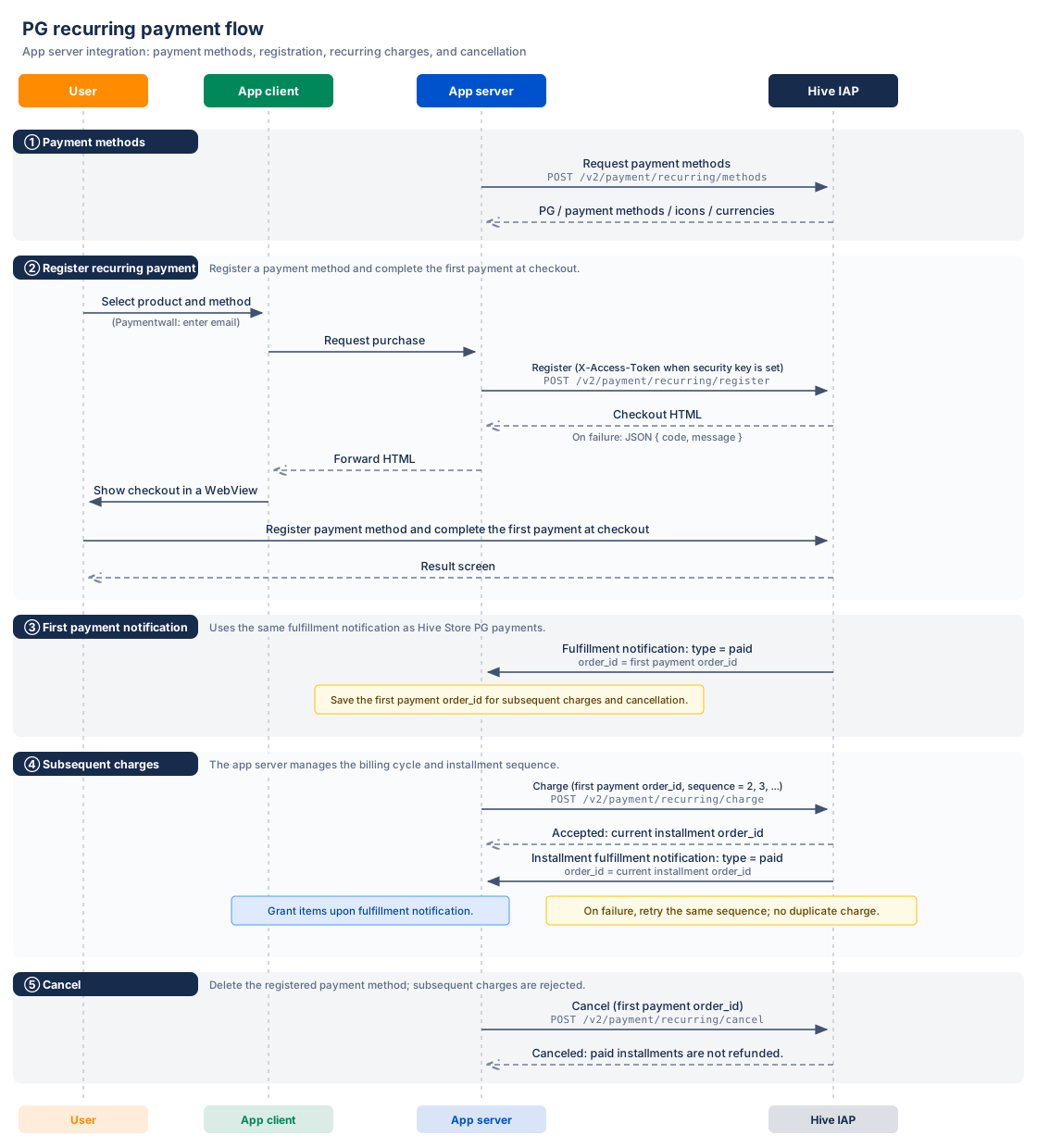
The PG payment integration process performed on the app server is as follows.
- Show the user the payment method by requesting a list of payment methods from the app server.
- Request recurring payment registration with the product and payment method selected by the user.
- Display the payment page HTML received as a registration response in your web view or browser.
- Save the
order_idof the Payment Notification from the Hive server when the user registers the payment method and completes the first payment. - Please use the
order_idyou saved at the next checkout and re-pay with your billing cycle number. - Process product payments based on a one-time payment notification.
- Ask for cancellation when you end your recurring payment.
After the second round, your order number will be forwarded to your recurring charges response and the payment notification for the second time. Connect and manage your initial order IDs and order numbers in the app server.
If the user closes the payment page or fails to register, the Hive server will not send a payment notification.
Prerequisites
Set up your payment method and payment notification URL in the Hive console before calling the API. If you have set up a security key in your app, you will also need to prepare an authentication token.
Connect payment methods
Connect your recurring payment method to the app from the Hive console. See PG settings for instructions on how to set it up.
Configure the payment notification URL
Register the URL of the app server to receive payment results in Hive Console > Billing > Payment Settings > PG Settings > Add-on Settings. Use the same settings as regular PG payments. See PG Payment Notification Settings for more information on how to set this up.
Prepare an authentication token
If you have set security key in the app, you can get Access Token by issuing OAuth Token. Include this token in the X-Access-Token in the request header when calling the API.
Common requests and responses
All APIs use the POST method and the request body in JSON format. Sending forms is not supported. Make a request by prefixing the path of each API with the host of the environment you want to use.
- Production host:
https://hiveiap.qpyou.cn - Sandbox host:
https://sandbox-hiveiap.qpyou.cn
Request header
Format the request body as Content-Type. The X-Access-Token only validates if you have set a security key in your app.
| Fields | Type | Required? | Description |
|---|---|---|---|
Content-Type | String | Required | application/json |
X-Access-Token | String | Conditional Required | OAuth 2.0 Access Token required if you have set a security key in your app |
User identification
When requesting a recurring charges or cancellation, the information of the user who registered the recurring payment must be communicated. The Hive server uses player_type and player_id together to identify you.
If player_type is v4, pass the Hive Player ID vid to player_id. If v0, forward the Hive membership UID uid. player_type is the same value as vid_type in the payment notification.
player_id must be a numeric string with a value of 1 or greater. If a non-numeric value is passed, 10010002 returns an error.
Response body
Success if code in the JSON response is the string "0". The error also responds with the HTTP status code 200, so check the code in the body. Token authentication failure responds with HTTP status code 401.
If the recurring payment registration is successful, the payment page HTML will be returned instead of JSON. See Register Response.
| Fields | Type | Include Responses | Description |
|---|---|---|---|
code | String | JSON Response | Result code. "0" succeeded, see error code for other values |
message | String | JSON Response | Result message, including the cause if an error occurs, and the internal error message is Internal server error |
Examples of common success responses include:
Retrieve Payment Methods API
View your payment methods for recurring payments. Display the payment methods in order of array in the list viewed, and pass the identifiers of the items selected by the user to the recurring payment registration request.
Request info
The request path is /v2/payment/recurring/methods. The request method and authorization header follow the common request and response.
- Production URL:
https://hiveiap.qpyou.cn/v2/payment/recurring/methods - Sandbox URL:
https://sandbox-hiveiap.qpyou.cn/v2/payment/recurring/methods
Request body
Tier price is the per-currency price you set for your product. If you specify market_pid, it will return only the payment methods that can be paid in the currency with the tier price set for the product.
If country is omitted, the country is determined by the IP of the requested server, so it is recommended to pass the user's country code.
| Fields | Type | Required? | Description |
|---|---|---|---|
appid | String | Required | App ID |
market_pid | String | Select | Product ID. Used to filter payment methods by the currency in which the tier price of the product is located |
country | String | selection, recommended | User country code. ISO 3166-1 alpha-2 format |
language | String | Select | Payment method display name language. Default is en |
Below is the body of the request to check the payment method of the product item08 for Korean users.
Response body
The success response contains a common response field and an array of payment_methods. Each item in the array is a PG and payment method information.
| Fields | Type | Included Locations | Description |
|---|---|---|---|
payment_methods | Array | Response Body | A list of payment methods for recurring payments. Sequence is display order |
agency_id | Integer | payment_methods[] | PG Identifier. Forward recurring enrollment requests exactly as they are |
agency_code | String | payment_methods[] | PG Code. kakaopay, danal_tpay, paymentwall, kcp_billing |
agency_name | String | payment_methods[] | PG Name |
pay_method | String | payment_methods[] | Payment method code. kakaopay, card |
payment_method_id | Integer | payment_methods[] | Payment method identifier. Forward recurring payment registration request as-is |
payment_method_name | String | payment_methods[] | Payment method display name based on language |
icon_url | String | payment_methods[] | Payment method icon URL |
currency | String | payment_methods[] | Payment currency |
Below is an example of a response to return a KakaoPay payment method. https://… in icon_url is a notation that omits the actual URL.
Returns 10010003 if the app or the item is not found or if the out-of-sale item is checked. If there is no recurring payment method that matches the country and product currency criteria, 10010005 will be returned.
Register Recurring Payment API
It requests the payment page HTML so that the user can register the payment method and proceed to the first payment. The app server will still display the received HTML in your web view or browser.
After completing the registration in the payment page, you will see the Hive result screen. The results of the first payment will be forwarded to the app server as a payment notification.
Request info
The request path is /v2/payment/recurring/register. The request method and authorization header follow the common request and response.
- Production URL:
https://hiveiap.qpyou.cn/v2/payment/recurring/register - Sandbox URL:
https://sandbox-hiveiap.qpyou.cn/v2/payment/recurring/register
Request body
Look up the list of payment methods, including market_pid, and forward the agency_id and payment_method_id included in the response. country should also pass the same value as when looking up the list.
| Fields | Type | Required? | Description |
|---|---|---|---|
appid | String | Required | App ID |
market_pid | String | Required | The ID of the product to subscribe to. Use same commodity in all billing cycles |
server_id | String | Required | App server ID, to be communicated in all times' payment notices |
player_id | String | Required | User ID. See Identify User |
player_type | String | Required | User type. v4 or v0 |
agency_id | Integer | Required | PG identifier for the payment method list inquiry response |
payment_method_id | Integer | Required | Payment method identifier for the payment method list inquiry response |
email | String | Conditional Required | Buyer email. Payment wall required, no other PGs used |
iap_payload | String | Select | Additional information to be forwarded to the app server. Will be communicated in the payment notice for all billing cycles and cannot be changed to a recurring charges request |
country | String | selection, recommended | The country code of the user. It should be the same as the value passed when looking up the list, and if omitted, it will be determined by the IP of the requested server |
language | String | Select | The language of the payment page and the results screen. Default is en |
Below is the body of your request to register for recurring payments with Kakao Pay.
Response body
Please check the Content-Type in the response header, as the response format varies depending on the success of the registration request. The app determines what text users will see when a request fails.
| Result | HTTP Status Code | Content-Type | Response Handling |
|---|---|---|---|
| Success | 200 | text/html | Display the received payment page HTML as it is to the user |
| Failed | 200 | application/json | Confirm code and message of common answers |
Below is the response when the email is missing from the payment month enrollment request.
Registration process
The first payment is the product tier price at the time of registration. Applies the price in the currency of the selected payment method.
A new recurring payment will be created each time you request to register. If the user closes the payment page, the recurring payment will remain incomplete and they will not be able to request a recurring charges.
After the first payment is made, the Hive server will send a payment notification with type to paid. Save the order_id of this notification as the issuing order number.
If you receive a 10010005 error, please revisit your payment method list, including market_pid, and request with the payment method included in your response. See Error codes for further information on how to handle errors.
Charge Recurring Payment API
We'll request payment after the second payment to your payment method on file. A successful response is a receipt of payment. Late PG approvals, like a payment wall, may result in an approval after a successful response, and once approved, the Hive server will send a payment notification.
Request info
The request path is /v2/payment/recurring/charge. The request method and authentication header follow the common request and response.
- Production URL:
https://hiveiap.qpyou.cn/v2/payment/recurring/charge - Sandbox URL:
https://sandbox-hiveiap.qpyou.cn/v2/payment/recurring/charge
Request body
order_id will be forwarded the issuing order number from the first payment notification. sequence is an idempotent key that separates billing cycles within the same recurring payment and prevents duplicate charges when retrying the same billing cycle.
| Fields | Type | Required? | Description |
|---|---|---|---|
appid | String | Required | App ID of the app you registered |
order_id | String | Required | Issue Order No. order_id of 1st payment notification |
sequence | Integer | Required | An billing cycle number. It is a value of 2 or more, and the same value is used when retrying the same billing cycle |
player_id | String | Required | ID of the registered user |
player_type | String | Required | Types of Registered Users |
Below is the text requesting the second payment with the issuing order number.
Response body
The success response will include the common response field and the order number for this billing cycle. Please associate this number with this billing cycle to save.
| Fields | Type | Include Responses | Description |
|---|---|---|---|
order_id | String | Successful retry response | Order number for this billing cycle, such as order_id for the corresponding billing cycles' payment notices and refund notices |
Below is the successful response that returns the second order number.
Charge conditions and retries
At all times, you will pay with the product specified at the time of recurring payment registration. An billing cycle number is managed by the app server, and Hive does not check for consecutive billing cycles.
If you stop selling an item, we will process a recurring charges request for recurring payments that have already been registered. Stop selling only blocks new registrations, so don't request a recurring charges to stop billing.
When requested again with the same sequence, the processing is as follows.
| Repeat Status | Response | Additional Charges | App server processing |
|---|---|---|---|
| Paid | 10010007 | None | Ignore duplicate requests as they have already been paid for times |
| Pending Approval | Success response with same order_id | None | Payment of the product based on the payment notification |
| Transfer request failed | Payment retry result | Retry Payment | Retry with same sequence |
Return the reason for PG's failure to message with 10010024 in case of PG approval failure. Please advise the user to confirm the payment method and try again with the same sequence. Internal errors 10010001, 10010004, and 10010022 are also retried with the same sequence.
Cancel Recurring Payment API
When you cancel a recurring payment, the Hive server deletes the payment method registered with that recurring payment. 10010023 returns an error when requesting a recurring charges after cancellation.
Request info
The request path is /v2/payment/recurring/cancel. The request method and authentication header follow the common request and response.
- Production URL:
https://hiveiap.qpyou.cn/v2/payment/recurring/cancel - Sandbox URL:
https://sandbox-hiveiap.qpyou.cn/v2/payment/recurring/cancel
Request body
Provide the issuing order number of the recurring payment you wish to terminate, as well as the app and user information you have registered. The order number cannot be canceled after the second round.
| Fields | Type | Required? | Description |
|---|---|---|---|
appid | String | Required | App ID of the app you registered |
order_id | String | Required | Issue Order No. order_id of 1st payment notification |
player_id | String | Required | ID of the registered user |
player_type | String | Required | Types of Registered Users |
Below is the body of your request to cancel your recurring payment with the issuing order number.
Response body
Success responses include the common response fields code and message. Below is the revocation successful response.
Return 10010003 if no recurring payment is found, or 10010023 if it has already been revoked or is not active. Please retry the 10010004 error that failed to delete the PG payment method.
Payment notification and result processing
The Hive server sends the recurring payment results to the same payment notification URL, in the same format as a regular PG payment. Please refer to the PG payment result notification service for the request format and delivery fields.
Link order IDs to billing cycles
Payout notifications do not include the recurring payment and the billing cycle number. The app server should use the issued order number you saved and the order_id in the recurring charges response to determine which recurring payment notification corresponds to which recurring payment.
| When to send | type | order_id | App server processing |
|---|---|---|---|
| 1st payment completed | paid | Issuing Order Number | Save initial order ID and process first round payment |
| Paid after 2nd round | paid | Applicable times Order no. order_id in the recurring charges response | Process product payments after associating with saved billing cycles |
| Refund an billing cycle from Hive console or PG | cancelled | Refunded times order number | Process refunds as a result of this billing cycle |
server_id, iap_payload, market_pid, the value sent at registration will be communicated in the payment notification of all times.
Item delivery and refunds
Use purchase_bypass_info in the Payment Notification where type is paid to verify the receipt and pay the item. Please refer to the PG payment result notification service for forwarding fields.
Refunded billing cycles will be subject to Refund user recurring charges as per normal payment.
Error codes
Even if the HTTP status code is 200, you must check the code in the JSON body. Identify the error code and the status of the request:
| Code | Related APIs | Cause | Handling Method |
|---|---|---|---|
0 | JSON Response Common | Success | Handling Success Responses for Each API |
10010001 | Common | Internal error | Retry. Retry using the same sequence |
10010002 | Common | Missing required value, typographical error, non-JSON body, non-POST method. Include if the sequence of the recurring charges is less than or equal to 1 or the player_type is incorrect | Modify Request Values and Format |
10010003 | View and register payment methods | App or product not found, product discontinued. Missing email on the payment wall when registering | Check the app and the product. Request it as an item on sale, and re-request the payment wall after entering the email |
10010003 | Re-payment, cancellation | No recurring payments found. Non-initial order ID or recurring payment by another app or user | Confirmation of the first initial order ID and registered app and user information |
10010004 | Common | PG interlocking error, including failure to delete PG payment method upon cancellation | Retry. Retry using the same sequence |
10010005 | View and register payment methods | No recurring payment method matching country and product currency | Revisit the list, including market_pid, and register with the payment method included in the response |
10010007 | Recurring charges | Times I've already paid | Ignore this as it is a duplicate |
10010022 | Common | Internal error | Retry. Retry using the same sequence |
10010023 | Re-payment, cancellation | Subscription not active due to cancellation, failed enrollment, incomplete enrollment, etc. | Remind user to relist |
10010024 | Recurring charges | Failure to approve PGs such as over the limit, stopping cards, etc. Include reason for PG failure in message | After the user has been notified of the payment method, try again with the same sequence |
HTTP 401 | Common | Token authentication failed | Verify X-Access-Token's credentials |
Integration considerations
When linking PG recurring payments, check how the order number and order number are used, when the item is paid, what the price is based on, and the scope of cancellation.
Use the initial order ID
Requests for recurring charges and cancellation must be made with the issuing order number order_id in the first payment notification. Returns a 10010003 error if requested with a post-secondary order number. See Integration Flow for how to manage order numbers.
Billing cycle number and retries
Use sequence starting at 2. You must forward the same sequence when retrying the same round of payments to avoid double billing. Refer to the Recurring charges API for response by billing cycle status and retry method.
Deliver items based on payment notifications
Make payments based on type paid payment notices. Payments should not be made solely in response to a successful recurring charges. Refer to the Payment Notification and Outcome Processing API to learn how to validate receipts and link billing cycles.
Apply the product price at the time of payment
The amount of each payment is the product tier price at the time the payment was requested. If you change the price of an item, you'll pay the updated amount in the next installment. Refer to the Recurring charges API for what is being paid for again and how it will be handled in the event of a suspension.
Paymentwall buyer email
When registering a recurring payment with the payment wall, please enter the buyer's email to the user and forward it to email. Please refer to the Recurring Payment Registration API for request fields and entry conditions.
Distinguish cancellation from refunds
If you cancel your recurring payment, you won't be refunded for any times you've already paid. If you'd like to refund these billing cycles, you'll need to process a separate refund. Refer to the revocation API for revocation requests and responses.