Unity
Adkit สำหรับ AD(X): Unity
AdKit เป็นโมดูลโฆษณาที่แก้ไขข้อผิดพลาดที่เกิดขึ้นในการประมวลผลแพ็คเกจ AD(X) Unity และสนับสนุนความสะดวกสบายของผู้ใช้ อ่านหน้านี้ทีละหน้าเพื่อใช้ AdKit รวมถึง SDK ที่สนับสนุน
การติดตั้ง
เข้าถึง Hive Developers และดาวน์โหลดและติดตั้ง AdKit.
- ดาวน์โหลดเวอร์ชันล่าสุดของ AdKit จาก Hive Developers และแตกไฟล์ที่นี่ ที่นี่.
- ในแถบเครื่องมือ Unity ให้เลือกไฟล์ .unitypackage ภายใต้ Assets > Import Package > Custom Package… และคลิก Import.

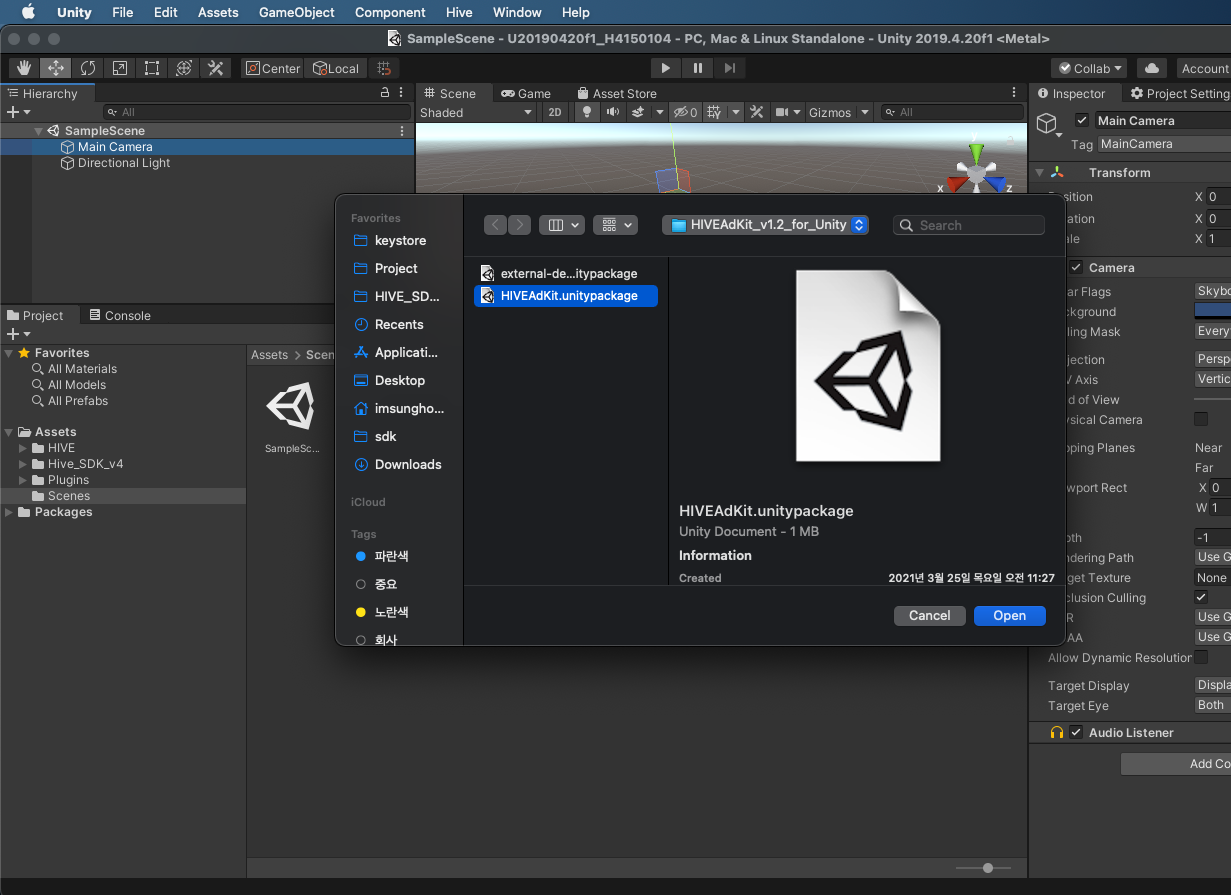
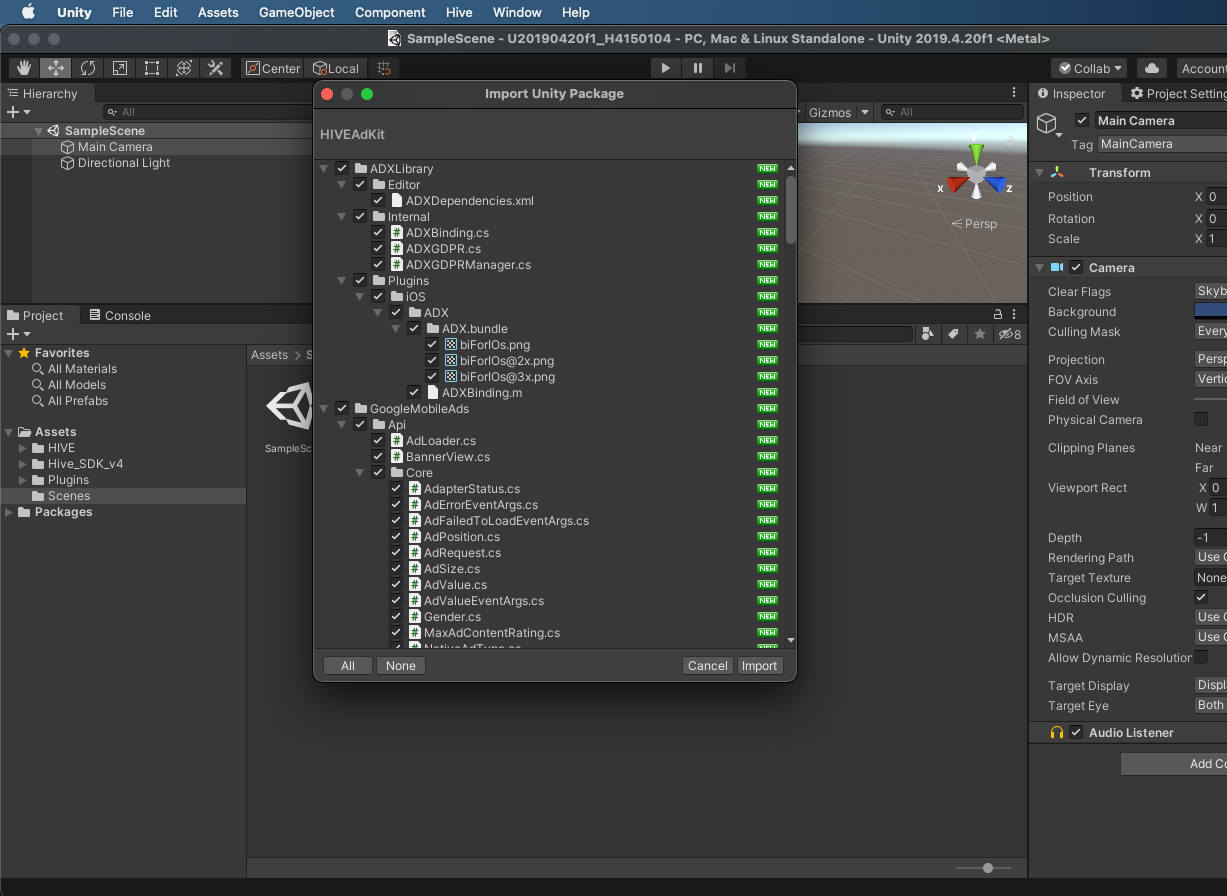
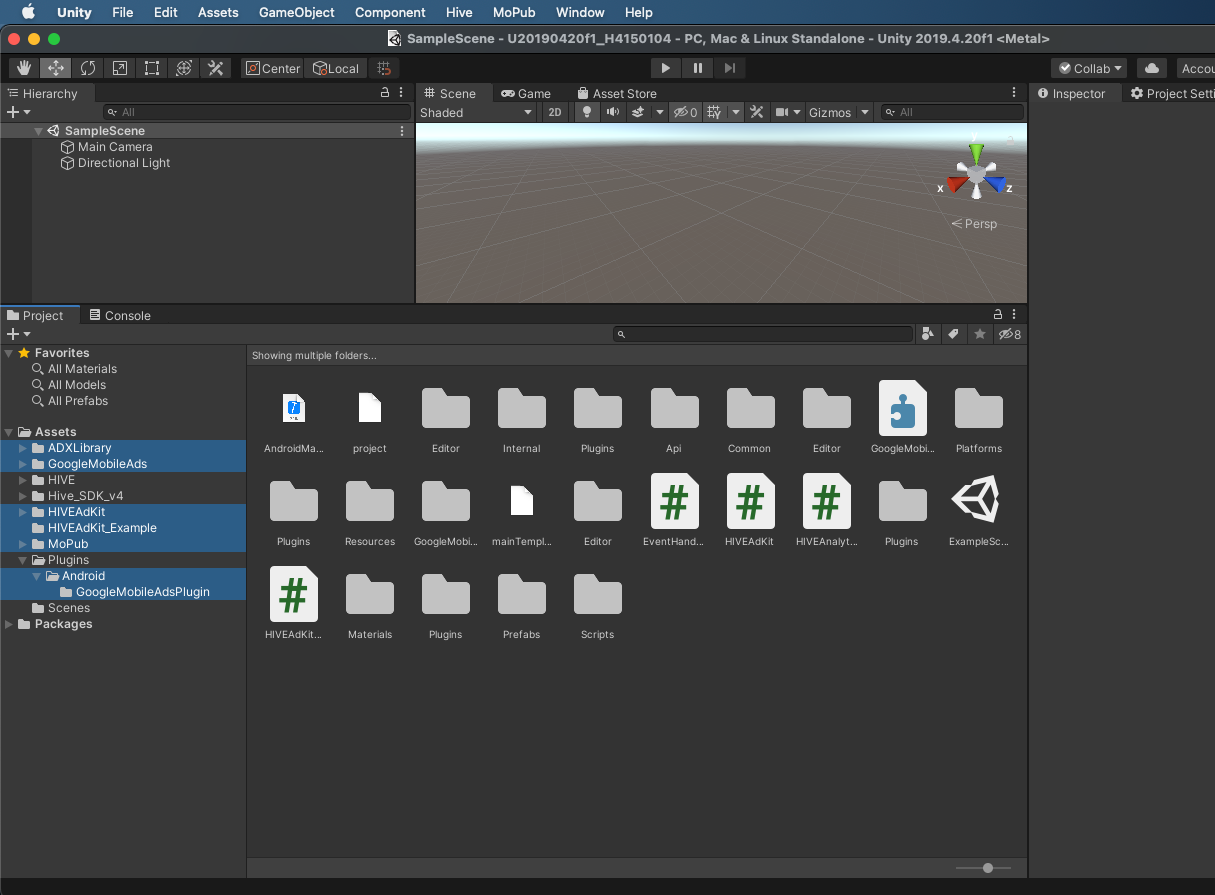
- หลังจากการนำเข้าทำเสร็จสิ้น ให้ตรวจสอบว่าไฟล์และโฟลเดอร์ที่เกี่ยวข้องกับ AdKit และ AD(X) ถูกสร้างขึ้นภายใต้โฟลเดอร์ Assets หรือไม่
Warning
เมื่อทดสอบ AdKit ในระหว่างการพัฒนา คุณต้องใช้ กุญแจโฆษณา ทดสอบ
อัปเดต
ถอนการติดตั้ง AdKit ที่คุณกำลังใช้งานและติดตั้งเวอร์ชันล่าสุดเพื่ออัปเดต.
วิธีการใช้งาน
iOS (Unity 2019.4 ขึ้นไป)
เมื่อ build โปรเจกต์ iOS ด้วย Unity 2019.4 ขึ้นไป ระบบจะสร้าง target UnityFramework ที่ทำงานเป็น Dynamic Framework
-
ตั้งค่า EDM4U ใน iOS Resolver Settings ของ Unity (Assets > External Dependency Manager > iOS Resolver > Settings) ให้ตรวจสอบการตั้งค่า build แบบ static_framework (Link frameworks statically)
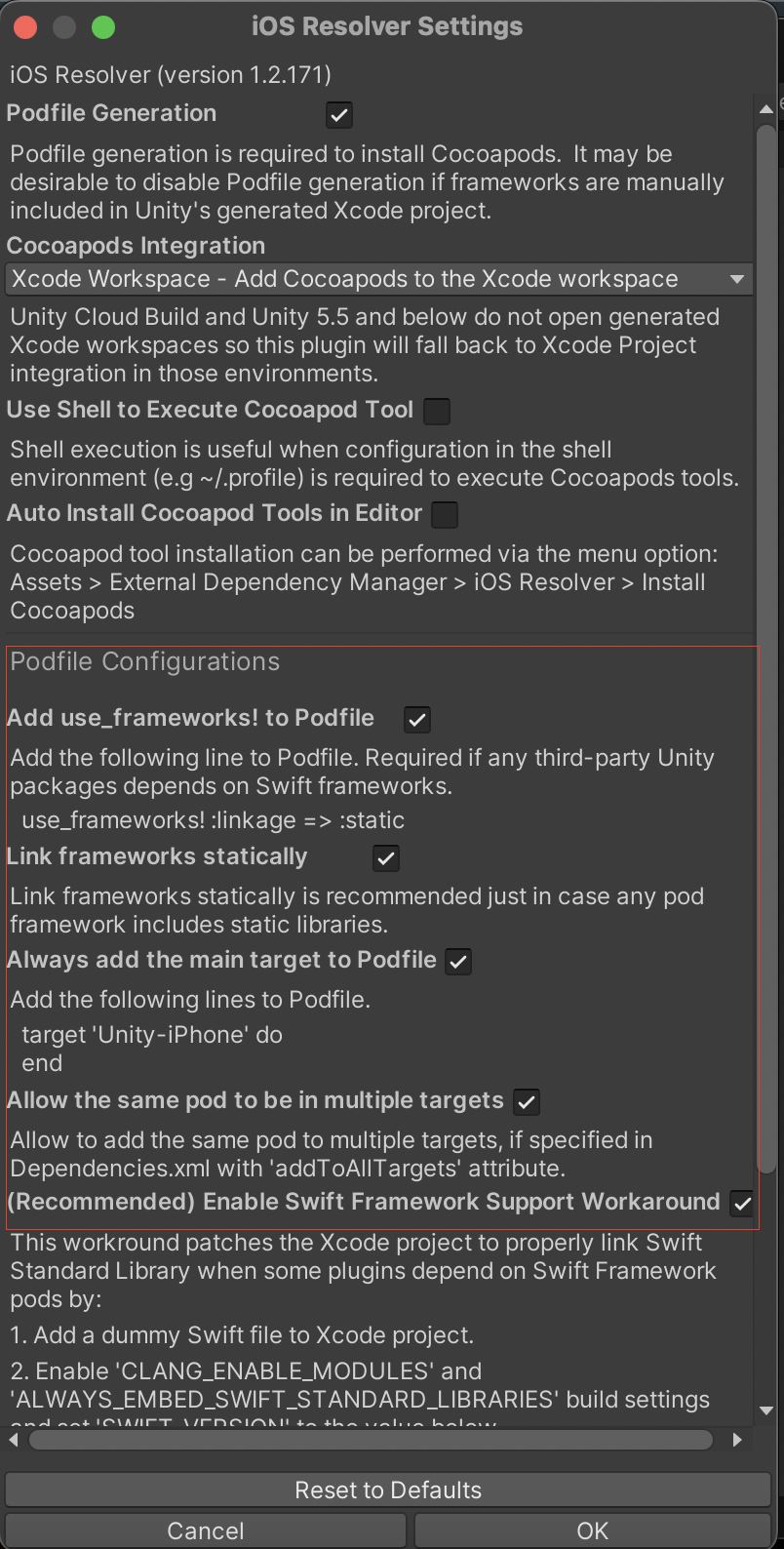 Facebook SDK ให้บริการเฉพาะแบบ Dynamic Framework ขณะที่ Podfile รองรับการตั้งค่า framework ได้เพียงรูปแบบเดียว ดังนั้นเมื่อเปิด Link frameworks statically และใช้ Facebook SDK ให้ยกเลิก comment รายการที่เกี่ยวข้องด้านล่าง
string[] frameworksToEmbed = {
    ...
    "FBAudienceNetwork.xcframework",

    // หากใช้ Facebook SDK ให้ยกเลิก comment ของ SDK ที่ใช้งาน
    // "FBAEMKit.xcframework",
    // ...
};
Warning
- ยกเลิก comment เฉพาะ Facebook SDK ที่ใช้งานอยู่เท่านั้น
- หากปิด Link frameworks statically การยกเลิก comment ขณะใช้ Dynamic Framework อาจทำให้เกิดความขัดแย้ง
-
Build โปรเจกต์
Warning
หาก
pod installล้มเหลวระหว่างสร้างโปรเจกต์ Xcode และได้เปิด Link frameworks statically ไว้ข้างต้น อย่าเรียกpod installโดยตรงในเส้นทางโปรเจกต์ที่สร้างขึ้น ให้ build โปรเจกต์ใหม่ใน Unity Editor
คุณสมบัติ
- โฆษณาแบบมีรางวัล
- เมื่อใช้ AdKit API และ SDK ร่วมกัน หรือใช้โมดูลแยก การส่งข้อมูลบันทึกจะขึ้นอยู่กับ RewardVideo API ที่เรียกใช้ ข้อมูลบันทึกจะถูกส่งไปยังเซิร์ฟเวอร์ Analytics เวอร์ชันขั้นต่ำที่รองรับฟีเจอร์นี้มีดังนี้
- SDK v4.11.0
- SDK v1.17.2
- โมดูลแยก ModuleManager v2.6.0
- โมดูลแยก CommonModule v1.5.0
- เมื่อใช้ AdKit API และ SDK ร่วมกัน หรือใช้โมดูลแยก การส่งข้อมูลบันทึกจะขึ้นอยู่กับ RewardVideo API ที่เรียกใช้ ข้อมูลบันทึกจะถูกส่งไปยังเซิร์ฟเวอร์ Analytics เวอร์ชันขั้นต่ำที่รองรับฟีเจอร์นี้มีดังนี้
- โฆษณาคั่นระหว่างหน้า
- โฆษณาแบนเนอร์แบบปรับขนาดได้
สำหรับรายละเอียดเกี่ยวกับการใช้ AdKit โปรดอ่านคู่มือต่อไปนี้
กำลังเริ่มต้น AdKit
ขั้นตอนที่จำเป็นก่อนการเริ่มต้น โหลด และแสดงโฆษณาทุกประเภท (AD)
การกำหนดเป้าหมายในยุโรปและสหราชอาณาจักร
หากเกมของคุณมุ่งเป้าไปที่ยุโรปและสหราชอาณาจักร (EEA & UK) จะต้องแสดงป๊อปอัปการยินยอม GDPR (กฎระเบียบการคุ้มครองข้อมูลทั่วไป) Adkit รองรับ UMP (แพลตฟอร์มการสื่อสารของผู้ใช้) ของ Google สำหรับการแสดงป๊อปอัปการยินยอม GDPR เพื่อใช้ Google UMP ก่อนอื่นให้ดูที่ คู่มือการสร้างข้อความ GDPR เพื่อจัดทำข้อความ GDPR ของคุณ
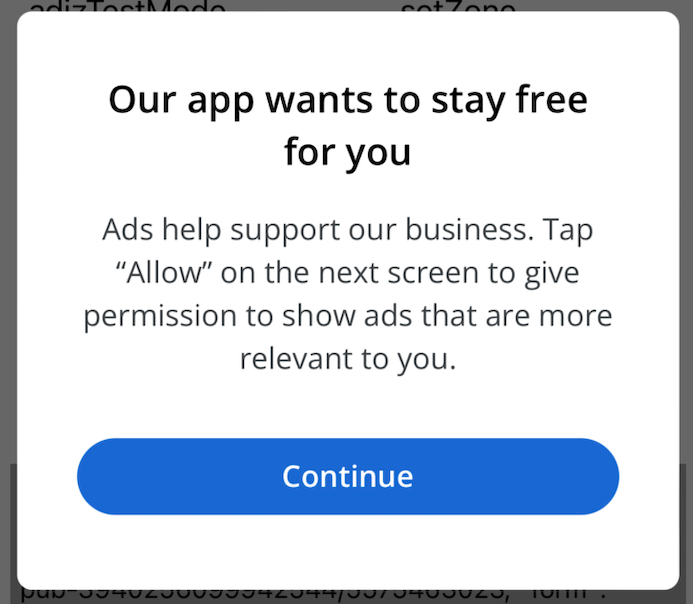
เมื่อใช้ SDK Hive AuthV4.setup จะเปิดเผยข้อความ IDFA ดังนั้นการสร้างข้อความ IDFA จึงเป็นทางเลือกโดยพื้นฐาน อย่างไรก็ตาม หากคุณกำลังใช้ข้อความ GDPR คุณต้องสร้างข้อความ IDFA ตาม คำอธิบายโดยละเอียดเกี่ยวกับข้อความ IDFA และการแจ้งเตือน ATT
หากคุณได้สร้างข้อความ GDPR และข้อความ IDFA ทั้งสองแล้ว ให้เริ่มต้น Hive AdKit ด้วย InitializeWithShowADXConsent ตามที่แสดงด้านล่าง
Important
หากคุณกำลังใช้ Hive SDK คุณต้องดำเนินการ AuthV4.setup หลังจากเสร็จสิ้นการเริ่มต้น Hive AdKit หากหน้าจอขอความยินยอม GDPR ปรากฏขึ้นหลังจากแสดงการแจ้งเตือนความยินยอม ATT (APP Tracking Transparency) แอปของคุณอาจถูกปฏิเสธระหว่างการตรวจสอบแอปของ Apple
// When targeting Europe & the UK for commercial distribution
int debugState = 0;
HIVEAdKit.InitializeWithShowADXConsent(appId, debugState, null, adkitConsentState =>
{
    /*
    * adkitConsentState : User's personal information usage and collection status for AD(X)
    * - 0 : No consent status exists
    * - 1 : Region where consent is not required
    * - 2 : User has refused the usage and collection of personal information
    * - 3 : User has consented to the usage and collection of personal information
    */
});

/*
 * To test the GDPR consent popup, set debugState to 1 and configure testDeviceId to display the GDPR test popup.
 * The device ID for the Test Device (testDeviceId) can be found in the Android Logcat and Xcode console logs.
 * The testDeviceId is used only for testing. You must specify testDeviceId as null during commercial distribution.
 * Example Android log: Use new ConsentDebugSettings.Builder().addTestDeviceHashedId("ABCDEFGHIJKLMNOPQRSTUVWXYZ") to set this as a debug device.
 * Example Xcode log: To enable debug mode for this device, set: UMPDebugSettings.testDeviceIdentifiers = @[ABCDEFGHIJKLMNOPQRSTUVWXYZ]
 */

int debugState = 1;
string testDeviceId = "ABCDEFGHIJKLMNOPQRSTUVWXYZ";
List testDevices = new List();
testDevices.Add(testDeviceId);

HIVEAdKit.InitializeWithShowADXConsent(appId, debugState, testDevices, adkitConsentState =>
{
    /*
    * adkitConsentState : User's personal information usage and collection status for AD(X)
    * - 0 : No consent status exists
    * - 1 : Region where consent is not required
    * - 2 : User has refused the usage and collection of personal information
    * - 3 : User has consented to the usage and collection of personal information
    */
});
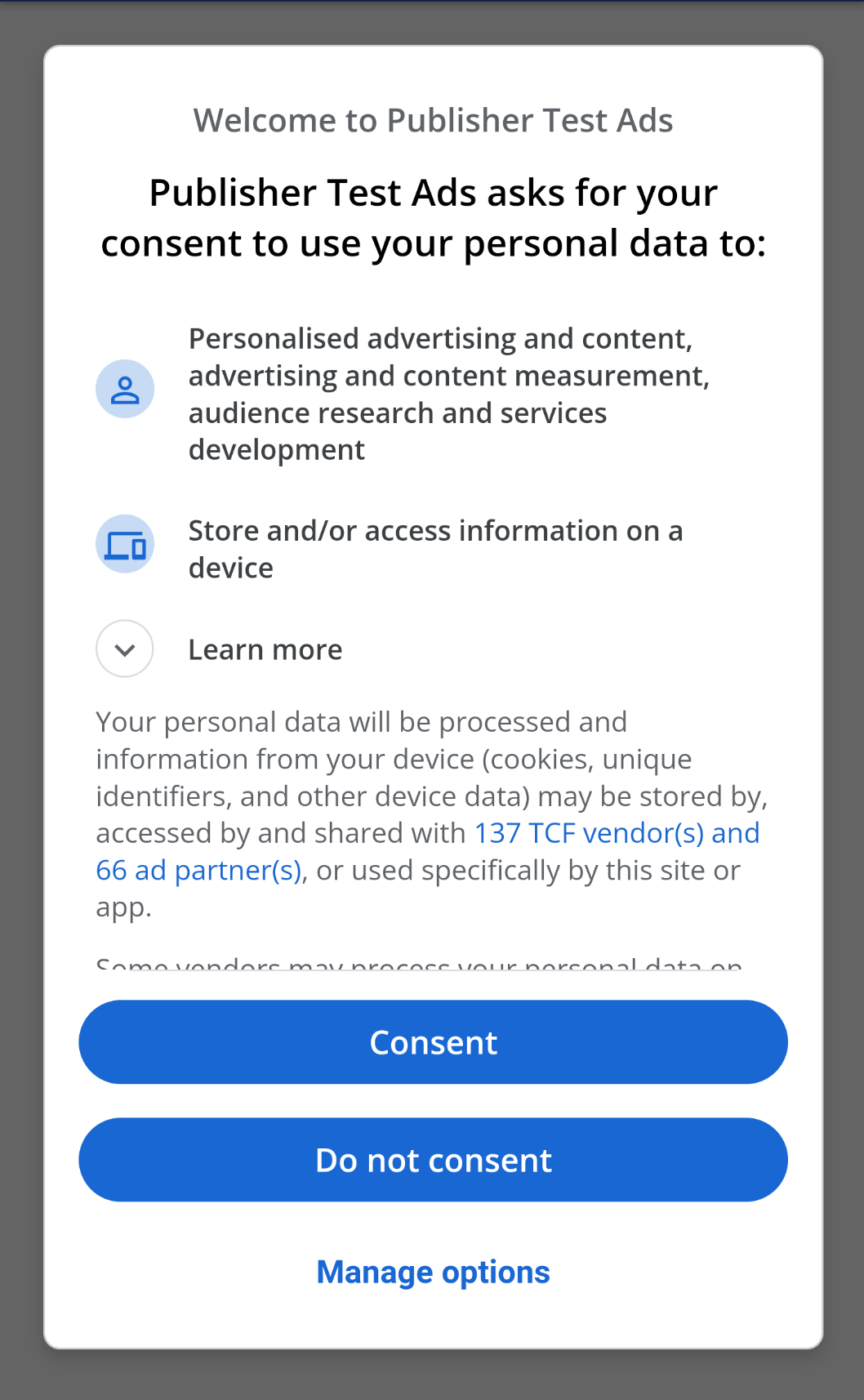
เมื่อเริ่มต้น Hive AdKit หากพื้นที่ที่กำหนดเป้าหมายถูกกำหนดให้เป็นยุโรปและสหราชอาณาจักร (EEA & UK) หน้าจอการยินยอม GDPR จะถูกแสดงโดยอัตโนมัติเช่นที่แสดงด้านล่าง
ในสภาพแวดล้อม iOS ข้อความอธิบาย IDFA จะแสดงโดยอัตโนมัติในภูมิภาคนอกยุโรปและสหราชอาณาจักร
การกำหนดเป้าหมายภูมิภาคอื่น
เมื่อกำหนดเป้าหมายภูมิภาคนอกยุโรปและสหราชอาณาจักร ให้เริ่มต้นด้วย InitializeWithSetConsentState
/*
 * Set the user's personal information usage and collection status for AD(X)
 * 0 : No consent status exists
 * 1 : Region where consent is not required
 * 2 : User has refused the usage and collection of personal information
 * 3 : User has consented to the usage and collection of personal information
 */
int consentState = 1;
HIVEAdKit.InitializeWithSetConsentState(appId, consentState);
การตั้งค่าขั้นสูง
// GameData Example
[Serializable]
public class SendInfo
{
    public int level;
    public int gold;
}
SendInfo addtionalInfo = new SendInfo();
addtionalInfo.level = 1;
addtionalInfo.gold = 100;

// Send as a JSON Obejct format
HIVEAdKit.SetAdditionalInfo(JsonUtility.ToJson(addtionalInfo));
ประเภทที่ได้รับรางวัล
// Initialize Rewarded AD
// Initialize Rewarded AD
EventHandlers eventHandlers = new EventHandlers.Builder()
                                                .OnAdLoaded(OnAdLoadedCB)
                                                .OnAdOpening(OnAdOpeningCB)
                                                .OnAdClosed(OnAdClosedCB)
                                                .OnAdFailedToLoad(OnAdFailedToLoadCB)
                                                .OnAdFailedToShow(OnAdFailedToShowCB)
                                                .OnAdReward(OnAdRewardCB)
                                                .OnPaidEvent(OnPaidEventCB)
                                                .Build();
// Generate an instance
RewardVideoAd = HIVEAdKit.RewardVideo.Initialize(rewardVideoUnitId, eventHandlers);

// Load Rewarded AD
// Send AD loading information to Analytics
if( HIVEAdKit.RewardVideo.IsInitialzed(RewardVideoAd) ) {
    HIVEAdKit.RewardVideo.LoadAd(RewardVideoAd, "Unity-AdaptiveBanner-Show-AdditionalInfo");
}

// Show RewardVideo type
// Send AD loading information to Analytics
if( HIVEAdKit.RewardVideo.IsLoaded(RewardVideoAd) ) {
    HIVEAdKit.RewardVideo.Show(RewardVideoAd, "Unity-AdaptiveBanner-Show-AdditionalInfo");
}
ประเภทอินเตอร์สติชัล
EventHandlers eventHandlers = new EventHandlers.Builder()
                                                .OnAdLoaded(OnAdLoadedCB)
                                                .OnAdOpening(OnAdOpeningCB)
                                                .OnAdClosed(OnAdClosedCB)
                                                .OnAdFailedToLoad(OnAdFailedToLoadCB)
                                                .OnAdClick(OnAdClickCB)
                                                .OnPaidEvent(OnPaidEventCB)
                                                .Build();
// Generate an instance
InterstitialAd = HIVEAdKit.Interstitial.Initialize(InterstitialAdUnitId, eventHandlers);

// Load
// Send AD loading information to Analytics
if( HIVEAdKit.Interstitial.IsInitialzed(InterstitialAd) ) {
     HIVEAdKit.Interstitial.Load(InterstitialAd, "Unity-AdaptiveBanner-Show-AdditionalInfo");
}

// Show
// Send AD loading information to Analytics
if( HIVEAdKit.Interstitial.IsLoaded(InterstitialAd) ) {
     HIVEAdKit.Interstitial.Show(InterstitialAd, "Unity-AdaptiveBanner-Show-AdditionalInfo");
}
ประเภทแบนเนอร์แบบปรับตัว
EventHandlers eventHandlers = new EventHandlers.Builder()
                                                            .OnAdLoaded(OnBannerAdLoadedCB)
                                                            .OnAdOpening(OnAdOpeningCB)
                                                            .OnAdClosed(OnAdClosedCB)
                                                            .OnAdFailedToLoad(OnAdFailedToLoadCB)
                                                            .OnAdClick(OnAdClickCB)
                                                            .OnPaidEvent(OnPaidEventCB)
                                                            .Build();
HIVEAdKit.AdaptiveBanner.AdPosition bannerPosition = HIVEAdKit.AdaptiveBanner.AdPosition.Top;
HIVEAdKit.AdaptiveBanner.AdSize adaptiveSize = HIVEAdKit.AdaptiveBanner.AdSize.AD_SIZE_320x50;

// Generate an instance
AdaptiveBannerAd = HIVEAdKit.AdaptiveBanner.Initialize(AdaptiveBannerAdUnitId, adaptiveSize, bannerPosition, eventHandlers);

// Load and show
// Send AD loading information to Analytics
HIVEAdKit.AdaptiveBanner.LoadAd(AdaptiveBannerAd, "Unity-AdaptiveBanner-Show-AdditionalInfo");

// Hide
HIVEAdKit.AdaptiveBanner.Destroy(AdaptiveBannerAd);
การสนับสนุน iOS 14
ต่อไปนี้คือรายการ SKAdNetwork ของ AD(X) สำหรับการสนับสนุน iOS 14 และเวอร์ชันที่ใหม่กว่า AdKitPostprocess อิงจากการอัปเดตเมื่อวันที่ 29 มกราคม 2021 อย่าลืมตรวจสอบการอัปเดตล่าสุด
- การอัปเดต SKAdNetwork
สนับสนุน Android 11
แท็ก <queries> ถูกเพิ่มลงในไฟล์ AndroidManifest.xml ของไลบรารี AD(X) โดยรองรับ Android 11 หากคุณตรวจสอบบันทึกข้อผิดพลาดดังต่อไปนี้ในขณะที่สร้างโปรเจ็กต์ของคุณใน Unity โปรดดูแนวทางในการสร้างด้วย Unity-Android 11.
- บันทึกข้อผิดพลาดตัวอย่างใน Unity
AndroidManifest.xml: AAPT: error: unexpected element <queries> found in <manifest>.
- แนวทางการสร้างด้วย Unity-Android 11
การตั้งค่า ADX Proguard
ไฟล์ AAR ของไลบรารีรวมกฎของ Proguard ดังนั้นการตั้งค่าจึงดำเนินการโดยอัตโนมัติ。
การแจ้งเตือนการรวม Unity
¶หาก App ID บน GoogleMobileAdsSettings ถูกลบออก ให้ไปที่ Unity > Assets > Google Mobile Ads > Settings และเลือกช่องทำเครื่องหมาย Delay app measurement จากนั้นให้ลบออกอีกครั้ง. 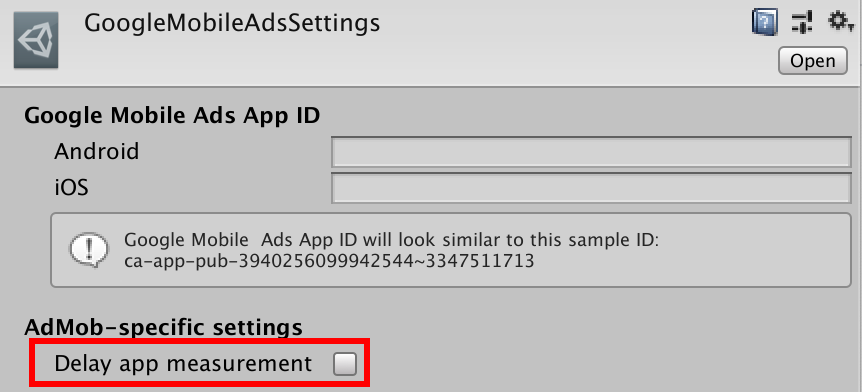
ทดสอบโฆษณา
สิ่งสำคัญสำหรับผู้โฆษณาคือไม่ถูกเรียกเก็บเงินเมื่อคลิกโฆษณาทดสอบในระหว่างการพัฒนา หากคุณคลิกโฆษณามากเกินไปนอกโหมดทดสอบ จะถือว่าเป็นการกระทำที่ไม่ถูกต้อง ดังนั้นโปรดระวังอย่าให้เป็นบัญชีเป้าหมายที่จะถูกแจ้งรายงาน อ้างอิงจาก Google Developers เพื่อใช้โฆษณาทดสอบ
รหัสข้อผิดพลาด
ดูรหัสและข้อความเมื่อโหลดโฆษณาไม่สำเร็จได้ที่ Ad Error ของ AD(X)
การถอนการติดตั้ง
ในการถอนการติดตั้ง AdKit สำหรับ AD(X) ให้ลบไฟล์และโฟลเดอร์ในรายการต่อไปนี้
-
- เกี่ยวกับ AdKit
- /Assets/HIVEAdKit
- /Assets/HIVEAdKit_Example
- เกี่ยวกับ AD(X)
- /Assets/ADXLibrary
- /Assets/GoogleMobileAds
- /Assets/Plugins/Android/GoogleMobileAdsPlugins
- เกี่ยวกับ AdKit
Note
รายการไฟล์ที่เกี่ยวข้องกับ AD(X) อาจแตกต่างกันไปขึ้นอยู่กับเวอร์ชัน AD(X) ที่รวมอยู่ใน AdKit.