Unreal Engine 5
本指南说明安装 Hive SDK 后需要执行的任务。
设置自动旋转屏幕功能
当屏幕方向设置为同时支持横屏和竖屏时,需要进行以下设置。
Android
对于 Android 应用构建,如果将屏幕方向设置为同时支持横屏和竖屏,则需要进行以下代码修改,才能使自动旋转屏幕功能正常工作。
- 前往 /Engine/Build/Android/Java/src/com/epicgames/unreal/GameActivity.java.template。
- 添加
HiveActivity.onConfigurationChanged()API。@Override public void onConfigurationChanged(Configuration newConfig) { HiveActivity.onConfigurationChanged(this, newConfig); // Add super.onConfigurationChanged(newConfig); // forward the orientation boolean bPortrait = newConfig.orientation == Configuration.ORIENTATION_PORTRAIT; nativeOnConfigurationChanged(bPortrait); }
iOS
Hive SDK Unreal Engine 5 iOS 不需要单独设置屏幕自动旋转。
设置 entitlements (iOS)
用于应用签名的 entitlements 文件由应用项目直接管理,并通过 Unreal Engine 的 PremadeIOSEntitlements 设置指定。
为使远程推送通知、Apple 登录、Universal Link 等 Hive SDK 主要功能正常工作,entitlements 文件必须包含这些功能对应的权限项。
-
在应用项目中创建 entitlements 文件。例如:Build/IOS/YourGame.entitlements。以下是基于 Hive SDK 功能的配置示例。
<?xml version="1.0" encoding="UTF-8"?> <!DOCTYPE plist PUBLIC "-//Apple//DTD PLIST 1.0//EN" "http://www.apple.com/DTDs/PropertyList-1.0.dtd"> <plist version="1.0"> <dict> <key>application-identifier</key> <string>{Team ID}.{Bundle ID}</string> <key>com.apple.developer.team-identifier</key> <string>{Team ID}</string> <!-- 开发构建为 true,发布构建为 false --> <key>get-task-allow</key> <false/> <key>aps-environment</key> <string>production</string> <key>com.apple.developer.applesignin</key> <array> <string>Default</string> </array> <key>com.apple.developer.associated-domains</key> <array> <string>applinks:{游戏使用的域名}</string> </array> <key>com.apple.developer.game-center</key> <true/> </dict> </plist> -
Hive SDK 各功能所需的 entitlement 项如下。请仅包含应用使用的功能对应的项,这些功能也必须在 provisioning profile 中作为 capability 启用。有关各项的详细说明,请参阅 Apple 官方文档。
使用的功能 所需 entitlement 通用(应用签名) application-identifier、com.apple.developer.team-identifier- 将{Team ID}、{Bundle ID}替换为游戏的值Remote Push aps-environment- 开发环境为development,发布环境为productionApple 登录 (IdP) com.apple.developer.applesigninUniversal Link(Deep Link/邀请链接) com.apple.developer.associated-domains- 域名配置请参阅设置 Universal LinkGame Center 登录 (IdP) com.apple.developer.game-center年龄声明(AgeRange 模块) com.apple.developer.declared-age-range- 详情请参阅 App Store 合规 -
在 Unreal Editor 菜单中点击 Edit > Project Settings,然后在左侧面板中选择 Platforms > Xcode Project。在 Entitlements 部分指定已创建的 entitlements 文件。
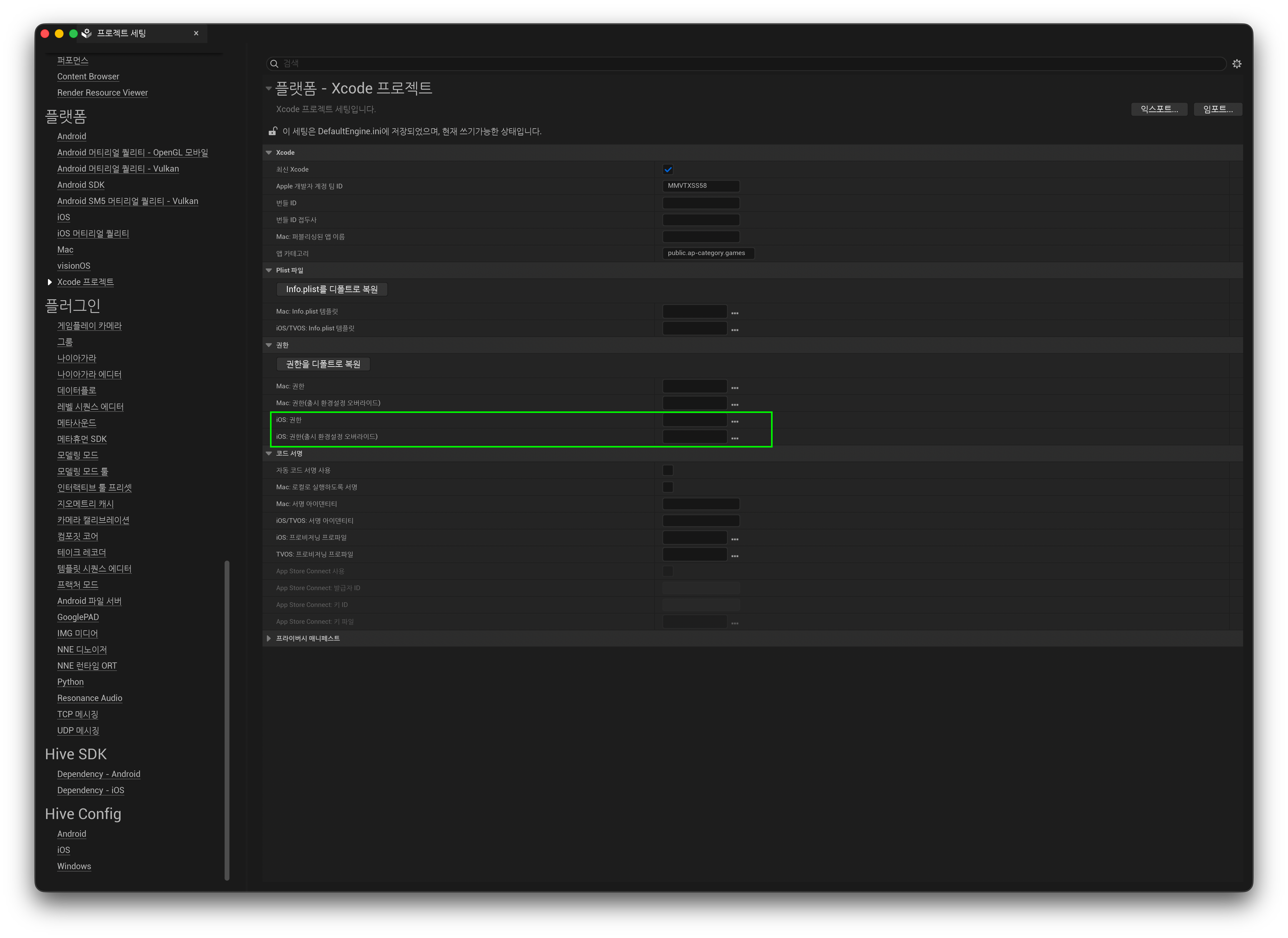
项目 说明 iOS: Entitlements 用于应用签名的 entitlements 文件 iOS: Entitlements (override shipping configuration) 若 Shipping 构建使用其他文件,请在此指定 设置将按如下形式保存到 Config/DefaultEngine.ini。也可以直接编辑该文件来指定。
-
构建后,请确认 entitlements 是否已应用到应用。
Note
- 使用
PremadeIOSEntitlements指定文件后,该文件会在 iOS 签名阶段原样应用。- 缺少必需项时:Push、Apple 登录等相关功能将无法正常工作。
- 包含不支持的项时:如果 entitlements 文件中包含未在 provisioning profile 中注册的权限,应用安装和代码签名验证将失败。
- Hive SDK 插件的 Plugins/HIVESDK/Source/HiveSDKiOS/template/ 路径中包含一个示例 entitlements 文件,供参考使用。
Warning
示例 entitlements 文件出于测试目的启用了几乎所有权限项。请勿直接复制到项目中使用。务必仅选择并使用游戏服务所需的有效项。
应用 HIVEAppDelegate (iOS)
从 Hive SDK v4 26.4.1 开始,HIVEAppDelegate swizzling 会在 Hive SDK 插件内部自动执行。应用启动时插件会自动处理,因此无需在应用代码中进行额外操作。
删除 v4 26.4.1 之前版本的既有集成代码
如果正在使用早于 Hive SDK v4 26.4.1 的版本,请在更新时删除之前的修改。
-
删除手动调用 HIVEAppDelegate 的代码:参考旧指南中的“应用 HIVEAppDelegate (iOS)”步骤,从项目中删除应用初始化时添加的如下代码块。
#if PLATFORM_IOS UIApplication * dummyApplication = [UIApplication sharedApplication]; Class clzHIVEAppDelegate = NSClassFromString(@"HIVEAppDelegate"); SEL selApplicationDidFinishLaunchingWithOptions = NSSelectorFromString(@"application:didFinishLaunchingWithOptions:"); if( clzHIVEAppDelegate != nil && [clzHIVEAppDelegate respondsToSelector:selApplicationDidFinishLaunchingWithOptions] ) { NSMethodSignature *method = [clzHIVEAppDelegate methodSignatureForSelector:selApplicationDidFinishLaunchingWithOptions]; if (method != nil) { NSInvocation *invocation = [NSInvocation invocationWithMethodSignature:method]; [invocation setSelector:selApplicationDidFinishLaunchingWithOptions]; [invocation setTarget:clzHIVEAppDelegate]; [invocation setArgument:(void*)&dummyApplication atIndex:2]; NSDictionary *localLaunchOptions = [IOSAppDelegate GetDelegate].launchOptions; if( localLaunchOptions != nil ) { [invocation setArgument:(void*)&localLaunchOptions atIndex:3]; } [invocation invoke]; } } #endif -
删除 Deep Link 委托订阅代码:参考旧指南中的“为 Deep Link 设置添加 Promotion 代码 (iOS)”步骤,删除添加到
GameInstance等类中的如下订阅和处理程序代码。-
处理程序内部逻辑可能根据所使用的接口,以
Promotion::processURI(...)或FHivePromotion::ProcessURI(...)的形式实现。// Subscription code (GameInstance::Init, etc.) - remove FIOSCoreDelegates::OnOpenURLwithOptions.AddUObject(this, &UMyGameInstance::ApplicationOpenURL); // Handler - remove (including the declaration in the header) void UMyGameInstance::ApplicationOpenURL(UIApplication* application, NSURL* url, NSDictionary* options) { Promotion::processURI(std::string([[url absoluteString] UTF8String])); }
-
-
删除 Blueprint bootstrap trigger 调用:删除应用中自定义并在 Blueprint 中调用的所有 trigger 函数(例如
RemoveOpenURLDelegate())及其对应的调用节点。如果上述应用内委托订阅已正确删除,直接应用到自定义引擎中的既有 openURL 相关修改代码(
IOSAppDelegate.h、IOSAppDelegate.cpp)不会影响引擎行为。因此,可以保留该代码,无需删除或回滚。