Terms
Terms and conditions specify the rights, obligations, and responsibilities of the service provider and the user. When providing app services, you must notify users of the terms of use and privacy policy or obtain their consent.
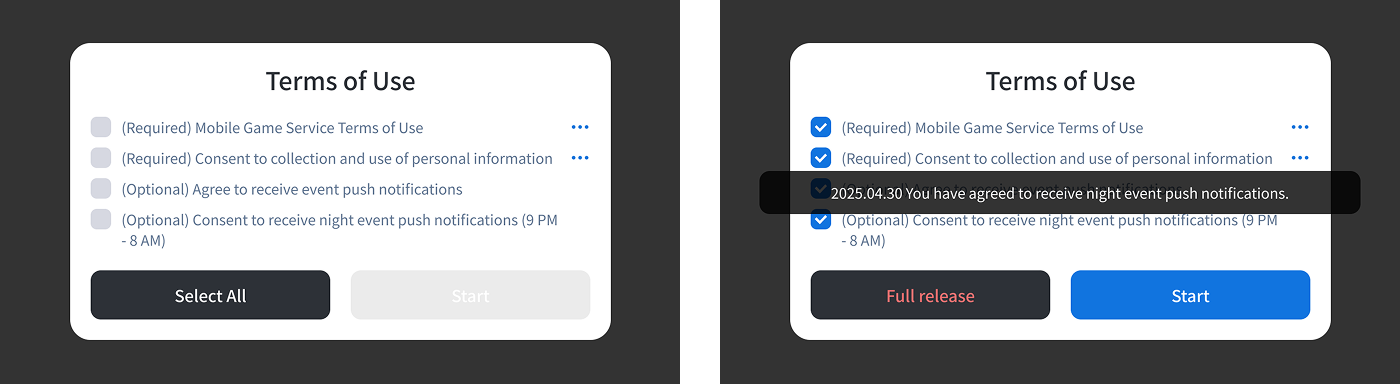
Hive SDK Provisioning lets you register and manage the terms that users agree to or decline when starting the app. It provides the following features:
- Review terms
- Delete terms consent history
- COPPA compliance
- GDPR compliance
- Verify legal guardian consent
For details on registering terms, refer to Hive Console Guide > Provisioning > Terms.
Review terms
During initialization, Hive SDK determines the user's country from their IP address and displays the country-specific terms registered in Hive Console. After users enter the app, provide a feature that lets all users review the terms and privacy policy, regardless of whether country-specific terms appear. For example, provide a Review terms button.
To implement this feature, register the terms in Hive Console. Call AuthV4.showTerms() when the user clicks the Review terms button. Hive SDK selects terms in the user's device language from the Terms Combination (M) registered for the country determined by the access IP address. If that combination has no terms in the device language, it displays the terms in the combination's default language. The game language setting, setGameLanguage, does not affect the display language of the terms review screen.
To display terms in the user's device language, register Terms Content (S) for every supported language in the Terms Combination (M) in Hive Console. For details, refer to Terms Combination (M) > View Again Settings.

The following example shows how to display the terms of service.
Delete device-based terms consent history
With device-based terms, the device retains the user's consent from the first app launch. Call AuthV4.resetAgreement to delete this history.
With device-based terms, consent information remains on the device after account deletion, so the consent popup does not appear when the app restarts. To display it again when initializing Hive SDK after account deletion, implement the following sequence:
- Call
AuthV4.resetAgreementto delete the saved consent information. - Call
AuthV4.setupto initialize Hive SDK. - Hive SDK automatically displays the consent popup again during initialization.
Account-based terms do not support deleting consent history. To select device-based or account-based terms, modify agreementDetermineBase in Basic configuration.
COPPA compliance
Apps released in the United States and its territories that target users under 13 must comply with the Children's Online Privacy Protection Act (COPPA). COPPA is a U.S. law that protects the personal information of children under 13. For users under 13, the app must meet all COPPA requirements, including the following examples:
- Guest login as the only authentication method
- No display of certain user-tracking ads
- No push notifications
- No in-app chat
- No storage of inquiries in the app's customer support service
- No collection of personal information under certain conditions
Review all COPPA requirements to ensure compliance. For details, refer to COPPA.
When complying with COPPA, users under 13 cannot enter the app on PC. COPPA requires these users to log in with guest accounts, but Hive SDK does not support guest login on PC.
Check for under 13
Hive SDK provides AuthV4.getAgeGateU13 to check whether a user is under 13. Use this value to meet COPPA requirements, such as providing only guest login or hiding certain ads. Call the method after the user selects whether they are under 13 in the terms popup. It returns true if the user is under 13.
For example, if the value is true, the app must provide only guest login. Disable account linking buttons or remove them from the UI to prevent linking with other IdP accounts, such as Google or Facebook accounts.
Adiz or Adkit automatically displays only in-app ads that meet COPPA requirements. If you do not use Adiz or Adkit, implement code to display only compliant in-app ads.
When ageGateU13 is true, Hive SDK behaves as follows:
| Platform | Description |
|---|---|
| Android | * Does not display the More Games button in the exit popup. * Does not receive remote push notifications, and push APIs do not work. |
| iOS | * Does not display the push permission popup when calling AuthV4.setup() and Auth.initialize().* Push APIs do not work. |
API Reference: AuthV4.getAgeGateU13
API Reference: AuthV4 ::getAgeGateU13
API Reference: AuthV4.getAgeGateU13
API Reference: AuthV4.INSTANCE.getAgeGateU13
API Reference: AuthV4Interface.getAgeGateU13
API Reference: HIVEAuthV4 getAgeGateU13
GDPR compliance
Service providers must comply with the General Data Protection Regulation (GDPR) if they have an establishment in Europe or provide goods or services to data subjects in Europe from outside Europe.
In Hive Console, configure the display of GDPR terms. After the user agrees to the terms, call Configuration.getAgeGateU16Agree().
For details on GDPR compliance, refer to the GDPR website.
GDPR terms agreement inquiry
Hive SDK provides Configuration.getAgeGateU16Agree() to check whether a user under 16 in a country subject to GDPR has agreed to the GDPR terms. Call it after the user selects their consent status in the terms popup. A return value of true indicates consent; false indicates no consent.
When using third-party libraries, use Configuration.getAgeGateU16Agree() to restrict app features based on whether the user is under 16. For example, use it to prevent personalized ads from appearing to children.
Confirm legal guardian consent
If the app uses legal guardian consent terms, call Configuration.getLegalGuardianConsentAgree() to check the user's legal guardian consent status. A return value of true indicates consent.