Add-ons
Request birthday verification
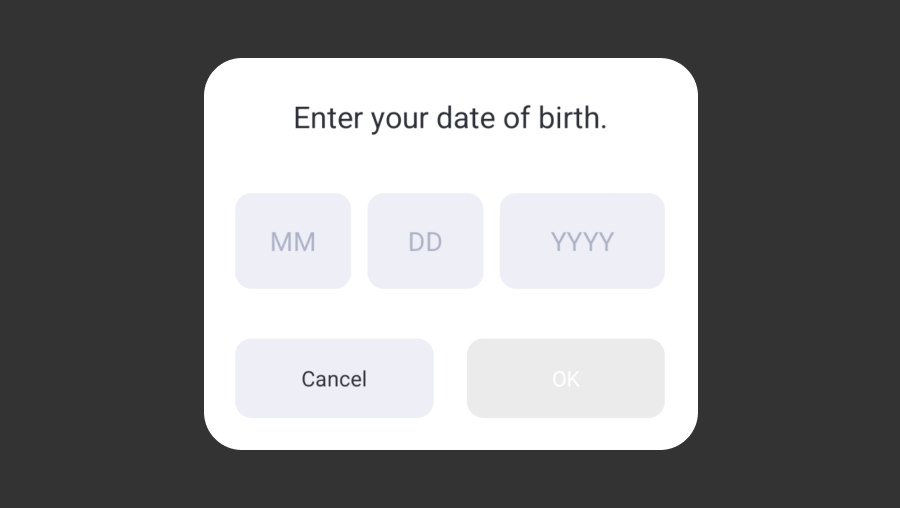
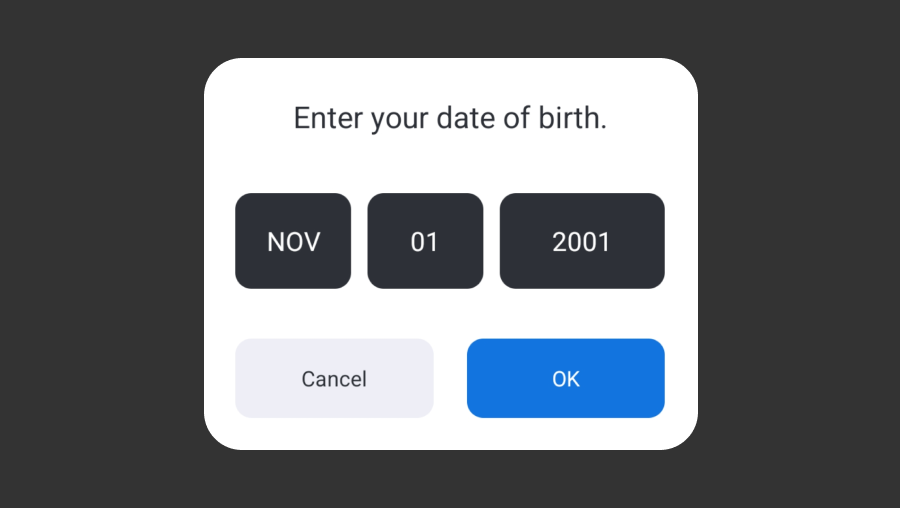
AuthV4.checkAgeGate displays a popup that allows users to enter their date of birth information. Users can select their date of birth from the year/month/day fields in the popup. When the user completes the input, AuthV4.checkAgeGate returns the value (in yyyy-MM-dd format) via callback.
Warning
Hive SDK does not verify whether the date of birth information entered by the user is accurate.
Info
The popup display language changes according to the language value set in Hive SDK. Also, the year/month/day order may change depending on the language value.
Cancel button display control
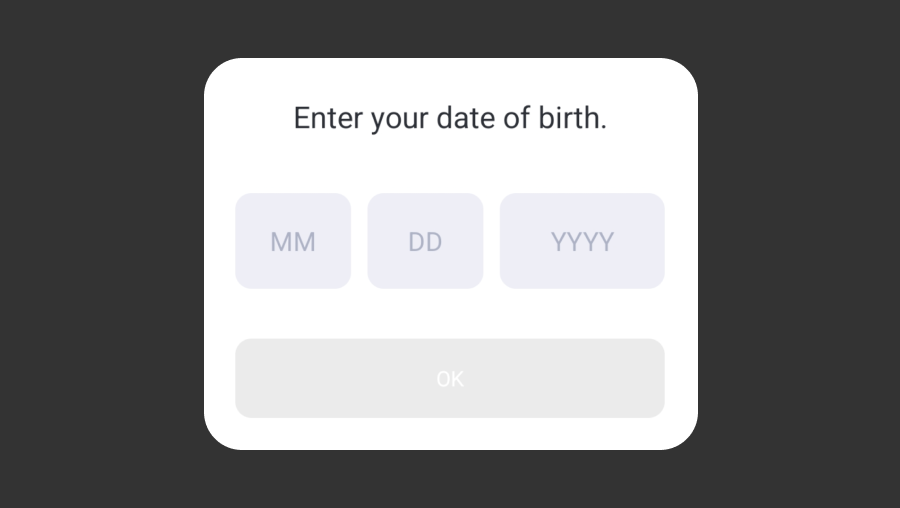
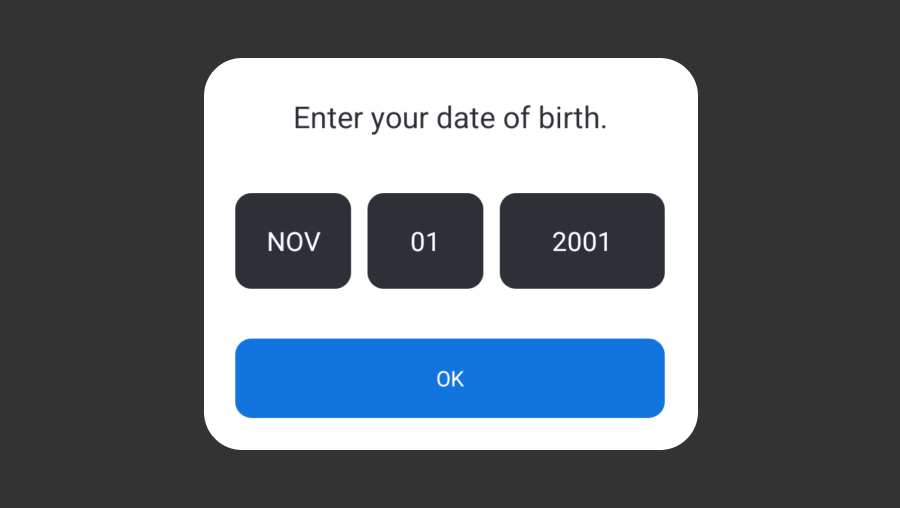
When calling AuthV4.checkAgeGate, you can determine whether to display the cancel button based on the useCloseButton setting. If you call the method with useCloseButton=false, the cancel button will not be displayed, and in this case, the user cannot close the popup or navigate to another screen before selecting their date of birth.
Example code
#include <HIVE_SDK_Plugin/HIVE_CPP.h>
using namespace std;
using namespace hive;

bool useCloseButton = true;     // or 'false'. (Whether to use cancel button)
AuthV4::checkAgeGate (useCloseButton, [=](ResultAPI const & result, std::string dateOfBirth) {
    if (!result.isSuccess()) {
        // Failure or cancel
        return;
    }
    else {
        // Success
        // Returns dateOfBirth data (in yyyy-MM-dd format)
    }
});
import com.hive.AuthV4
import com.hive.ResultAPI

var useCloseButton = true;     // or 'false'. (Whether to use cancel button)
AuthV4.checkAgeGate(useCloseButton, object : AuthV4.AuthV4AgeGateListener {
    override fun onAuthV4AgeGate(result: ResultAPI, dateOfBirth: String?) {
        if (!result.isSuccess) {
            // Failure or cancel
            return
        }
        else {
            // Success
            // Returns dateOfBirth data (in yyyy-MM-dd format)
        }
    }
})
import com.hive.AuthV4;
import com.hive.ResultAPI;


boolean useCloseButton = true;     // or 'false'. (Whether to use cancel button)
AuthV4.INSTANCE.checkAgeGate(useCloseButton, (result, dateOfBirth) -> {
    if (!result.isSuccess()) {
        // Failure or cancel
        return;
    }
    else {
        // Success
        // Returns dateOfBirth data (in yyyy-MM-dd format)
    }
});
#import <HIVEService/HIVEService-Swift.h>

BOOL useCloseButton = YES;   // or 'NO'. (Whether to use cancel button)
[HIVEAuthV4 checkAgeGate:useCloseButton handler: ^(HIVEResultAPI *result, NSString *dateOfBirth) {
    if (!result.isSuccess()) {
        // Failure or cancel
        return;
    }
    else {
        // Success
        // Returns dateOfBirth data (in yyyy-MM-dd format)
    }
}];
Bring Facebook friend lists
getProviderFriendsList() method provides the PlayerID of user's Facebook friends in the same game app. Those who plays without Facebook sync are not on the friend lists, and those who synced before return -1 as PlayerID.
Warning
Facebook revised the policy which explains the basic access permission items to Platform API in May, 2018. To use Facebook /user/friends API henceforth, you need user_friends permission.
Check the guideline for Facebook App Review
API Reference: hive.AuthV4.getProviderFriendsList
using hive;

    AuthV4.ProviderType providerType = AuthV4.ProviderType.FACEBOOK;

    AuthV4.getProviderFriendsList (providerType, (ResultAPI result, AuthV4.ProviderType providerType, Dictionary<String, Int64> providerUserIdList) => {
         if (!result.isSuccess()) {
             return;
         }

         if (providerUserIdList != null) {
             foreach (KeyValuePair<String, Int64> providerUserId in providerUserIdList ) {
                 // providerUserId: providerUserId.Key
                 // playerId: providerUserId.Value
             }
         }
});
#include "HiveAuthV4.h"

EHiveProviderType TargetProviderType = EHiveProviderType::FACEBOOK;
FHiveAuthV4::GetProviderFriendsList(TargetProviderType,
                                                                        FHiveAuthV4OnGetProviderFriendsListDelegate::CreateLambda([this](const FHiveResultAPI& Result, const EHiveProviderType& ProviderType, const ProviderFriendsMap& ProviderUserIdList) {
        // (alias) using ProviderFriendsMap = TMap<FString, int64>;
        if (!Result.IsSuccess()) {
                return;
        }

        for (const auto& ProviderUserIdEntry : ProviderUserIdList) {
                // ProviderUserId: ProviderUserIdEntry.Key;
                // Player Id: ProviderUserIdEntry.Value;
        }

}));
API Reference: AuthV4::getProviderFriendsList
#include <HIVE_SDK_Plugin/HIVE_CPP.h>
    using namespace std;
    using namespace hive;

    ProviderType providerType = ProviderType::FACEBOOK;

    AuthV4::getProviderFriendsList (providerType, [=](ResultAPI const & result, ProviderType providerType, map<string,PlayerID> providerUserIdList) {
         if (!result.isSuccess()) {
             return;
         }

         if (providerUserIdList != null) {
             for(auto i = providerUserIdList.begin() ; i != providerUserIdList.end(); i++)
             {
                 // providerUserId: ( i->first).c_str()
                 // playerId: i->second
             }
         }
});
API Reference: com.hive.AuthV4.getProviderFriendsList
import com.hive.AuthV4
    import com.hive.ResultAPI

    val providerType = AuthV4.ProviderType.FACEBOOK

    AuthV4.getProviderFriendsList(providerType, object : AuthV4.AuthV4ProviderFriendsListener {
         override fun onGetProviderFriendsList(result: ResultAPI, providerType: AuthV4.ProviderType, providerUserIdList: Map<String, Long>?) {
             if (!result.isSuccess) {
                 return
             }

             providerUserIdList?.forEach {
                 // providerUserId: it.key
                 // playerId: it.value
             }
         }
})
API Reference: com.hive.AuthV4.getProviderFriendsList
import com.hive.AuthV4;
    import com.hive.ResultAPI;

    AuthV4.ProviderType type = AuthV4.ProviderType.FACEBOOK;

    AuthV4.INSTANCE.getProviderFriendsList(type, (result, providerType, providerUserIdList) -> {
         if (!result.isSuccess()) {
             return;
         }

         if (providerUserIdList != null) {
             for (Map.Entry<String, Long> entry : providerUserIdList.entrySet()) {
                 // providerUserId: entry.getKey();
                 // playerId: entry.getValue();
             }
         }
});
API Reference: AuthV4Interface.getProviderFriendsList
import HIVEService

    AuthV4Interface.getProviderFriendsList(.Facebook) { result, retProviderType, providerUserIdList in
         if !result.isSuccess() {
             return
         }

         if let providerUserIdList = providerUserIdList {
             for (key in providerUserIdList.keys) {
                 // providerUserId: key
                 // playerId: providerUserIdList[key]
             }
         }
}
API Reference: HIVEAuthV4:getProviderFriendsList
#import <HIVEService/HIVEService-Swift.h>

    [HIVEAuthV4 getProviderFriendsList: HIVEProviderTypeFACEBOOK handler: ^(HIVEResultAPI *result, HIVEProviderType retProviderType, NSDictionary<NSString *,NSNumber *> *providerUserIdList) {
         if (!result.isSuccess()) {
             return;
         }

         if (providerUserIdList != nil) {
             for (NSString *key in providerUserIdList) {
                 // providerUserId: key
                 // playerId: [[providerUserIdList objectForKey:key] longlongValue];
             }
         }
}];
Respond to COPPA
The Children's Online Privacy Protection Act (COPPA) is a United States feneral law, which aims to protect the privacy of children under the age of 13 on-line. To respond to COPPA, Hive Platform released Hive SDK 4.10.0 including getAgeGateU13() API to query whether users are under 13 or not. The API returns true if the user age is under 13.
Sample code
API Reference: AuthV4.getAgeGateU13
API Reference: AuthV4 ::getAgeGateU13
API Reference: AuthV4.getAgeGateU13
API Reference: AuthV4.INSTANCE.getAgeGateU13
API Reference: AuthV4Interface.getAgeGateU13
API Reference: HIVEAuthV4 getAgeGateU13
What changes
The followings are implemented if ageGateU13() returns true.
- iOS
- Agreement request popup on Push notification is not displayed when calling
AuthV4.setup()orAuth.initialize(). - Push API is not implemented.
- Agreement request popup on Push notification is not displayed when calling
- Android
- More Games button is not displayed when showing Exit Popup.
- Unavailable to receive Remote Push, and Push API is not implemented.
Checking terms of services agreement for the users under 16 in GDPR applicable countries
Starting from Hive SDK 24.2.0, you can determine whether users under 16 years old have agreed to the terms in countries affected by GDPR (General Data Protection Regulation) using the Configuration.getAgeGateU16Agree() method. If the returned value is true, it means that a user under 16 has agreed to the terms; if false, it means they have not. When using third-party libraries, if you need to restrict app features based on whether the user is under 16, you can utilize the Configuration.getAgeGateU16Agree() method.
Checking legal guardian consent
Starting from Hive SDK 24.3.0, if the game app uses the legal guardian consent confirmation terms, you can retrieve whether the game app user has obtained legal guardian consent by calling the Configuration.getLegalGuardianConsentAgree() method. If the value is true, it indicates that consent has been given.
Respond to OS permission requests
Access permission list required for playing game is organized in AndroidManifest.xml file. Try to send some permissions as string list of relevant API and use them. You can check whether user opts in or opts out of the specific permissions. If some of Dangerous permission are denied, make sure to display the popup which requests access to OS again. Other permissions are automatically opted in or opted out in accordance with the settings on user device. If you type wrong permissions or wrong words, the system regards as the permissions are not declared on the AndroidManifest.xml file and not allowed to access the permissions.
Android 6.0 (API level 23) supports this feature. If OS is iOS or Android API level is earlier than 23, ResultAPI is sent as not supported.
Note
This feature is for Android only.
Sample code
API Reference: PlatformHelper .requestUserPermissions
String[] requestArray = {"android.permission.WRITE_EXTERNAL_STORAGE", "android.permission.BLUETOOTH", "android.permission.READ_CONTACTS"};
    List<String> requests = new List<String>(requestArray);

    PlatformHelper.requestUserPermissions( requests, (ResultAPI result, String[] granted, String[] denied) => {

         if (result.code == ResultAPI.Code.PlatformHelperOSNotSupported) {
            //Android only
         }

         if (result.code == ResultAPI.Code.PlatformHelperOSVersionNotSupported) {
             //Android OS version not supported.
         }

         if (granted != null && granted.Length > 0) {
             foreach (String name in granted) {
                 // List of permissions accepted among requests
             }
         }

         if (denied != null && denied.Length > 0) {
             foreach (String name denied) {
                 // List of permissions denied among requests
             }
         }
});
#include "HivePlatformHelper.h"

TArray<FString> Requests;
Requests.Add(TEXT("android.permission.WRITE_EXTERNAL_STORAGE"));
Requests.Add(TEXT("android.permission.READ_CONTACTS"));

FHivePlatformHelper::RequestUserPermissions(Requests, FHivePlatformHelperOnUserPermissionsDelegate::CreateLambda([this](const FHiveResultAPI& Result, const TArray<FString>& GrantedRequests, const TArray<FString>& DeniedRequests) {

        switch(Result.Code) {
                case FHiveResultAPI::ECode::Success: {
                        if (GrantedRequests.Num() > 0) {
                                // List of permissions accepted among requests
                        }
                        if (DeniedRequests.Num() > 0) {
                                // List of permissions denied among requests
                        }
                }
                        break;
                case FHiveResultAPI::ECode::PlatformHelperOSVersionNotSupported:
                        // Android OS version not supported.
                        break;
                default:
                        // Other exceptions
                        break;
        }
}));
API Reference: PlatformHelper ::requestUserPermissions
string requestArray[] = {"android.permission.WRITE_EXTERNAL_STORAGE", "android.permission.BLUETOOTH", "android.permission.READ_CONTACTS"};
    vector<string> requests(begin(requestArray), end(requestArray));

    PlatformHelper::requestUserPermissions(requests, [=](ResultAPI const & result, vector<string> const & granted, vector<string> const & denied) {

         if (result.code == hive::ResultAPI::PlatformHelperOSNotSupported) {
             //Android only
         }

         if (result.code == hive::ResultAPI::PlatformHelperOSVersionNotSupported) {
             //Android OS version not supported.
         }

         if (!granted.empty()) {
             for (string name : granted) {
                 // List of permissions accepted among requests
             }
         }

         if (!denied.empty()) {
             for (string name : denied) {
                 // List of permissions denied among requests
             }
         }
});
API Reference: PlatformHelper.requestUserPermissions
import com.hive.PlatformHelper
    import com.hive.ResultAPI

    val requests = arrayListOf(
         "android.permission.WRITE_EXTERNAL_STORAGE",
         "android.permission.BLUETOOTH",
         "android.permission.READ_CONTACTS"
    )

    PlatformHelper.requestUserPermissions(requests, object : PlatformHelper.RequestUserPermissionsListener {
         override fun onRequestUserPermissions(result: ResultAPI, granted: List<String>, denied: List<String>) {
             when (result.code) {
                 ResultAPI.Code.Success -> {
                     if (granted.isNotEmpty()) {
                         // List of permissions accepted among requests
                     }
                     if (denied.isNotEmpty()) {
                         // List of permissions denied among requests
                     }
                 }
                 ResultAPI.Code.PlatformHelperOSVersionNotSupported -> {
                     //Android OS version not supported.
                 }
                 else -> {
                     // other exception situations
                 }
             }
         }
})
API Reference: PlatformHelper .INSTANCE.requestUserPermissions
import com.hive.PlatformHelper;
    import com.hive.ResultAPI;

    List<String> requests = Arrays.asList(
             "android.permission.WRITE_EXTERNAL_STORAGE",
             "android.permission.BLUETOOTH",
             "android.permission.READ_CONTACTS");

    PlatformHelper.INSTANCE.requestUserPermissions(requests, (result, granted, denied) -> {
         switch (result.getCode()) {
             case Success:
                 if (!granted.isEmpty()) {
                     // List of permissions accepted among requests
                 }
                 if (!denied.isEmpty()) {
                     // List of permissions denied among requests
                 }
                 break;
             case PlatformHelperOSVersionNotSupported:
                 //Android OS version not supported.
                 break;
             default:
                 // other exception situations
                 break;
         }
});
Using Device Management
Device Management automatically implements upon login according to settings on Hive Console. After login, a game app calls theshowDeviceManagement() method of AuthV4 class and displays the Device Management list to a user.
When login is canceled due to the failure of device authentication, a game app with Device Management should handle the AuthV4NotRegisteredDevice code of Result API for attempting to silent login again or carrying out to logout. For more information on the Device Management, refer to the operation guide: Introduction to Device Management.
API Reference: AuthV4.showDeviceManagement
API Reference: AuthV4 ::showDeviceManagement
API Reference: AuthV4.showDeviceManagement
API Reference: AuthV4.INSTANCE .showDeviceManagement
API Reference: AuthV4Interface .showDeviceManagement
API Reference: HIVEAuthV4 showDeviceManagement
Google Play game achievements and leaderboards
To get your game app featured on Google Play Games, you need to implement achievement and leaderboard function of Google Play Games.
When a user logs in with Google Play, they are automatically logged in to Play Games Services (PGS) and can use achievements and leaderboards. For detailed information about related features, refer to the Google Play Games Services Guide.
Note
When using the AuthV4Helper class
- If a user rejects login during an implicit login attempt to Google Play Games after launching the app, the app remembers this and will no longer attempt implicit login. Even if automatic login is possible while the player session is maintained, the app continues to remember the state where implicit login was rejected.
- If a user who is not logged in to Google Play achieves an achievement, the result is not sent to Google Play Games.
This content complies with the Google Play Games Services Guide.
Send playerID
If you need to request PlayerID to Google Play Games, implement getGooglePlayerId() method in the ProviderGoogle class. By implementing this method, it sends PlayerID as well as AuthCode, which validates session key.
Followings are sample codes.
API Reference: hive.ProviderGoogle.getGooglePlayerId
API Reference: ProviderGoogle::getGooglePlayerId
// Request the playerID from Google Play Games.
ProviderGoogle::getGooglePlayerId([=](ResultAPI const &result, std::string const &googlePlayerId, std::string const &authCode) {
    if (result.isSuccess())
    {
        // Success in API call.
    }
});
API Reference: com.hive.ProviderGoogle.getGooglePlayerId
Achievements
Implement ProviderGoogle class to use Achievement function of Google Play Games through Hive SDK.
Request to reveal a hidden achievement
To reveal a hidden achievement to the currently signed-in user, call achievementsReveal() method. It will have no effect but uncover the 0% of achievement. Followings are sample codes.
API Reference: hive.ProviderGoogle.achievementsReveal
#include "HiveProviderGoogle.h"

// Achievement ID
FString AchievementId = TEXT("abcdef123456");
FHiveProviderGoogle::AchievementsReveal(AchievementId, FHiveProviderGoogleOnAchievementsDelegate::CreateLambda([this](const FHiveResultAPI& Result) {
        if (Result.IsSuccess()) {
                // API call successful
        }
}));
API Reference: ProviderGoogle::achievementsReveal
API Reference: ProviderGoogle.achievementsReveal
import com.hive.ProviderGoogle
    import com.hive.ResultAPI
    //Achievement ID
    val achievementId = "abcdef123456"
    ProviderGoogle.achievementsReveal(achievementId, object : ProviderGoogle.GoogleAchievementsListener {
         override fun onAchievementsResult(resultAPI: ResultAPI) {
             if (resultAPI.isSuccess) {
                 // call successful
             }
         }
})
API Reference: ProviderGoogle .INSTANCE.achievementsReveal
Request to unlock an achievement
To unlock an achievement to the currently signed-in user, call achievementsUnlock() method. This method will mark 100% of achievement regardless of its status; hidden or not. Followings are sample codes.
API Reference: ProviderGoogle.achievementsUnlock
API Reference: ProviderGoogle::achievementsUnlock
API Reference: ProviderGoogle.achievementsUnlock
import com.hive.ProviderGoogle
    import com.hive.ResultAPI
    //Achievement ID
    val achievementId = "abcdef123456"
    ProviderGoogle.achievementsUnlock(achievementId, object : ProviderGoogle.GoogleAchievementsListener {
         override fun onAchievementsResult(resultAPI: ResultAPI) {
             if (resultAPI.isSuccess) {
                 // call successful
             }
         }
})
API Reference: ProviderGoogle .INSTANCE.achievementsUnlock
Request to increment an achievement
To use the request function to increment achievement, set the achievement value as a parameter, and then call achievementsIncrement() method. The achievement value is the sum of the value set when the corresponding API is called and the achievement is automatically achieved when the total sum is max.
Followings are sample codes.
API Reference: hive.ProviderGoogle.achievementsIncrement
#include "HiveProviderGoogle.h"

//Achievement ID
FString AchievementId = TEXT("abcdef123456");
// Achievement numbers
int32 Value = 1;

FHiveProviderGoogle::AchievementsIncrement(AchievementId, Value, FHiveProviderGoogleOnAchievementsDelegate::CreateLambda([this](const FHiveResultAPI& Result) {
        if (Result.IsSuccess()) {
                // call successful
        }
}));
API Reference: ProviderGoogle::achievementsIncrement
#include <HIVE_SDK_Plugin/HIVE_CPP.h>
    using namespace std;
    using namespace hive;
    //Achievement ID
    string achievementId = "abcdef123456";
    // Achievement numbers
    int value = 1;
    ProviderGoogle::achievementsIncrement(achievementId, value, [=](ResultAPI const & result) {
      if(result.isSuccess()){
      // call successful
      }
});
API Reference: ProviderGoogle.achievementsIncrement
import com.hive.ProviderGoogle
    import com.hive.ResultAPI
    //Achievement ID
    val achievementId = "abcdef123456"
    // Achievement numbers
    val value = 1
    ProviderGoogle.achievementsIncrement(achievementId, value, object : ProviderGoogle.GoogleAchievementsListener {
         override fun onAchievementsResult(resultAPI: ResultAPI) {
             if (resultAPI.isSuccess) {
                 // call successful
             }
         }
})
API Reference: ProviderGoogle .INSTANCE.achievementsIncrement
Request to show achievement list (Helper)
Note
Hive SDK 4.7.0 provides Helper, which easily compares signed-in account on user device and PlayerID-synced account. If two accounts are not the same, refer to IdP Sync page to handle the situation.
Call showAchievements() method to request achievement list of Google Play Games.
Followings are sample codes.
API Reference: AuthV4.Helper.showAchievements
using hive;
    AuthV4.Helper.showAchievements ((ResultAPI result, AuthV4.PlayerInfo playerInfo) => {
      switch (result.code) {
        case ResultAPI.Code.Success:
          // Deliver Success with achievement indication
          break;
        case ResultAPI.Code.AuthV4ConflictPlayer:
          // account conflict
          break;
        case ResultAPI.Code.AuthV4GoogleLogout:
          //TODO:
          // After logging out of Google Play, log out of the game
          // Relaunching the game must be handled by the development studio
          break;
        default:
          // other exception situations
          break;
      }
});
#include "HiveAuthV4.h"

FHiveAuthV4::Helper::ShowAchievements(FHiveAuthV4HelperDelegate::CreateLambda([this](const FHiveResultAPI& Result, const TOptional<FHivePlayerInfo>& PlayerInfo) {
        switch (Result.Code) {
                case FHiveResultAPI::ECode::Success:
                        // Deliver Success with achievement indicatio
                        break;
                case FHiveResultAPI::ECode::AuthV4ConflictPlayer:
                        // 계정 충돌
                        break;
                case FHiveResultAPI::ECode::AuthV4GoogleLogout:
                        // TODO:
                        // After logging out of Google Play, log out of the game
                        // Relaunching the game must be handled by the development studio
                        break;
                default:
                        // other exception situations
                        break;
        }
}));
API Reference: AuthV4 ::Helper::showAchievements
#include <HIVE_SDK_Plugin/HIVE_CPP.h>
    using namespace std;
    using namespace hive;
    AuthV4::Helper::showAchievements([=](ResultAPI const & result, shared_ptr playerInfo) {
      switch (result.code) {
        case ResultAPI::Success:
          // Deliver Success with achievement indication
          break;
        case ResultAPI::AuthV4ConflictPlayer:
          // account conflict
          break;
        case ResultAPI::AuthV4GoogleLogout:
          //TODO:
          // After logging out of Google Play, log out of the game
          // Relaunching the game must be handled by the development studio
          break;
        default:
          // other exception situations
          break;
      }
});
API Reference: AuthV4.Helper.showAchievements
import com.hive.AuthV4
    import com.hive.ResultAPI
    AuthV4.Helper.showAchievements(object : AuthV4.Helper.AuthV4HelperListener {
         override fun onAuthV4Helper(result: ResultAPI, playerInfo: AuthV4.PlayerInfo?) {
             when (result.code) {
                 ResultAPI.Code.Success -> {
                     // Deliver Success with achievement indication
                 }
                 ResultAPI.Code.AuthV4ConflictPlayer -> {
                     // account conflict
                 }
                 ResultAPI.Code.AuthV4GoogleLogout -> {
                     //TODO:
                     // After logging out of Google Play, log out of the game
                     // Relaunching the game must be handled by the development studio
                 }
                 else -> {
                     // other exception situations
                 }
             }
         }
})
API Reference: AuthV4.Helper.INSTANCE.showAchievements
import com.hive.AuthV4;
    import com.hive.ResultAPI;

    AuthV4.Helper.INSTANCE.showAchievements((result, playerInfo) -> {
         switch (result.getCode()) {
             case Success:
                 // Deliver Success with achievement indication
                 break;
             case AuthV4ConflictPlayer:
                 // account conflict
                 break;
             case AuthV4GoogleLogout:
                 //TODO:
                 // After logging out of Google Play, log out of the game
                 // Relaunching the game must be handled by the development studio
                 break;
             default:
                 // other exception situations
                 break;
         }
});
Warning
If user signs out from the settings screen of Play Games Services, user account is signed out and error code named ResultAPI.Code.AuthV4GoogleLogout is sent as a callback. As signed-out is completed, logout popup is shown up and display changes to game title.
Request to show achievement list (Auth v4)
Call showAchievements() method to request achievement list of Google Play Games.
Followings are sample codes.
API Reference: ProviderGoogle .showAchievements
using hive;
    ProviderGoogle.showAchievements((ResultAPI result) => {
      switch (result.code) {
        case ResultAPI.Code.Success:
          // Deliver Success with achievement indication
          break;
        case ResultAPI.Code.AuthV4GoogleLogout:
          //TODO:
          // After logging out of Google Play, log out of the game
          // Relaunching the game must be handled by the development studio
          break;
        default:
          // other exception situations
          break;
      }
});
#include "HiveProviderGoogle.h"

FHiveProviderGoogle::ShowAchievements(FHiveProviderGoogleOnLeaderboardsDelegate::CreateLambda([this](const FHiveResultAPI& Result) {
                case FHiveResultAPI::ECode::Success:
                        // 업적 표시와 함께 Success 전달
                        break;
                case FHiveResultAPI::ECode::AuthV4GoogleLogout:
                        // TODO:
                        // Google Play 로그아웃 후 게임 로그아웃 실행
                        // 게임 재실행은 개발 스튜디오에서 처리해야함
                        break;
                default:
                        // 기타 예외 상황
                        break;
}));
API Reference: ProviderGoogle ::showAchievements
#include <HIVE_SDK_Plugin/HIVE_CPP.h>
    using namespace std;
    using namespace hive;
    ProviderGoogle::showAchievements([=](ResultAPI const & result) {
      switch (result.code) {
        case ResultAPI::Success:
          // Deliver Success with achievement indication
          break;
        case ResultAPI::AuthV4GoogleLogout:
          //TODO:
          // After logging out of Google Play, log out of the game
          // Relaunching the game must be handled by the development studio
          break;
        default:
          // other exception situations
          break;
      }
});
API Reference: ProviderGoogle.showAchievements
import com.hive.ProviderGoogle
    import com.hive.ResultAPI
    ProviderGoogle.showAchievements(object : ProviderGoogle.GoogleAchievementsListener {
         override fun onAchievementsResult(resultAPI: ResultAPI) {
             when(resultAPI.code) {
                 ResultAPI.Code.Success -> {
                     // Deliver Success with achievement indication
                 }
                 ResultAPI.Code.AuthV4GoogleLogout -> {
                     //TODO:
                     // After logging out of Google Play, log out of the game
                     // Relaunching the game must be handled by the development studio
                 }
                 else -> {
                     // other exception situations
                 }
             }
         }
})
API Reference: ProviderGoogle.INSTANCE.showAchievements
import com.hive.ProviderGoogle;
    import com.hive.ResultAPI;

    ProviderGoogle.INSTANCE.showAchievements(resultAPI -> {
         switch (resultAPI.getCode()) {
             case Success:
                 // Deliver Success with achievement indication
                 break;
             case AuthV4GoogleLogout:
                 //TODO:
                 // After logging out of Google Play, log out of the game
                 // Relaunching the game must be handled by the development studio
                 break;
             default:
                 // other exception situations
                 break;
         }
});
Warning
If the user signs out from the settings screen of Google Play Games, error code named ResultAPI.Code.AuthV4GoogleLogout is sent as a callback. Once this error is sent, make sure to code as same as the process when signed-out button in game is tapped.
Leaderboards
Implement ProviderGoogle class to use Leaderboard function of Google Play Games through Hive SDK.
Leaderboard score updates
Call leaderboardsSubmitScore() method to request leaderboard score updates of Google Play Games.
Followings are sample codes.
API Reference: hive.ProviderGoogle.leaderboardsSubmitScore
#include "HiveProviderGoogle.h"

// Leaderboard ID
FString LeaderboardId = TEXT("12345abcde");

// Leaderboard score number
int64 Score = 100;

FHiveProviderGoogle::LeaderboardsSubmitScore(LeaderboardId, Score, FHiveProviderGoogleOnLeaderboardsDelegate::CreateLambda([this](const FHiveResultAPI& Result) {
        if (Result.IsSuccess()) {
                // API call successful
        }
}));
API Reference: ProviderGoogle::leaderboardsSubmitScore
#include <HIVE_SDK_Plugin/HIVE_CPP.h>
    using namespace std;
    using namespace hive;
    // Leaderboard ID
    string leaderboardId = "12345abcde";

    // Leaderboard score number
    long score = 100;

    ProviderGoogle::leaderboardsSubmitScore(leaderboardId, score, [=](ResultAPI const & result) {
       if (result.isSuccess()) {
          // API call successful
        }
});
API Reference: ProviderGoogle.leaderboardsSubmitScore
import com.hive.ProviderGoogle
    import com.hive.ResultAPI
    // Leaderboard ID
    val leaderboardId = "12345abcde"
    // Leaderboard score number
    val score = 100L
    ProviderGoogle.leaderboardsSubmitScore(leaderboardId, score, object : ProviderGoogle.GoogleLeaderboardsListener {
         override fun onLeaderboardsResult(resultAPI: ResultAPI) {
             if (resultAPI.isSuccess) {
                 // API call successful
             }
         }
})
API Reference: com.hive.ProviderGoogle.leaderboardsSubmitScore
import com.hive.ProviderGoogle;
    import com.hive.ResultAPI;

    // Leaderboard ID
    String leaderboardId = "12345abcde";

    // Leaderboard score number
    long score = 100;

    ProviderGoogle.INSTANCE.leaderboardsSubmitScore(leaderboardId, score, resultAPI -> {
         if (resultAPI.isSuccess()) {
             // API call successful
         }
});
Request to show leaderboard list (Helper)
Call showLeaderboards() method to request leaderboard list of Google Play Games.
Followings are sample codes.
API Reference: hive.AuthV4.Helper.showLeaderboard
using hive;
    AuthV4.Helper.showLeaderboard ((ResultAPI result, AuthV4.PlayerInfo playerInfo) => {
       switch (result.code) {
         case ResultAPI.Code.Success:
           // Deliver Success with leaderboard display
           break;
         case ResultAPI.Code.AuthV4ConflictPlayer:
           // account conflict
           break;
         case ResultAPI.CodeAuthV4GoogleLogout:
    //TODO:
           // After logging out of Google Play, log out of the game
           // Relaunching the game must be handled by the development studio
           break;
         default:
           // other exception situations
           break;
       }
});
#include "HiveAuthV4.h"

FHiveAuthV4::Helper::ShowLeaderboard(FHiveAuthV4HelperDelegate::CreateLambda([this](const FHiveResultAPI& Result, const TOptional<FHivePlayerInfo>& PlayerInfo) {
                case FHiveResultAPI::ECode::Success:
                        // Deliver Success with leaderboard display
                        break;
                case FHiveResultAPI::ECode::AuthV4ConflictPlayer:
                        // account conflict
                        break;
                case FHiveResultAPI::ECode::AuthV4GoogleLogout:
                        // TODO:
                        // After logging out of Google Play, log out of the game
          // Relaunching the game must be handled by the development studio
                        break;
                default:
                        // 기타 예외 상황
                        break;
}));
API Reference: com.hive.AuthV4.Helper.showLeaderboard
#include <HIVE_SDK_Plugin/HIVE_CPP.h>
    using namespace std;
    using namespace hive;
    AuthV4::Helper::showLeaderboard([=](ResultAPI const & result, shared_ptr playerInfo) {
    switch (result.code) {
           case ResultAPI::Success:
             // Deliver Success with leaderboard display
             break;
           case ResultAPI::AuthV4ConflictPlayer:
             // account conflict
             break;
           case ResultAPI::AuthV4GoogleLogout:
    //TODO:
             // After logging out of Google Play, log out of the game
             // Relaunching the game must be handled by the development studio
             break;
           default:
             break;
         }
});
API Reference: Helper.showLeaderboard
import com.hive.AuthV4
    import com.hive.ResultAPI
    AuthV4.Helper.showLeaderboard(object : AuthV4.Helper.AuthV4HelperListener {
         override fun onAuthV4Helper(result: ResultAPI, playerInfo: AuthV4.PlayerInfo?) {
             when (result.code) {
                 ResultAPI.Code.Success -> {
                     // Deliver Success with leaderboard display
                 }
                 ResultAPI.Code.AuthV4ConflictPlayer -> {
                     // account conflict
                 }
                 ResultAPI.Code.AuthV4GoogleLogout -> {
                     //TODO:
                     // After logging out of Google Play, log out of the game
                     // Relaunching the game must be handled by the development studio
                 }
                 else -> {
    // other exception situations
    }
             }
         }
})
API Reference: AuthV4.Helper.INSTANCE.showLeaderboard
import com.hive.AuthV4;
import com.hive.ResultAPI;

AuthV4.Helper.INSTANCE.showLeaderboard((result, playerInfo) -> {
    switch (result.getCode()) {
        case Success:
            // Deliver Success with leaderboard display
            break;
        case AuthV4ConflictPlayer:
            // account conflict
            break;
        case AuthV4GoogleLogout:
            //TODO:
            // After logging out of Google Play, log out of the game
            // Relaunching the game must be handled by the development studio
            break;
        default:
            // other exception situations
            break;
    }
});
Warning
If the user signs out from the settings screen of Google Play Games, user account is signed out and error code named ResultAPI.Code.AuthV4GoogleLogout is sent as a callback. As signed-out is completed, logout popup is shown up and display changes to game title.
Request to show leaderboard list (Auth v4)
Call showLeaderboards() method to request leaderboard list of Google Play Games.
Followings are sample codes.
API Reference: hive.ProviderGoogle.showLeaderboards
using hive;

    ProviderGoogle.showLeaderboards(onLeaderboardsResult, (ResultAPI result) => {
    switch (result.code) {
         case ResultAPI.Code.Success:
           // Deliver Success with leaderboard display
           break;
         case ResultAPI.CodeAuthV4GoogleLogout:
           //TODO:
           // After logging out of Google Play, log out of the game
           // Relaunching the game must be handled by the development studio
           break;
         default:
           // other exception situations
           break;
       }
});
#include "HiveProviderGoogle.h"

FHiveProviderGoogle::ShowLeaderboard(FHiveProviderGoogleOnLeaderboardsDelegate::CreateLambda([this](const FHiveResultAPI& Result) {
                    case FHiveResultAPI::ECode::Success:
                        // Deliver Success with leaderboard display
                        break;
                case FHiveResultAPI::ECode::AuthV4GoogleLogout:
                        // TODO:
                        // After logging out of Google Play, log out of the game
          // Relaunching the game must be handled by the development studio
                        break;
                default:
                        // other exception situations
                        break;
}));
API Reference: ProviderGoogle::showLeaderboards
#include <HIVE_SDK_Plugin/HIVE_CPP.h>
    using namespace std;
    using namespace hive;
    ProviderGoogle::showLeaderboard([=](ResultAPI const & result) {
    switch (result.code) {
           case ResultAPI::Success:
             // Deliver Success with leaderboard display
             break;
           case ResultAPI::AuthV4GoogleLogout:
             //TODO:
             // After logging out of Google Play, log out of the game
             // Relaunching the game must be handled by the development studio
             break;
           default:
    // other exception situations
             break;
         }
});
API Reference: ProviderGoogle.showLeaderboards
import com.hive.ProviderGoogle
    import com.hive.ResultAPI
    ProviderGoogle.showLeaderboards(object : ProviderGoogle.GoogleLeaderboardsListener {
         override fun onLeaderboardsResult(resultAPI: ResultAPI) {
             when(resultAPI.code) {
                 ResultAPI.Code.Success -> {
                     // Deliver Success with leaderboard display
                 }
                 ResultAPI.Code.AuthV4GoogleLogout -> {
                     //TODO:
                     // After logging out of Google Play, log out of the game
                     // Relaunching the game must be handled by the development studio
                 }
                 else -> {
    // other exception situations
    }
             }
         }
})
API Reference: com.hive.ProviderGoogle.showLeaderboards
import com.hive.ProviderGoogle;
    import com.hive.ResultAPI;

    ProviderGoogle.INSTANCE.showLeaderboards(resultAPI -> {
         switch (resultAPI.getCode()) {
             case Success:
                 // Deliver Success with leaderboard display
                 break;
             case AuthV4GoogleLogout:
                 //TODO:
                 // After logging out of Google Play, log out of the game
                 // Relaunching the game must be handled by the development studio
                 break;
             default:
                  // other exception situations
                 break;
         }
});
Warning
If the user signs out from the settings screen of Google Play Games, error code named ResultAPI.Code.AuthV4GoogleLogout is sent as a callback. Once this error is sent, make sure to code as same as the process when signed-out button in game is tapped.
Google Play Games Game Statistics{ #google-play-game-stats }
If you are developing for the purpose of participating in the Google Level Up program, you must apply the game statistics function of Google Play Games.
Google Play Games' Game Stats is a feature that collects the user's play history as events and displays them as statistics on the gamer's profile. Your app defines its own statistics, and sets counting methods, such as running totals or highs, in the Google Play Console.
To use game statistics features using the Hive platform, you can use theAuthV4.Helperclass. For a detailed description of related features, see Google Play Games Game Statistics.
Game statistics are supported starting from Hive SDK 26.7.0. Android only, iOS is not supported. To use game statistics, Android minSdk 24 or higher is required.
Caution
Game statistics are based on [Play Games Services] (#google-play-games) authentication and are independent of whether or not your Hive account is linked. If the user is not signed in with Google Play or declines implicit sign-in, no statistics will be collected even if the API returns success.
Preparation{ #game-stats-prepare }
To use game statistics, you need to create an event and set up statistics in the Google Play Console. Creating an event declares which play records the app will send, and setting statistics defines which statistics the collected records will display in the gamer profile.
Create event
To create an event for a new, unpublished game, you need to create a CSV file for thePlayerGameEvent.csvevent.
For a more detailed explanation, please refer to CSV File Guidelines for Events.
PlayerGameEvent.csv declares the event names and properties the app will send. There are four property types: STRING, INT64, DOUBLE, and BOOL.
progressUpdate is a reserved event predefined by Google Play Games exclusively for progress, and it uses only currentProgress as its property.
For a file configuration example, see Event and property declaration below.
Statistics settings
To set up statistics, you must upload a statistics ZIP file that includes RepetitiveStatsConfig.csv and ProgressionStatConfig.csv. StatLocalizations.csv is an optional file for translating, or localizing, the statistic names and descriptions displayed on the user screen into multiple languages.
The RepetitiveStatsConfig.csv file defines repetitive statistic items for aggregating actions that users perform repeatedly. Repetitive statistics support the SUM, MAX, MIN, and COUNT aggregation methods and can apply filters based on specific property values.
For a file configuration example, see Repetitive statistics definition below.
ProgressionStatConfig.csv defines progression statistics that show how far the user has progressed through the app. You can record progression statistics by using Request Google Play Games to record game progress.
For a file configuration example, see Progression statistics definition below.
Bundle the created CSV files and statistic icons into a ZIP file and upload it to Google Play Console. For the icon specifications required for each statistic and ZIP configuration rules, see ZIP file guidelines for statistics.
Configuration example
Use the example below to see how the events and statistics created in the previous two steps appear in the gamer profile.
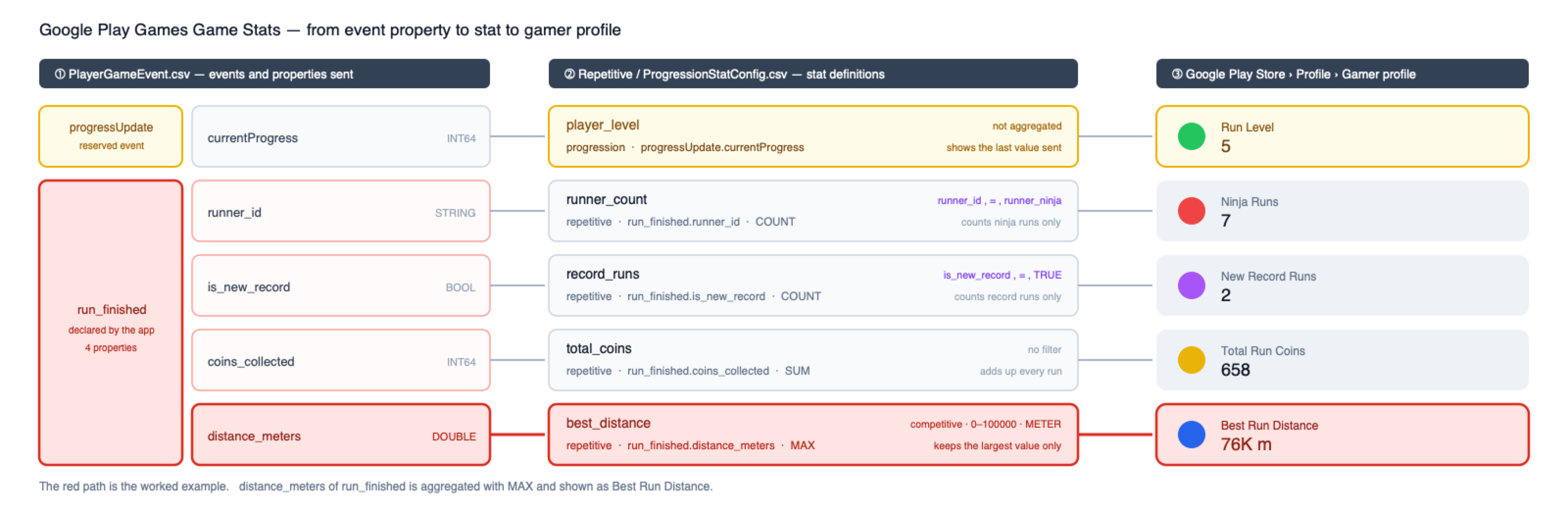
This example uses an endless runner game. The player selects a character and runs. When a run ends, the game determines which character was used, how far the player ran, how many coins were collected, and whether a new record was set. These four values are sent in a single run_finished event whenever a run ends. With the addition of Run Level, which shows how far the user has progressed through the app rather than the result of a single run, five statistics are configured.
The example is described using an endless runner game. When a round ends after the player selects a character and plays, four session data items and one cumulative progression data item are combined into a total of five statistics and sent in a single run_finished event.
- Round result statistics (4 types): selected character, distance traveled, number of coins collected, whether a new record was achieved
- Account progression statistic (1 type):
Run Level, which represents the app's overall cumulative progression state
Event and property declaration
Declare the event names and properties to send in PlayerGameEvent.csv. You can declare up to 20 events, and up to 20 properties per event.
Event Name,Property Name,Property Type
progressUpdate,currentProgress,INT64
run_finished,runner_id,STRING
run_finished,is_new_record,BOOL
run_finished,coins_collected,INT64
run_finished,distance_meters,DOUBLE
Repetitive statistics definition
Define statistics that aggregate actions users perform repeatedly in RepetitiveStatsConfig.csv. The value in the Stat Display Name column becomes the statistic name displayed in the gamer profile.
Stat Id,Event Name,Event Property Name,Aggregation Type,Stat Display Name,Stat Description,Filter Property,Filter Operator,Filter Value,Is Competitive,Min limit,Max limit,Icon File Name,Good value direction,Unit
best_distance,run_finished,distance_meters,MAX,Best Run Distance,The farthest distance the player has run in a single run.,,,,true,0,100000,stat_best_distance.png,INCREASING,METER
total_coins,run_finished,coins_collected,SUM,Total Run Coins,Total number of coins the player has collected across all runs.,,,,false,,,stat_total_coins.png,INCREASING,
record_runs,run_finished,is_new_record,COUNT,New Record Runs,Number of runs in which the player set a new personal record.,is_new_record,=,TRUE,false,,,stat_record_runs.png,INCREASING,
runner_count,run_finished,runner_id,COUNT,Ninja Runs,Number of runs completed with the ninja character.,runner_id,=,runner_ninja,false,,,stat_runner_count.png,INCREASING,
Aggregation Type is the method used to calculate a single representative value when the same event accumulates repeatedly, and supports SUM, MAX, MIN, and COUNT.
- Example usage: Apply
MAXfor best distance,SUMfor total coins, andCOUNTfor occurrence counts.
Filters consist of the three columns Filter Property, Filter Operator, and Filter Value, and only events that satisfy the condition are included in aggregation. When no filter is applied, leave all three columns empty.
- Same-event branching example: Even if
record_runsandrunner_countare collected based on the samerun_finishedevent, they are aggregated as separate statistic items when their configured filter conditions differ.
Note
Statistics with Is Competitive set to true require Min limit and Max limit. In the example above, the range 0 to 100000 is specified for best_distance.
Progression statistics definition
The ProgressionStatConfig.csv file defines statistics that show how far the user has progressed through the app. Progression statistics are displayed as the first statistic in the gamer profile.
Stat Id,Event Property Name,Stat Display Name,Stat Description,Icon File Name,Good value direction,Unit
player_level,currentProgress,Run Level,Players accumulate experience by finishing runs and level up.,stat_player_level.png,INCREASING,
Unlike repetitive statistics, progression statistics do not have event name or aggregation columns. This is because progression statistics always use the reserved progressUpdate event and display the most recently delivered value as-is.
Why the reserved progressUpdate event is used separately
Metrics that represent the user's progress level in the app, such as Run Level, indicate the user's current state rather than the result of a single round. This progression data is sent through progressUpdate, the dedicated reserved event predefined by Google Play Games, and is recorded in Hive SDK by calling the gameStatsRecordProgress() method.
Progress is not subject to cumulative aggregation, so it does not go through a separate calculation process such as SUM or MAX. Even if the same metric is delivered multiple times, it is not summed. It is updated and displayed as the latest value sent most recently.
ZIP file configuration
Bundle the repetitive statistics CSV file, progression statistics CSV file, and the icons required for each statistic into a ZIP file and upload it. The ZIP configuration required for the example above is as follows.
RepetitiveStatsConfig.csv
ProgressionStatConfig.csv
StatLocalizations.csv          # Optional
stat_best_distance.png
stat_total_coins.png
stat_record_runs.png
stat_runner_count.png
stat_player_level.png
Icons must be PNG or JPEG images sized 512 x 512 px and must match the file names entered in the Icon File Name column. All configuration files must be located at the top level of the ZIP file, and subdirectories are not supported. You can define up to 50 statistic metrics in total across the two CSV files.
Warning
Do not include PlayerGameEvent.csv in the ZIP. Register events first as a CSV file in Event settings in Google Play Console, and register statistics as a ZIP file in Statistics settings.
Published game statistics cannot be deleted, so finalize the statistic configuration before publishing.
Game Stats Record{ #game-stats-record }
The event to send is created with the Game Statistics Event class. The class name varies depending on the engine; Unity, C++, and Android useAuthV4.GameStatsEvent, and Unreal Engine usesFHiveGameStatsEvent. Enter the event name declared in the Google Play Console into the constructor and fill the property with theaddProperty()method appropriate for the property type. For a detailed description of how to declare the names and types of properties, see CSV File Guidelines for Events.
The three methods described in this section simply write events to the device's buffer. The actual transfer happens when you callgameStatsRequestEventsUpload()as described in Request to upload game statistics events from Google Play Games.
Caution
The name and type of the property must match the value declared in the Google Play Console. If there is a mismatch, the event will not be reflected in statistics.
Request to log game statistics events from Google Play Games
To record a single game statistics event, call thegameStatsRecordEvent()method.
Below is example code. Therun_finishedevent declared in pre-preparation is used as is. The event name and property name use the values declared in the CSV, and the property value is the value that the app fills with the play results.
API Reference: hive.AuthV4.Helper.gameStatsRecordEvent
using hive;

// Event name declared in Google Play Console
AuthV4.GameStatsEvent gameStatsEvent = new AuthV4.GameStatsEvent("run_finished")
        .addProperty("runner_id", "runner_ninja")    // STRING
        .addProperty("is_new_record", true)          // BOOL
        .addProperty("coins_collected", 10L)         // INT64
        .addProperty("distance_meters", 1350.2);     // DOUBLE

AuthV4.Helper.gameStatsRecordEvent(gameStatsEvent, (ResultAPI result, AuthV4.PlayerInfo playerInfo) => {
    if (result.isSuccess()) {
        // call successful
    }
});
#include "HiveAuthV4.h"

// Event name declared in Google Play Console
FHiveGameStatsEvent GameStatsEvent(TEXT("run_finished"));
GameStatsEvent.AddProperty(TEXT("runner_id"), FString(TEXT("runner_ninja")))    // STRING
              .AddProperty(TEXT("is_new_record"), true)                        // BOOL
              .AddProperty(TEXT("coins_collected"), 10)                        // INT64
              .AddProperty(TEXT("distance_meters"), 1350.2);                   // DOUBLE

FHiveAuthV4::Helper::GameStatsRecordEvent(GameStatsEvent, FHiveAuthV4HelperDelegate::CreateLambda([this](const FHiveResultAPI& Result, const TOptional<FHivePlayerInfo>& PlayerInfo) {
        if (Result.IsSuccess()) {
// API call successful
        }
}));
API Reference: AuthV4::Helper::gameStatsRecordEvent
#include <HIVE_SDK_Plugin/HIVE_CPP.h>
using namespace std;
using namespace hive;

// Event name declared in Google Play Console
GameStatsEvent gameStatsEvent("run_finished");
gameStatsEvent.addProperty("runner_id", "runner_ninja")      // STRING
              .addProperty("is_new_record", true)            // BOOL
              .addProperty("coins_collected", (long long)10) // INT64
              .addProperty("distance_meters", 1350.2);       // DOUBLE

AuthV4::Helper::gameStatsRecordEvent(gameStatsEvent, [=](ResultAPI const & result, shared_ptr<PlayerInfo> playerInfo) {
    if (result.isSuccess()) {
        // call successful
    }
});
API Reference: AuthV4.Helper.gameStatsRecordEvent
import com.hive.AuthV4
import com.hive.ResultAPI

// Event name declared in Google Play Console
val gameStatsEvent = AuthV4.GameStatsEvent("run_finished")
        .addProperty("runner_id", "runner_ninja")    // STRING
        .addProperty("is_new_record", true)          // BOOL
        .addProperty("coins_collected", 10L)         // INT64
        .addProperty("distance_meters", 1350.2)      // DOUBLE

AuthV4.Helper.gameStatsRecordEvent(gameStatsEvent, object : AuthV4.Helper.AuthV4HelperListener {
    override fun onAuthV4Helper(result: ResultAPI, playerInfo: AuthV4.PlayerInfo?) {
        if (result.isSuccess) {
            // call successful
        }
    }
})
API Reference: AuthV4.Helper.INSTANCE.gameStatsRecordEvent
import com.hive.AuthV4;
import com.hive.ResultAPI;

// Event name declared in Google Play Console
AuthV4.GameStatsEvent gameStatsEvent = new AuthV4.GameStatsEvent("run_finished")
        .addProperty("runner_id", "runner_ninja")    // STRING
        .addProperty("is_new_record", true)          // BOOL
        .addProperty("coins_collected", 10L)         // INT64
        .addProperty("distance_meters", 1350.2);     // DOUBLE

AuthV4.Helper.INSTANCE.gameStatsRecordEvent(gameStatsEvent, (result, playerInfo) -> {
    if (result.isSuccess()) {
        // call successful
    }
});
Request to record multiple game statistics events from Google Play Games
To record multiple game statistics events at once, call thegameStatsRecordEvents()method. The event list can contain several of the same events or a mix of different events, or it can fill in only some of the declared properties and send them.
Below is example code. This shows a case where two of the samerun_finishedevents are included, but onlyrunner_idandcoins_collectedare filled in for the properties.
API Reference: hive.AuthV4.Helper.gameStatsRecordEvents
using hive;

List<AuthV4.GameStatsEvent> gameStatsEvents = new List<AuthV4.GameStatsEvent>();

gameStatsEvents.Add(new AuthV4.GameStatsEvent("run_finished")
        .addProperty("runner_id", "runner_ninja")
        .addProperty("coins_collected", 2L));

gameStatsEvents.Add(new AuthV4.GameStatsEvent("run_finished")
        .addProperty("runner_id", "runner_default")
        .addProperty("coins_collected", 5L));

AuthV4.Helper.gameStatsRecordEvents(gameStatsEvents, (ResultAPI result, AuthV4.PlayerInfo playerInfo) => {
    if (result.isSuccess()) {
        // call successful
    }
});
#include "HiveAuthV4.h"

FHiveGameStatsEvent First(TEXT("run_finished"));
First.AddProperty(TEXT("runner_id"), FString(TEXT("runner_ninja")))
     .AddProperty(TEXT("coins_collected"), 2);

FHiveGameStatsEvent Second(TEXT("run_finished"));
Second.AddProperty(TEXT("runner_id"), FString(TEXT("runner_default")))
      .AddProperty(TEXT("coins_collected"), 5);

TArray<FHiveGameStatsEvent> GameStatsEvents;
GameStatsEvents.Add(First);
GameStatsEvents.Add(Second);

FHiveAuthV4::Helper::GameStatsRecordEvents(GameStatsEvents, FHiveAuthV4HelperDelegate::CreateLambda([this](const FHiveResultAPI& Result, const TOptional<FHivePlayerInfo>& PlayerInfo) {
        if (Result.IsSuccess()) {
// API call successful
        }
}));
API Reference: AuthV4::Helper::gameStatsRecordEvents
#include <HIVE_SDK_Plugin/HIVE_CPP.h>
using namespace std;
using namespace hive;

GameStatsEvent first("run_finished");
first.addProperty("runner_id", "runner_ninja")
     .addProperty("coins_collected", (long long)2);

GameStatsEvent second("run_finished");
second.addProperty("runner_id", "runner_default")
      .addProperty("coins_collected", (long long)5);

vector<GameStatsEvent> gameStatsEvents;
gameStatsEvents.push_back(first);
gameStatsEvents.push_back(second);

AuthV4::Helper::gameStatsRecordEvents(gameStatsEvents, [=](ResultAPI const & result, shared_ptr<PlayerInfo> playerInfo) {
    if (result.isSuccess()) {
        // call successful
    }
});
API Reference: AuthV4.Helper.gameStatsRecordEvents
import com.hive.AuthV4
import com.hive.ResultAPI

val gameStatsEvents = listOf(
    AuthV4.GameStatsEvent("run_finished")
            .addProperty("runner_id", "runner_ninja")
            .addProperty("coins_collected", 2L),
    AuthV4.GameStatsEvent("run_finished")
            .addProperty("runner_id", "runner_default")
            .addProperty("coins_collected", 5L)
)

AuthV4.Helper.gameStatsRecordEvents(gameStatsEvents, object : AuthV4.Helper.AuthV4HelperListener {
    override fun onAuthV4Helper(result: ResultAPI, playerInfo: AuthV4.PlayerInfo?) {
        if (result.isSuccess) {
            // call successful
        }
    }
})
API Reference: AuthV4.Helper.INSTANCE.gameStatsRecordEvents
import com.hive.AuthV4;
import com.hive.ResultAPI;

List<AuthV4.GameStatsEvent> gameStatsEvents = new ArrayList<>();

gameStatsEvents.add(new AuthV4.GameStatsEvent("run_finished")
        .addProperty("runner_id", "runner_ninja")
        .addProperty("coins_collected", 2L));

gameStatsEvents.add(new AuthV4.GameStatsEvent("run_finished")
        .addProperty("runner_id", "runner_default")
        .addProperty("coins_collected", 5L));

AuthV4.Helper.INSTANCE.gameStatsRecordEvents(gameStatsEvents, (result, playerInfo) -> {
    if (result.isSuccess()) {
        // call successful
    }
});
Request to record game progress from Google Play Games{ #game-stats-progress }
To record the user's progress, call thegameStatsRecordProgress()method. Values sent to this method are sent to the scheduled eventprogressUpdateand reflected in the progress statistics defined inProgressionStatConfig.csv.
Progress is a current value, not a cumulative value. Even if you send a value three times, it doesn't add up and the last value sent is displayed. We recommend that you always send the current progress at app startup.
Caution
You can declarecurrentProgressasINT64orSTRINGin the Google Play Console. If sent differently from the declared type, the event will be discarded and not reflected in statistics, so usegameStatsRecordProgress(), which receives a string value only when declared as a string. String values are used to record progress levels that are difficult to express with numbers, such as rank tier. The standard for determining the order of strings is not public, so use numbers whenever possible.
Below is example code.
API Reference: hive.AuthV4.Helper.gameStatsRecordProgress
#include "HiveAuthV4.h"

// Player's current progress level
int64 CurrentProgress = 5;

FHiveAuthV4::Helper::GameStatsRecordProgress(CurrentProgress, FHiveAuthV4HelperDelegate::CreateLambda([this](const FHiveResultAPI& Result, const TOptional<FHivePlayerInfo>& PlayerInfo) {
        if (Result.IsSuccess()) {
// API call successful
        }
}));
API Reference: AuthV4::Helper::gameStatsRecordProgress
#include <HIVE_SDK_Plugin/HIVE_CPP.h>
using namespace std;
using namespace hive;

// Player's current progress level
long long currentProgress = 5;

AuthV4::Helper::gameStatsRecordProgress(currentProgress, [=](ResultAPI const & result, shared_ptr<PlayerInfo> playerInfo) {
    if (result.isSuccess()) {
        // call successful
    }
});
API Reference: AuthV4.Helper.gameStatsRecordProgress
import com.hive.AuthV4
import com.hive.ResultAPI

// Player's current progress level
val currentProgress = 5L

AuthV4.Helper.gameStatsRecordProgress(currentProgress, object : AuthV4.Helper.AuthV4HelperListener {
    override fun onAuthV4Helper(result: ResultAPI, playerInfo: AuthV4.PlayerInfo?) {
        if (result.isSuccess) {
            // call successful
        }
    }
})
API Reference: AuthV4.Helper.INSTANCE.gameStatsRecordProgress
Request to upload game statistics events from Google Play Games{ #game-stats-upload }
To request upload of game statistics events stored in the device's buffer, call thegameStatsRequestEventsUpload()method.
Caution
gameStatsRecordEvent(),gameStatsRecordEvents(), andgameStatsRecordProgress()only write events to the device's buffer and do not transmit them. You need to callgameStatsRequestEventsUpload()to actually send it to Google servers. This is the first thing to check when statistics are not being collected.
Below is example code.
API Reference: hive.AuthV4.Helper.gameStatsRequestEventsUpload
API Reference: AuthV4::Helper::gameStatsRequestEventsUpload
API Reference: AuthV4.Helper.gameStatsRequestEventsUpload
API Reference: AuthV4.Helper.INSTANCE.gameStatsRequestEventsUpload
Once your event is successfully uploaded, check your game statistics by opening your gamer profile in thetab of yourMy Page in the Google Play Store app.
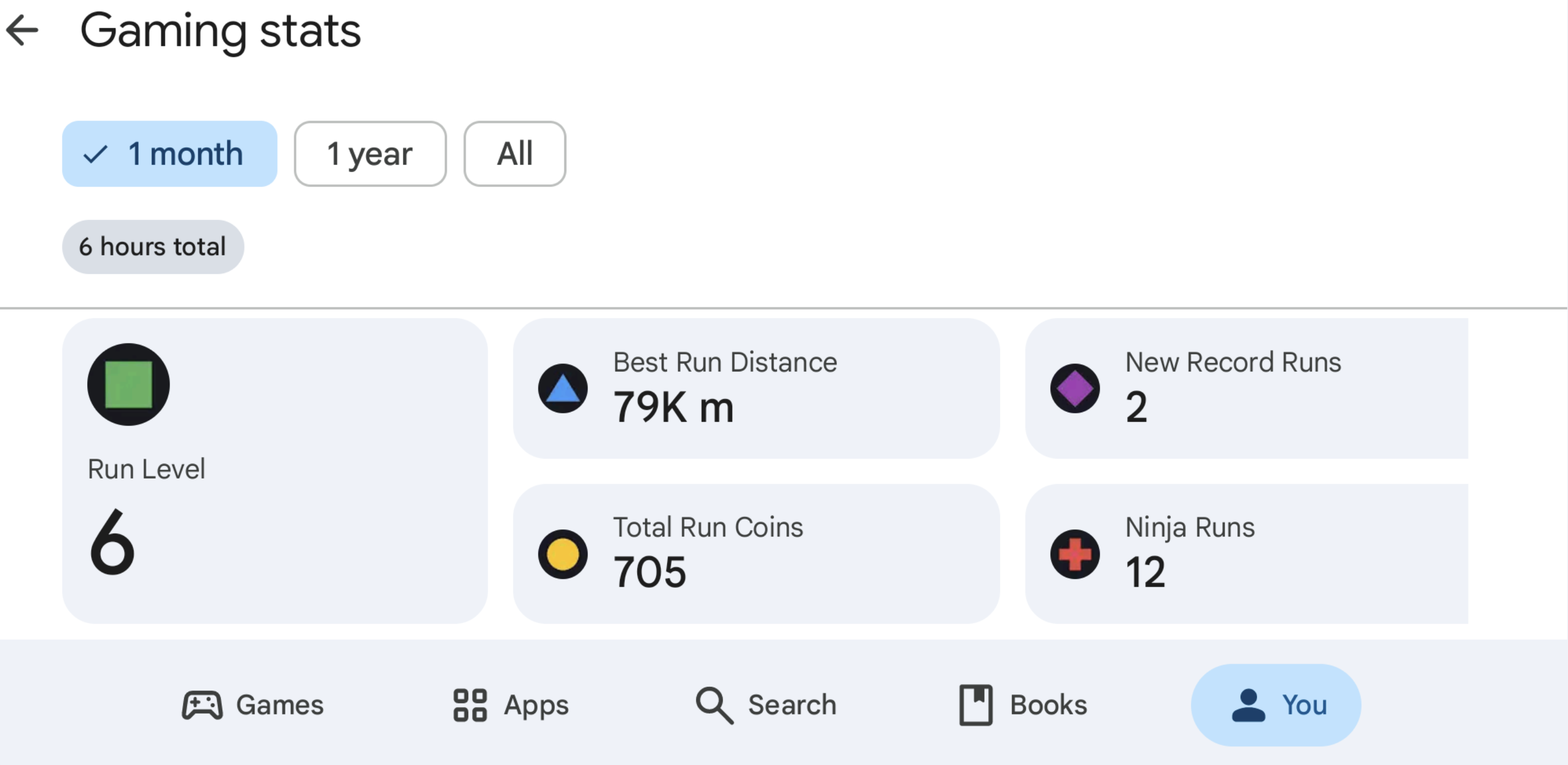
It takes time for it to be displayed after uploading, so it is normal for it to not be confirmed immediately. If statistics are not displayed, check in the order below.
-
Make sure you have called
gameStatsRequestEventsUpload(). -
Check your Google Play login status.
-
Check whether the event name, property name, and type declared in CSV match the values written in the code.
-
Check log messages on the device through terminal settings. If a message such as 'Successfully submitted GameStats event' is displayed, the transmission is successful.
Apple Game Center achievements and leaderboards
To get your game featured on Apple Game Center, you need to apply achievement and leaderboard function of Apple Game Center.
Regardless authentication status of users, the two functions of Apple Game Center are provided by Hive SDK. That is, achievement and leaderboard uses the Apple Game Center account, but achievement and leaderboard uses the Apple Game Center account, but this account may not be linked to Hive account or differ from Hive account which the user currently signed in.
For more information about the function of Apple Game Center, see Apple Game Center Guide.
Note
iOS Enterprise does not support Apple Game Center.
Achievements
Implement ProviderApple class to use Achievement function of Apple Game Center through Hive SDK.
Request achievement list
To load an achievement list, call loadAchievements() method.
Followings are sample codes.
API Reference: hive.ProviderApple.loadAchievements
// Request achievement list to Provider Apple
// using hive


// Callback handler managing the request for achievement list to Provider Apple
public void onLoadAchievements(ResultAPI result, List achievementList) {

Logger.log("ProviderTestView.onLoadAchievements() Callback\nresult = " + result.toString() + "\n");

if (result.isSuccess() != true)
    return;
}

// Request achievement list to Provider Apple
ProviderApple.loadAchievements(onLoadAchievements);
API Reference: ProviderApple::loadAchievements
// Request achievement list to Provider Apple
ProviderApple::loadAchievements([=](ResultAPI const & result,std::vector<ProviderAppleAchievement>; const & achievements) {
    // Result callback
    cout<<"ProviderApple::loadAchievements() Callback"<<endl<<result.toString()<<endl;


    if (result.isSuccess() != true)
        return;

});
API Reference: HIVEProviderApple::showAchievements:
API Reference: HIVEProviderApple::showAchievements:
// Request achievement list to Provider Apple
[HIVEProviderApple loadAchievements:^(HIVEResultAPI *result, NSArray<HIVEProviderAppleAchievement *>; *achievements) {


    Loggerd(@"HIVEProviderApple.loadAchievements:\nresult = %@\nachievements = %@", result, achievements);

    if (result.isSuccess) {

    }
    else {

    }

    }];
Request to report an achievement
To report an achievement, call reportAchievement() method with parameters set to Achievement rate and Notification banner exposure for successful achievements.
Followings are sample codes.
API Reference: hive .ProviderApple.reportAchievement
using hive;

    //Achievement achieved %. Achievement completed at 100
    String achievementPercent = "100";
    // Whether to display the top banner when an achievement is successful. default false
    Boolean isShow = true;
    //Achievement Id
    String achievementId = "com.hivesdk.achievement.10hit";

    ProviderApple.reportAchievement(achievementPercent, isShow, achievementId, (ResultAPI result) => {
         if (result.isSuccess()) {
             // call successful
         }
});
#include "HiveProviderApple.h"

//Achievement achieved %. Achievement completed at 100
FString Percent = TEXT("100");
// Whether to display the top banner when an achievement is successful. default false
bool bIsShow = true;
// Achievement Id
FString AchievementId = TEXT("com.hivesdk.achievement.10hit");

FHiveProviderApple::ReportAchievement(Percent, bIsShow, AchievementId, FHiveProviderAppleOnReportAchievement::CreateLambda([this](const FHiveResultAPI& Result) {
        if (Result.IsSuccess()) {
                // API call successful
        }
}));
API Reference: ProviderApple ::reportAchievement
#include <HIVE_SDK_Plugin/HIVE_CPP.h>
    using namespace std;
    using namespace hive;

    //Achievement achieved %. Achievement completed at 100
    string achievementPercent = "100";
    // Whether to display the top banner when an achievement is successful. default false
    bool isShow = true;
    //Achievement Id
    string achievementId = "com.hivesdk.achievement.10hit";

    ProviderApple::reportAchievement(achievementPercent, isShow, achievementId, [=](ResultAPI const & result) {
         if (result.isSuccess()) {
             // call successful
         }
});
API Reference: ProviderApple.reportAchievement
import HIVEService

    //Achievement achieved %. Achievement completed at 100
    letachievementPercent = "100"
    // Whether to display the top banner when an achievement is successful. default false
    let isShow = true
    //Achievement Id
    let achievementId = "com.hivesdk.achievement.10hit"

    ProviderApple.reportAchievement(achievementPercent, showsCompletionBanner: isShow, achievementIdentifier: achievementId) { result in
         if result.isSuccess() {
             // call successful
         }
}
API Reference: HIVEProviderApple reportAchievement
#import <HIVEService/HIVEService-Swift.h>

    //Achievement achieved %. Achievement complete when 100
    NSString *achievementPercent = @"100";
    // Whether to display the top banner when an achievement is successful. default NO
    BOOL isShow = YES;
    //Achievement Id
    NSString *achievementId = @"com.hivesdk.achievement.10hit";

    [HIVEProviderApple reportAchievement: achievementPercent showsCompletionBanner: isShow achievementIdentifier: achievementId handler: ^(HIVEResultAPI *result) {
         if ([result isSuccess]) {
             // call successful
         }
}];
Request to show achievement UI (Helper)
Note
SDK 4.7.0 provides Helper, which easily compares signed-in account on user device and PlayerID-synced account. If two accounts are not the same, refer to IdP Sync page to handle the situation.
To show achievement UI, call showAchievements() method.
Followings are sample codes.
API Reference: hive.AuthV4.Helper.showAchievements
using hive;

AuthV4.Helper.showAchievements ((ResultAPI result, AuthV4.PlayerInfo playerInfo) => {
switch (result.code) {
    case ResultAPI.Code.Success:
    // Deliver Success with achievement indication
    break;
    case ResultAPI.Code.AuthV4ConflictPlayer:
    // account conflict
    break;
    case ResultAPI.Code.AuthV4GoogleLogout:
    //TODO:
    // After logging out of Google Play, log out of the game
    // Relaunching the game must be handled by the development studio
    break;
    default:
    // other exception situations
    break;
}
});
#include "HiveAuthV4.h"

FHiveAuthV4::Helper::ShowAchievements(FHiveAuthV4HelperDelegate::CreateLambda([this](const FHiveResultAPI& Result, const TOptional<FHivePlayerInfo>& PlayerInfo) {
        switch (Result.Code) {
                case FHiveResultAPI::ECode::Success:
                        // Deliver Success with achievement indication
                        break;
                case FHiveResultAPI::ECode::AuthV4ConflictPlayer:
                        // account conflict
                        break;
                default:
                        // other exception situations
                        break;
        }
}));
API Reference: AuthV4 ::Helper::showAchievements
#include <HIVE_SDK_Plugin/HIVE_CPP.h>
    using namespace std;
    using namespace hive;
    AuthV4::Helper::showAchievements([=](ResultAPI const & result, shared_ptr playerInfo) {
      switch (result.code) {
        case ResultAPI::Success:
          // Deliver Success with achievement indication
          break;
        case ResultAPI::AuthV4ConflictPlayer:
          // account conflict
          break;
        case ResultAPI::AuthV4GoogleLogout:
          //TODO:
          // After logging out of Google Play, log out of the game
          // Relaunching the game must be handled by the development studio
          break;
        default:
          // other exception situations
          break;
      }
});
API Reference: AuthV4Interface .helper().showAchievements
// If the currently logged in Hive account is not connected to GameCenter
    // Automatically attempts to connect to GameCenter

    import HIVEService

    AuthV4Interface.helper().showAchievements() { result, playerInfo in
         switch result.getCode() {
             case .success:
                 // Deliver Success with achievement indication
             case .authV4ConflitPlayer:
                 // account conflict
             default:
                 break
         }
}
API Reference: [ HIVEAuthV4 helper] showAchievements
// If the currently logged in Hive account is not connected to GameCenter
    // Automatically attempts to connect to GameCenter

    #import <HIVEService/HIVEService-Swift.h>

    [[HIVEAuthV4 helper] showAchievements: ^(HIVEResultAPI *result, HIVEPlayerInfo *playerInfo) {
         switch ([result getCode]) {
             case HIVEResultAPICodeSuccess:
                 // Deliver Success with achievement indication
                 break;
             case HIVEResultAPICodeAuthV4ConflictPlayer:
                 // account conflict
                 break;
             default:
                 // other exception situations
                 break;
         }
}];
Request to show achievement UI
To show achievement UI, call showAchievements() method.
Followings are sample codes.
API Reference: ProviderApple.showAchievements
API Reference: ProviderApple::showAchievements
API Reference: ProviderApple.showAchievements
API Reference: HIVEProviderApple showAchievements
Request to reset an achievement
To reset an achievement, implement resetAchievements() method.
Followings are sample codes.
API Reference: hive.ProviderApple.resetAchievements
API Reference: ProviderApple ::resetAchievements
API Reference: resetAchievements(_:)
API Reference: HIVEProviderApple showAchievements
Leaderboards
Implement ProviderApple class to use Leaderboard function of Apple Game Center through Hive SDK.
Request to report the leaderboard score
To report the leaderboard score to Apple Game Center, call reportScore() method.
Followings are sample codes.
API Reference: hive .ProviderApple.reportScore
#include "HiveProviderApple.h"

FString PlayerScore = TEXT("1234");
FString LeaderBoardId = TEXT("com.hivesdk.leaderboard.10hit");

FHiveProviderApple::ReportScore(PlayerScore, LeaderBoardId, FHiveProviderAppleOnReportLeaderboard::CreateLambda([this](const FHiveResultAPI& Result) {
        if (Result.IsSuccess()) {
                // API call successful
        }
}));
API Reference: ProviderApple ::reportScore
#include <HIVE_SDK_Plugin/HIVE_CPP.h>
using namespace std;
using namespace hive;

string playerScore = "1234";
string leaderBoardId = "com.hivesdk.leaderboard.10hit";

ProviderApple::reportScore(playerScore, leaderBoardId, [=](ResultAPI const & result) {
    if (result.isSuccess()) {
        // call successful
    }
});
API Reference: HIVEProviderApple ::reportScore:leaderboardIdentifier:handler:
#import <HIVEService/HIVEService-Swift.h>

    NSString *playerScore = @"1234";
    NSString *leaderBoardId = "com.hivesdk.leaderboard.10hit";

    [HIVEProviderApple reportScore: playerScore leaderboardIdentifier: leaderBoardId handler: ^(HIVEResultAPI *result) {
         if ([result isSuccess]) {
             // call successful
         }
}];
Request to show leaderboard UI (Helper)
To show leaderboard UI, call showLeaderboard() method.
Followings are sample codes.
API Reference: hive .AuthV4.Helper.showLeaderboard
// If the currently logged in Hive account is not connected to GameCenter
    // Automatically attempts to connect to GameCenter

    using hive;

    AuthV4.Helper.showLeaderboard((ResultAPI result, AuthV4.PlayerInfo playerInfo) => {
         switch (result.code) {
             case ResultAPI.Code.Success:
                 // Deliver Success with leaderboard display
                 break;
             case ResultAPI.Code.AuthV4ConflictPlayer:
                 // account conflict
                 break;
             default:
                 // other exception situations
                 break;
         }
});
API Reference: AuthV4 ::Helper::showLeaderboard
// If the currently logged in Hive account is not connected to GameCenter
// Automatically attempts to connect to GameCenter

#include <HIVE_SDK_Plugin/HIVE_CPP.h>
using namespace std;
using namespace hive;

AuthV4::Helper::showLeaderboard([=](ResultAPI const & result, shared_ptr<PlayerInfo> playerInfo) {
    switch (result.code) {
        case ResultAPI::Success:
            // Deliver Success with leaderboard display
            break;
        case ResultAPI::AuthV4ConflictPlayer:
            // account conflict
            break;
        default:
            break;
    }
});
API Reference: showLeaderboard
// If the currently logged in Hive account is not connected to GameCenter
    // Automatically attempts to connect to GameCenter

    import HIVEService

    AuthV4Interface.helper().showLeaderboard() { result, playerInfo in
         switch result.getCode() {
             case .success:
                 // Deliver Success with leaderboard display
             case .authV4ConflictPlayer:
                 // account conflict
             default:
                 break
         }
}
API Reference: HIVEProviderApple ::showLeaderboard:
// If the currently logged in Hive account is not connected to GameCenter
    // Automatically attempts to connect to GameCenter

    #import <HIVEService/HIVEService-Swift.h>

    [[HIVEAuthV4 helper] showLeaderboard: ^(HIVEResultAPI *result, HIVEPlayerInfo *playerInfo) {
         switch ([result getCode]) {
             case HIVEResultAPICodeSuccess:
                 // Deliver Success with leaderboard display
                 break;
             case HIVEResultAPICodeAuthV4ConflictPlayer:
                 // account conflict
                 break;
             default:
                 // other exception situations
                 break;
         }
}];
Request to show Leaderboard UI
To show Leaderboard UI, call showLeaderboard() method.
Followings are sample codes.
API Reference: hive .ProviderApple.showLeaderboard
API Reference: ProviderApple ::showLeaderboard
API Reference: showLeaderboard(_:)
API Reference: HIVEProviderApple ::showLeaderboard:
Post photos on social media
Users can share and post photos on Facebook by importing photos from the gallery of their devices through a game app. Followings are sample codes:
API Reference: SocialV4. sharePhoto
API Reference: SocialV4::sharePhoto
API Reference: SocialV4.sharePhoto
API Reference: SocialV4.INSTANCE. sharePhoto
API Reference: SocialV4Interface.sharePhoto
API Reference: HIVESocialV4 sharePhoto
Automatic login to PC games with Community login
When you click the Play on PC button on the Community website, the PC game will be launched through Crossplay Launcher.
At this time, the PC game is automatically logged in using the 'login token value' of the Community.
Warning
Automatic login to PC games with Community login feature only works on Hive SDK Windows 24.0.0 and higher.
Steam implicit login (Unity Windows)
Hive SDK v4 Unity Windows 24.2.0 supports Steam implicit login.
When using Steam implicit login with Hive SDK v4 Unity Windows 24.2.0 or higher, please note the following restrictions:
- You must use the
AuthV4.Helper.signInmethod; theAuthV4.signIn(AUTO,...)method cannot be used. - After installing the game app, users must perform Steam implicit login at least once.
- When the user uninstalls the game app, you must implement removal of the
propFolderfolder where Hive SDK configuration data is stored.