Error code
Error popup
When an issue occurs during the operation of the Crossplay Launcher, an error message along with an error code will be displayed as shown in the image below.
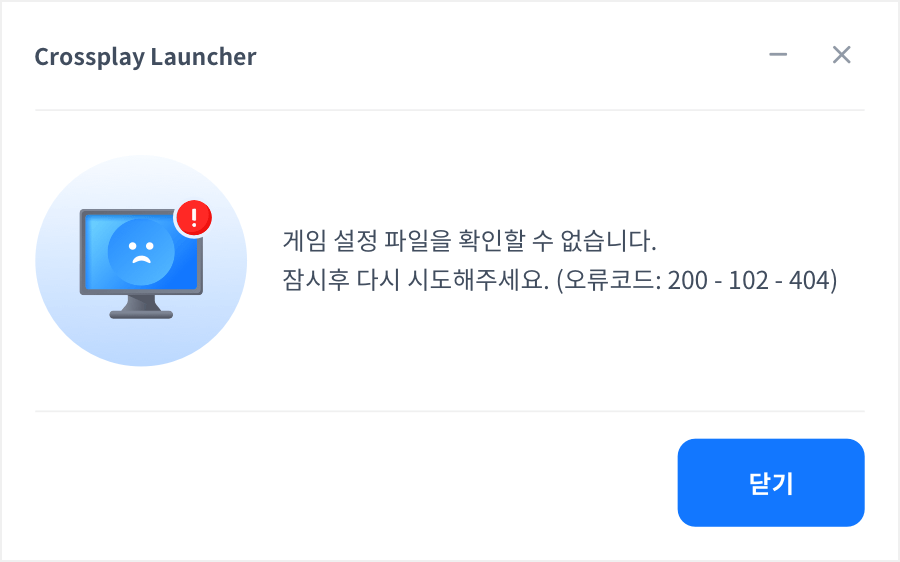
Error codes
These are the error codes that occur during the Crossplay Launcher update, app installation and update, and execution.
Crossplay Launcher update
These are the error codes that occur during the process of updating the Crossplay Launcher.
| Code | Description | Remarks | Error Texts |
|---|---|---|---|
| 100 - 100 | An error occurred when parsing the Web Start command line. | Failed to update the Crossplay Launcher. Try again after a while. (Error Code : 100 – 100) | |
| 100 - 100 - 1 | Exception handling occurred while obtaining the app name and the web page(or image) URL of the launcher promotion area. | Failed to update the Crossplay Launcher. Please check the network connection. (Error Code: 100-100-1) | |
| 100 - 100 - 2 | Failed to obtain the app name and the web page(or image) URL of the launcher promotion area. | Failed to update the Crossplay Launcher. Please check the network connection. (Error Code: 100-100-2) | |
| 100 - 102 - 001 | Exception handling occurred while obtaining the information about the latest version of launcher. | Failed to update the Crossplay Launcher. Try again after a while. (100-102-001) | |
| 100 - 102 - X | A communication failure occured while obtaining the information about the latest version of launcher. | X : http status code | “Failed to update the Crossplay Launcher. Try again after a while. (Error Code: 100 - 102 - X)" |
| 100 - 103 | The obtained information about the latest version of launcher is returned as an empty value. | Failed to update the Crossplay Launcher. Try again after a while. (100-103) | |
| 100 - 104 - 001 | Exception handling occurred while obtaining the information about the latest version of launcher. | Failed to update the Crossplay Launcher. Try again after a while. (100-104) | |
| 100 - 104 - X | A communication failure occurred while obtaining the information about the latest version of launcher. | X : http status code | Failed to update the Crossplay Launcher. Try again after a while. (100-104-x) |
| 100 - 105 - X | An error occurred while handling I/O for downloading a file. | X : 200 (open file) 201 (write file) 202 (close file) | Failed to update the Crossplay Launcher. Try again after a while. (100-105-x) |
| 100 - 106 | The file download timed out. | Failed to update the Crossplay Launcher. Try again after a while.(100 – 106) | |
| 100 - 107 - X | The file download failed. | X : 1 (UNSUPPORTED_PROTOCOL) 2 (FAILED_INIT) 3 (URL_MALFORMAT) 4 (UPLOAD_FAILED) 5 (READ_ERROR) 6 (UNKNOWN_ERROR) | Failed to update the Crossplay Launcher. Try again after a while.(100 – 107 – X) |
| 100 - 108 | An unknown error occurred after file downloads. | Failed to update the Crossplay Launcher. Try again after a while(Error Code : 100 – 108) | |
| 100 - 109 | Hash check mismatched after file downloads. | Failed to update the Crossplay Launcher. Try again after a while(Error Code : 100 – 109) | |
| 100 - 110 - 001 - X | Running GCP_Updater of Crossplay Launcher failed. | X : Debug system error codes *Windows only | Failed to update the Crossplay Launcher. Try again after a while. (100 – 110 – 001 – X) |
| 100 - 110 - 002 - X | Running GCP_Updater of Crossplay Launcher failed. | X : Debug system error codes *Windows only | Failed to update the Crossplay Launcher. Try again after a while. (100 – 110 – 002 – X) |
App installation, update, and execution
These are the error codes of the errors that occur during the installation, update, and execution of apps through the Crossplay Launcher.
| Code | Description | Remarks | Error Texts |
|---|---|---|---|
| 200 - 100 | An error occurred when parsing the Web Start command line. | Failed to run the Crossplay Launcher. Try again after a while.(Error Code : 200 – 100) | |
| 200 - 101 - 001 | Failed to save app information in the setting file after selecting the path the app installed. | Failed to install the app. Try again after a while. (200-101-001) | |
| 200 - 101 - 002 | Failed to save app information(such as installation path, version, and others) in the setting file after completing the app installation. | Failed to install the app. Try again after a while. (200-101-002) | |
| 200 - 101 - 003 | Failed to save app information(such as installation path, version, and others) in the setting file after completing the app installation. | The app update proceeds in the order of the uploaded version, and the setup information is saved as the setup information of the target version (newer version) whenever the update is successful. e.g., When uploading the version v1, v2, and v3 orderly Example: If the version is uploaded in the order of v1, v2, and v3,
| Failed to update the app. Try again after a while. (200-101-003) |
| 200 - 102 - 001 | Exception handling occured while obtaining the information about the app version. | Unable to check the app information. Try again after a while.(Error Code : 200 – 102-001) | |
| 200 - 102 - X | A communication error occurred while obtaining the information about the app version. | X : http status code | Unable to check the app information. Try again after a while.(200-102-x) |
| 200 - 103 - 001 | Exception handling occured while obtaining the information about the app release version. | Unable to check the app information. Try again after a while.(200 – 103 – 001) | |
| 200 - 103 - X | A communication failure occurred while obtaining the information about the app release version. | X : http status code | Unable to check the app information. Try again after a while. (200-103-x) |
| 200 - 104 - 001 | Exception handling occured while obtaining the specific version of app file information. | Unable to check the app information. Try again after a while.(200 – 104 – 001) | |
| 200 - 104 - X | A communication failure occurred while obtaining the specific version of app file information. | X : http status code | Unable to check the app information. Try again after a while. (200-104-x) |
| 200 - 105 | Hash check mismatched after downloading a app file | Failed to download the app files. Please reboot your PC and reinstall the app if you keep getting the same problem. Please install the app at another location if the same issue keeps happening. (Error Code : 200 – 105) | |
| 200 - 106 - X | An error occurred while handling I/O for downloading a app file. | X : 200 (open file) 201 (write file) 202 (close file) | Failed to download the app files. Please reboot your PC and reinstall the app if you keep getting the same problem. Please install the app at another location if the same issue keeps happening. (Error Code : 200 – 106 – X) |
| 200 - 107 | The file download timed out. | Failed to download the app files. Try again after a while.(200 – 107) | |
| 200 - 108 - X | The file download failed. | X : 1 (UNSUPPORTED_PROTOCOL) 2 (FAILED_INIT) 3 (URL_MALFORMAT) 4 (UPLOAD_FAILED) 5 (READ_ERROR) 6 (UNKNOWN_ERROR) | Failed to download the app files. Try again after a while.(200 – 108-X) |
| 200 - 109 | An unknown error occurred after file downloads. | Failed to download the app files. Try again after a while.(Error Code : 200 – 109) | |
| 200 - 110 | Reading the meta.json file failed. | Handling to create the app's icon file after completing app installation * Windows only | Unable to check the app configuration files. Please reboot your PC, remove the app in the Control panel, and reinstall the app. (Error Code : 200 – 110) |
| 200 - 111 - 001 | An error occurred during JSON parsing for the icon path after reading the meta.json file successfully. | Unable to check the app configuration files. Please reboot your PC, remove the app in the Control panel, and reinstall the app.(Error Code: 200 – 111 – 001) | |
| 200 - 111 - 002 | An error occurred during JSON parsing for the icon path after reading the meta.json file successfully. | Unable to check the app configuration files. Please reboot your PC, remove the app in the Control panel, and reinstall the app.(Error Code: 200 – 111 – 002) | |
| 200 - 112 | Registering a registry failed after installing a app. | Registers app name, icon, publisher, and uninstaller.exe on the control panel. * Windows only | Failed to install the app. Try again after a while. (200-112) |
| 200 - 113 - 001 | Exception handling occurred while obtaining the patch info(differences between versions) for updating a app. | Unable to check the app patch information. Try again after a while.(200-113-001) | |
| 200 - 113 - X | A communication failure occurred while obtaining the patch info(differences between versions). | X : http status code | Unable to check the app patch information. Try again after a while.(200-113-x) |
| 200 - 114 | Unable to search CDN because the current version of the app on the user's PC is too old. | The version of the installed app cannot be updated. Please reboot your PC, remove the app in the Control panel, and reinstall the app. (200-114) | |
| 200 - 116 - X | An error occured while updating the app file. | Failed to update the app. Please reboot your PC, remove the app in the Control panel, and reinstall the app. (200-116-X) | |
| 200 - 117 | Hash check mismatched after updating a app | Failed to update the app. Please reboot your PC, remove the app in the Control panel, and reinstall the app. (Error Code : 200 – 117) | |
| 200 - 117-1 | Failed to rename the {file name}_patched after updating app files | Failed to update the app. If the same problem appears again after rebooting your PC, you must delete the app on the Control Panel and re-install it. (Error Code: 200 - 117 - 1) | |
| 200 - 119 | Lack of space for installing a app | Unable to install the app due to insufficient disk space. (200-119) | |
| 200 - 120 | Reading the meta.json file failed. | After clicking the app start button, search the path of the app executable and run it. | Unable to start the app. Please reboot your PC, remove the app in the Control panel, and reinstall the app. (Error Code : 200 – 120) |
| 200 - 121 | Parsing the path of the app executable failed after reading the meta.json file successfully. | Unable to start the app. Please reboot your PC, remove the app in the Control panel, and reinstall the app. (Error Code : 200 – 121) | |
| 200 - 122 | Exception handling occurs while obtaining the path of the app executable after reading the meta.json file successfully. | Unable to start the app. Please reboot your PC, remove the app in the Control panel, and reinstall the app. (Error Code: 200 – 122-x) | |
| 200 - 123 - X | Running a app failed. | X : Debug system error codes * Windows only | Unable to start the app. Please reboot your PC, remove the app in the Control panel, and reinstall the app. (Error Code : 200 – 123) |