Minor protection legislation compliance
Hive SDK provides the Age Range module that can check user age in response to the App Store Responsibility Act for the Protection of Minors and the Brazilian ECA. With the enforcement of age verification laws mandating user age verification, developers distributing apps through the store can apply the Age Range module to check user age range and request parental approval.
Age Range Operation Overview{ #age-range }
The Age Range module calls thegetAgeRangeAPI to check the user's age range and status.
Depending on the response results, we provide content that meets country-specific policies or, if necessary, call theshowAgeRangeUpdatePermissionAPI to request parental approval.
When to use
The Age Range module only applies in countries with user age verification legislation in place.
Note
- Available starting from Hive SDK v4 26.0.1 (Android/iOS).
- Google Play uses the Google Play Age Signals library 0.0.4 starting with Hive SDK v4 26.7.0. The response field and user status calculation method have changed from the previous version. For more information, see getAgeRange API response data.
- In countries where the law has not been implemented, the Age Range module does not need to be applied.
Warning
Google Play Age Signals library 0.0.3 will not be available after October 31, 2026. Apps that distribute to Google Play and use the Age Range module must update to Hive SDK v4 26.7.0 or later.
Warning
Before the bill goes into effect, calls togetAgeRangewill not return normal user status.
- You may receive an error response until the age verification law goes into effect.
- Apple provides a sandbox testing environment. For more information, please refer to Apple's official notice.
- There is no need to add the Age Range module until the Age Verification Act is implemented. Even if it is added and called, other than clear operation error responses such as
PENDINGorDENIED, the remaining errors can be ignored. - After the bill goes into effect, user age and status information can be received normally.
iOS Requirements
To proceed with user age range verification on iOS, the conditions below must be met:
-
Xcode 26.2 or higher
-
Feature available in iOS 26.2 and above
Age Range processing flow
Implementation flow by OS
- Android
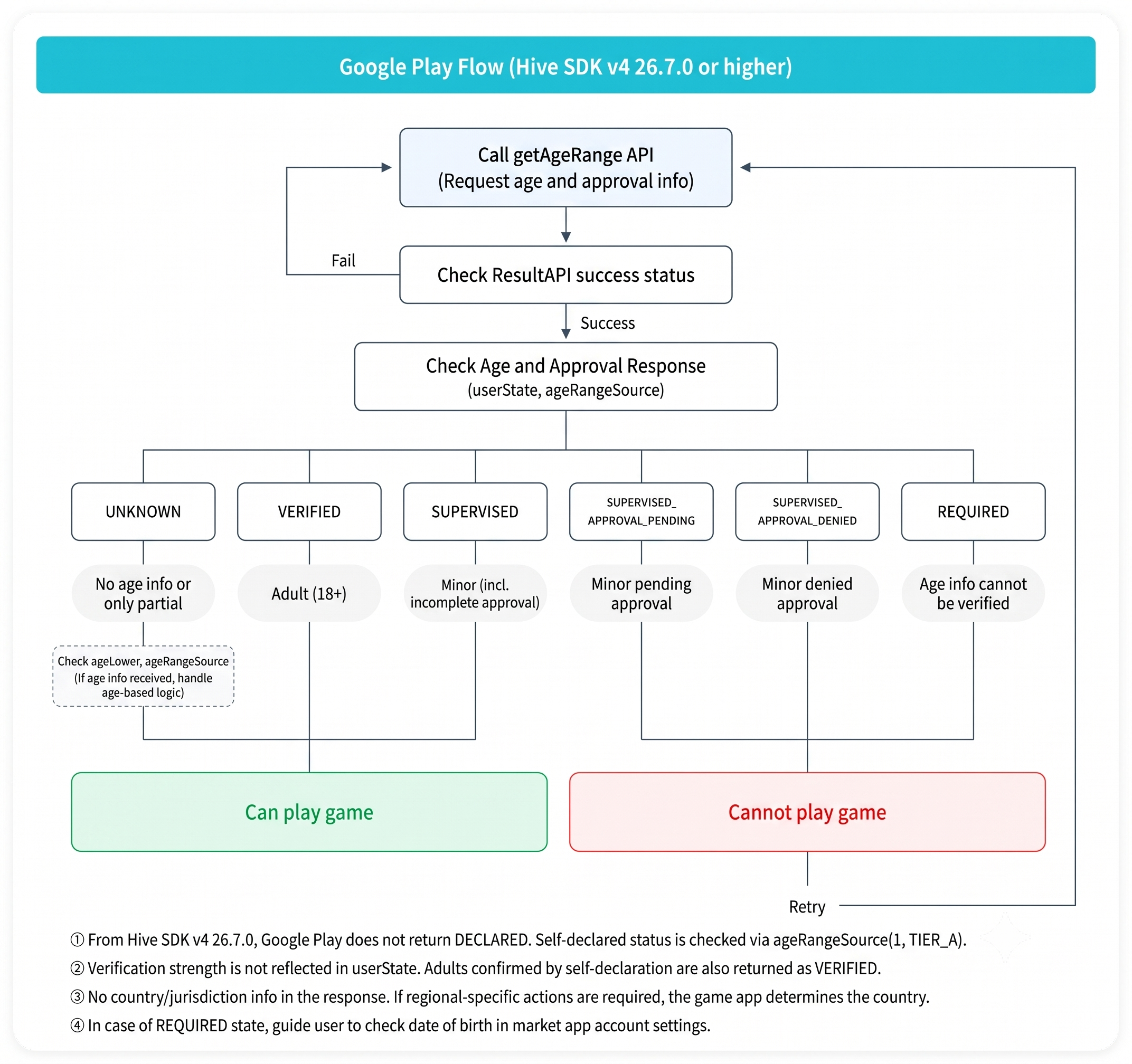
- Google Play (Hive SDK v4 26.7.0 or higher)
-
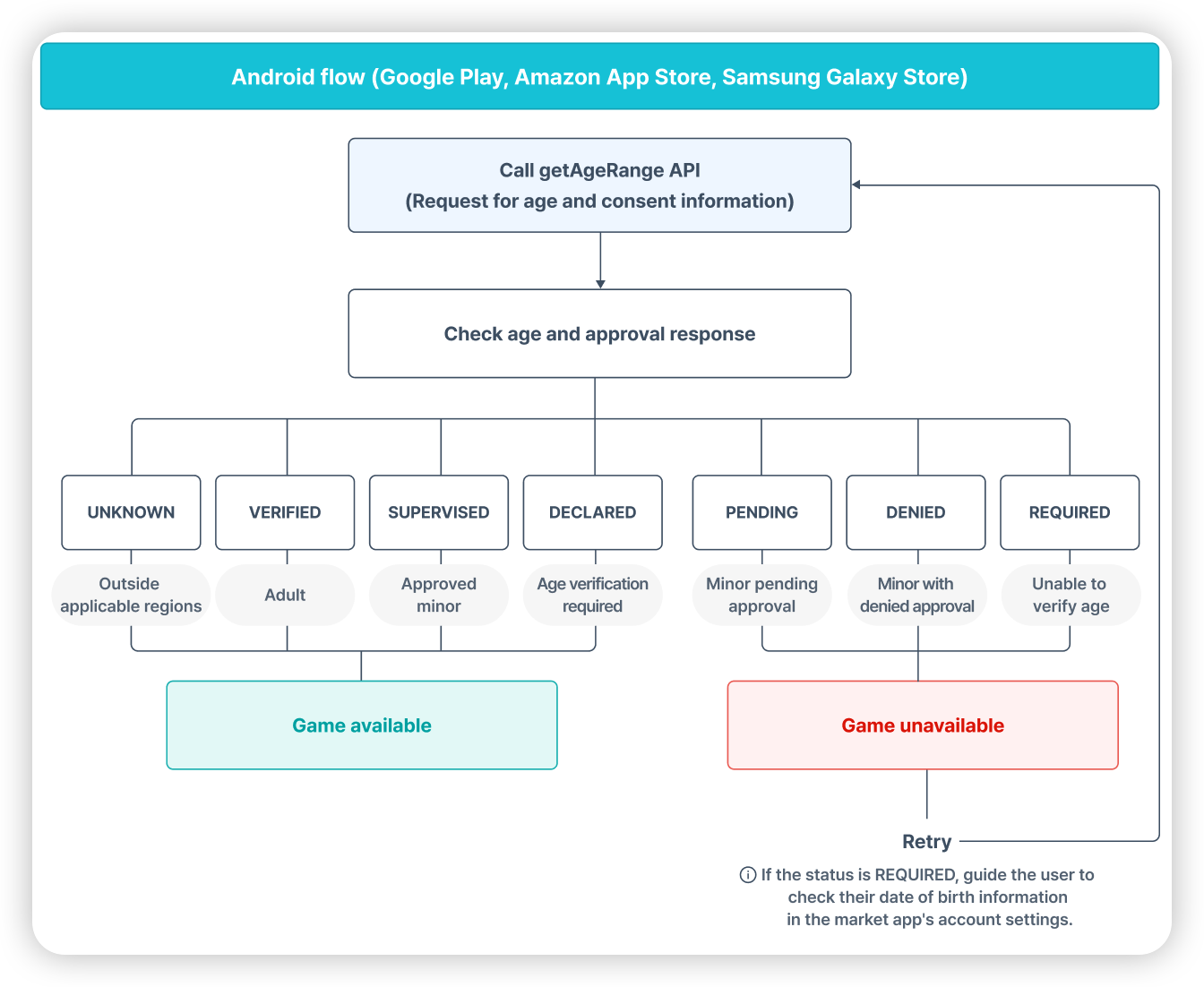
Amazon Appstore, Samsung Galaxy Store, Google Play (less than Hive SDK v4 26.7.0)
-
iOS
- Apple App Store
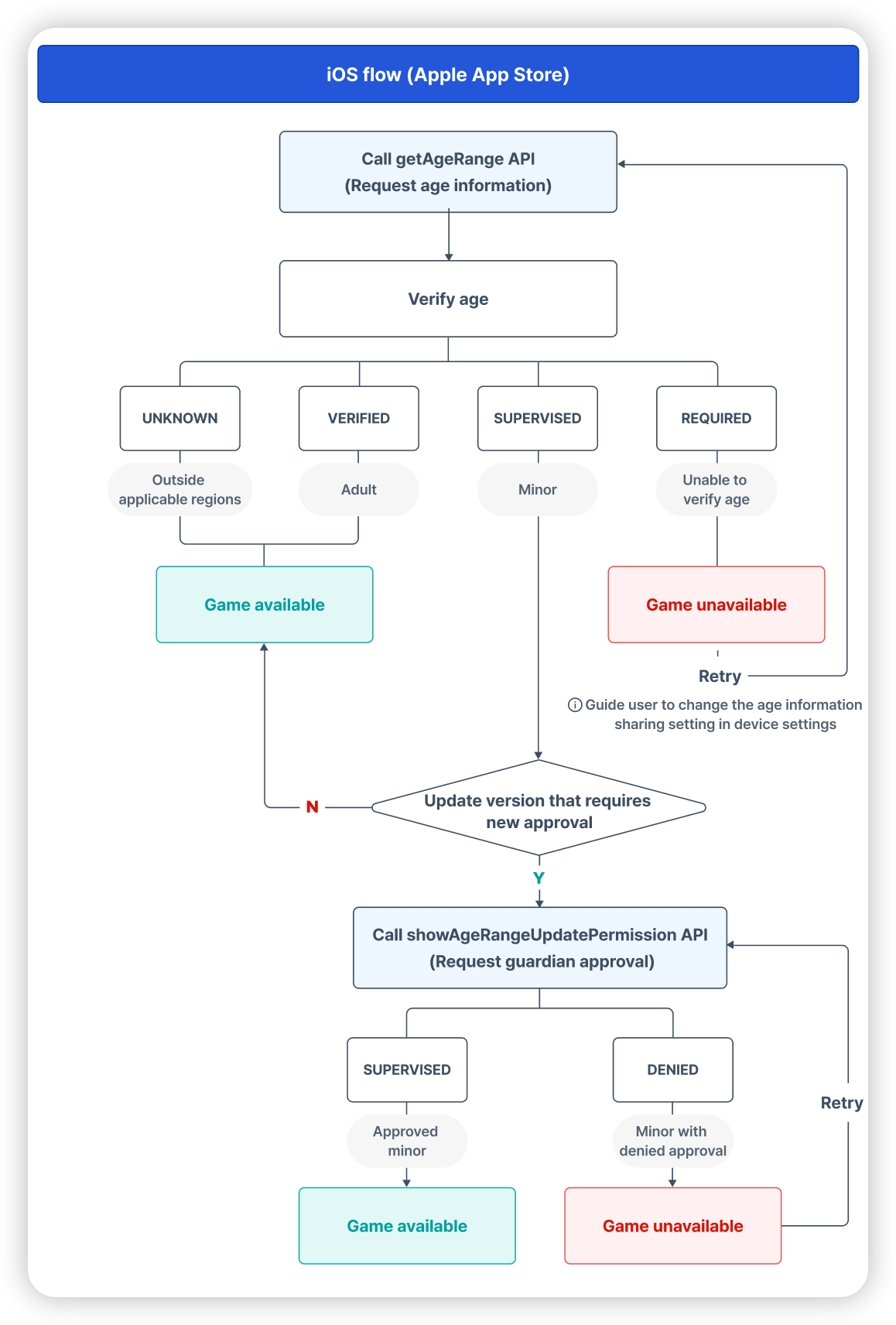
- Apple App Store
Note
- Google Play supports Brazil ECA. Starting with Hive SDK v4 26.7.0, Google Play does not return a DECLARED status. Even in regions where age information sharing is based on the user/guardian's choice, such as Brazil, the same status value is returned as in other regions, and whether the age was self-reported by the user is checked with
ageRangeSource.- Apple App Store supports Brazil ECA. Provides the user's age information directly if applicable, or returns a REQUIRED status if age information cannot be verified.
- Amazon Appstore and Samsung Galaxy Store do not support Brazil ECA and will not return any Brazil-specific responses.
- Google Play's response does not include country and jurisdiction information. If you need to respond differently by region, you must check your country directly in the app with
Configuration.hiveCountry. This value is based on the connection IP, so it may differ from the country set in your Google Play account. SUPERVISED (including approval pending)in the Google Play implementation flow does not mean that parental approval has not been received.SUPERVISEDis a minor status that does not require additional approval, and statuses that require approval are returned separately asSUPERVISED_APPROVAL_PENDINGandSUPERVISED_APPROVAL_DENIED.- In this guide, in compliance with the App Store Liability Act, you will not be able to enter the app if parental consent is not confirmed. However, the actual operation method may be slightly different depending on the service policy and operating policy of each app.
Example processing by country
| Applicable countries | MajoruserStatus | App processing |
|---|---|---|
| Countries without age verification law | UNKNOWN | Continue without further processing. However, for apps serving Brazil,UNKNOWNmay come from Brazilian users, so check the country first according to UNKNOWNstatus determination. |
| USA | VERIFIED,SUPERVISED,SUPERVISED_APPROVAL_PENDING,SUPERVISED_APPROVAL_DENIED | We determine the user's age range and provide age-appropriate content. If significant changes occur within the app while inSUPERVISEDstatus, parental approval will be requested. The Apple App Store advertises via theshowAgeRangeUpdatePermissionAPI, and the Android Store advertises via their respective developer consoles. Parental approval progress (SUPERVISED_APPROVAL_PENDING,SUPERVISED_APPROVAL_DENIED) may restrict features or content according to the app service policy. |
| Brazil | VERIFIED,SUPERVISED,UNKNOWN,REQUIRED | We determine the user's age range and provide age-appropriate content.REQUIREDwill guide you to set your user age information. Brazil is a region where age information sharing is based on user/guardian choice, so if the user refuses to share, Google Play returnsUNKNOWN. For guidance when receivingUNKNOWN, refer to DeterminingUNKNOWNstatus. |
Note
Starting with Hive SDK v4 26.7.0, Google Play returns the same status for Brazilian users as for other regions. If there is existing code that branched to theDECLAREDstate for Brazil response, it should be modified by referring to DECLARED State Return Discontinuation and Replacement.
Preparation: Add Age Range module
As a preliminary preparation for using the Age Range module, add or remove the Age Range module depending on the development engine and target OS of each SDK.
SDK Native Android
Add Age Range module
-
Set the market in SDK common settings.
-
Add the following content to the module-levelbuild.gradlefile.
Warning
The Google Play Age Signals library requiresminSdkVersion23 or higher. The Hive SDK v4 body supports 21, but apps that add thehive-agerange-google-agesignalsmodule must setminSdkVersionto 23 or higher. Setting it below 23 will cause an error during the manifest merge step at build time.
Remove Age Range module
Remove the contents below from the module-levelbuild.gradlefile:
// implementation "com.com2us.android.hive:hive-agerange-google-agesignals" // Remove this line when not in use
SDK Native iOS
Add Age Range module
App Store Liability Act-related system APIs are only supported on iOS 26.2 or later.
- Refer to Podfileexample code and add Age Range module settings.
target 'HIVE_GAME_COOL' do
  pod 'HiveAgeRangeApple', '${SDK_VERSION}' # After 26.3.4, the 'Notify me of important changes in the app and request approval' option can be applied.
  pod 'HiveAgeRangePermissionApple', '${SDK_VERSION}'  # (26.3.4+ Optional)
end
-
In the SDK Native iOS environment, add the Declared Age Range permission in the order below.
-
Select the project from theproject navigatorin the Xcode project window.
-
Select the app from theTARGETSlist.
-
Click theSigning & Capabilitiestab.
-
Click the+ Capabilitybutton at the top left of theSigning & Capabilitiestab.
-
Select and addDeclared Age Rangefrom the list.
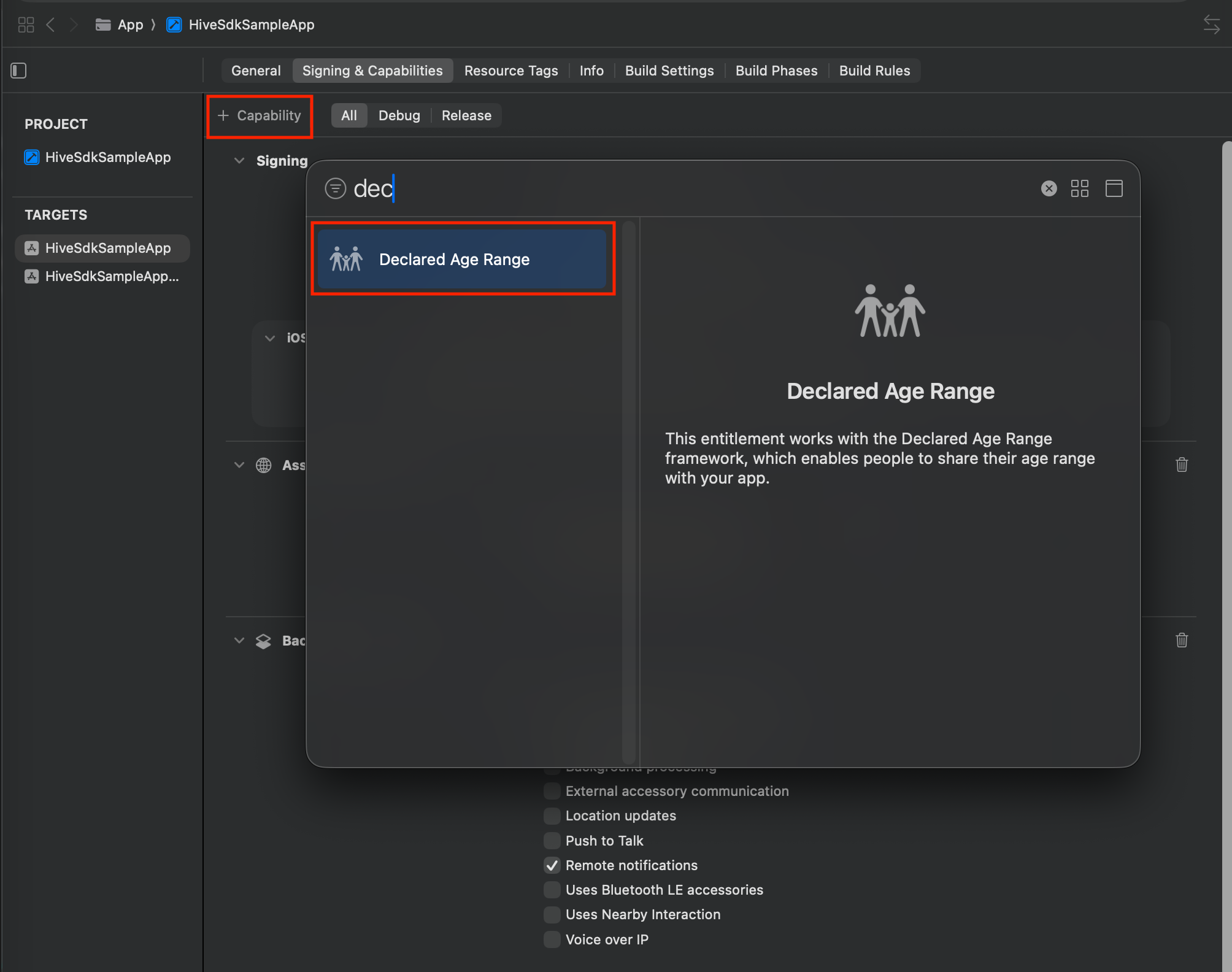
- You can checkDeclared Age Rangeadded to theSigning & Capabilitieslist.
-
Remove Age Range module
See Podfileexample code to remove the Age Range module settings.
SDK Cocos2d-x Android
Same as SDK Native Android.
SDK Cocos2d-x iOS
Same as SDK Native iOS.
SDK Unity Android
To use the Age Range module in the Android target Unity environment, set it in the order below.
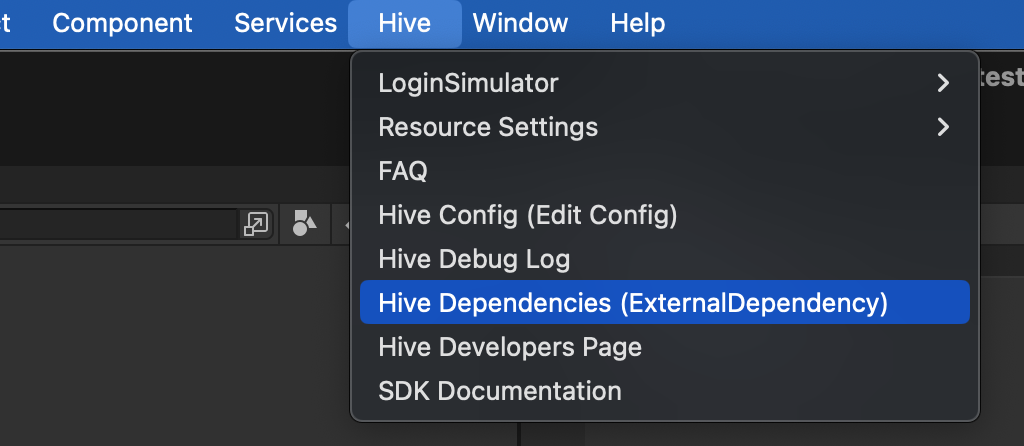
- ClickHive > ExternalDependency.
- Check theAge Range [Market]item for the supported store underMarket SettingsSettings. The Age Range module requires the Store module you want to support.
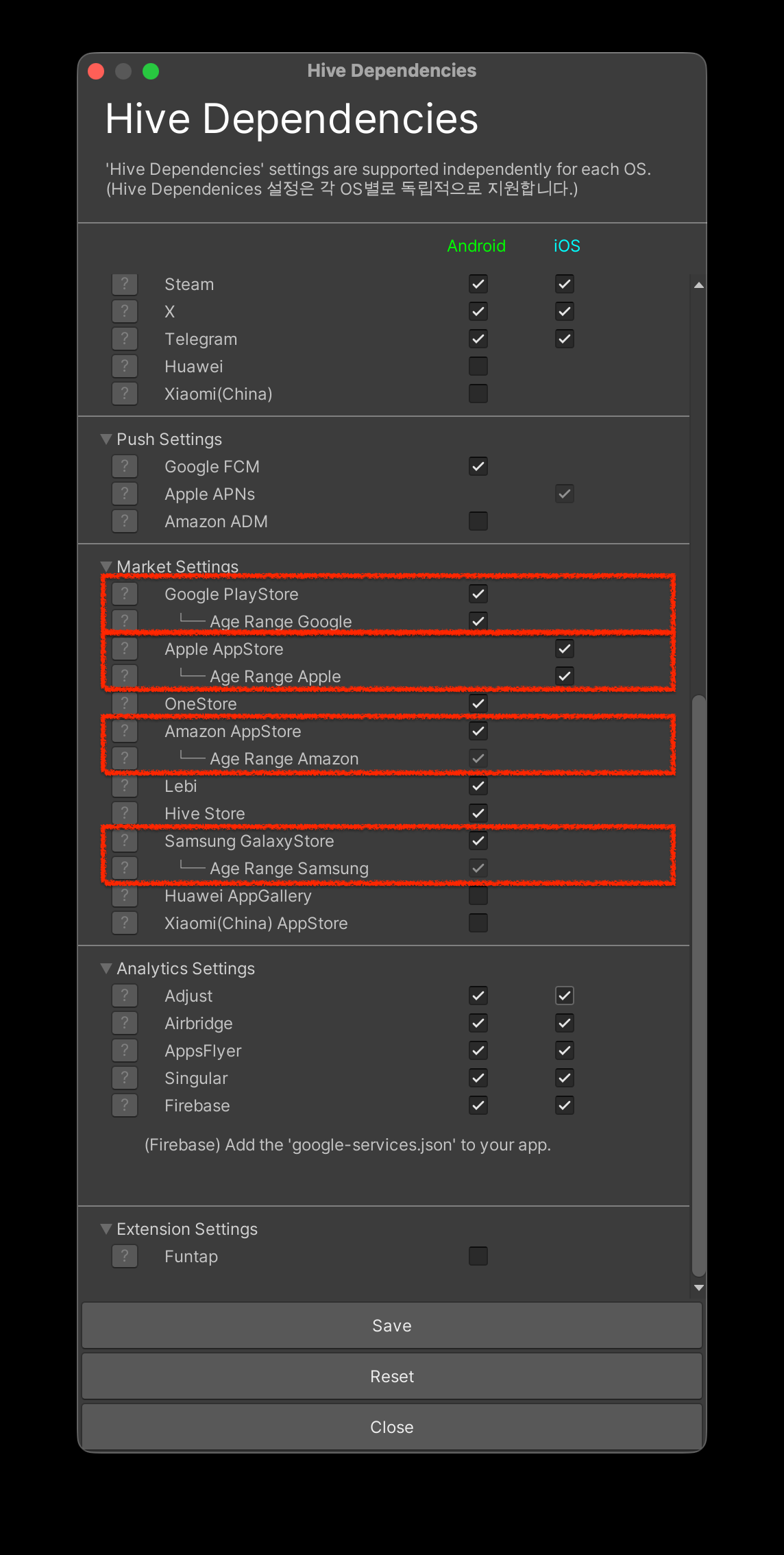
※ If you do not want to use the Age Range module, uncheck it.
If you do not use theAge Range GoogleandAge Range Applemodules, you can uncheck them. TheAge Range AmazonandAge Range Samsungmodules are automatically included when you include their respective parent's Store modules.
Warning
The Google Play Age Signals library requiresminSdkVersion23 or higher. For more information, see SDK Native Android.
SDK Unity iOS
App Store Liability Act-related system APIs are only supported on iOS 26.2 or later.
- ClickHive > ExternalDependency.
- Check theAge Range [Market]item for the supported store underMarket SettingsSettings. The Age Range module requires the Store module you want to support.
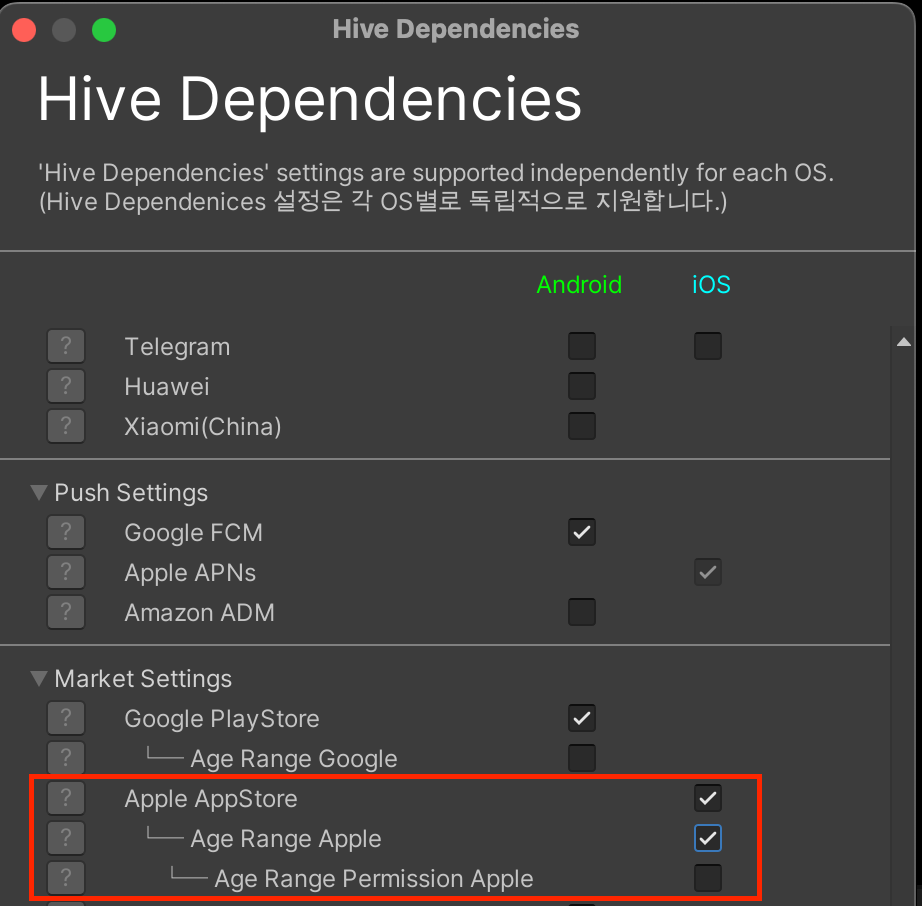
※ If you do not want to use the Age Range module, uncheck it.
You can uncheckAge Range AppleandAge Range Permission Appleif you do not use the module.
To use the Age Range module in an iOS-targeted Unity environment, add the Declared Age Range permission in the order below. You can easily set it up with the Unity editor.
-
SelectHiveat the top of Unity.
-
SelectBuild project post process setting > iOS.

- InHive PostProcess Editor (iOS), select theAge Rangecheckbox.
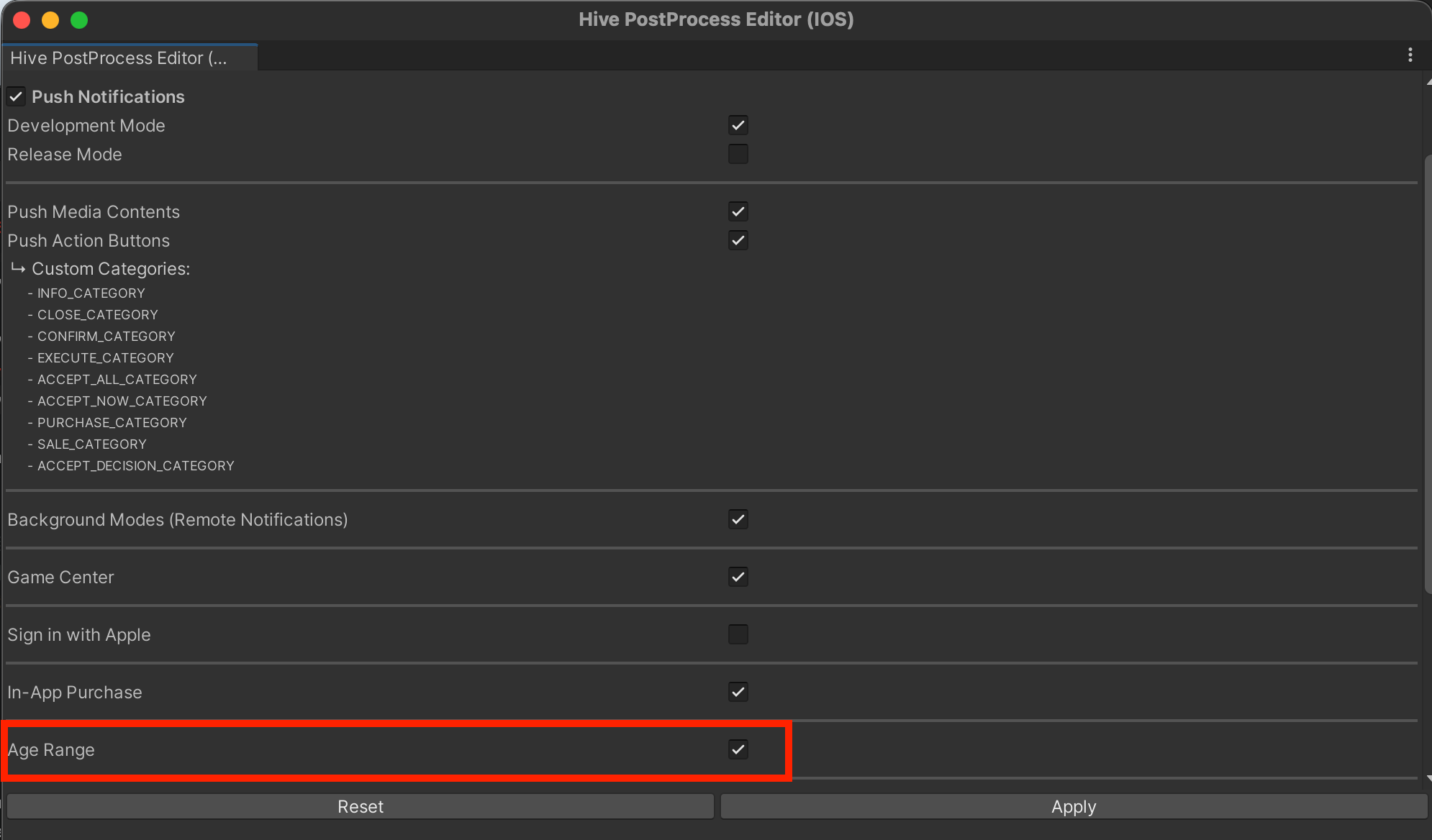
- AfteriOS project export, you can checkDeclared Age Rangeadded to theSigning & Capabilitieslist.
SDK Unreal Engine Android
To use the Age Range module in an Android-targeted Unreal Engine environment, set it in the order below.
-
SelectUnreal Editor > Edit > Project Settings.
-
On the left panel ofProject Settings, selectHive SDK > Dependency > Android.
-
CheckHive Module > Enable AgeRange.
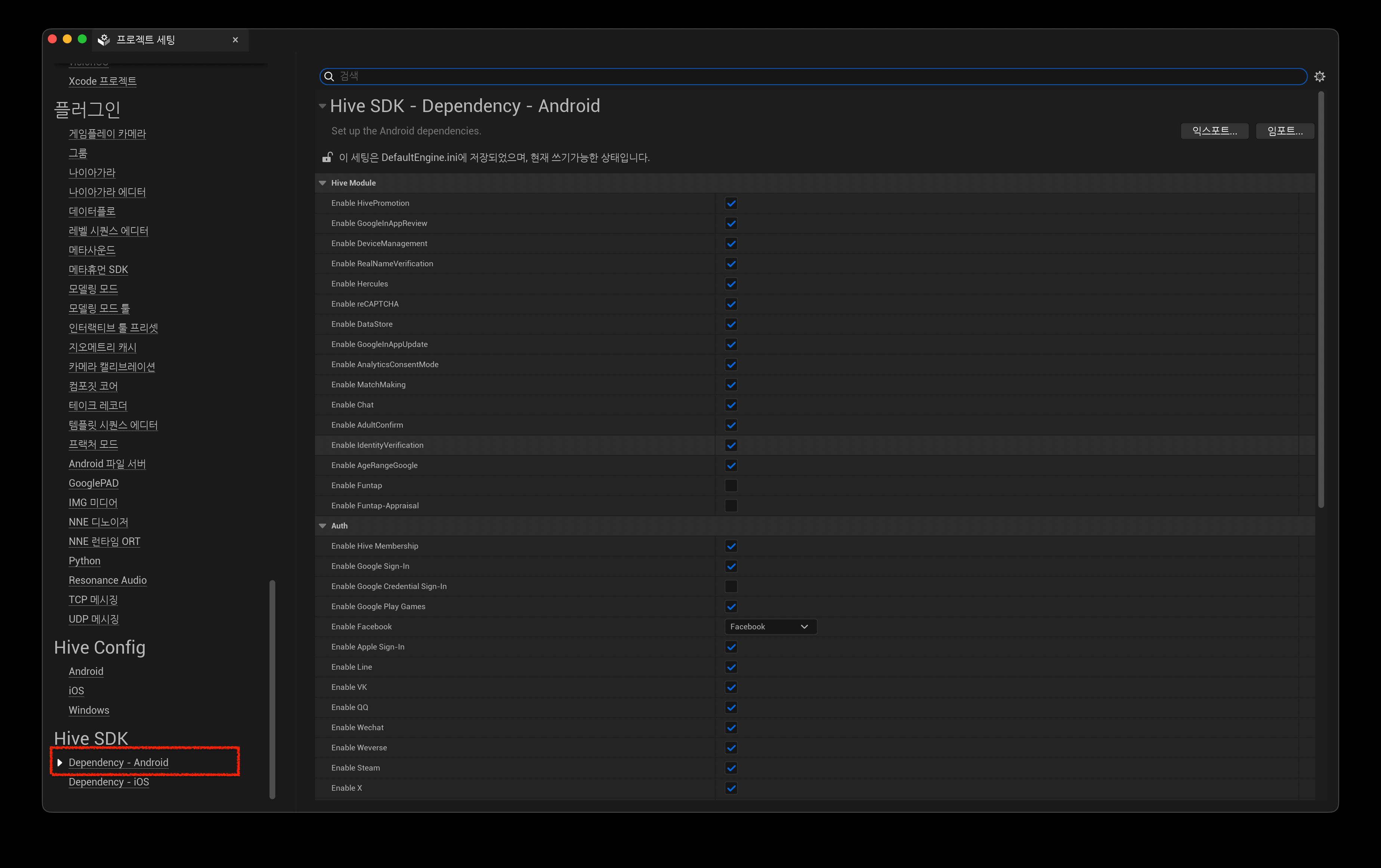
※ Uncheck if you do not want to use the AgeRange module.
Warning
The Google Play Age Signals library requiresminSdkVersion23 or higher. For more information, see SDK Native Android.
SDK Unreal Engine iOS
App Store Liability Act-related system APIs are only supported on iOS 26.2 or later.
To use the Age Range module in an iOS-targeted Unreal Engine environment, set it in the order below.
-
SelectUnreal Editor > Edit > Project Settings.
-
On the left panel ofProject Settings, selectHive SDK > Dependency > iOS.
-
CheckHive Module > Enable AgeRange.
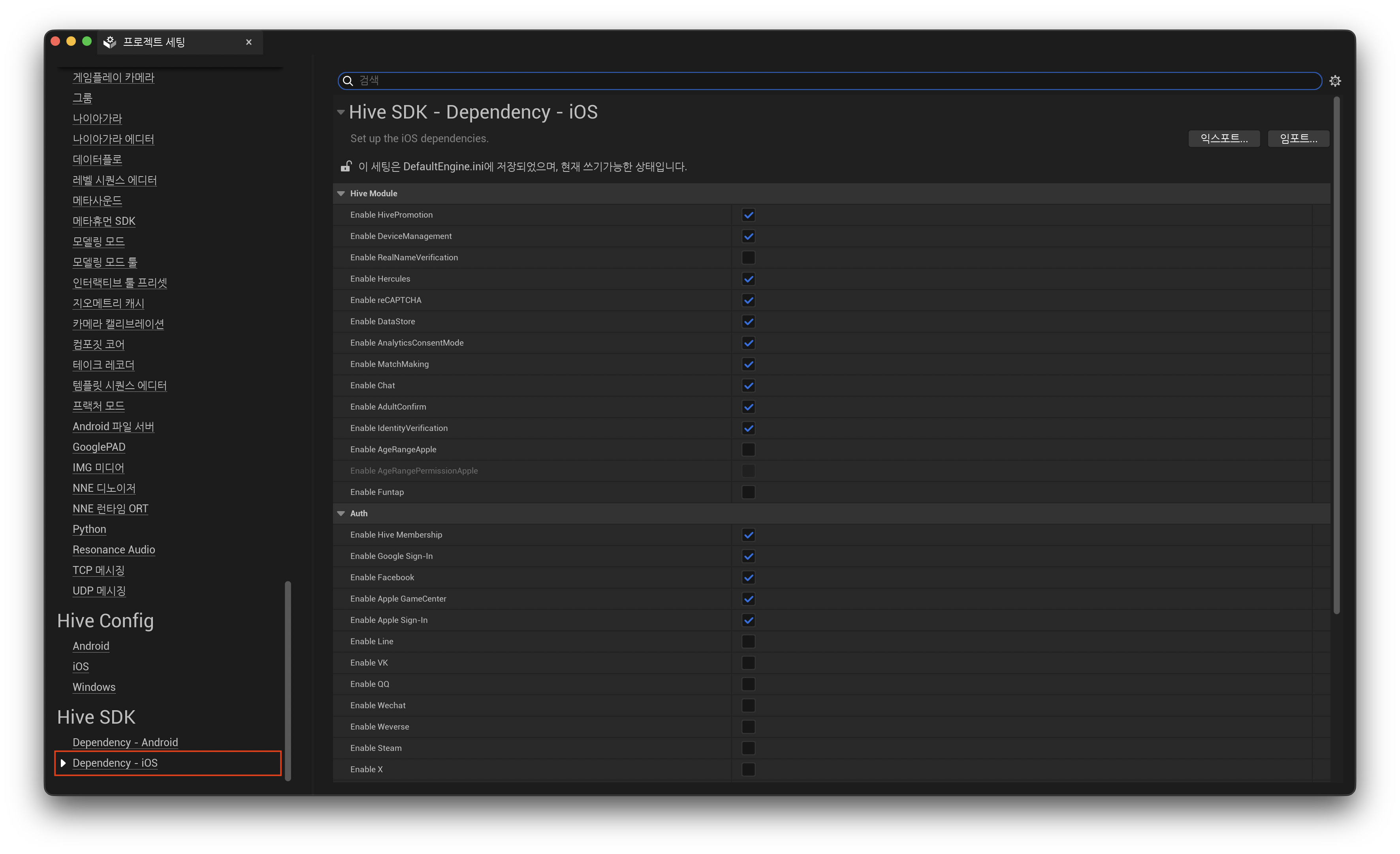
※ Uncheck if you do not want to use the AgeRange module.
-
Add the Declared Age Range permission.
Add the key below to the entitlements file. For information on how to create and apply entitlements files, see Entitlements Settings (iOS).
Add the code below to the entitlements creation section ofIOSExport.cs. For modification locations, see Entitlements settings (iOS).
Request user age range and approval status
To check the user's age and parental permission status, your runtime app calls the getAgeRange API.
This API is not required to be called every time the app is run, and can be called when necessary depending on service policy or functional requirements.
You may consider calling in the following cases:
-
When running the app, you need to control features or content based on user age or parental approval status
-
If there are changes due to app updates that may affect age ratings
-
In cases where guardian re-consent is required due to significant changes, etc.
Even if the app provides its own age verification function, we recommend calling the Age Range API first to utilize the user age information provided by the store.
Warning
Google Play may display an age information sharing consent screen duringgetAgeRangecalls. This may be the case in regions where sharing of age information is based on user/guardian choice, and where the call is made by a user who has not yet consented.
Since the app cannot control when the consent screen is displayed, call it when the screen transition is natural, such as at the beginning of the app launch, not during game play. Instead of calling it repeatedly in one session, call it only once and save the result for use.
Google Play has a time limit on waiting for a response. If the timeout is exceeded, it returnsResultAPI.TIMEOUT.
getAgeRange API call
Calling the getAgeRange API returns the user status (userStatus) and age range (ageLower,ageUpper).
Example code for the getAgeRange API call to request the user's age range is below.
API Reference: Unity®
API Reference: C++
#include <HIVE_SDK_Plugin/HIVE_CPP.h>
using namespace std;
using namespace hive;

hive::AuthV4::getAgeRange([](hive::ResultAPI const& result, hive::AgeRange const& ageRange) {
    if (!result.isSuccess()) return;

    if (ageRange.ageRangeSource == hive::AgeRangeSource::TIER_A) {
        // Age confirmed by self-report
    }
});
API Reference: Kotlin
import com.hive.AuthV4;
import com.hive.ResultAPI;

AuthV4.getAgeRange(object : AuthV4.AuthV4GetAgeRangeListener {
    override fun onAuthV4GetAgeRange(result: ResultAPI, ageRange: AuthV4.AgeRange?) {
        if (!result.isSuccess || ageRange == null) return

        val userStatus = ageRange.userStatus                        // Int (AuthV4.UserStatus 의 value)
        val ageLower = ageRange.ageLower
        val ageUpper = ageRange.ageUpper
        val approvalDate = ageRange.mostRecentApprovalDate
        val ageRangeId = ageRange.ageRangeId                        // Google: installId(UUID)
        val ageRangeSource = ageRange.ageRangeSource                // 1~4, -1 이면 값 없음

        // 열거형으로 비교하려면
        when (AuthV4.UserStatus.getUserStatus(userStatus)) {
            AuthV4.UserStatus.VERIFIED -> { /* 성인 */ }
            AuthV4.UserStatus.SUPERVISED -> { /* 미성년 */ }
            else -> { /* UNKNOWN, REQUIRED 등 */ }
        }
    }
})
API Reference: Java
import com.hive.AuthV4;
import com.hive.ResultAPI;

AuthV4.getAgeRange((result, ageRange) -> {
    if (!result.isSuccess() || ageRange == null) return;

    int userStatus = ageRange.getUserStatus();
    int ageLower = ageRange.getAgeLower();
    int ageUpper = ageRange.getAgeUpper();
    String approvalDate = ageRange.getMostRecentApprovalDate();
    String ageRangeId = ageRange.getAgeRangeId();
    int ageRangeSource = ageRange.getAgeRangeSource();              // 1~4, -1 이면 값 없음

});
API Reference: Swift
API Reference: Objective-C
When the getAgeRange API call is successful
If thegetAgeRangecall is successful, you can check the user's age and authorization status usinguserStatus,ageLower, andageUpper.
The default age ranges provided are as follows.
-
0~12 years old
-
13 to 15 years old
-
16~17 years old
-
18 years or older
Google Play uses this default range, and you can optionally adjust it only as needed. If there is a separate age range that meets the app's service policy, you can enter up to three minimum ages for the app in [Age Signal in Google Play Console] (https://play.google.com/console/developers/app/age-signals?hl=ko). The minimum age gap must be at least 2 years and can only be changed once a year. For more information, see Google Play official documentation.
Warning
If you change the age range, the values returned asageLowerandageUpperwill also change. If your app branches based on a specific age, make sure it matches the range you set in the Google Play Console.
Note
If a significant change occurs within the app whileuserStatusisSUPERVISED, the Apple App Store calls theshowAgeRangeUpdatePermissionAPI to notify the guardian of the change and request approval.
| userStatus | App processing |
|---|---|
UNKNOWN | The user's age cannot be verified. Most users come from regions where age verification laws do not apply, but others are also included. On Google Play,UNKNOWNincludes multiple causes, so check DeterminingUNKNOWNstatus before assuming that you are not eligible for age verification. |
VERIFIED | Check user age range (ageLower,ageUpper) to provide age-appropriate content. |
SUPERVISED | Check user age range (ageLower,ageUpper) to provide age-appropriate content. Apps distributed to the Apple App Store call theshowAgeRangeUpdatePermissionAPI to request parental approval when significant changes occur within the app. On Android, this API returnsNOT_SUPPORTED, so notify it through each store's developer console.SUPERVISEDis a minor who does not require additional parental approval. This includes both cases where you have already been approved and cases where approval is not required because the app did not request approval. |
SUPERVISED_APPROVAL_PENDING | Guardian approval is in progress. We check the user's age range (ageLower,ageUpper) to provide age-appropriate content, and may restrict features or content according to the app service policy. |
SUPERVISED_APPROVAL_DENIED | Guardian approval has been denied. We check the user's age range (ageLower,ageUpper) to provide age-appropriate content, and may restrict features or content according to the app service policy. |
REQUIRED | User age information cannot be verified. You will be instructed to set your age information in the Store app or device settings. |
DECLARED | Check user age range (ageLower,ageUpper) to provide age-appropriate content. Starting withHive SDK v4 26.7.0, Google Play does not return this status. See DECLARED status return deprecation and replacement. |
When the getAgeRange API call fails
If your app fails to call the getAgeRange API after requesting it, you will receive a ResultAPI failure code like the one below.
/*
 * RESPONSE_FAIL, NETWORK, DEVELOPER_ERROR, NOT_SUPPORTED
 * TIMEOUT, INVALID_PARAM (Google Play)
 */
ResultAPI.isSuccess() == false
Additional failure codes that may occur in Google Play are listed below.
*TIMEOUT: Google Play did not respond within the timeout period.
*INVALID_PARAM: An activity that would display the age information sharing consent screen could not be found. AfterAuthV4.setup, you must call it while the app is on the screen.
API call errors can occur for a variety of reasons, including using a store app that is not the latest version.
A call does not fail if the user declines to share age information. In this case, the call is successful anduserStatusis returned asUNKNOWN, so process according to UNKNOWNstatus determination.
If an error occurs during a session, it must be implemented to minimize disruption to the user experience as much as possible, such as terminating the call when the maximum number of API call retries is exceeded.
getAgeRange API response data{ #agesignals-004 }
A description of the getAgeRange API response fields is as follows. Utilizes each field value to provide app processes based on age.
Response values can change; if you want the most up-to-date values, request an API response when your app opens.
| Response field | Values | Description |
|---|---|---|
userStatus | VERIFIED | User is over 18 years of age. |
| SUPERVISED | The user has a supervised account with an age set by a parent. UseageLowerandageUpperto determine the user's age range.You are a minor who does not require additional parental approval. This includes both cases where you have already been approved and cases where approval is not required because the app did not request approval. Statuses requiring approval are divided into SUPERVISED_APPROVAL_PENDINGandSUPERVISED_APPROVAL_DENIED. | |
| SUPERVISED_APPROVAL_PENDING | The user has a supervised account, and the supervising parent has not yet approved one or more pending significant changes. UseageLowerandageUpperto determine the user's age range. UsemostRecentApprovalDateto see the last significant changes approved. | |
| SUPERVISED_APPROVAL_DENIED | The user has a supervised account, and the supervised user's parent has declined to approve one or more significant changes. UseageLower,ageUpperandmostRecentApprovalDateto see the last approved significant changes. | |
| UNKNOWN | Your age cannot be verified. Users may be from outside the applicable jurisdiction or region, or may be over or under the age of 18. If you setHive Console > Provisioning > SDK SettingstoVerify User AgetoNever Verify, you will get aUNKNOWNresponse.Starting with Hive SDK v4 26.7.0, Google Play also returns this value when age information is shared but no age range is received, and when the parental approval status cannot be interpreted. For more information, see UNKNOWNStatus Determination. | |
| REQUIRED | You are not identified or supervised in your jurisdiction or territory. These users may be over or under the age of 18. To verify age, ask users to check their status by visiting their device settings and Store app. | |
| DECLARED | You, your parent, or legal guardian have reported your age. UseageLower,ageUpperto determine the user's age range. Starting withHive SDK v4 26.7.0, Google Play does not return this value. Self-reporting can be checked with ageRangeSource.Apple App Store does not return this value, and Amazon Appstore and Samsung Galaxy Store do not support the Brazilian ECA and do not return responses specific to Brazil. | |
ageLower | 0 to 18 | The lower bound (inclusive) of the supervised user's age range. UseageLowerandageUpperto determine the user's age range. |
| -1 | userStatusis UNKNOWN, REQUIRED.Starting with Hive SDK v4 26.7.0, Google Play sometimes returns the age range and ageRangeIdeven ifuserStatusis UNKNOWN. See UNKNOWNstatus determination. | |
ageUpper | 2 to 18 | The upper limit (inclusive) of the supervised user's age range. UseageLowerandageUpperto determine the user's age range. |
| -1 | User is over 18 years old oruserStatusis UNKNOWN, REQUIRED.Starting with Hive SDK v4 26.7.0, Google Play sometimes returns the age range and ageRangeIdeven ifuserStatusis UNKNOWN. See UNKNOWNstatus determination. | |
mostRecentApprovalDate | Datestamp | Date of the most recent significant change approved. Example: "2023-07-01T00:00:00.008Z" Apple App Store is not supported. Samsung Galaxy Store returns data in the form YYYY-MM-DD. |
| Empty (a blank value) | userStatusis SUPERVISED and no significant changes have been submitted. oruserStatusis UNKNOWN, REQUIRED.Apple App Store is not supported. | |
ageRangeId | App Store generated ID | This is an identifier ID generated by the store. Google Play: The ID assigned by Google Play to supervised user installs is installID. Used to notify app revocation of approval. See Cancel app approval.Amazon Appstore: This is userIdin your Amazon account.Apple App Store: Not supported. Samsung Galaxy Store: This is IDcreated by Samsung Galaxy Store. |
| Empty (a blank value) | userStatusis UNKNOWN, REQUIRED.Apple App Store is not supported. Starting with Hive SDK v4 26.7.0, Google Play sometimes returns the age range and ageRangeIdeven thoughuserStatusis UNKNOWN. See UNKNOWNstatus determination. | |
ageRangeSource | 1 (TIER_A) | This is the age self-reported by the user. This field was added starting from Hive SDK v4 26.7.0. Meaningful values only return Google Play; other stores are always -1. |
| 2 (TIER_B) | This age is set and managed by parents or guardians. | |
| 3 (TIER_C) | Age assessed using credit card, email address, selfie assessment, government issued ID, or tax ID. | |
| 4 (TIER_D) | Age verified by a combination of government-issued ID and selfie or digital ID. | |
| -1 | No age verification source information available. |
Starting with Hive SDK v4 26.7.0, Google Play uses the Google Play Age Signals library 0.0.4. The three below are specific to Google Play; the behavior of Amazon Appstore, Samsung Galaxy Store, and Apple App Store has not changed.
The existing five fields ofAuthV4.AgeRange(userStatus,ageLower,ageUpper,mostRecentApprovalDate,ageRangeId) have the same names, types, and meanings, and theageRangeSourcefield has been added. Therefore, most apps will work without any code modifications, but there are three things to check when interpreting Google Play responses:
DECLARED state return break and replace{ #declared-replacement }
Google Play does not return statusDECLARED. The constant itself remains for backwards compatibility, so no compilation errors occur. However, the code that branched toDECLAREDno longer executes that branch without leaving any errors.
Check whether the age is self-reported by the user withageRangeSource.
| Original (0.0.3) | replace(0.0.4) |
|---|---|
userStatus == DECLARED | ageRangeSource == 1 (TIER_A) |
Warning
TIER_A inageRangeSourceis not a 1:1 replacement forDECLARED.
-DECLAREDwas actually used to distinguish Brazilian users, butageRangeSourcedoes not have country or jurisdiction information. - Since self-reporting can occur regardless of region, if the two values are mechanically replaced, even users outside of Brazil will be processed with the Brazilian logic. - If you need to respond differently by region, you must check the country directly withConfiguration.hiveCountryin the app. This value is based on the connection IP, so it may differ from the country set in your Google Play account.
Additionally, users who self-report and are at least 18 years old will now be returned asVERIFIED. In 0.0.3, it was identified asDECLARED, indicating that it was an unverified self-report, but in 0.0.4,ageRangeSourcemust also be checked to distinguish it.
userStatus and age verification source
userStatusdoes not distinguish through which method the user's age was verified. Users confirmed to be 18 years of age or older through self-report (TIER_A) will also be returned asVERIFIED, the same as users confirmed with government-issued ID.
If you need to handle things differently depending on your age verification source, please also checkageRangeSource. This field is an integer value and can be compared in C++ and Unreal Engine with the constantshive::AgeRangeSourceandEHiveAgeRangeSourcerespectively.
Warning
ageRangeSourceis a value that distinguishes age verification sources, and the size of the number does not indicate superiority or inferiority. TIER_C includes evaluation using a government-issued ID or tax ID, and TIER_D includes a combination of government-issued ID and selfie evaluation.
If you only want to allow specific sources, do not compare by size likeageRangeSource >= 3, but specify the value you want to allow directly. The meaning of each value can also be found in Google Play official documentation.
UNKNOWN status determination{ #unknown-detail }
UNKNOWNcannot confirm user age. This does not mean that it is not subject to age verification, so it should not be passed just because it isUNKNOWN.
Among the countries where the law has been implemented, the United States returnsREQUIREDrather thanUNKNOWNwhen the user's age is unknown. Therefore, the only people who need to make additional judgments when receivingUNKNOWNare Brazilian users. There is no country information in Google Play's response, so if your app serves Brazil, check the country directly withConfiguration.hiveCountry.
Note
The Apple App Store returnsREQUIREDrather thanUNKNOWNif the age information for a Brazilian user cannot be determined.
If you are confirmed to be a Brazilian user, the instructions will be divided according to theageRangeSourcevalue.
ageRangeSource | user status | App information |
|---|---|---|
| not -1 | You have allowed age information to be shared, but age has not been verified. | The Google Play app will guide you through age verification. |
| -1 | You have not given permission to share your age information. | You are asked to allow age information to be shared. |
You can use a single phrase such as Age verification is required without distinguishing between the two cases. Whether users who received UNKNOWN in Brazil can continue to use the app is determined according to the app service policy.
If the user declines to share their age information and then relaunches the app and callsgetAgeRange, Google Play displays the sharing request screen again. Google Play determines how many times this screen is displayed, and if the user repeatedly closes or rejects it, it will no longer be displayed.
Even if it isUNKNOWN, values may be contained inageLowerandageUpper. In this case, the user may be under the age of 18, so check these two values to provide age-appropriate content.
Warning
Even if the lookup fails,userStatusis returned asUNKNOWNand is not distinguished as a response field. Before processingUNKNOWN, first check whetherResultAPIis successful.
Notify and request approval of important changes within the app
In accordance with regulations in some jurisdictions and regions, if any of the following changes occur in the app, the app must notify guardians (parents) of the changes and request permission for minor users to continue using the app.
-
Changes to data collected, stored, and shared
-
Change age level
-
Add new in-app purchases and advertising features
-
User experience changes, etc.
The app decides when to notify you of changes and request approval. The method for notifying changes for each store is as follows.
-
Google Play, Amazon Appstore, Samsung Galaxy Store: Notification through developer console operated by each store
-
Apple App Store: Notification by calling
showAgeRangeUpdatePermissionAPI directly from the app
showAgeRangeUpdatePermission API
Apps that distribute to the Apple App Store call the showAgeRangeUpdatePermission API directly from the app to notify guardians (parents) of important changes and request approval.
Warning
On Android, this API does not work and always returnsResultAPI.NOT_SUPPORTED. Apps distributing to Google Play, Amazon Appstore, and Samsung Galaxy Store must notify changes through each store's developer console.
Starting with Hive SDK 26.3.4, you must add theHiveAgeRangePermissionApplemodule to use theshowAgeRangeUpdatePermissionAPI. For more information, see SDK Native iOS.
Example code calling the showAgeRangeUpdatePermission API is below.
API Reference: Unity®
API Reference: C++
#include <HIVE_SDK_Plugin/HIVE_CPP.h>
using namespace std;
using namespace hive;

std::string description = "This update adds video calling and location sharing features.";

AuthV4::showAgeRangeUpdatePermission(description, [=](ResultAPI const & result, AgeRange const & ageRange) {
    if (result.isSuccess()) {
        // API call success
    }
});
API Reference: Kotlin
import com.hive.AuthV4;
import com.hive.ResultAPI;

val description: String = "This update adds video calling and location sharing features."

AuthV4.showAgeRangeUpdatePermission(description, object : AuthV4.AuthV4GetAgeRangeListener {
    override fun onAuthV4GetAgeRange(result: ResultAPI, ageRange: AuthV4.AgeRange?) {
        if (result.isSuccess) {
            // API call success
        }
    }
})
API Reference: Java
API Reference: Swift
API Reference: Objective-C
#include "HiveAuthV4.h"

FString Description = TEXT("This update adds video calling and location sharing features.");

FHiveAuthV4::ShowAgeRangeUpdatePermission(Description, FHiveAuthV4OnShowAgeRangeUpdatePermissionDelegate::CreateLambda([this](const FHiveResultAPI& Result, const FHiveAuthV4AgeRange& AgeRange) {
    if (Result.IsSuccess()) { // call successful
    }
}));
Notice of withdrawal of parental approval
Even if guardians (parents) have approved notifications of important changes within the app, they can later cancel their approval. If you revoke approval, minor users will no longer have access to your app.
When revoking parental approval, how to check withdrawal notification through each store is as follows.
-
You can check the withdrawal by downloading the
installIDlisting from Google Play: Age Signal.installIDon Google Play is valid for 3 months and will be deleted thereafter.
-
Apple App Store: Send Notification regarding approval cancellation.
-
Amazon Appstore: You can be notified of the revocation by downloading Amazon
userIdfrom the Reporting section of the Developer Console. -
Samsung Galaxy Store: Since there is no separate notification of parental approval withdrawal, you can call the
getAgeRangeAPI and check with the returned status value.
Age Range Test
The Hive SDK provides a test environment and test cases to receive a normal response when requesting the getAgeRange API, regardless of whether age verification legislation is in effect or not.
The Age Range test environment and test cases can only be used in the Android target development environment and can simulate API behavior by setting debug mode.
Note
To test the Age Range feature in an iOS-targeted development environment, you can use the sandbox testing tool provided by Apple. Log in with your Apple Sandbox account to test it.
Enable debug mode
To set debug mode in the Android target development environment, run the command below. Debug mode only works if Hive ZoneType is notREAL(SANDBOX,TEST).
As the last value of the command, enter one of the TestCase numbers 1 to 19 in the Test case data responses section below.
Use the debug mode setting only for unit testing or integration testing to verify behavior in your app.
Data response by test case
After setting debug mode in the Android target development environment, the data response returned by Google Play for each test case is as follows.
Warning
In Hive SDK v4 26.7.0, the number of test cases has been increased from 12 to 19 and renumbered. Test case numbers used in 26.6.0 and earlier return different responses in 26.7.0, so if you are using an existing test script, double-check the numbers against the table below.
| TestCase | userStatus | ageLower | ageUpper | mostRecentApprovalDate | ageRangeId | ageRangeSource | Description |
|---|---|---|---|---|---|---|---|
1 | VERIFIED | 18 | -1 | Empty | Empty | 3 (TIER_C) | This is a response to users over 18 years of age who are not subject to parental approval. |
2 | SUPERVISED | 13 | 15 | 2026-01-01T07:00:00.008+0900 | 550e8400-e29b-41d4-a716-446655441111 | 2 (TIER_B) | In response to users ages 13 to 15 (inclusive) whose guardians have approved significant changes. |
3 | VERIFIED | 18 | -1 | Empty | Empty | 1 (TIER_A) | This is a response to a user who has been confirmed to be 18 years or older based on the user's self-reported age. |
4 | SUPERVISED | 13 | 15 | 2026-01-01T07:00:00.008+0900 | 550e8400-e29b-41d4-a716-446655441111 | 1 (TIER_A) | In response to users self-reporting age and having their guardian approve significant changes. |
5 | UNKNOWN | -1 | -1 | Empty | Empty | -1 | In response to users whose age information was not shared. This includes both users in regions where age verification laws do not apply, as well as users who have opted out of sharing in regions based on user choice. |
6 | REQUIRED | -1 | -1 | Empty | Empty | -1 | In response to users unable to verify age or consent. |
7 | SUPERVISED_APPROVAL_PENDING | 0 | 12 | Empty | 550e8400-e29b-41d4-a716-446655441111 | 2 (TIER_B) | This is a response to a user whose parental approval is in progress. |
8 | SUPERVISED_APPROVAL_DENIED | 0 | 12 | 2026-01-01T07:00:00.008+0900 | 550e8400-e29b-41d4-a716-446655441111 | 2 (TIER_B) | This is a response to a user whose guardian has denied approval. |
9 | UNKNOWN | -1 | -1 | Empty | Empty | -1 | This is a response when the age information sharing status cannot be confirmed. |
10 | UNKNOWN | -1 | -1 | Empty | Empty | -1 | Response when age information sharing status is not specified. |
11 | VERIFIED | 18 | -1 | Empty | Empty | 4 (TIER_D) | In response to users 18 years of age or older who do not have parental permission status specified. |
12 | UNKNOWN | -1 | -1 | Empty | Empty | -1 | The response when the API returns the ResultAPI.RESPONSE_FAIL status. (APP_NOT_OWNED) |
13 | UNKNOWN | -1 | -1 | Empty | Empty | -1 | The response when the API returns the ResultAPI.RESPONSE_FAIL status. (CLIENT_TRANSIENT_ERROR) |
14 | UNKNOWN | -1 | -1 | Empty | Empty | -1 | The response when the API returns the ResultAPI.RESPONSE_FAIL status. (INTERNAL_ERROR) |
15 | UNKNOWN | -1 | -1 | Empty | Empty | -1 | The response when the API returns the ResultAPI.RESPONSE_FAIL status. (API_NOT_AVAILABLE) |
16 | SUPERVISED | 13 | 15 | Empty | 550e8400-e29b-41d4-a716-446655441111 | 1 (TIER_A) | This is a response to a user between the ages of 13 and 15 (inclusive) whose age has been verified without going through a parental approval process. |
17 | UNKNOWN | -1 | -1 | Empty | Empty | 3 (TIER_C) | This is in response to a user who shared age information but whose age range cannot be confirmed. It can be distinguished from numbers 5, 9, and 10 by the fact thatageRangeSourceis not -1. |
18 | UNKNOWN | 13 | 15 | Empty | 550e8400-e29b-41d4-a716-446655441111 | 2 (TIER_B) | Response when parental approval status is received with an undefined value. Since you are a user under the age of 18 with verified age, you should checkageLowerandageUpper. |
19 | SUPERVISED | 0 | 12 | Empty | 550e8400-e29b-41d4-a716-446655441111 | 2 (TIER_B) | This is a response to a user whose age was confirmed to be between 0 and 12 years old (inclusive) without going through the parental approval process. |