Analytics Management
Overview
Analytics Management is a feature for designating and managing Analytics Administrators, who are responsible for organization, workspace, user management, and settings across Analytics.
When you complete the initial setup to use Analytics, you are granted Initial Administrator privileges; after that, you can add administrators or remove permissions from existing administrators.
Note
The menu and administrator list are only available to Analytics Administrators.
What Can You Do?
Operations Managers
- By designating the person responsible for overseeing Analytics operations within the organization as an administrator, you can clarify permission and responsibility scope.
- When there is a change of person in charge or a reorganization, you can quickly add or replace administrators so Analytics management continues without interruption.
Quick Start
To add an administrator, follow the steps below.
- Click the account icon in the top right, then select the Analytics Management menu.
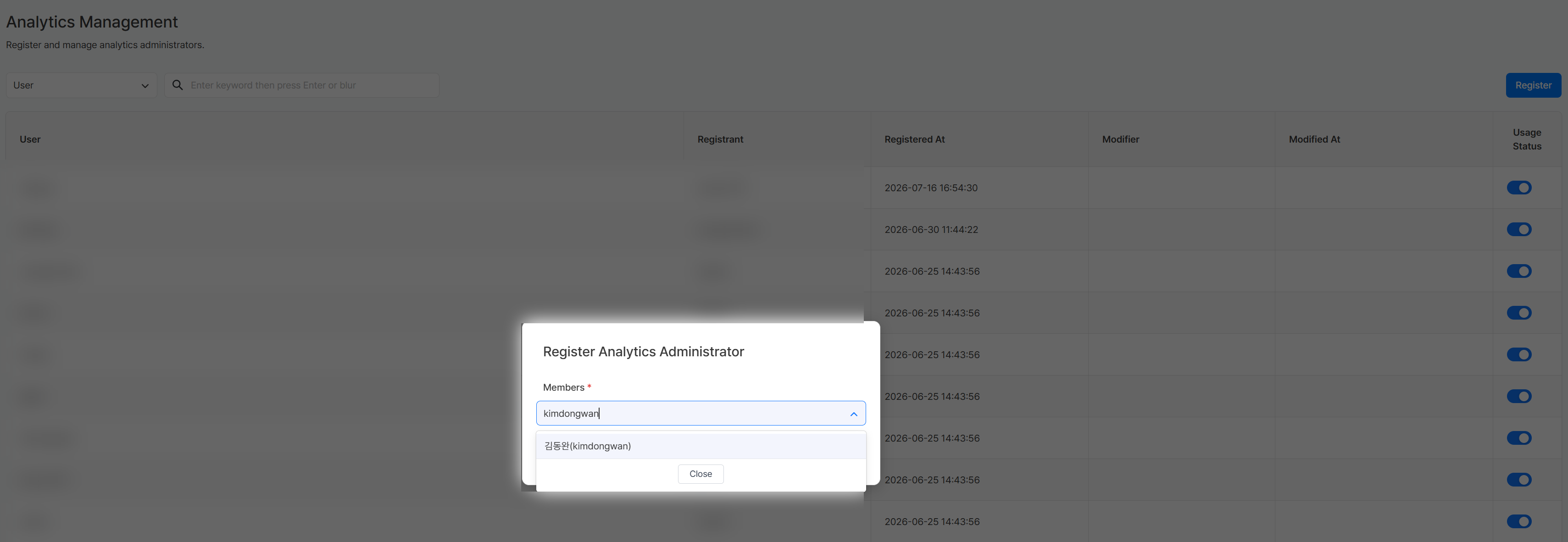
- Click the Register button at the top right of the list.
- In the Register Analytics Administrator popup, search for a member and select the user to register as an administrator.
Note
For details on designating the initial administrator, removing administrator permissions, and more, refer to All Features.
All Features
Key Concepts
| Concept | Description |
|---|---|
| Analytics Administrator | A user with permission to manage organization, workspace, user management, and settings across Analytics |
Designating the Initial Administrator
The very first user to access Analytics can carry out the initial setup. Once registration is complete, that account is automatically designated as the administrator responsible for organization, workspace, user management, and settings across Analytics.
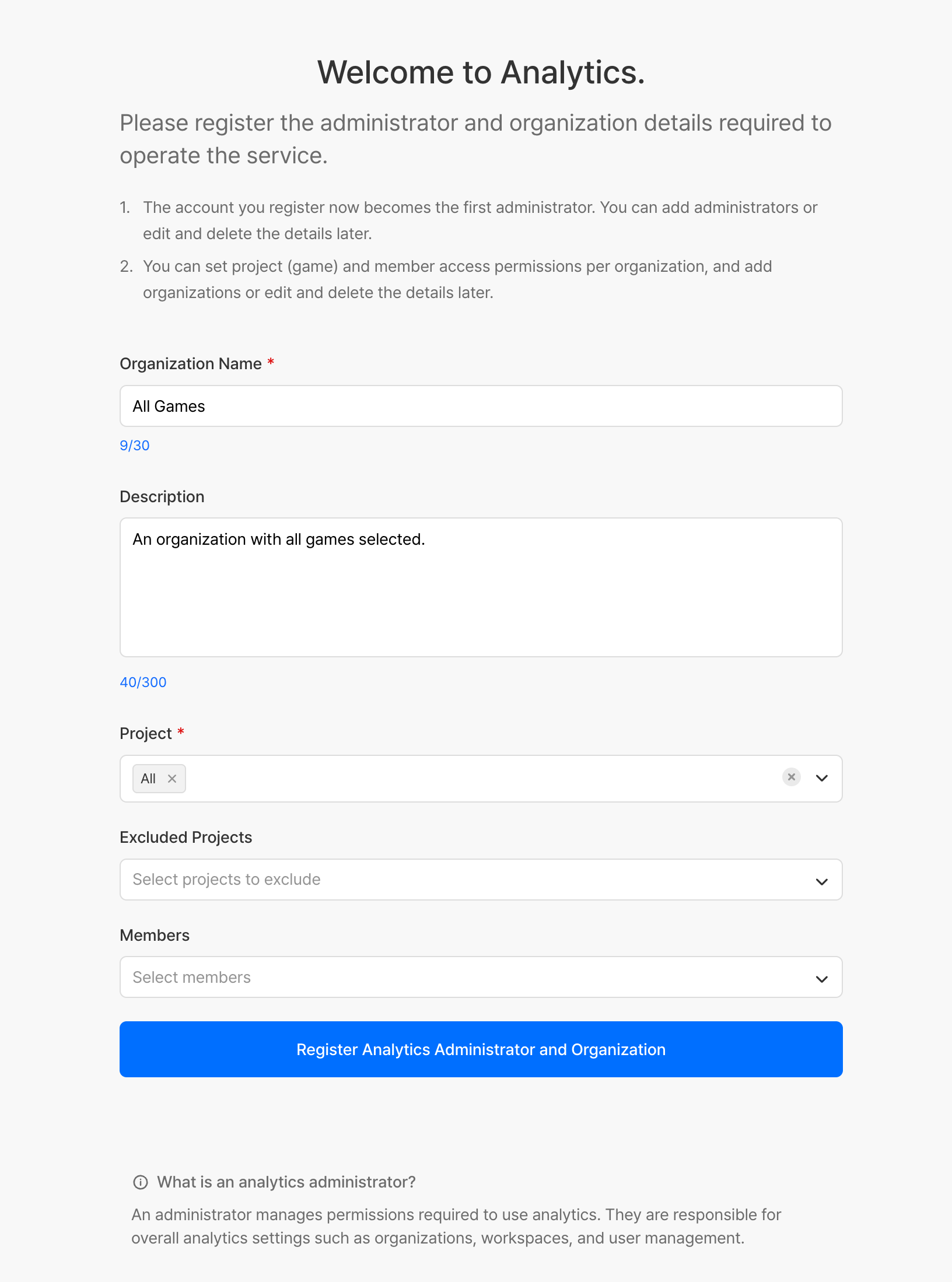
| Item | Required | Description |
|---|---|---|
| Organization Name | Required | Name of the organization to register |
| Description | Optional | Description of the organization |
| Project | Required | Project(s) (games) to include in the organization |
| Exclude Project | Optional | Project(s) to exclude from the organization |
| Member | Optional | Members to include in the organization |
Adding an Administrator
Register an additional administrator to share responsibility for settings across Analytics.
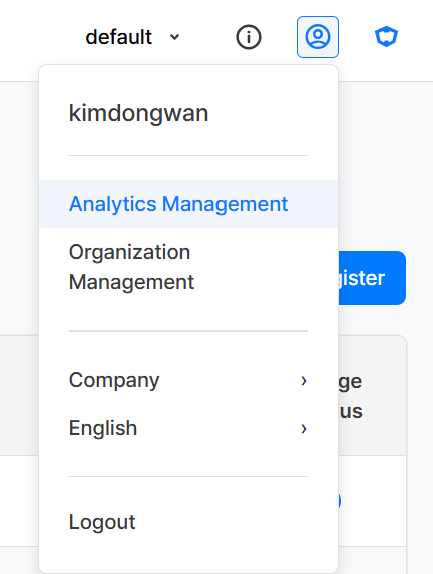
- Click the account icon in the top right, then select the Analytics Management menu.
- Click the Register button at the top right of the list.
- In the Register Analytics Administrator popup, search for a member and select the user to register as an administrator.
| Display Item | Description |
|---|---|
| User | The user account registered as an Analytics Administrator |
| Registered By | The account that registered this user as an administrator |
| Registered At | The date and time the administrator was registered |
| Modified By | The account that last modified the administrator's information |
| Modified At | The date and time the administrator's information was last modified |
| Usage Status | The administrator's active status |
Removing Administrator Permissions
Remove permissions from a user who no longer needs administrator access.

- Turn off the Usage Status toggle for the user in the administrator list, and that user's administrator permissions will be removed.
Example Use Cases
Changing the Analytics Administrator
Situation: Replace the existing Analytics Administrator with a different person in charge
Process:
1. Register the new person in charge as an administrator in Analytics Management
2. Turn off the Usage Status toggle for the previous person in charge to remove their administrator permissions
Notes & Tips
- Analytics Administrators have permissions over organization, workspace, user management, and settings across Analytics, so designate them carefully.
- Keep the administrator list up to date when there is a change of person in charge or when someone leaves the company.
Related Menu
- Organization Management - Manage organization information
- Workspace Management - Create and manage workspaces
- User Management - Manage workspace permissions by user