Coupon reward implementation steps
To grant items to users with coupons, you must implement coupons and the mailbox together. This is because 'Coupon' only sends grant mail containing the items set for the coupon to the user's in-app mailbox, and the user receives the items in that mailbox.
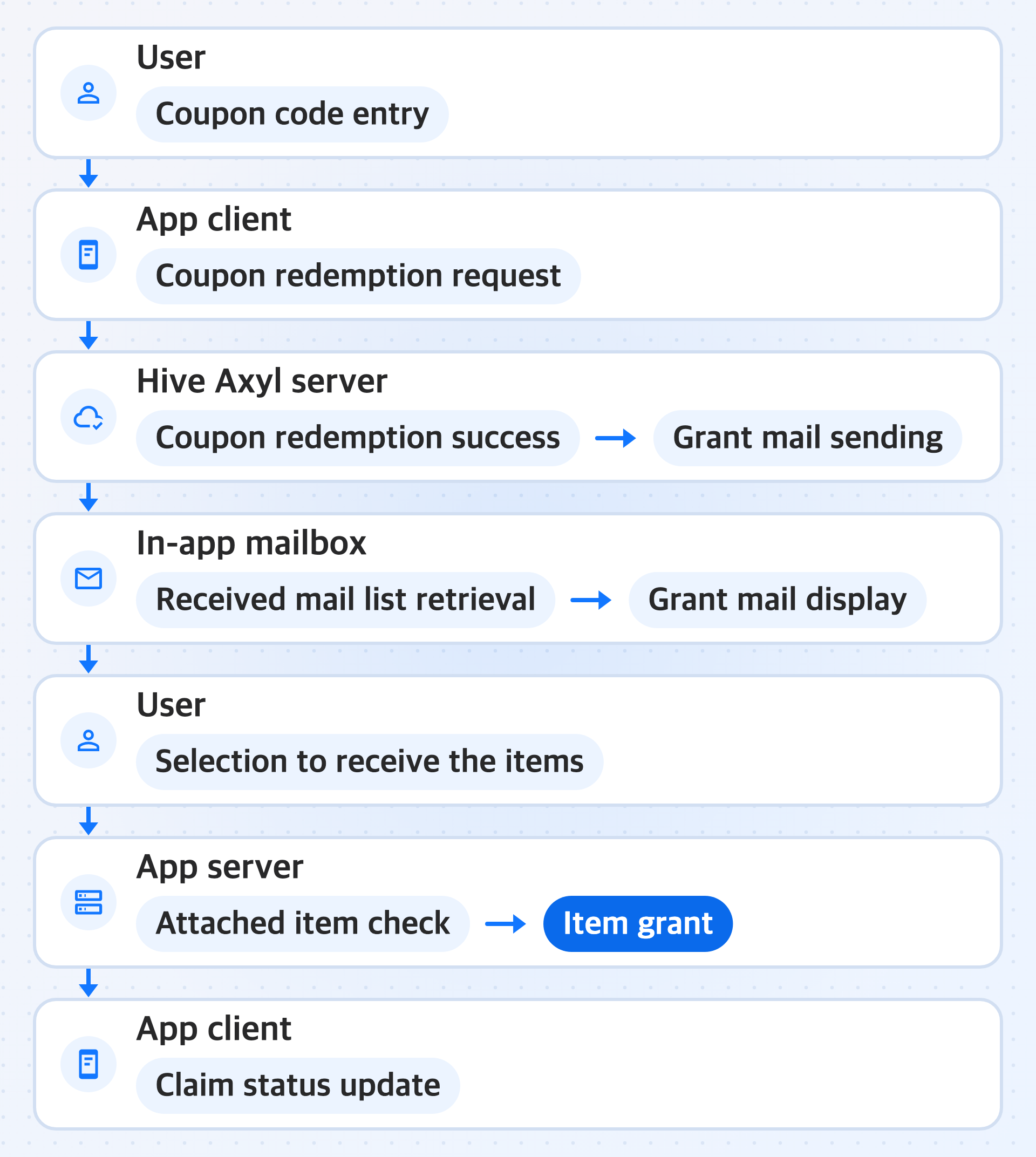
Once you have completed Install the module, initialize, and log in, complete the coupon reward feature in the following order.
1. Prepare the items to grant and the coupon
For the app client to make a coupon redemption request, there must be a coupon code for the user to enter. Therefore, the operator first prepares the items to grant with the coupon and the coupon in the Hive Console in the following order.
- In Item registration, the operator registers the items to grant with the coupon.
- In Coupon issuance, the operator sets the coupon type, the usage period, and the items and quantities to grant, and requests issuance.
- When an approver with the coupon approval permission approves the request, coupon codes are generated.
Note
To check the flow of entering a coupon code in the app and receiving the items before the official launch, specify Test Coupon Quantity when you issue a bulk coupon, so that test coupons are issued along with it. Test coupons can be used even before the usage start date.
2. Request coupon redemption
When the user enters a coupon code in the in-app coupon exchange, the app client calls RedeemCouponAsync() to redeem the coupon. The in-app coupon exchange is the app screen where the user enters a coupon code, and the app builds it itself. If the coupon code cannot be redeemed, RedeemCouponAsync() returns a result case for each reason, so the app decides the message to show the user for each result case. For details, see Redeem coupons.
A successful coupon redemption means that the request to send the grant mail has been accepted, not that the user has received the items. The user receives the items through steps 3 and 4.
3. Display grant mail in the mailbox
Grant mail is the mail that the Hive Axyl server sends to the user's in-app mailbox when coupon redemption succeeds. The items set for the coupon are contained in this mail as attached items. The in-app mailbox is the app screen where the user checks received mail and receives the attached items, and the app builds it itself with the mailbox module. On this screen, the app client retrieves the received mail list and shows the grant mail to the user.
For the mailbox tasks the app must implement itself, see Mailbox, and for received mail list retrieval, see Get received mail. For the sender, language, and category of grant mail, see Grant mail sending information.
4. Grant items and update the claim status
When the user selects to receive the items of the grant mail, the app server checks the attached items and grants the items to the user. The Hive Axyl SDK mailbox only records the claim status of attached items, so after the app server grants the items, the app client updates the claim status by marking the mail as read.
The app decides how to separate the screen where the user opens mail from the action of receiving the items. For marking as read, see Mark mail as read, and for the order in which to find and process grant mail, see Claim the items in the mailbox.
5. Check coupon usage records
Check in the Hive Console who used which coupon code and when. The operator looks up coupon usage records by coupon code or Player ID in Coupon code usage history.