Permission management overview
The Console provides the Owner, Admin, and Member roles. Owners and Admins are the Console's permission managers and manage page permissions.
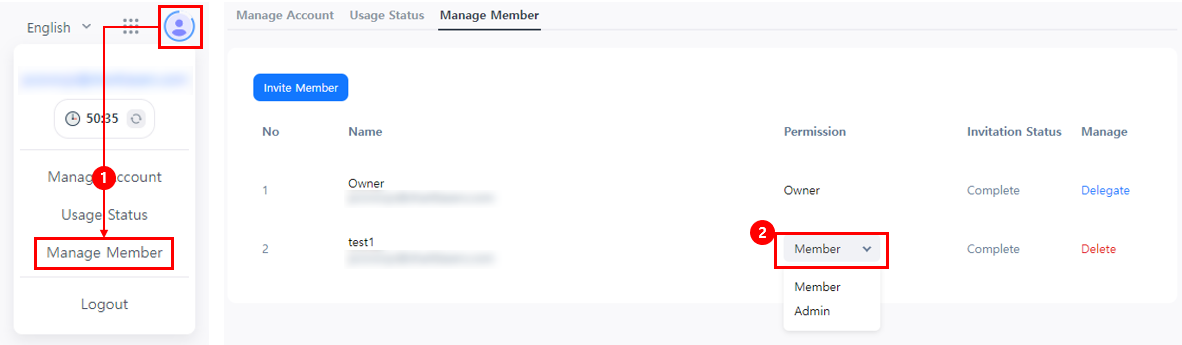
When a Console member is invited, the "Member" role is assigned by default. Permission managers (Owners and Admins) can change the invited member's role.
Console permission guide
To use the Console, you need the required page access permissions, action permissions, and project permissions.
- Access permission: Permission to access a specific Console page and view its content.
- Action permission: Permission to perform actions such as editing, deleting, or approving. Feature availability depends on the permissions granted.
- Project permission: Specifies the projects a user can access and view.
Most Console pages require access permissions and project permissions, but some pages can be used without project permissions. Separate action permissions may be required for each page.
The Console is divided into Live and Sandbox servers, and permissions can be managed separately for each server.
Permission guide for permission managers (Owners and Admins)
This is the permission guide for permission managers (Owners and Admins). Owners and Admins are automatically granted access to all Console pages, all action permissions, and project permissions.
Permission guide for members
This is the permission guide for company members. New members who join after receiving an invitation from a permission manager (Owner or Admin) are automatically granted the "Member" group permission.
The "Member" group displays only pages that exclude personal and sales information and does not allow members to view project data. To use the Console, members must receive "Individual" or "Group" permissions from a permission manager (Owner or Admin).