SEO & GTM
Settings for optimizing search traffic and collecting user behavior analysis data for the community and web shop.
- SEO: Optimizes so that major search engines can smoothly collect site content and reflect it in search results.
- Controls the exposure method in search engine results by managing meta tag information such as Title, Description, and Keyword for each page.
- GTM: Integrates the Google Tag Manager container to collect behavior logs of site visitors.
- Inserts and manages analysis tags without modifying the source code, and tracks major on-site events such as purchase conversions or button clicks.
➡️ Console Path: Community & Web Shop > Common Operation Settings > SEO & GTM
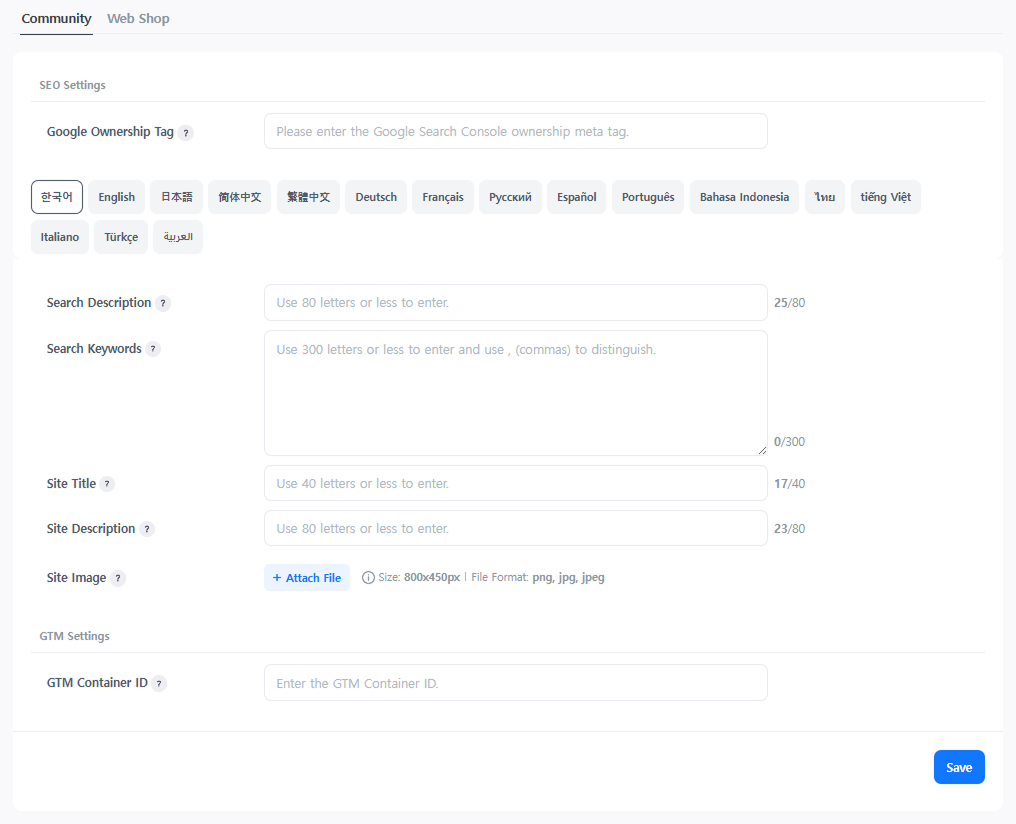
SEO Settings
When a service is created, the title and representative image registered in the App Center are automatically reflected as the default values for meta information. Configure them directly in the Hive Console for further optimization.
- Google Ownership Tag: Registers the ownership tag for Google Search Console integration. After registration, it monitors search traffic and diagnoses site issues.
- Search Description: Enters the site description to be exposed in search results. It helps increase search priority and click-through rates.
- Search Keyword: Enters the representative keywords of the service. Excessive keyword entry has a negative impact on search engine optimization, so enter them appropriately.
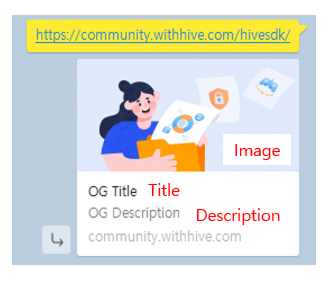
- Open Graph Tag: Sets the information exposed when sharing on SNS. Since it is categorized by language, register it separately for each operating language and service.
- Site Title: Enters the title to be exposed when sharing on SNS.
- Site Description: Enters the description to be exposed when sharing on SNS.
- Site Image: Sets the representative image to be exposed when sharing on SNS.
- Since Open Graph tags are affected by cache, they may not be reflected immediately on some SNS platforms. Please note that it may take some time to be reflected.
GTM Settings
Enter the GTM container ID and collect visitor behavior data. For the web shop, purchase events are automatically integrated just by entering the container ID, supporting e-commerce data analysis in Google Analytics.
Purchase Event Data Upon payment completion, the following data is automatically transmitted.
| Item | Parameter |
|---|---|
| Unique order number | ecommerce > transaction_id |
| Payment currency | ecommerce > currency |
| Product name | ecommerce > items > item_name |
| Product price | ecommerce > items > price |
| Purchase quantity | ecommerce > items > quantity |
| Purchase date and time | purchase_datetime |
| Payment method | payment_method |