Deleted Content Management
This page lets you search for and restore deleted community posts and comments. Search for posts and comments separately, and review their content before restoring them.
➡️ Console Path: Community & Web Shop > Community Post Management > Deleted Content Management
Deleted Content Search and List
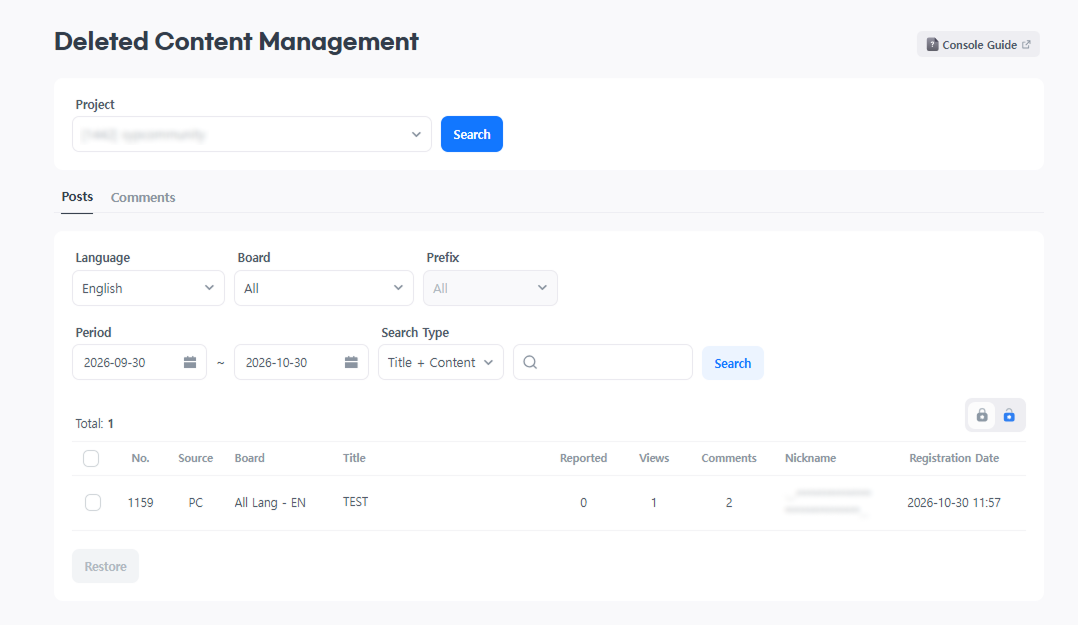
Configuration Method:
- Select a project in
Deleted Content Management. - Select the
PostsorCommentstab. - Select the language and bulletin board, and set any required search criteria.
- Review the deleted content in the results list.
| Search Option | Selection Criteria |
|---|---|
| Language / Bulletin Board | Select a supported language and a bulletin board created in that language. The default bulletin board selection is All. |
| Prefix | Select from the prefixes registered for the selected bulletin board. If no prefixes are registered, the option is disabled. |
| Date Range | Select the start and end dates based on the post registration date. The default range is from 30 days before today through today. |
| Search Field | Select Title + Content, Title, Content, Nickname, Player ID, or Community ID, then enter a search term. |
The list displays the title or comment content, nickname, registration date, view count, comment count, and other information. View and comment counts on the Comments tab are displayed using the same criteria as on the Posts tab. Select a title or comment content to open the View Deleted Content screen.
Restoring Deleted Posts
On the Posts tab, select the posts to restore, then select Restore. When the confirmation pop-up appears, select Confirm. The Restore button is disabled if no posts are selected.
If the original bulletin board has been deleted, the post cannot be restored, and the message Unable to restore because the destination bulletin board has been deleted. is displayed.
Restoring Deleted Comments
- Restoring from the List: Select the comments to restore, then select
Restore. TheRestorebutton is disabled if no comments are selected. - Restoring from the View Deleted Content Screen: Select the comment content or post title to open the
View Deleted Contentscreen, then selectRestorefor the comment.
Once restoration is complete, the message Restored to the original post. is displayed.
Comments cannot be restored if their original post has been deleted. If only the post has been deleted, the message Unable to restore because the comment's original post has been deleted. is displayed. If both the post and bulletin board have been deleted, the message Unable to restore because the comment's original post and bulletin board have been deleted. is displayed.
Reviewing Deleted Content and Comments
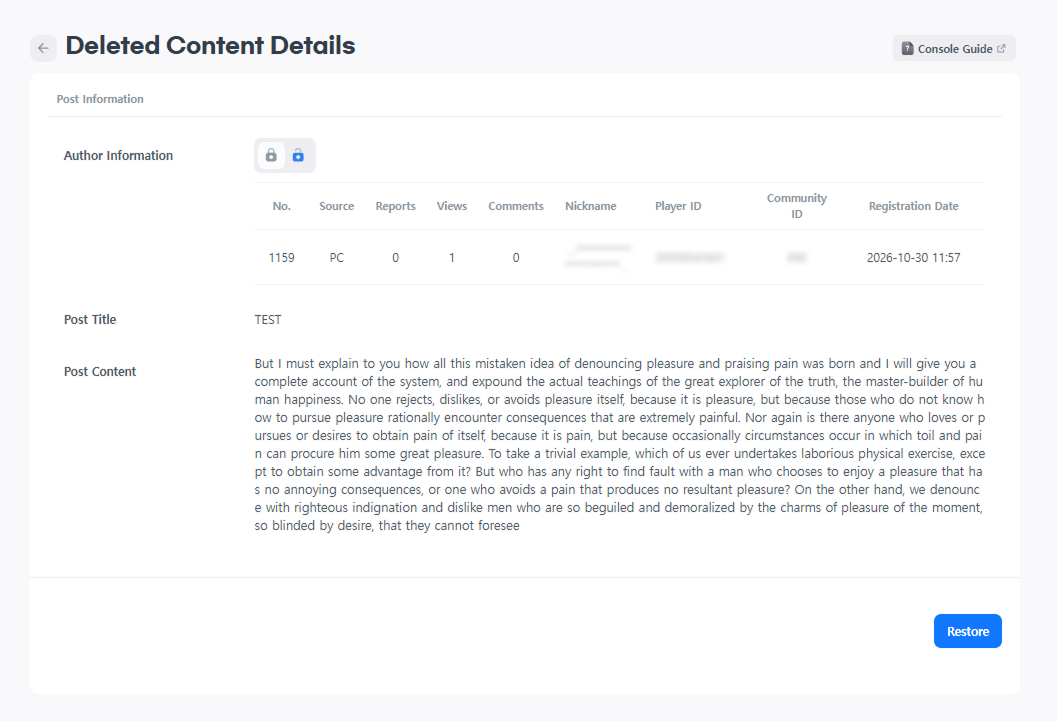
On the View Deleted Content screen, review the deleted post's author information, title, and body.
- Viewing Reported Comments: Select
Show Reported Comments Only. For comments with a report count displayed, select the count to review the report history. - Managing Comment Status: Under
Morefor a comment, select the option to make it public or private, or delete it. Comment editing is not available. - Downloading Comment Records: Select
Download Recordsin the comments section.