Playio
Playio is one of the external channels that can be linked with the Hive Web Shop, enabling the sale of Hive Web Shop products through the Playio Web Shop. Since it directly utilizes the existing Hive Web Shop configurations, activating the channeling service after setup applies the same product configuration and operational methods. Playio integration only functions after a prior contract is finalized. Proceed with the configuration below once the contract is completed.
Prerequisites
Creating a Hive Web Shop is mandatory for the integration. Set up your shop by following the steps below. If you are already operating a Hive Web Shop, proceed only with '3. Store Settings'.
- 1. Preparation
- Login Settings: Issue a Web Login App ID. Do not proceed with the actual web login setup. Learn more
- Product Sales Settings: Among the payment configurations for product purchases, proceed with configuring the price tier, registering products, and implementing the provision target information inquiry API. Do not proceed with PG configuration. Learn more
- 2. Common Settings
- Site Settings: Configure the site address, usage status, and supported languages to launch the site. For the site address, enter a value used as a keyword to distinguish sites within the Hive service, rather than the address used in Playio. Learn more
- 3. Store Settings: Enter the authentication information issued by Playio. Learn more
- 4. Web Shop Settings: Configure the Web Shop features required for purchasing products. Entering the provision target information is mandatory; configure other required items based on the products to be sold. Learn more
- 5. Product Management: Specify the products to display and their order, and configure product information such as product names and images. Learn more
Activating Channeling Service
After completing all the prerequisites, follow the steps below to proceed with the configuration.
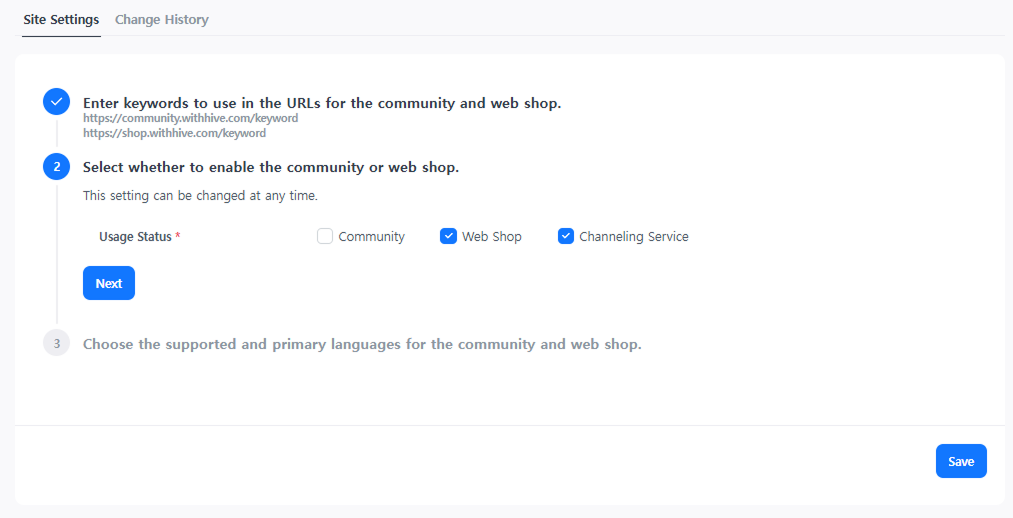
➡️ Console Path: Community & Web Shop > Common Settings > Site Settings
Configuration Method:
-
Activate the channeling service in General Management > Site Settings.
-
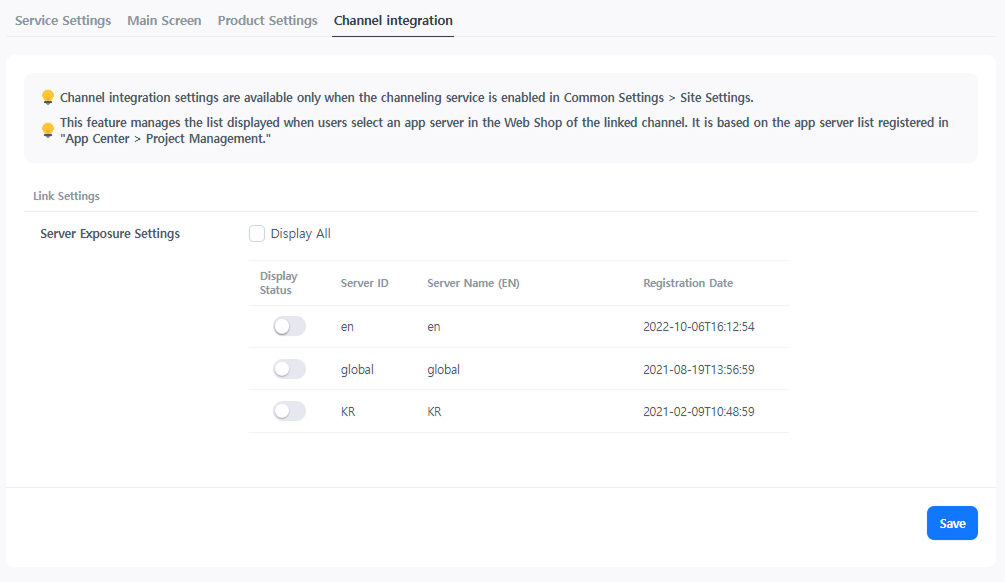
Configure this in Web Shop > Web Shop Settings > Channel Link.
- Set up the servers to be exposed so that users can select the product provision server. Only servers set to be exposed will be displayed in the list, so please exclude test or verification servers.
- Set up the servers to be exposed so that users can select the product provision server. Only servers set to be exposed will be displayed in the list, so please exclude test or verification servers.