Metric filter management
Overview
Metric filter management is a feature that excludes the event data generated on QA servers or test app IDs when metric figures are aggregated.
It defines exclusion targets based on the server ID and app ID conditions of event data, not by user.
Note
Only users with Analytics administrator permissions can register, delete, and edit.
What can you do?
Business/marketing users
- When metric figures look abnormally high, you can quickly solve the problem just by asking an administrator to check whether QA server and test app filters are set.
Data analysts
- If you check the metric filter list, you can see at a glance which servers' and apps' data is excluded from the current aggregation.
- When something looks wrong in metric figures, you can quickly find the cause by reviewing the filter settings.
Quick start
If you are adding a metric filter for the first time, follow the steps below to exclude a QA server or test app ID.
- Click the Settings > Metric Settings > Metric Filter Management menu in the left sidebar.
- Click the + Register button in the upper-right corner.
- Enter the filter name.
- After you select a Project, choose either Server ID or App ID as the type of attribute to filter, and then select the values.
- Click the Save button.
Note
For detailed features such as registering and deleting metric filters, see Full features.
Full features
Key concepts
| Concept | Description |
|---|---|
| Metric Filter | A rule that excludes specific event data from aggregation based on server ID or app ID conditions |
| Server ID | The server identifier of a test environment such as QA or staging. Events that occur on that server are not real user data |
| App ID | An app identifier used for development or testing. Events sent with that app ID need to be excluded from aggregation |
View the metric filter list
View the list of metric filters currently applied. 
| Displayed item | Description |
|---|---|
| Management Name | The name that identifies the metric filter |
| Project | The project that the metric filter applies to |
| Attribute | The name of the attribute the filter applies to (server ID or app ID) |
| Attribute Value | The filter value for the attribute |
Create a metric filter
Define the server ID or app ID conditions to exclude from aggregation.
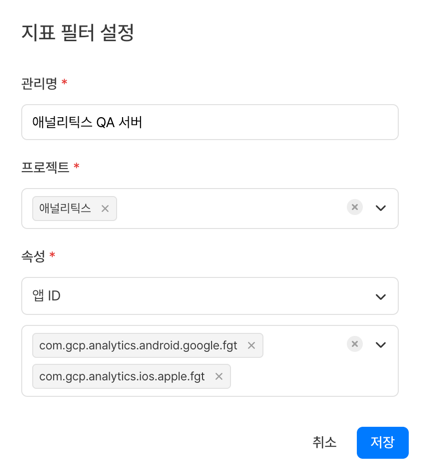
| Item | Description |
|---|---|
| Management Name | The name that identifies the metric filter |
| Project | The project that the metric filter applies to |
| Attribute | The name of the attribute the filter applies to (server ID or app ID) |
| Attribute Value | The filter value for the attribute |
Delete a metric filter
- Editing is not supported. If you need to change the conditions, delete the filter and register it again.
- After deletion, the event data of the affected users is included in aggregation again.
Use cases
Exclude QA server events
Management Name: QA Server
Project: Analytics
Attribute: Server ID
Attribute Value: select "qa-server-001", "qa-server-002"
→ All events that occurred on the QA servers are excluded from metric aggregation.
Exclude test app IDs
Management Name: FGT App ID
Project: Analytics
Attribute: App ID
Attribute Value: select "com.example.analytics.fgt"
→ Events sent with the test app ID are excluded from aggregation.
How is this different from metric excluded user management?
| Category | Metric Excluded User Management | Metric Filter Management |
|---|---|---|
| Exclusion Basis | User ID (userId, deviceId) | Server ID, App ID |
| Main Target | Internal staff, personal accounts of QA staff | All QA servers, test app IDs |
| Use Case | Exclude the account of a specific QA staff member | Exclude all QA server events |
Notes & tips
- If you delete a filter, the event data of that server ID or app ID is included in aggregation again, and metric figures may change.
- If the server ID (serverId) or app ID (appId) attribute is not included when events are sent, the filter does not work. Check the rules for sending these attributes with your development team first.
Related menus
- Metric excluded user management — Exclude from aggregation based on specific users (playerId)
- Event — Check the event attributes to use in filter conditions