Metric excluded user management
Overview
Metric Excluded User Management is a feature that excludes events generated by test payments, QA staff, and other internal staff from metric aggregation.
You can exclude the events generated for testing before the official launch from metric aggregation to separate them from real user data.
Note
Only users with Analytics administrator permissions can register, delete, and edit excluded users.
What can you do?
Business/marketing users
- If internal staff data seems to be included in metrics, you can get clean metrics just by asking an administrator to register those accounts.
Data analysts
- Check the list of users excluded from aggregation before analysis to immediately verify that internal data is excluded correctly.
- Register internal test accounts in advance during the soft launch period to keep real user data clean from the start.
Developers
- Register development and test accounts as users excluded from aggregation to completely prevent test data from mixing into metrics.
- Update the list when team members change to always keep the excluded user list accurate.
Quick start
If you are registering excluded users for the first time, follow these steps to exclude internal accounts from aggregation.
- Click the Settings > Metric Settings > Metric Excluded User Management menu in the left sidebar.
- Click the + Register button in the upper-right corner.
- Enter a management name.
- Select the target project.
- Select User ID or Device ID as the identifier type.
- Enter the ID value of the user to exclude.
- Click the Save button.
Note
For detailed features such as bulk registration with a file and deletion, see Full features.
Full features
Key concepts
| Concept | Description |
|---|---|
| Metric Excluded User | A user to exclude from metric calculations (internal staff, QA staff, test accounts, and so on) |
| User ID | A unique ID that identifies a user based on the account |
| Device ID | A unique ID that identifies a user based on the device |
View the excluded user list
Check the list of users currently excluded from aggregation. 
| Displayed item | Description |
|---|---|
| Management Name | The name that identifies the user excluded from aggregation |
| Project | The project to which the exclusion applies |
| Identifier Type | User ID or device ID |
| Value | The ID value of the user to exclude |
Register excluded users
Register an individual user as a user to exclude from aggregation.
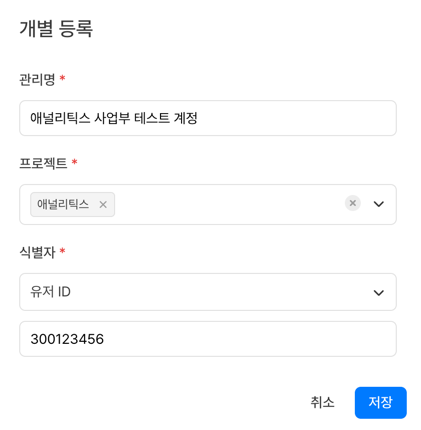
| Item | Description |
|---|---|
| Management Name | The name that identifies the user excluded from aggregation |
| Project | The project to apply the exclusion to |
| Identifier Type | User ID or device ID |
| Value | The ID value of the user to exclude |
Register in bulk with a file
Register multiple users at once with a file as users to exclude from aggregation.
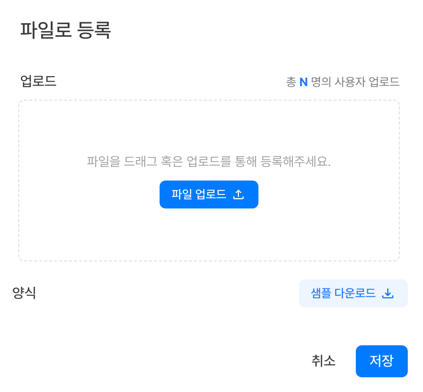
- Download the registration template with the File Download button.
- Enter the information of the users to register in the template.
- Upload the file with the File Upload button.
- After the upload is complete, check the added excluded users in the list.
Delete excluded users
Delete users who no longer need to be excluded (for example, employees who left the company) from the excluded user list.
- Editing is not supported. If you need to change the conditions, delete the user and register it again.
- After deletion, the event data of the user is included in aggregation again.
Use cases
Register development/QA team accounts in bulk
Use bulk registration with a file to register internal accounts team by team at once.
Management Name: Dev Team - Hong Gil-dong  /  Project: App A  /  Identifier Type: User ID  /  Value: 1001
Management Name: Dev Team - Kim Young-hee  /  Project: App A  /  Identifier Type: User ID  /  Value: 1002
Management Name: QA Team - Lee Cheol-su    /  Project: App A  /  Identifier Type: User ID  /  Value: 1003
→ Register development and QA accounts in bulk so that internal test data does not affect the actual metrics
Notes & tips
- Events of users registered as users excluded from aggregation are still collected, but those users are excluded when metrics such as DAU and MAU are calculated.
- During the soft launch period before the official launch of the app, make sure to register internal test accounts in advance.
- Enter user ID values accurately. If there is a typo, the user may not be excluded, or a different user may be excluded.
Related menus
- Metric filter management — Exclude event data based on QA servers and test app IDs
- User activity tracking — Check the event activity of a specific user